On this page
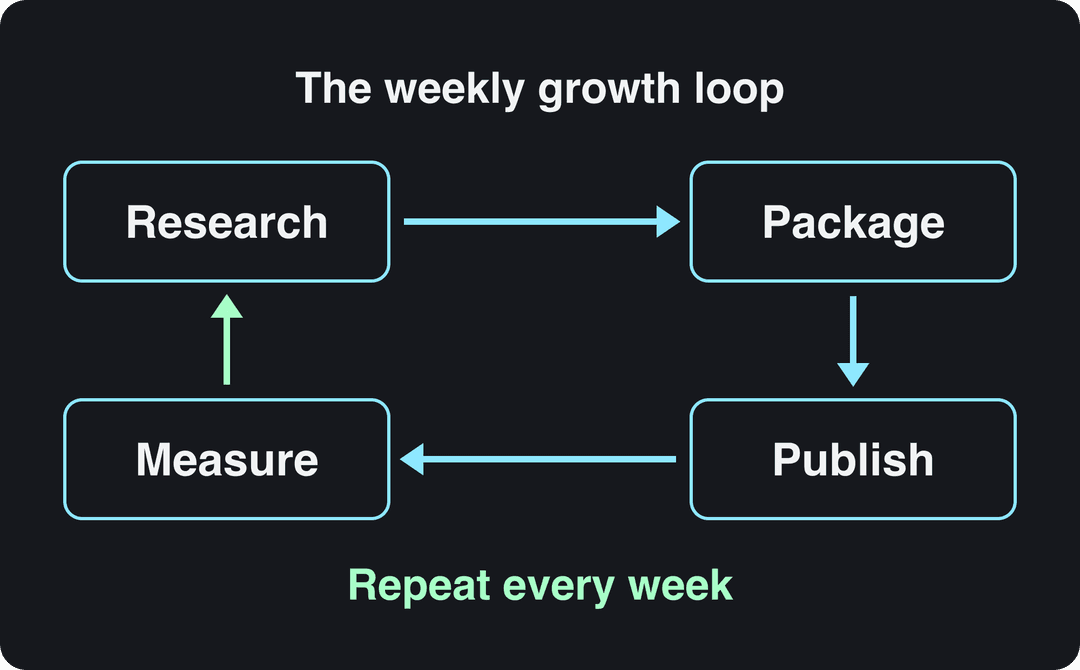
A YouTube growth playbook is a repeatable weekly loop: pick a niche narrow enough to own, research topics that already pull views, package each video with a sharp title and thumbnail, and hold attention past the opening. Use Shorts to bring in new viewers, then let YouTube Studio analytics tell you what to make more of.
The rules changed in 2026, and most growth advice has not caught up. Since August 24, 2026, YouTube counts a view the moment a video starts to play, so raw view counts now flatter weak videos, while YPP earnings still use engaged views and engaged watch hours. And from February 1, 2027, new channels need double today's watch hours or Shorts views to earn ad revenue. A playbook built for the old rules wastes your first year.
- Daily YouTube Shorts views
- 200B+
- YouTube Official Blog, August 2026
- Share of uploads as Shorts linked to the best channel results
- 25% to 40%
- AIR Media-Tech, May 2026
- Shorts RPM as a share of long-form RPM in almost every niche
- 3% to 14%
- AIR Media-Tech, September 2026
- YouTube channels publishing Shorts each day
- 10M+
- Alphabet, April 2026
What happened to the YouTube Creator Playbook?
The "YouTube Creator Playbook" was an official guide YouTube published for creators years ago. It is no longer the place YouTube keeps its current guidance: the rules now live in YouTube Help, and the tools in YouTube Studio. Its core ideas still hold (publish consistently, package every video well, keep viewers watching), but it predates Shorts, the Shorts route into the YouTube Partner Program, 3-minute Shorts and the 2027 changes.
The playbook below is built on YouTube's current published rules, step by step.
The YouTube growth playbook at a glance
| Step | What you do | What to check in YouTube Studio |
|---|---|---|
| 1. Niche | Pick one audience and one problem | Returning viewers |
| 2. Research | Find topics that already pull views | Search terms in Traffic sources |
| 3. Package | Write the title and thumbnail first | Impressions click-through rate |
| 4. Retain | Deliver the title's promise fast | Audience retention graph |
| 5. Shorts | Use Shorts to reach new viewers | Subscribers gained per video |
| 6. Schedule | Batch work so you never miss a week | Uploads per month |
| 7. Measure | Make more of what wins | Engaged views, traffic sources |
Step 1: Choose a niche narrow enough to own
Channels grow when YouTube can match them to a clear group of viewers. MrBeast built a channel on oversized challenges; Vox on explainers that answer one question per video. Neither tries to be everything, and viewers know what they get before they click.
A quick test: if you cannot write 30 video ideas for your niche in one sitting, it is too narrow to sustain a channel. If your ideas would appeal to anyone, it is too broad for YouTube to find your audience.
Define your viewer in one sentence: who they are, what they want, what stops them. "Beginner home cooks who want weeknight dinners in one pan" works. "Food content" does not.
Third-party roundups such as Global Media Insight's YouTube user statistics and Notta's YouTube statistics compilation give a rough picture of who uses YouTube overall. Treat them as background only: the Audience tab in YouTube Studio, with your own viewers' age, countries and returning-viewer share, is the data that should shape your channel.
Do you need to show your face?
No. In Revid's analysis of 176,367 TikToks with 1,000+ likes posted between October 2025 and October 2026, faceless videos had a median of 114K views and 17.4% passed 1M views, versus 67K and 12.7% for videos with one person on camera. That is TikTok data, not YouTube, and the sample only includes videos that already reached 1,000+ likes, so it shows what successful videos have in common rather than proving cause. The full method is in Revid's study of what makes TikToks go viral.
Faceless videos earned a median of 114K views, against 67K for videos with one person on camera, and passed 1M views 38% more often.
Source: Revid analysis of 176,367 TikToks with 1,000+ likes posted between Oct 1, 2025 and Oct 16, 2026 (61,203 creators)
Show the data
| Median views | Share that passed 1M views | |
|---|---|---|
| Animals | 147.4K | 24.1% |
| Faceless | 113.9K | 17.4% |
| Groups of people | 96.1K | 16% |
| Objects or products | 70.8K | 13.2% |
| One person on camera | 67.4K | 12.7% |
If you go faceless on YouTube, the rule that matters is originality: YouTube does not let AI personas presented as human experts monetize advice on health, legal, financial or political topics. The faceless YouTube channel blueprint covers formats and setup.
Step 2: Research what already works before you film
Every video should start from evidence that people want it. Three free sources:
- YouTube search. Type your topic into YouTube and note the autocomplete suggestions: those are phrases real viewers type.
- Competitor outliers. Open three to five channels in your niche, sort their videos by Popular, and look for videos that got far more views than the channel's typical upload. An outlier on a small channel tells you the topic, not the creator's fame, did the work.
- Comments. Questions under competitors' videos are video ideas they have not answered yet.
Skip the old advice to chase YouTube's Trending page. YouTube Help now only describes Trending Charts for a few categories (Movie Trailers, Music Videos, Gaming), not a general Trending tab.
To automate the competitor part, Revid's channel watcher tracks the YouTube and TikTok channels you choose (5 on the Growth plan), syncs them daily and flags their outlier videos. Its free deep analysis (up to 60 a day) explains why a given video worked: the hook, the timed structure and how to adapt it to another niche.
Step 3: Package every video before you make it
The title and thumbnail decide whether anyone clicks. Write them first: if you cannot make a title and thumbnail you would click, change the video idea, not the edit.
- Title: one clear promise, the viewer's words, under 100 characters. Put the specific outcome early ("I tracked every dollar for a month" beats "My budgeting experience"). A YouTube title generator helps when you are stuck.
- Thumbnail: one subject, high contrast, three words of text at most, readable at phone size. It should show what the title promises, not repeat it.
- Test it: YouTube Studio on desktop can A/B test up to 3 titles and thumbnails per video and shows the variant with the highest watch time to everyone. Shorts are not eligible.
| Field | Limit or spec (YouTube Help) |
|---|---|
| Title | 100 characters |
| Description | 5,000 characters |
| Tags | 500 characters in total |
| Video thumbnail | 3840x2160 recommended, 16:9, minimum width 640 px |
| Thumbnail file size | 50 MB on desktop, 2 MB on mobile |
| Shorts thumbnail | 9:16 at 2160x3840, uploaded in YouTube Studio on a computer |
Custom thumbnails need a verified account. For vertical videos, YouTube replaces a 16:9 custom thumbnail with an auto-generated 4:5 one on the home, explore and subscription pages, so keep the subject centered.
Step 4: Hold attention past the opening
A click only counts for growth if viewers stay. Open the audience retention graph for each video and read it with these rules:
- Steep drop at the start: the opening does not confirm the title's promise. Cut logos, greetings and "before we start" sections; show the payoff or the problem first.
- Dip in the middle: a slow section. Cut it, or move the strongest point earlier.
- Spikes: viewers rewound to rewatch. Make more of whatever is there.
Sample openings that confirm the promise fast:
- "This one setting is why your phone videos look blurry. Here's the fix, then three mistakes to avoid."
- "I cooked one-pan dinners all week. Two were great, one was a disaster, and the disaster taught me the most."
- "Everyone says start with a niche. Here's how to test one before you film a single video."
Script the first lines word for word even if you improvise the rest. An AI script generator gives you a first draft to cut down.
The index leans toward videos that surface in hashtag and keyword searches, so its view counts run high: compare the groups, not the absolute numbers.
Source: Revid TikTok index: 2,377,477 TikToks with AI labels per video, snapshot of Sep 15, 2026. Median views estimated from view buckets.
Show the data
| Median views | Share past 1M views | |
|---|---|---|
| 0-7s | 88.3K | 19.9% |
| 8-15s | 111.1K | 22.6% |
| 16-30s | 141K | 25.1% |
| 31-60s | 120.4K | 22.8% |
| 61-120s | 97K | 19.8% |
| 2-5 min | 89.1K | 18.3% |
| 5 min+ | 90.1K | 17.2% |
Step 5: Use YouTube Shorts as the top of your funnel
Shorts are where new viewers find you. YouTube said in August 2026 that the platform sees over 200 billion daily Shorts views. Alphabet said in April 2023 that channels posting weekly on Shorts saw the majority of their new channel subscribers come from Shorts. And AIR Media-Tech's study of 18,000 English-language channels (published May 2026) found the best results when Shorts made up 25% to 40% of a channel's uploads. More sourced figures are on our YouTube Shorts statistics page.
Shorts are weak at paying the bills. AIR Media-Tech's September 2026 analysis of 274 channels found Shorts RPM was 3% to 14% of long-form RPM in almost every niche, and Shorts made up less than 2% of revenue for most channels while generating 1% to 35% of their views. The decision rule: use Shorts to find viewers, long-form videos to earn and to build loyalty.
Shorts rules to know:
- Square or vertical videos up to 3 minutes count as Shorts.
- A Short longer than one minute with an active Content ID claim of any type is blocked globally and cannot be monetized, so clear your music.
- Since September 2026, YouTube has been rolling out Shorts series, which organize Shorts into seasons and episodes. Recurring formats suit it well.
Prompt to try
Create a 45-second vertical YouTube Short for beginner home cooks. Open with the hook "You only need one pan for tonight's dinner," then show three quick weeknight one-pan meals with one key step each. Use warm close-up food visuals, an upbeat friendly voiceover and bold captions, and end by asking viewers which meal they will cook first.
How to make Shorts from your long videos with Revid
- Paste a long video's link into Revid's YouTube clip maker; the AI cuts it into short vertical clips.
- Review the cuts and captions in the timeline editor and trim anything that does not open strong.
- Publish or schedule the Shorts directly to YouTube from Revid's queue.
For Shorts that do not come from existing footage, the AI YouTube Shorts generator turns a script or an idea into a finished Short with visuals, voice-over and captions.
Step 6: Publish on a schedule you can keep for a year
YouTube publishes no ideal upload frequency. Pick the pace you can hold through a bad month, because a channel that posts weekly for a year beats one that posts daily for three weeks and stops.
Make it sustainable by batching:
| Stage | What to batch |
|---|---|
| Pre-production | Research, titles and thumbnails for a month of videos in one session |
| Production | Film several videos with the same setup; a clear microphone and simple lighting matter more than the camera |
| Post-production | Edit in one block, then cut Shorts from each long video |
Two rules to keep in mind. Under current rules, YouTube may turn off monetization for channels that have not uploaded or posted for 6 months or more. From February 1, 2027, a YPP channel counts as active with 2 long-form videos or 5 Shorts uploaded every 90 days (or 1,000 qualified watch hours in 365 days, or 1 million qualified Shorts views in 90 days).
If AI tools help you produce faster, YouTube allows them for monetized content when the result shows your creative vision and gives educational or entertainment value. It does not allow monetization of AI content made with generic templates that looks mass-produced.
Step 7: Read your analytics and double down
YouTube does not publish a ranking formula, but its recommendations follow viewer behavior: whether people click when they see your video, how long they keep watching, and whether they come back. For background on how past changes affected channels, see The Polar Bears' overview of YouTube algorithm updates.
| Metric | What it tells you | If it is low, do this |
|---|---|---|
| Impressions click-through rate | Whether packaging works | Rewrite the title, test new thumbnails |
| Audience retention | Whether the video keeps its promise | Shorten the opening, cut slow sections |
| Engaged views vs views | Real attention (views now count on play) | Judge videos by engaged views and watch time |
| Traffic sources | Where viewers find you (Browse, Suggested, Search, Shorts feed) | Invest in the source that already works |
| Returning viewers | Loyalty to your niche | Make series and follow-ups |
| Subscribers gained per video | Which topics convert | Make more videos on the winners |
Review monthly, not daily. When a topic beats your channel average twice, make a follow-up or a series on it. When a format underperforms three times, drop it.
Build a community that brings viewers back
Returning viewers are the steadiest growth you can get. Reply to comments in the first hours after publishing, pin a question that invites a real answer, and use the Posts tab for polls between uploads; the poll results are free topic research. Live Q&As and viewer submissions (their setups, stories or results) give fans a reason to come back and share. For subscriber-specific tactics, see how to boost subscribers on YouTube.
Monetization milestones to plan around
| YPP level | Requirements today | From February 1, 2027 |
|---|---|---|
| Fan funding and Shopping (no ad revenue) | 500 subscribers plus 3,000 watch hours in the last year or 3 million Shorts views in 90 days | Unchanged |
| Ad revenue, new applicants | 1,000 subscribers plus 4,000 watch hours in 12 months or 10 million Shorts views in 90 days | 1,000 subscribers plus 8,000 watch hours in 365 days or 20 million Shorts views in 90 days |
| Shorts ad revenue each month (members) | Share of the Shorts Creator Pool; creators keep 45% | Also needs 10 million qualified Shorts views in the last 90 days |
Joining also requires living in an eligible country, no active Community Guidelines strikes, 2-Step Verification, advanced features access and a linked AdSense for YouTube account; review typically takes about a month. Channels already in YPP are not affected by the new entry thresholds.
Your first 90 days
| Period | Focus | Done when |
|---|---|---|
| Days 1 to 30 | Niche, viewer sentence, idea list, first uploads | You have a backlog of researched ideas and a schedule |
| Days 31 to 60 | Packaging and retention: test titles, fix openings | Your retention graphs drop less at the start |
| Days 61 to 90 | Shorts from every long video, follow-ups on winners | You know which topics and traffic sources bring subscribers |
Then repeat the loop with the next 90 days, keeping only what the data supports.
FAQ
How long does it take to grow a YouTube channel?
There is no official timeline; it depends on your niche, upload pace and packaging. Judge progress in 90-day blocks, the window YouTube itself uses for Shorts eligibility and, from 2027, for channel activity.
Do YouTube Shorts count toward the 4,000 watch hours?
No. Watch hours from Shorts views in the Shorts Feed do not count toward the watch-hour threshold; Shorts count through the separate Shorts views route (10 million qualified Shorts views in 90 days today).
Is it too late to start a YouTube channel in 2026?
No, but competition is heavy: Alphabet said over ten million channels were publishing Shorts each day as of March 2026. A narrow niche and better packaging matter more than starting early.
How often should you upload to YouTube?
As often as you can sustain for a year; YouTube sets no ideal frequency. From February 2027, the minimum for a YPP channel to count as active is 2 long-form videos or 5 Shorts every 90 days, unless it meets the watch-hour or Shorts-view alternative.
Can you grow and monetize a channel with AI-made videos?
Yes, if the videos show your own creative vision and give real value; template, mass-produced AI content cannot be monetized. Disclose realistic AI-generated scenes with the AI use setting in YouTube Studio, which by itself does not limit reach or earnings.
Sources
- Revid analysis of 176,367 TikToks with 1,000+ likes posted between Oct 1, 2025 and Oct 16, 2026 (61,203 creators)
- Revid TikTok index: 2,377,477 TikToks with AI labels per video, snapshot of Sep 15, 2026. Median views estimated from view buckets.
- YouTube Official Blog, New opportunities to earn and changes to the YouTube Partner Program (August 2026)
- AIR Media-Tech, Do YouTube Shorts help your long-form videos? Data from 18,000 channels (May 2026)
- AIR Media-Tech, YouTube Shorts RPM vs long-form: real monetization data from 274 channels (September 2026)
- Alphabet, Q1 2026 earnings call transcript (April 2026)
Charts and figures checked on November 6, 2026.