How to Link TikTok to Instagram (Both Ways) in 2 Minutes
The exact taps to link TikTok to Instagram and Instagram back to TikTok, how to repost TikToks to Reels without the watermark, and what to do when the Add Instagram button is missing.

On this page
To link TikTok to Instagram, open TikTok, tap Profile, then Edit profile, scroll to Social, tap Add Instagram and log in to your Instagram account. An Instagram icon then appears on your TikTok profile. To link the other way, paste your TikTok profile URL into the Links field of your Instagram bio.
The whole setup takes under two minutes, and on its own it does very little: it is a signpost, not a growth engine. The common mistake comes after linking, when creators repost TikTok downloads to Reels with the watermark still on and a long block of hashtags. Instagram now allows 5 hashtags per post, and a caption with more simply won't post.
- Maximum hashtags per Instagram post; captions with more won't post
- 5
- Instagram rules
- Median TikTok views for videos with 4 hashtags, the best of any count
- 77K
- Revid analysis of 176,367 TikToks
- Average TikTok engagement rate by followers, vs 0.45% on Instagram Reels
- 2.60%
- Socialinsider, August 2026
- Longest Reel Instagram recommends to non-followers
- 3 min
- Instagram guidance
Can you link TikTok and Instagram?
Yes, but only as profile links. TikTok lets you add your Instagram account to your profile, where it shows as a tappable Instagram icon. Instagram lets you add your TikTok profile URL as a link in your bio. Do both and anyone who finds you on one app can reach the other in one tap.
Are TikTok and Instagram connected?
No. They are separate apps run by separate companies: Instagram belongs to Meta, and in the US TikTok has been run by TikTok USDS Joint Venture since January 2026. Linking does not merge followers, posts, DMs or analytics, and it does not cross-post your videos. The Instagram login you see while linking only proves to TikTok that you own the account.
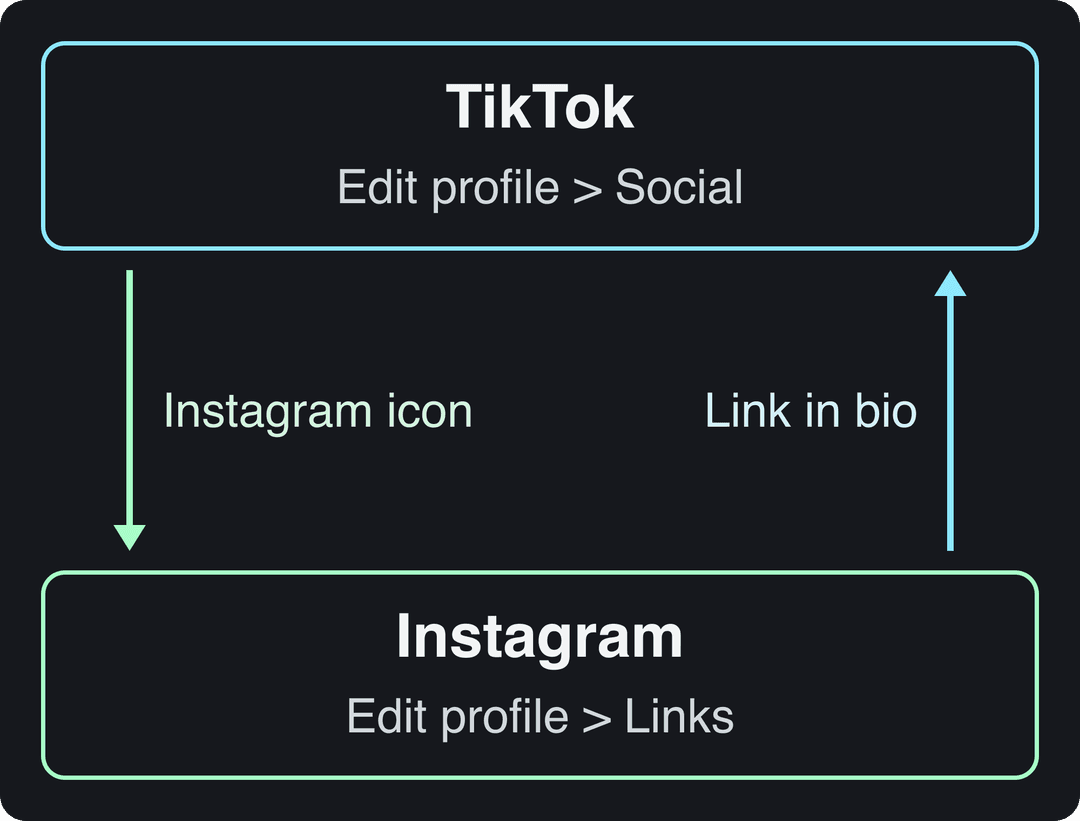
How to link TikTok to Instagram, step by step
Before you start, make sure your Instagram account is public. A private account turns every tap from TikTok into a follow request that most people won't wait for.
- Open the TikTok app and tap Profile in the bottom-right corner.
- Tap Edit profile.
- Scroll down to the Social section.
- Tap Add Instagram.
- Log in to the Instagram account you want to show and approve the connection.
- Go back to your profile. An Instagram icon now sits next to the Edit profile button. Tap it once to check it opens the right account.
TikTok moves menu labels between app versions. If you don't see Add Instagram, jump to the troubleshooting section below.
How to add your TikTok link to Instagram
This is the reverse link, and Instagram has no special TikTok button for it: you add your TikTok URL as a regular bio link.
- Get your TikTok profile URL. It is tiktok.com/@ followed by your username (for example, tiktok.com/@yourname).
- Open Instagram, go to your profile and tap Edit profile.
- Tap Links, then Add external link.
- Paste your TikTok URL, give it the title "TikTok" so it reads clearly in your bio, and save.
When you post a TikTok you want Instagram followers to see, you can also share it to your Instagram Story with a link sticker pointing to the video. That gives your Instagram audience a reason to follow you on TikTok too.
How to share TikTok videos to Instagram
Linking profiles and moving videos are two different jobs. Here are the ways to get a TikTok onto Instagram, from worst to best:
| Method | TikTok watermark | Use it for |
|---|---|---|
| Download from TikTok, upload as a Reel | Yes | Avoid it |
| TikTok Share menu to Instagram Stories | Yes | A quick teaser that sends people to the full post |
| Upload your original file as a Reel | No | Your default for every repost |
| Publish to both from a scheduler | No | Posting on both apps every week |
Keep the original export from your camera roll or editor before you post on TikTok, and upload that file to Instagram. A TikTok logo bouncing around a Reel tells viewers it is a repost from another app, and it is the easiest fix you will ever make.
Then adapt the file and caption to Instagram's rules:
- Size: 9:16 at 1080x1920 works on both apps. Instagram accepts Reels from 1.91:1 to 9:16, at least 30 fps and 720 pixels. If you need a 4:5 version for the feed, a free video resizer converts it in one step.
- Length: TikTok uploads can run up to 60 minutes and Reels up to 20 minutes, but Instagram does not recommend Reels longer than 3 minutes to non-followers. Cut long TikToks under 3 minutes before reposting.
- Caption: Instagram captions can be up to 2,200 characters. Rewrite the first line for Instagram instead of pasting the TikTok caption.
- Test with non-followers: trial reels are shown first to people who don't follow you, with insights within 24 hours. They need a public account with at least 200 followers (professional accounts) or 1,000 followers (personal accounts).
On the TikTok side, Revid's analysis of 176,367 TikToks with 1,000+ likes posted between October 2025 and October 2026 found that 4 hashtags had the best median (77K views) and 3 hashtags were close behind (75K), while 9 or more dropped to 16K. That is TikTok data from videos that already passed 1,000 likes, so it shows a pattern rather than a cause, but it makes the choice easy: a set of 3 or 4 tags fits Instagram's cap and matches what worked on TikTok. The full TikTok virality study breaks down the method.
Prompt to try
Make a 30-second vertical recipe teaser for a 10-minute garlic butter pasta. Open with the hook "This pasta takes 10 minutes and one pan," show quick cuts of the key steps with bold captions, and end with "The full ingredient list and step-by-step photos are on my Instagram, link on my profile."
Posts with 3 or 4 hashtags earned the most views. Captions stuffed with 9 or more hashtags did worst of all, with median views cut by about 80%.
Source: Revid analysis of 176,367 TikToks with 1,000+ likes posted between Oct 1, 2025 and Oct 16, 2026 (61,203 creators)
Show the data
| Median views | Share that passed 1M views | |
|---|---|---|
| None | 51.1K | 9.8% |
| 1 | 64K | 11.8% |
| 2 | 71.3K | 12.7% |
| 3 | 75.4K | 13.1% |
| 4 | 77.2K | 13.4% |
| 5 | 67.3K | 12.1% |
| 6 to 8 | 71.8K | 12.7% |
| 9+ | 15.6K | 7.8% |
How to get TikTok viewers to follow you on Instagram
The icon on your profile only gets taps when a video gives people a reason to look for it. "Follow me on Instagram" at the end of a clip gets ignored. A specific payoff does not.
Calls to action that give a reason:
- "The full ingredient list and step-by-step photos are on my Instagram, link on my profile."
- "Part 2 is too long for here, it's on my Instagram."
- "I'm answering your questions in my Instagram Stories tonight."
- "The giveaway entry is on my Instagram, not here."
Open with a strong hook so people watch long enough to hear the CTA; a library of TikTok hooks that stop the scroll gives you starting lines. Mention Instagram in roughly every fifth to seventh video (1 in 5 to 7) so it never becomes background noise.
The two apps also behave differently once people arrive. Socialinsider's 2026 study of 69 million short-form videos (August 2026) found an average engagement rate by followers of 2.60% on TikTok against 0.45% on Instagram Reels, as listed on our YouTube Shorts statistics page. The Influencer Marketing Factory publishes its own comparison of TikTok and Instagram engagement rates, and Demandage keeps a roundup of Instagram usage statistics if you want to compare audiences. The practical rule: use TikTok for discovery, and give Instagram the formats it does better (Stories, carousels, DMs).
| Content | On TikTok | On Instagram |
|---|---|---|
| Tutorials | Quick cuts showing the result, under 60 seconds | A carousel with every step, or a slower Reel |
| Behind the scenes | Raw and spontaneous | Stories for informal chat, a curated photo dump in a carousel |
| Announcements | A fast video with text overlays | A graphic on the grid plus a Story that explains more |
| Q&A | Reply to a comment with a video | Question sticker in Stories |
Treating each app as its own channel is the core of a content distribution strategy, and it gives people a reason to follow you in both places instead of picking one.
Post to TikTok and Instagram from one place with Revid
If you post on both apps every week, the reposting step is where time disappears. Revid makes the video and publishes it to TikTok and Instagram from the same queue:
- Connect your TikTok and Instagram accounts once (how to add a social account to Revid).
- Create the video from an idea, a script or a link. Revid writes the script and adds visuals, a voice-over, synced captions and music, in 9:16.
- Because the file never passes through TikTok, there is no watermark to remove.
- Write a TikTok caption and a separate Instagram caption (5 hashtags at most), then schedule both from one publishing queue.
Each post published through Revid reports its views, likes and comments, so you can see which version did better on which app.
Videos posted between 3 and 6 a.m. Eastern earned the most views and passed 1M views most often. The evening slot most guides recommend (5 to 9 p.m.) was the weakest of the day.
Source: Revid analysis of 123,704 English-language TikToks with 1,000+ likes posted between Oct 1, 2025 and Oct 16, 2026
Show the data
| Median views | Share that passed 1M views | |
|---|---|---|
| 12a | 67.3K | 14% |
| 1a | 79.4K | 15.1% |
| 2a | 79K | 14.2% |
| 3a | 90.8K | 16.1% |
| 4a | 120.4K | 19.9% |
| 5a | 93.5K | 16.7% |
| 6a | 97K | 17% |
| 7a | 75.8K | 13.1% |
| 8a | 83.9K | 14.3% |
| 9a | 70.5K | 13.1% |
| 10a | 65.5K | 13.6% |
| 11a | 65.7K | 13.1% |
| 12p | 60.4K | 11.9% |
| 1p | 60.9K | 11.8% |
| 2p | 53.7K | 11.2% |
| 3p | 63K | 11.9% |
| 4p | 63.8K | 11.5% |
| 5p | 55.6K | 11.1% |
| 6p | 55.3K | 11.5% |
| 7p | 50.4K | 11% |
| 8p | 60.5K | 12.3% |
| 9p | 62.2K | 13.1% |
| 10p | 62.3K | 12.6% |
| 11p | 67.2K | 13.3% |
How to check if TikTok is sending you followers
Instagram does not label visitors as coming from TikTok, so judge it by timing. After you post a TikTok with an Instagram CTA, check Instagram Insights the next day: profile activity and new follows are the numbers that move. Follower insights need at least 100 followers and cover up to the past 90 days.
When one CTA video moves those numbers and others don't, repeat that format and that offer. A free TikTok account audit shows which of your TikToks perform best, which tells you where to place your next Instagram CTA. For the Instagram side, these ways to increase Instagram engagement and this guide to getting more views on Instagram Reels help you keep the people who arrive.
Instagram link not showing or not working on TikTok
Work through these in order:
- Update both apps. An outdated TikTok or Instagram app is the most common reason the option is missing or the login fails.
- Check your account type. Some users find the Add Instagram option missing on a TikTok Business account. Switching to a Personal account in Settings and privacy > Account, linking Instagram, then switching back is worth a try.
- Clear TikTok's cache. Go to Settings and privacy > Free up space and tap Clear next to Cache, then try again.
- Reset the connection. If the login keeps failing, remove TikTok's access in your Instagram settings, then start the linking steps again from TikTok.
- Wrong account linked. Remove the Instagram link from the Social section of Edit profile and add it again while logged in to the right Instagram account.
FAQ
Will I lose followers if I unlink TikTok from Instagram?
No. Unlinking only removes the Instagram icon from your TikTok profile. Your followers on both apps stay exactly where they are.
How do I unlink Instagram from TikTok?
Go to Profile > Edit profile, find Instagram in the Social section, tap it and choose to remove it. You can link the same or a different account again at any time.
Does linking Instagram help the TikTok algorithm?
Not directly. TikTok ranks videos on how people engage with them on TikTok, but a community that follows you in two places tends to comment, share and watch more, which helps indirectly.
Can TikTok post my videos to Instagram automatically?
TikTok has no setting that publishes your videos to Instagram Reels on its own. You can share a video manually from the Share menu (with the watermark), upload your original file, or use a scheduler such as Revid that publishes to both apps.
Should I link a private Instagram account to TikTok?
You can, but it defeats the purpose. Visitors from TikTok hit a follow request instead of your posts, and most will leave, so keep the account public if you want TikTok traffic to grow it.
Sources
- Revid analysis of 176,367 TikToks with 1,000+ likes posted between Oct 1, 2025 and Oct 16, 2026 (61,203 creators)
- Revid analysis of 123,704 English-language TikToks with 1,000+ likes posted between Oct 1, 2025 and Oct 16, 2026
- Socialinsider, TikTok vs. Reels vs. Shorts: 2026 Engagement Data (August 2026)
Charts and figures checked on November 6, 2026.