How to Make Videos Without Showing Your Face: 8 Formats + Data
Eight faceless video formats, how to set up each one, and what Revid's analysis of 176,367 TikToks says about how faceless videos perform.
On this page
To make videos without showing your face, pick a format where something else fills the frame: your screen, your hands, stock footage under a voiceover, animation, on-screen text, gameplay or AI-generated visuals. Write a short script, record clean audio or use an AI voice, add captions, and export in 9:16 for TikTok, Reels and Shorts.
Staying off camera does not cost you reach. In Revid's analysis of 176,367 TikToks with 1,000+ likes posted between October 2025 and October 2026, faceless videos had a median of 114K views and 17.4% passed 1 million, against 67K and 12.7% for videos with one person on camera. The sample only holds videos that already cleared 1,000 likes, so it shows what strong performers have in common rather than proving cause. The method is in our study of what makes a TikTok go viral.
Faceless videos earned a median of 114K views, against 67K for videos with one person on camera, and passed 1M views 38% more often.
Source: Revid analysis of 176,367 TikToks with 1,000+ likes posted between Oct 1, 2025 and Oct 16, 2026 (61,203 creators)
Show the data
| Median views | Share that passed 1M views | |
|---|---|---|
| Animals | 147.4K | 24.1% |
| Faceless | 113.9K | 17.4% |
| Groups of people | 96.1K | 16% |
| Objects or products | 70.8K | 13.2% |
| One person on camera | 67.4K | 12.7% |
Revid's full index points the same way: across 2,377,477 public TikToks, faceless videos averaged 2.2M views against 1.6M for person-focused ones, and 30% passed 1M views versus 22%. Animal videos did even better in the 12-month study (147K median, 24.1% past 1M), so a pet is a legitimate co-host.
- Median TikTok views for faceless videos, vs 67K with one person on camera
- 114K
- Revid study of 176,367 TikToks
- Share of faceless TikToks that passed 1M views, vs 12.7% on camera
- 17.4%
- Revid study of 176,367 TikToks
- Median views for faceless tutorials, about 3x on-camera tutorials (52K)
- 156K
- Revid study of 176,367 TikToks
Which faceless video format should you pick?
Pick by what you already have, not by what looks impressive. The table compares the eight formats covered below.
| Format | Best for | What you need | Effort |
|---|---|---|---|
| Screen recording | Software, finance, design and coding tutorials | Computer or phone, screen recorder, microphone | Low |
| Voiceover + stock footage | History, facts, explainers, list videos | Script, stock library, editor | Medium |
| Hands-only and POV footage | Product demos, unboxing, cooking, crafts, UGC | Phone, overhead or chest mount, soft light | Medium |
| Animation and whiteboard | Complex ideas, science, business concepts | Animation software or an AI generator | High (manual) to low (AI) |
| Slideshow with narration | Courses, data, training, case studies | Slides app, microphone | Low |
| Text on screen with music | Quotes, facts, stories, motivation | Template, licensed music | Low |
| Gaming | Gameplay, commentary, guides | Game, capture software, microphone | Medium |
| AI-generated video | Any topic, daily posting, no footage | AI video tool | Low |
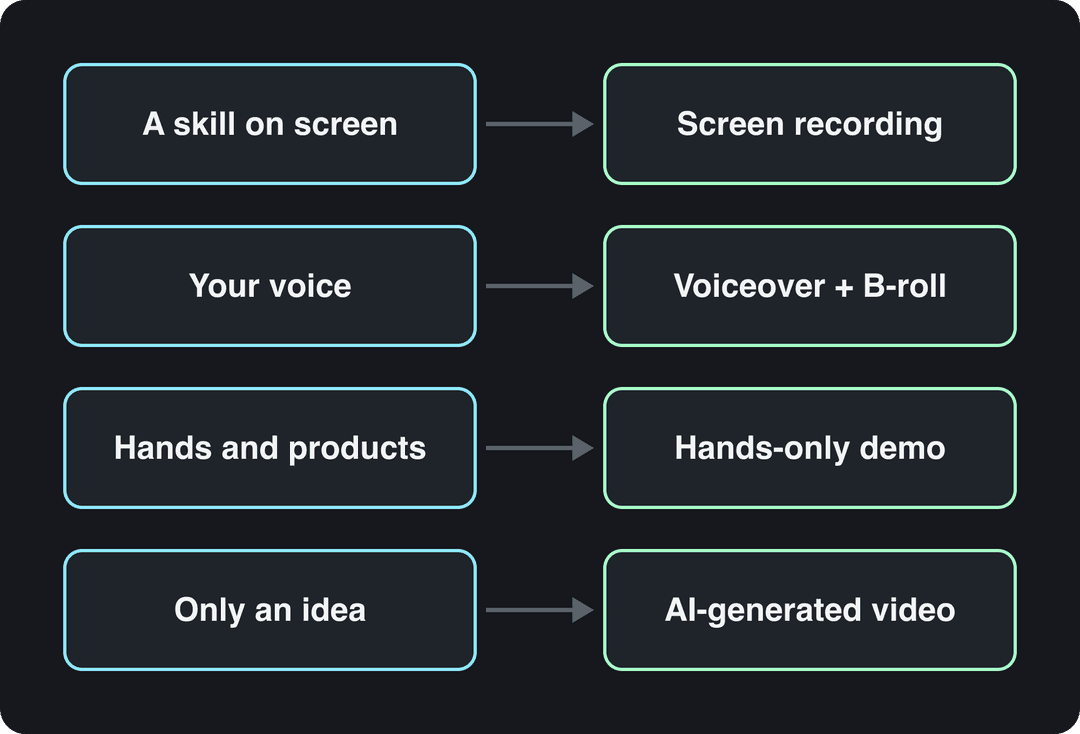
Two decision rules settle most cases. If you can teach something on a screen, start with screen recording: it is the cheapest format to make well. If you have nothing to film and no time to edit, start with voiceover or AI-generated video, then add hands-only footage once you know which topics get views.
8 ways to make videos without showing your face
1. Screen recordings and tutorials
You record your screen while you explain what you are doing. It works for anything that happens on a device: software walkthroughs, spreadsheet tricks, design, coding, budgeting apps. Channels such as Khan Academy, Traversy Media and ExcelIsFun built large audiences this way.
- Write the steps as a numbered outline before you hit record, so you never hesitate on screen.
- Clean your desktop, turn off notifications and hide tabs, bookmarks and inboxes that show your name.
- Record with a free tool: OBS Studio on any computer, QuickTime on a Mac, or the screen recorder built into iOS and Android.
- Move the cursor slowly and zoom in on the part of the screen that matters.
- Record the voiceover separately if talking and clicking at the same time makes you stumble.
- Cut every pause, then add captions.
For vertical platforms, crop to the area that matters instead of shrinking a full desktop into a 9:16 frame. In Revid's TikTok data, screen recordings had a 91K median, ahead of tripod (77K) and selfie (48K) footage.
2. Voiceover over stock footage or B-roll
You narrate a script and cover it with stock clips, B-roll you film yourself, images and text overlays. This is the format behind most fact, history, list and documentary-style channels.
- Write the script first and note one visual idea per sentence.
- Pull clips from a stock library you have a license for, or film your own B-roll (streets, hands, objects, screens).
- Change the shot every few seconds and match each clip to the exact sentence it sits under.
- Add quiet background music and captions.
Generic footage is the main risk: a clip of people shaking hands in an office tells the viewer nothing. Film a few specific shots of your own and write the script yourself, because YouTube treats videos that only read out text you didn't write (website copy, news feeds) as reused content, which it does not monetize. If sourcing clips is the slow part, a voiceover video maker picks matching visuals for each line of your script.
3. Hands-only demos, unboxings and over-the-shoulder shots
The camera shows your hands and the object, never your face. It suits product reviews, unboxing, cooking, makeup application, crafts, repairs and drawing. Three setups cover almost everything:
- Overhead: phone on an overhead arm, or a tripod with a horizontal arm, pointing straight down at the table.
- Chest down: camera at chest height, framed so the top edge sits below your chin.
- Over the shoulder: camera behind you, looking at what your hands are doing.
Light the product from a window or a soft lamp to one side, and check every frame for reflections: screens, mirrors, glossy packaging and spoons all show faces. Show the product from several angles, test it before you review it, and say what's wrong with it as well as what's right. If a brand paid you or sent the product, disclose it.
4. Animated and whiteboard explainers
Animation turns abstract ideas into pictures. Kurzgesagt and TED-Ed do it with motion graphics; RSA Animate and Khan Academy do it with hand-drawn whiteboard sketches. It is the strongest faceless format for science, history and "how does X work" topics.
Manual animation takes real time to learn, so keep the first videos simple: one concept per video, one color palette, and a finished script before you draw anything. For whiteboard videos, plan the drawing sequence on paper so each sketch appears exactly when the narration names it. If you want the look without learning animation software, an AI explainer video maker generates the visuals from your script.
5. Slideshows with narration
Build slides in PowerPoint, Keynote or Google Slides and narrate them. PowerPoint and Keynote can record narration and export the deck as a video, so you don't even need an editor. It fits courses, training, financial education and data-heavy topics.
Slideshows look corporate fast. Follow the 6x6 rule (at most six bullets per slide, six words per bullet), put one chart or image on most slides, and change slides every few seconds on short-form platforms. Never read a slide aloud word for word: say what the slide doesn't.
Prompt to try
Create a 25-second vertical text-on-screen video titled '5 facts about the ocean you won't believe'. Hook: 'We've mapped more of Mars than our own ocean floor.' Show one short fact per screen in bold white text over slow underwater footage, timed to a calm ambient beat, with no narration.
6. Text on screen with music
Words appear on screen in time with music or sound effects: quotes, facts, short stories, lists. Once you have a template, it is the fastest format to produce.
It also matches how many top TikToks work. In Revid's 12-month TikTok study, videos with under 40 characters of speech had a 123K median and 20.2% passed 1M views, while videos with someone talking throughout had 68K and 11.9%; fully silent videos had 73K. Short text over a strong visual can beat a full narration.
Keep each line short enough to read in one glance, use high contrast, and time text changes to the beat. Two limits apply: use licensed or platform-library music, and know that TikTok does not count text-only or photo-only videos as original for the Creator Rewards Program, so this format won't earn there.
7. Gaming and screen-based entertainment
You record gameplay with commentary, or stream and cut highlights afterwards. A distinctive voice, a channel name and an avatar replace the face, and streamers can build an audience without ever turning on a face cam.
Choose games you play well or know deeply, post on a regular schedule, and check each publisher's policy on monetizing footage of their game before you build a channel on it. Long streams become short clips with a game stream to short clip tool, which adds voiceover and subtitles to your best moments.
8. AI-generated videos
An AI video tool turns a script, a prompt or an article into a finished video with visuals, voice, captions and music. This is also the answer to "how to add video content without producing videos": blog posts, product pages and newsletters can become short videos without filming anything.
Two rules keep AI video safe. First, disclose realistic AI content: TikTok requires a label on AI-generated content with realistic images, audio or video, and YouTube requires the "AI use" setting when a scene looks real. Both platforms say the label alone doesn't hurt distribution. Second, add your own point of view: YouTube won't monetize AI content made from generic templates that looks mass-produced, but it allows AI-assisted videos that show the creator's creative vision.
How to vlog without showing your face
Faceless vlogs show what you see instead of who you are.
- POV shots: film from eye level or chest height so the viewer sees through your eyes.
- Back and silhouette shots: walk away from the camera, shoot against a bright window, or film your shadow.
- Hands and feet: coffee being poured, keys turning, shoes on a trail.
- Environment: the room, the street, the view, with your voice narrating over it.
- Voiceover in post: film silently during the day and record the narration later in a quiet room.
POV is also one of the strongest shooting styles on TikTok. In Revid's data, POV videos had a 107K median and 19% passed 1M views, against 48K and 9.2% for selfie-style footage.
If anonymity matters, check what's around you as carefully as your face: house numbers, street signs, car plates, mail labels, school logos, reflections in windows and the view from your home. Use a separate email and channel name, and if your voice is recognizable, use an AI voice or Revid's voice changer.
Prompt to try
Make a 30-second faceless tutorial on how to remove duplicate rows in Excel. Hook: 'Your spreadsheet is full of duplicates, here's a 5-second fix.' Show the result first, then three short steps with screen-style visuals, a calm AI voiceover and bold captions, ending with a one-line recap.
How to make educational videos without showing your face
Teaching is where faceless videos have the biggest edge. In Revid's TikTok study, faceless tutorials had a 156K median and 22.1% passed 1M views, while on-camera tutorials had 52K and 10%. Faceless comedy showed the same pattern (327K median versus 136K on camera).
Faceless tutorials earned about 3x the median views of on-camera tutorials (156K vs 52K).
Source: Revid analysis of 176,367 TikToks with 1,000+ likes posted between Oct 1, 2025 and Oct 16, 2026 (61,203 creators)
Show the data
| Median views | Share that passed 1M views | |
|---|---|---|
| Faceless tutorials | 155.6K | 22.1% |
| Product or object tutorials | 80.7K | 14.9% |
| On-camera tutorials | 52.5K | 10% |
| Faceless storytelling | 72.7K | 13.3% |
| On-camera storytelling | 64.4K | 11.7% |
| Faceless comedy | 326.7K | 26.4% |
| On-camera comedy | 135.5K | 20.7% |
Show the screen, the object or the diagram instead of a talking head, and build each video in four beats:
- Hook: state the result in the first seconds ("This one menu cleans a messy spreadsheet").
- Proof: show the finished result on screen.
- Steps: as few as possible, each with its own visual.
- Recap: one sentence, plus what to try next.
A sample script for a short screen-recorded tutorial:
"Your spreadsheet is full of duplicate rows. Here's how to remove them without touching each one. Select your data. In Excel, open the Data tab and click Remove Duplicates. Done. Save this for the next messy export someone sends you."
How to make UGC videos without showing your face
UGC (user-generated content) ads need to feel like a real customer, not a famous face. Hands unboxing the product, a POV shot of it in use, a voiceover explaining why you bought it, and on-screen text with the main benefit cover most briefs, because the product shots and the script do the selling.
If you need ads at volume, an AI UGC ad generator builds UGC-style videos with AI avatars from your product images.
How to make YouTube videos and Shorts without showing your face
Every format above works on YouTube. Vertical or square videos up to 3 minutes count as Shorts, so screen recordings, text videos and hands-only clips all fit. For long-form, voiceover with B-roll, screen tutorials and animation are the usual faceless choices.
YouTube's monetization rules don't require a face, but they bite harder on faceless channels. Videos that only read out text you didn't write, AI clips stitched together without a story, and AI personas presented as human experts on health, legal, financial or political topics can't earn. Write your own scripts and add your own analysis.
For the full YouTube walkthrough (channel setup, titles, thumbnails), see our guide to making YouTube videos without showing your face, and pick a topic from these faceless YouTube niches.
How to make faceless videos that don't look cheap
Most faceless videos fail for the same reasons, and none of them is the missing face.
- Bad audio. Without a face, the voice carries the video. Record in a small room with soft furnishings and a USB microphone close to your mouth, or use a natural AI voice.
- No hook. Open with the result, the problem or a surprising fact, never a logo or a slow greeting.
- Generic stock. Mix in footage you shot yourself and pick clips that match the exact sentence.
- Walls of text. Use short lines and high contrast, and keep text clear of the platform's buttons and captions.
- The same template every time. In July 2025 YouTube renamed its "repetitious content" policy to "inauthentic content" to target mass-produced videos. Vary the structure, visuals and angle from one video to the next.
- No captions. Add them to every video so viewers can follow with the sound off.
How to make a faceless video with Revid
Revid's faceless video generator builds the whole video from a script, an idea or a link, so there is nothing to film.
- Paste a script, describe the idea, or drop in a link to an article or a YouTube video.
- Choose the visuals: stock footage, AI images or AI video from models such as Seedance 2.5, MiniMax Hailuo H3, Wan 3.0 and Google Veo 3.
- Pick one of 1,000+ AI voices in 70+ languages (Elite plans and above can clone your own voice) and a caption style.
- Adjust any scene in the timeline editor, then publish or schedule to TikTok, Instagram and YouTube.
To start from a format that already works, search Revid's library of about 2.77 million short-form videos, open a faceless video in your niche, and use "Make it about your topic" to apply its hook and pacing to your subject. Sign-up is free and new accounts get free credits to try video creation, no credit card needed; regular creation then uses monthly credits on paid plans from $39/month.
FAQ
Can you make money on YouTube without showing your face?
Yes. The YouTube Partner Program doesn't require a face: today, ad revenue needs 1,000 subscribers plus either 4,000 qualified watch hours in 12 months or 10 million qualified Shorts views in 90 days. From February 1, 2027, new applicants need 8,000 watch hours in 365 days or 20 million Shorts views in 90 days.
What equipment do I need to make faceless videos?
A phone or computer, a microphone and an editing app are enough for most formats. Add an overhead phone mount for hands-only videos; AI-generated videos need no equipment at all.
Is it OK to use an AI voice for faceless videos?
Yes. YouTube doesn't require AI disclosure when you clone your own voice for voiceovers, and on both YouTube and TikTok a disclosure label does not reduce a video's reach by itself. Label the video when its visuals or audio show realistic people or events that didn't happen.
How long should a faceless video be?
As long as the content needs, and no longer. In Revid's 12-month TikTok study, every length from under 15 seconds to 10 minutes had a median between 58K and 76K views, so pacing matters more than length.
Sources
- Revid analysis of 176,367 TikToks with 1,000+ likes posted between Oct 1, 2025 and Oct 16, 2026 (61,203 creators)
Charts and figures checked on November 6, 2026.