How to Make YouTube Videos Without Showing Your Face: 8 Ways
Eight faceless YouTube formats compared, a step-by-step workflow, how to vlog or go live without your face, and the monetization rules that decide whether a faceless channel can earn.
On this page
To make YouTube videos without showing your face, choose a format where something else fills the screen: screen recordings, animation, overhead hands, stock footage, slideshows, a podcast with a static image, a text-led video essay or a VTuber avatar. Then write a script, record a clear voice-over and cut visuals to every line.
Going faceless is not a handicap. In Revid's analysis of 176,367 TikToks with 1,000+ likes posted between October 2025 and October 2026, faceless videos had a median of 114K views and 17.4% passed 1 million, against 67K and 12.7% for one person on camera. That is TikTok data, and it only covers videos that already cleared 1,000 likes, so it shows what successful videos share rather than proving cause. The full viral TikTok study has the method, and Revid's faceless vs on-camera case study across its wider index points the same way.
Faceless videos earned a median of 114K views, against 67K for videos with one person on camera, and passed 1M views 38% more often.
Source: Revid analysis of 176,367 TikToks with 1,000+ likes posted between Oct 1, 2025 and Oct 16, 2026 (61,203 creators)
Show the data
| Median views | Share that passed 1M views | |
|---|---|---|
| Animals | 147.4K | 24.1% |
| Faceless | 113.9K | 17.4% |
| Groups of people | 96.1K | 16% |
| Objects or products | 70.8K | 13.2% |
| One person on camera | 67.4K | 12.7% |
The catch: a faceless video has nothing to hide behind. Without a face to build trust, the script, the voice and the visuals do all the work, so most of this guide is about getting those three right. If you also post to TikTok and Reels, see our guide to making videos without showing your face on any platform.
- Median views for faceless TikToks, vs 67K for one person on camera
- 114K
- Revid analysis of 176,367 TikToks
- Share of faceless TikToks that passed 1 million views
- 17.4%
- Revid analysis of 176,367 TikToks
- Median views for faceless tutorials, vs 52K for on-camera tutorials
- 156K
- Revid analysis of 176,367 TikToks
- Maximum length of a YouTube Short (square or vertical video)
- 3 minutes
- YouTube Official Blog, October 2024
The 8 faceless YouTube formats compared
| Format | Effort | Gear you need | Best for | Main risk |
|---|---|---|---|---|
| Screen recording | Low | Screen recorder (OBS Studio, Camtasia, ScreenFlow), USB mic | Software, coding and gaming tutorials | Flat narration |
| Animation and motion graphics | High by hand, low with AI tools | Animation software or an AI video generator | Science, explainers, storytelling | Slow to produce manually |
| Overhead hands | Medium | Phone or camera on an overhead rig, soft lighting | Cooking, crafts, DIY, unboxing | Shadows and hands leaving the frame |
| Stock footage | Medium | Stock subscription, video editor | History, documentary, explainers | Looks like every other channel |
| Slideshow and images | Low | Images, basic editor | Listicles, countdowns, photo stories | Static if images never move |
| Podcast with a static image | Very low | Microphone, one branded image or visualizer | Commentary, interviews, opinion | Little visual reason to keep watching |
| Text-based video essay | Medium | Editor with text animation | Analysis, philosophy, literature | Needs strong writing and pacing |
| VTuber avatar | High | Avatar software (VTube Studio, Animaze), webcam | Gaming, live streams, anime | Setup time and learning curve |
Which faceless format should you pick?
Pick the format that matches what you already do well, not the one that looks easiest. If you know software or games, record your screen. If you make things with your hands, film from above. If your strength is talking, start with podcast-style commentary. If you write and research well, build narrated essays over stock footage, animation or AI visuals.
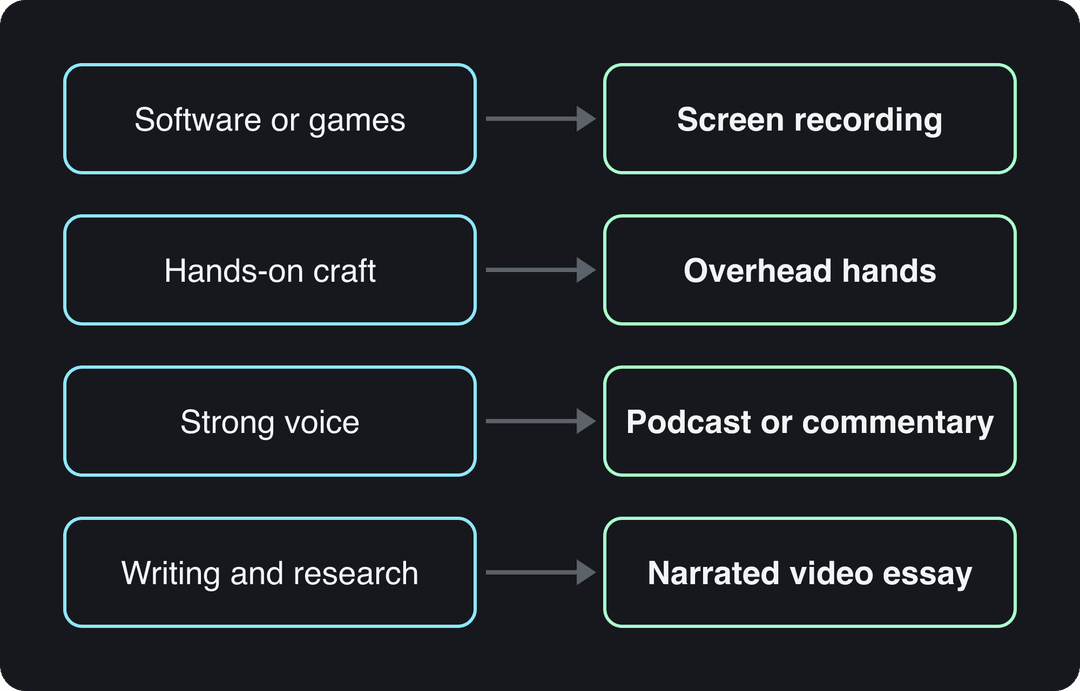
Start with one format and one topic lane for your first batch of videos. Switching formats every upload makes it impossible to tell what is working.
How to make a faceless YouTube video, step by step
- Choose the format and the topic. Write the one question the video answers. If you cannot state it in a sentence, the video will drift.
- Write the script first. Put the payoff or the most surprising fact in the first two sentences, then deliver in order. A faceless video lives or dies on the script, because nothing else on screen holds attention while you ramble.
- Record the voice-over. A USB microphone in a small room with soft furnishings (curtains, a sofa, a closet) beats an expensive mic in an echoing kitchen. Keep the same distance from the mic for the whole session. An AI voice works too if you pick one natural voice and keep it across the channel.
- Build visuals line by line. Give every sentence a shot that shows what it says: the menu you click, the ingredient you add, the map of the battle. Change the visual whenever the idea changes.
- Edit tight. Cut pauses and repeated takes, keep music well under the voice, and add captions so the video works with the sound off.
- Package it. Titles can be up to 100 characters and descriptions up to 5,000; a YouTube title generator helps you draft options. Custom thumbnails need a verified account, and YouTube recommends 3840x2160. This guide to YouTube metadata from TimeSkip covers titles, descriptions and tags in more depth.
- Disclose realistic AI content. If you generated a realistic scene or person, turn on the "AI use" setting in YouTube Studio when you upload.
- Read retention and fix one thing. In YouTube Studio analytics, find where viewers drop and change that part of the next script.
The faceless formats in detail
Screen recording tutorials
You capture your screen while you narrate the steps. Khan Academy built its early library on narrated digital whiteboards, and software makers such as TechSmith demo their own products this way.
The format performs: in the same TikTok study, faceless tutorials had a 156K median with 22.1% past 1 million views, against 52K and 10% for on-camera tutorials.
- Record with OBS Studio (free), Camtasia or ScreenFlow.
- Zoom into the area you are working in and highlight the cursor, so the action reads on a phone.
- Outline the steps first and record each step as its own clip; mistakes then cost one clip, not the whole take.
- Close notifications and personal tabs before you hit record.
Prompt to try
Make a 60-second motion graphics explainer on why the sky is blue. Open with the hook "The sky isn't actually blue, your eyes are just picky." Use clean flat diagrams of sunlight scattering, one consistent color palette and kinetic text for key terms, with a calm, curious narrator.
Animation and motion graphics
Animated characters, diagrams and kinetic text replace you on screen while your voice-over explains. Kurzgesagt's YouTube channel is the reference for science explainers; TED-Ed and The Infographics Show use the same approach.
Hand animation takes the most time of any format, so start simpler: template tools such as Vyond or Animaker, Adobe Character Animator for character-led content, or a motion graphics generator that turns a script into animated scenes. Whatever you use, lock one visual style (colors, fonts, character design) and keep it. A consistent look is what makes a faceless channel recognizable.
Overhead hands and object demos
The camera points at your workspace and only your hands appear. Tasty made this the default look for recipe videos, and teardown channels such as JerryRigEverything use it for devices.
- Mount the phone or camera directly overhead on an arm or rig so the frame never moves.
- Light from two sides to kill hand shadows; a window plus one lamp works.
- Mark the frame edges with tape so your hands and objects stay inside it.
- Use a lavalier mic or record the voice-over afterwards, and speed up the slow parts.
Stock footage compilations
You write the script, then cut licensed stock clips to match it. Explainer outlets such as Vox mix stock footage with graphics to illustrate ideas they cannot film.
Write the script before you search for clips, or you will bend the story to fit the footage. Subscription libraries such as Storyblocks or Envato Elements cover most topics; check the license terms for YouTube use. To avoid looking like every other stock channel, grade all clips to one color style and add your own maps, charts or text over them.
Slideshows and image-based videos
A sequence of images with narration and text overlays: the WatchMojo and Bright Side model for countdowns and explainers. It is the fastest format to produce and the easiest to make boring.
Never leave a still image fully still. Add a slow pan or zoom to each one, change images when the sentence changes, and use text overlays only for the key number or name. Use high-resolution images you have the rights to.
Podcast-style commentary with a static image
Your audio plays over a branded image, a waveform or a visualizer. Commentary and podcast channels use it to cross-post episodes with almost no editing.
It is the weakest format visually, so earn the watch time with audio: a good mic, a tight edit and chapters in the description so viewers can jump to the part they want. If you already have recordings, an audio to video converter turns them into captioned videos with visuals instead of a single still.
Text-based video essays
On-screen text carries the argument while your narration expands on it. Channels such as Pop Culture Detective and Wisecrack use text-heavy essays for analysis.
- Use one clean, high-contrast font and keep it for the whole channel.
- Show one short phrase at a time, timed to the narration, never a full paragraph.
- Highlight the key word as you say it.
- Keep backgrounds subtle so the text stays readable on a phone.
VTuber or virtual avatar
A digital character mirrors your expressions in real time through a webcam, so you get the personal presence of a face without revealing yours. Kizuna AI pioneered it; Ironmouse and Gawr Gura built large audiences with it, mostly in gaming and live streaming.
Start with VTube Studio or Animaze and a webcam that tracks well in your lighting. Design the character and its personality before launch, because changing the avatar later feels like changing your face. Rehearse with the software off-stream until expressions read naturally.
How do you make YouTube videos that don't suck?
Most bad faceless videos fail in the same few ways. Fix these and you are ahead of most of the format.
- Slow start. If the first lines are a greeting or a channel intro, cut them. Open with the result, the claim or the question the video answers.
- Bad audio. Viewers tolerate simple visuals; they leave over echo, hiss and uneven volume. Fix the room before you buy gear.
- Visuals that decorate instead of show. A random city skyline behind a sentence about budgeting is filler. Every shot should prove or illustrate the line it sits under.
- No script. Improvised narration without a face to carry it sounds like rambling. Script it, then read it aloud once and cut anything you trip over.
- Somebody else's words. Narrating an article or a news feed you did not write is reused content in YouTube's rules (see below).
- Weak packaging. A clear title and a readable thumbnail decide whether anyone clicks. On desktop, YouTube Studio can A/B test up to 3 titles and thumbnails on long-form videos (not Shorts).
Prompt to try
Create a 45-second POV video of a slow morning walk through a Lisbon neighborhood, filmed at chest height. Hook: "POV: you finally took the trip you kept postponing." Mix hands holding coffee, close-ups of tiled walls and wide street shots, with warm light and a soft reflective voice-over.
The index leans toward videos that surface in hashtag and keyword searches, so its view counts run high: compare the groups, not the absolute numbers.
Source: Revid TikTok index: 2,377,477 TikToks with AI labels per video, snapshot of Sep 15, 2026. Median views estimated from view buckets.
Show the data
| Median views | Share past 1M views | |
|---|---|---|
| Drone | 173.9K | 27.9% |
| Steady cam | 162.7K | 26.2% |
| Screen recording | 159.9K | 23.8% |
| Handheld | 140.9K | 25.6% |
| POV | 139.9K | 26% |
| Tripod | 117K | 23.6% |
| Selfie | 67K | 16.3% |
How to vlog without showing your face
Film what you see, not yourself. Point-of-view footage (camera at chest or head height, filming your hands, your path, your plate) is the core of a faceless vlog. In the same TikTok study, POV videos had a 107K median with 19% past 1 million views, against 48K for selfie-style footage.
- Mix three shot types: POV, close-ups of hands and objects, and wide shots of the place.
- Film yourself from behind or at a distance when you need to appear in the scene.
- Record ambient sound on location, then add a scripted voice-over at home so the story makes sense.
- Avoid showing reflections, street signs near your home or anything that gives away your identity if anonymity matters to you.
How to go live on YouTube without showing your face
You can stream with no camera at all: share your screen, show a static image with live audio, or appear as a VTuber avatar. The usual setup uses a computer and OBS Studio.
- In YouTube Studio, select Create, then Go live. The first time, your channel needs verification and live streaming is not activated instantly; check YouTube Help for current eligibility.
- In OBS Studio, open Settings, then Stream, choose YouTube and connect your account or paste the stream key from YouTube Studio.
- Build a scene with no camera source: Display or Window Capture for gameplay or coding, an Image source for a static branded screen, your microphone as an audio input, and the VTube Studio window if you use an avatar.
- Run a test stream set to private or unlisted and check what viewers actually see.
- For cooking or art streams, point the camera only at the desk and lock the framing before you go public.
Faceless channels and YouTube's monetization rules
Faceless and AI-assisted channels can earn on YouTube. The rules target how a video is made, not whether a face appears:
- Allowed: using AI or automated tools when the final video shows your creative vision and gives educational or entertainment value, such as AI help with a script or a background visual.
- Not allowed to monetize: mass-produced videos from generic templates without your own insight, compilations of unrelated AI clips stitched together to shock, and realistic visuals used to fake events.
- Not allowed to monetize: AI personas presented as human experts giving health, legal, financial or political advice.
- Disclosure: realistic AI content (a real person appearing to say something they did not, a realistic scene that never happened) must be disclosed. AI-written scripts, captions, thumbnails and cloning your own voice for voice-overs do not need it, and disclosure alone does not limit reach or earnings.
How to make a faceless YouTube video with Revid
If you would rather not film, animate or hunt stock clips at all, Revid builds the whole video from an idea, a script or a link.
- Open the faceless video generator and paste your idea, script or a link to an article or video.
- Revid writes the script and builds visuals scene by scene from stock footage, AI images, AI video (Seedance 2.5, MiniMax Hailuo, Wan 3.0 or Google Veo 3) or motion graphics. You can change any scene.
- Pick a voice from 1,000+ AI voices in 70+ languages (voice cloning is on Elite and above) and a caption style.
- Adjust timing in the timeline editor, export in 1080p or 4K, and publish or schedule straight to YouTube. For vertical videos, use the AI YouTube Shorts generator.
Add your own angle to every script so the channel stays clear of the mass-produced content rule. Sign-up is free and new accounts get free credits to try video creation, no credit card needed; regular creation then uses the monthly credits of a paid plan, from $39/month (see Revid pricing).
FAQ
Can you start a YouTube channel without showing your face?
Yes. Pick one faceless format and one topic, write a channel description (up to 1,000 characters) that says what viewers get, and publish on a steady schedule. Our guide to creating a faceless YouTube channel covers niche, branding and setup.
How do you make educational videos without showing your face?
Use screen recordings with zoom and annotations for software and math, or animation and motion graphics for concepts you cannot screen-record. Script each lesson around one question and show a visual for every step.
Can faceless YouTube channels get monetized?
Yes, under the same YouTube Partner Program thresholds: today, 1,000 subscribers plus 4,000 qualified public watch hours in 12 months or 10 million qualified Shorts views in 90 days. From February 1, 2027, new applicants need 8,000 qualified watch hours in 365 days or 20 million qualified Shorts views in 90 days.
What equipment do you need for faceless YouTube videos?
A decent USB microphone and a quiet room matter most. Add free screen recording software such as OBS Studio for tutorials, an overhead phone mount for hands-only videos, or an AI video tool if you want visuals without filming.
Can YouTube Shorts be faceless?
Yes. Any square or vertical video up to 3 minutes counts as a Short, and every format in this guide works vertically, especially POV, overhead hands and narrated AI or stock visuals.
Sources
- Revid analysis of 176,367 TikToks with 1,000+ likes posted between Oct 1, 2025 and Oct 16, 2026 (61,203 creators)
- Revid TikTok index: 2,377,477 TikToks with AI labels per video, snapshot of Sep 15, 2026. Median views estimated from view buckets.
- YouTube Official Blog, Tall updates coming to Shorts (October 2024)
Charts and figures checked on November 6, 2026.