On this page
To make a YouTube video with your phone, outline the video first, then film with the rear camera at 1080p or 4K and 30 fps, with the phone on a tripod facing a window. Edit in a free app such as CapCut and upload through the YouTube app with a searchable title and a custom thumbnail. Vertical videos up to 3 minutes become Shorts.
The most common mistake is holding the phone at arm's length and talking into the front camera for the whole video. In Revid's analysis of viral TikToks, selfie-style videos had the lowest median views of any shooting style. The fix costs nothing: put the phone on a stand and show the thing you are talking about.
- Daily YouTube Shorts views
- 200B+
- YouTube Official Blog, August 2026
- Longest vertical or square video YouTube classifies as a Short
- 3 min
- YouTube Official Blog, October 2024
- Median views of selfie-style TikToks, the lowest of any shooting style
- 48K
- Revid analysis of 176,367 TikToks
- Shorts views in 90 days new Partner Program applicants need from Feb 1, 2027
- 20M
- YouTube Official Blog, August 2026
What you need to make YouTube videos on a phone
Any recent phone that records 1080p is enough. Viewers notice bad sound, bad light and shaky footage long before they notice which camera you used, so spend your first money on those three problems, in this order:
| Accessory | What it fixes | Budget option |
|---|---|---|
| Tripod | Shaky footage, tired arms, framing that drifts | A tabletop tripod with a phone clamp, or a stack of books |
| External mic | Echo, room noise, a voice that sounds far away | A lavalier (clip-on) mic, wired or wireless |
| Light | Dark, grainy footage and shadows that change through the day | A small LED panel or clip-on ring light |
| Power bank | A dead battery halfway through a shoot | Any reputable 10,000mAh pack |
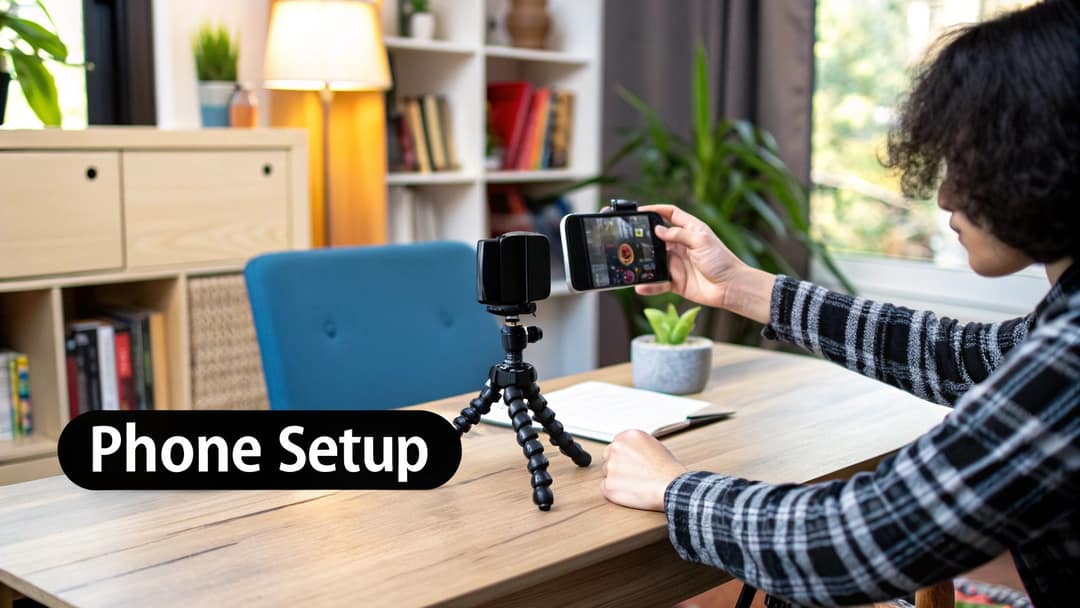
Before you buy a wired mic, check your phone's port (USB-C or Lightning) and buy the matching connector, or skip the question with a wireless lav that ships with its own receiver. If you get serious later, an all-in-one studio camera setup on a single mount holds the phone, a light and a mic on one stand. Start with the tripod: it is the upgrade you will see in the very next video.
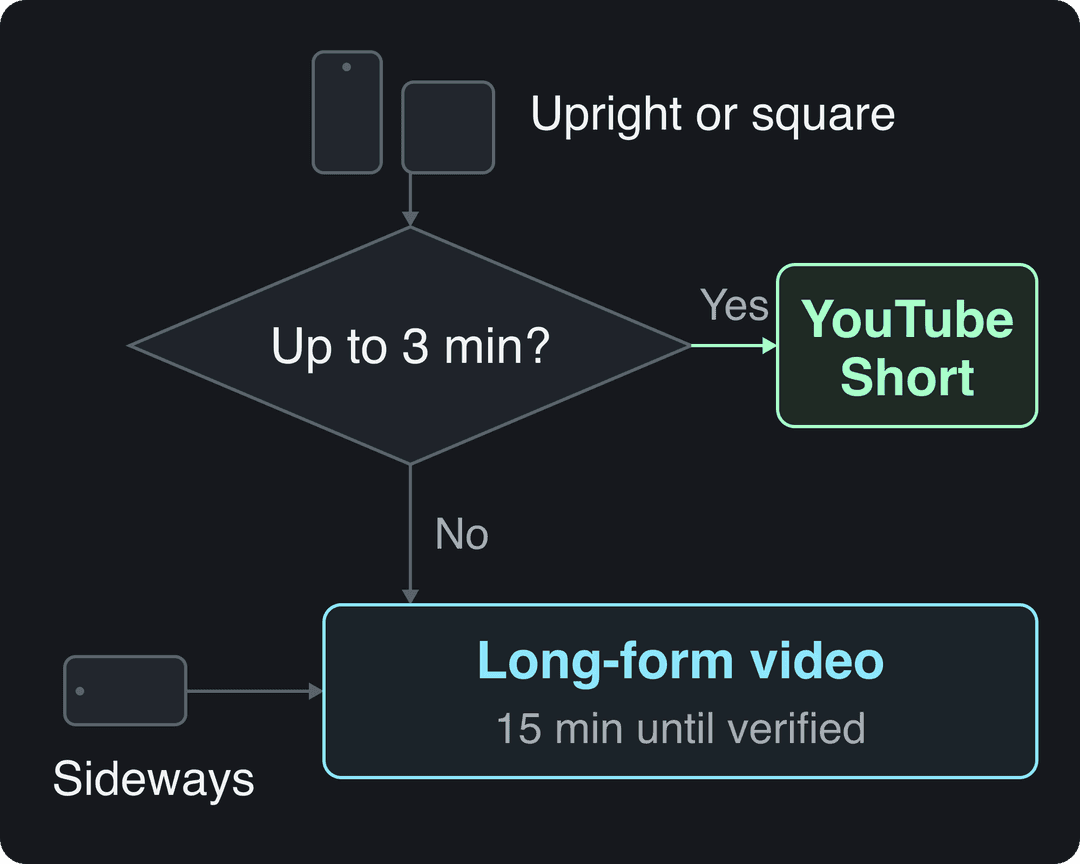
Shorts or a regular video: choose before you film
The way you hold the phone decides what kind of video you get. Since October 15, 2024, YouTube classifies square or vertical videos up to 3 minutes as Shorts. Horizontal videos, and vertical ones longer than 3 minutes, are regular long-form videos. By default those are limited to 15 minutes until you verify your account.
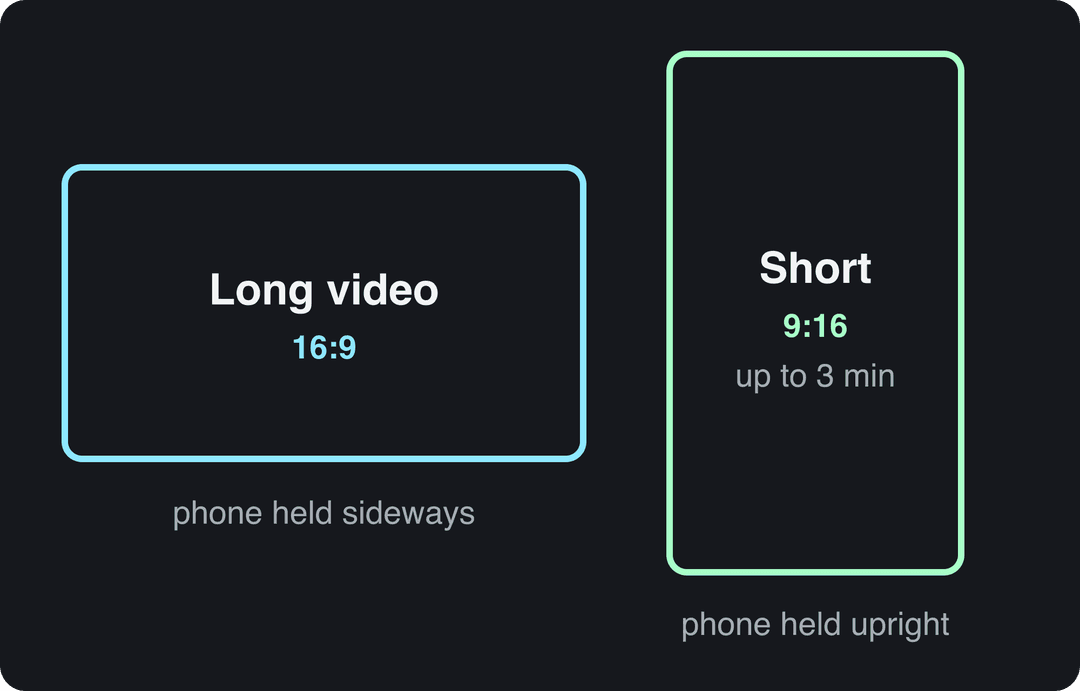
Use these rules:
- If the idea fits in under 3 minutes (one tip, a before-and-after, a quick reaction), hold the phone upright and make a Short.
- If it needs steps, a demo or a story that runs longer, hold the phone sideways and film 16:9.
- If you want both, film horizontally in 4K and keep yourself in the center of the frame, so a vertical clip can be cropped out later.
Shorts are worth the effort: in its August 2026 Partner Program update, YouTube said Shorts get over 200 billion daily views. For broader figures on YouTube's audience, Analyzify's collection of YouTube statistics gathers numbers from several sources.
When you film a Short, keep text and faces away from the bottom and right edges, where YouTube places the title, channel name and buttons. The YouTube Shorts safe zone template shows exactly which areas get covered.
The index leans toward videos that surface in hashtag and keyword searches, so its view counts run high: compare the groups, not the absolute numbers.
Source: Revid TikTok index: 2,377,477 TikToks with AI labels per video, snapshot of Sep 15, 2026. Median views estimated from view buckets.
Show the data
| Median views | Share past 1M views | |
|---|---|---|
| 0-7s | 88.3K | 19.9% |
| 8-15s | 111.1K | 22.6% |
| 16-30s | 141K | 25.1% |
| 31-60s | 120.4K | 22.8% |
| 61-120s | 97K | 19.8% |
| 2-5 min | 89.1K | 18.3% |
| 5 min+ | 90.1K | 17.2% |
Step 1: Plan the video in 15 to 20 minutes
A short plan saves hours of editing and stops you from rambling. Spend 15 to 20 minutes on two things: an idea people are searching for, and an outline you can follow on camera.
Find an idea people want
Start with a subject you know well, then check that people look for it:
- YouTube search autocomplete: type the start of a phrase ("how to repot a") and note the suggestions. They come from real searches.
- AnswerThePublic: shows the questions people ask around a keyword, which often become video titles as they are.
- Comments on popular videos in your niche: viewers ask for the follow-up video they want. Make it.
Start narrow. A channel about one thing (thrift flips, mobile gaming, houseplants) is easier for YouTube to recommend and for viewers to subscribe to than a channel about everything.
Prompt to try
Make a 45-second vertical YouTube Short titled "Edit a phone photo in 60 seconds". Open with a before-and-after reveal as the hook, then walk through brightness, contrast, saturation and a rule-of-thirds crop, one step per scene. Clean, bright style with bold captions and a calm, upbeat voiceover, ending with a call to watch the full tutorial.
Write an outline, not a word-for-word script
Your phone's notes app is enough. Bullet points keep you on track without the flat, read-aloud sound of a full script. If a blank page slows you down, Revid's free AI script generator drafts a first version you can cut down to bullets.
Example outline for a 5-minute tutorial, "Edit a phone photo in 5 minutes":
- Hook (0 to 15 s): show the before-and-after first. "Here is how this photo went from this to this, on a phone, in under 5 minutes."
- Setup (15 to 60 s): open the app, import the photo, point out the three tools you will use.
- Core edits (1 to 3 min): brightness, contrast, saturation, showing what each slider changes.
- Polish (3 to 4 min): crop using the rule of thirds.
- Recap and call to action (4 to 5 min): repeat the steps in one sentence each, then point to your next video.
The hook delivers on the title in the first seconds, and every later step is something the viewer can see on screen.
Step 2: Set up your phone camera
Check these settings once, before the first take:
| Setting | Use | Why |
|---|---|---|
| Resolution | 1080p, or 4K if you have the storage | 1080p is plenty for YouTube; 4K leaves room to crop or zoom in the edit |
| Frame rate | 30 fps (60 fps for gaming, sports or fast motion) | 30 fps looks natural for talking and tutorials |
| Lens | Rear main camera | The rear camera is usually sharper and handles low light better than the front one |
| Focus and exposure | Tap and hold on your face to lock them | Stops the picture from pulsing between bright and dark while you talk |
| Grid lines | On | Helps you keep the horizon level and your eyes in the upper third |
| Notifications | Do Not Disturb or airplane mode | A call or banner can ruin a take or stop the recording |
Also wipe the lens with a soft cloth. A fingerprint smudge makes every shot look hazy, and it is the most common cause of "soft" phone footage.
Step 3: Light, stabilize and record
Light
Daylight from a window is the best free light you have. Face the window so the light falls on you; never sit with the window behind you, or you become a silhouette. If you film at night or the sky keeps changing, put an LED panel slightly above eye level and off to one side. More general tips for taking better phone photos on light and framing apply to video too.
Stability
No tripod yet? Prop the phone on a stack of books, lean it against a mug, or tuck your elbows into your sides when you film handheld. Use a fixed setup for talking segments; handheld is fine for moving shots and b-roll.
Point the camera at the action
In Revid's analysis of 176,367 TikToks with 1,000+ likes posted between October 2025 and October 2026, POV videos had a median of 107K views (19% passed 1M), screen recordings 91K, handheld 80K, tripod 77K, and selfie-style videos only 48K (9.2% passed 1M). This is TikTok data from videos that already did reasonably well, so it shows what top videos have in common, not causes. For Shorts the lesson still holds: film the hands, the screen or the scene, not only your face at arm's length. The method is in Revid's study of what makes a TikTok go viral.
POV shots and screen recordings earned the most views. Selfie-style videos, the default for many creators, earned the least.
Source: Revid analysis of 176,367 TikToks with 1,000+ likes posted between Oct 1, 2025 and Oct 16, 2026 (61,203 creators)
Show the data
| Median views | Share that passed 1M views | |
|---|---|---|
| POV | 107.3K | 19% |
| Screen recording | 90.7K | 12.7% |
| Handheld | 79.8K | 14.5% |
| Steady cam | 78.2K | 14.9% |
| Drone | 83.4K | 14.9% |
| Tripod | 77.4K | 15.5% |
| Selfie | 48.4K | 9.2% |
Sound
Viewers forgive slightly grainy footage; they leave when they can't hear you. The phone's built-in mic works in a quiet, soft room (curtains, rugs, a sofa) if you stay close to it. Hard, empty rooms echo. A lavalier mic clipped to your shirt keeps your voice clear even when you move away from the phone, and it is the biggest quality jump for the least money.
Before every take, run the same three checks:
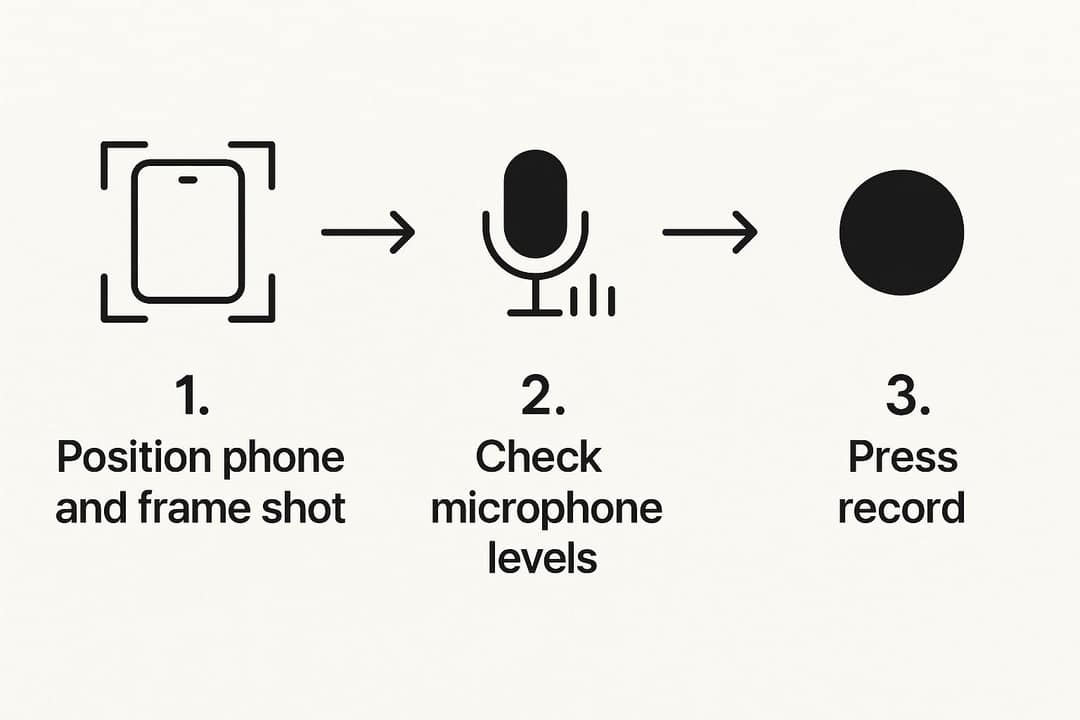
Record a few seconds, play them back with headphones, and only then film the whole thing.
Step 4: Edit the video on your phone
Two apps cover almost everyone:
- CapCut: the easiest place to start. Its free tier includes the full editor, 1080p export and auto-captions; premium templates, effects and most AI features are paid.
- LumaFusion: a paid app with a multi-track timeline closer to desktop software, for more control over audio mixing and color. Move to it only if CapCut starts to feel limiting.
Pick one and learn it well. Whatever app you use, the edit follows the same order:
- Cut the dead air. Trim the fumbling at the start and end of each clip, then remove pauses and repeated takes.
- Add b-roll. Cover your talking shot with footage of what you describe. Talking about a coffee maker? Show it brewing.
- Set the music low. Background music should sit well under your voice; loud music is the most common beginner mistake.
- Add text and captions. Use on-screen text for key points and auto-captions for viewers watching on mute, then proofread names and numbers.
- Export at the resolution and frame rate you filmed in.
For cutting techniques, pacing and color, see our complete guide to editing YouTube videos.
Step 5: Upload and optimize from the YouTube app
You can upload both Shorts and regular videos from your phone:
- Open the YouTube app, tap the + button and choose to upload a video (or create a Short), then pick your file.
- A vertical or square video up to 3 minutes opens as a Short, where you can add sound and text before tapping Next.
- Add the title, description and visibility, and answer the audience question (whether the video is made for kids).
- For a regular video, replace the auto thumbnail with your custom one if your account is verified.
- Publish or schedule, then open YouTube Studio to add tags, end screens and cards.
Title and description
Write the title in the words your viewer would type. "How to Make Sourdough Bread Without a Mixer" gets found; "My Baking Adventure" does not. Put the main phrase near the start. If you are stuck, a free YouTube title generator gives you options to test.
The first two sentences of the description show up in search, so restate the promise there, then explain what the video covers. A YouTube description generator can draft this from your topic.
| Field | Limit |
|---|---|
| Title | 100 characters |
| Description | 5,000 characters |
| Tags | 500 characters in total, not per tag |
| Video length (unverified account) | 15 minutes |
| Maximum upload | 256 GB or 12 hours, whichever is less |
Thumbnail
The thumbnail decides whether people click, so make one for every long-form video. A free app like Canva has YouTube templates. Use a bright, sharp still, 3 to 5 words of large text, and colors that contrast with each other.
- Size: YouTube recommends 3840x2160 (16:9), with a minimum width of 640 px.
- File size: up to 50 MB from a computer, but only 2 MB from a phone, so export a compressed JPG on mobile.
- Verification: custom thumbnails require a verified account.
- Vertical long videos: on the home, explore and subscription pages, YouTube replaces a 16:9 custom thumbnail with an auto-generated 4:5 one.
- Shorts: custom thumbnails can only be uploaded in YouTube Studio on a computer, by verified accounts (9:16, 2160x3840 recommended).
Tags, end screens and timing
Add a few tags mixing broad terms ("baking") and specific ones ("no-knead sourdough recipe"). Use end screens and cards to send viewers to your next video or a playlist; they are easiest to set up in YouTube Studio on a computer. For a first idea of when to publish, see this guide to the best time to upload to YouTube, then check when your own viewers are online in YouTube Studio analytics.
How to make Shorts with Revid when you can't film
Some days you won't have the light, the location or the time. Revid makes a finished Short from a text idea:
- Open the AI YouTube Shorts generator and type your idea or paste a link.
- Revid writes the script, generates the scene visuals, adds an AI voice-over, synced captions and music.
- Fix any scene in the timeline editor, export up to 4K, and publish or schedule it straight to YouTube.
Already posted a long phone video? Paste its link into the YouTube clip maker to cut it into vertical clips. One rule to respect: YouTube does not monetize mass-produced, template-style AI content, so add your own angle and script edits, and use the "AI use" disclosure in YouTube Studio for realistic AI scenes.
Can you make money with videos shot on a phone?
Yes. YouTube pays on views and watch time, not on the camera. To earn ad revenue today, the YouTube Partner Program requires 1,000 subscribers plus either 4,000 public watch hours in the last 12 months or 10 million qualified Shorts views in the last 90 days. Watch hours from the Shorts feed don't count toward the 4,000 hours.
Plan for the 2027 changes. From February 1, 2027, new applicants will need 8,000 qualified watch hours in the last 365 days or 20 million qualified Shorts views in the last 90 days (channels already in the program are not affected). From the same date, earning Shorts ad revenue in a given month will require 10 million qualified Shorts views in the last 90 days.
The lower tier (500 subscribers plus 3,000 watch hours or 3 million Shorts views) gives access to fan funding and shopping features, not ad revenue. Affiliate links and brand deals work at any size, as long as your audience trusts you.
Faceless Short to try
Create a 40-second faceless YouTube Short about three houseplants that are almost impossible to kill. Hook: "You can't kill these three plants, even if you try." Use close-up plant visuals, a warm, friendly voiceover and large captions, with one plant per scene and a quick care tip for each.
FAQ
How long should a YouTube video be?
As long as it takes to deliver what the title promises, and no longer. A quick tip works as a Short or a two-minute video; a full tutorial can run 15 minutes if every minute shows something useful.
How often should I post new videos?
Post on a schedule you can keep for months, such as one video a week. One good video a week beats five rushed ones, and consistency helps you grow a YouTube channel without burning out.
Can I upload videos longer than 15 minutes from my phone?
Yes, once your account is verified. Unverified accounts are limited to 15 minutes, and the maximum upload for anyone is 256 GB or 12 hours, whichever is less.
Is a phone camera good enough for YouTube?
Yes. A recent iPhone or Android phone filming 1080p or 4K with the rear camera is sharp enough for YouTube; light, sound and stability make far more difference than the phone model.
Do I need to show my face on camera?
No. In Revid's TikTok study, faceless videos had a median of 114K views against 67K for one person on camera; that is TikTok data from videos with 1,000+ likes, not proof for YouTube, but it shows faceless formats work in short-form video.
Sources
- Revid analysis of 176,367 TikToks with 1,000+ likes posted between Oct 1, 2025 and Oct 16, 2026 (61,203 creators)
- Revid TikTok index: 2,377,477 TikToks with AI labels per video, snapshot of Sep 15, 2026. Median views estimated from view buckets.
- YouTube Official Blog, New opportunities to earn and changes to the YouTube Partner Program (August 2026)
- YouTube Official Blog, Tall updates coming to Shorts (October 2024)
- YouTube Official Blog, New opportunities to earn and changes to the YouTube Partner Program (August 2026)
Charts and figures checked on November 6, 2026.