
How to Edit the Transcript and Re-generate Voice in Revid (2026)
Fix a line in your Revid video and get a matching voiceover: edit the text in the Script panel, then re-generate the voice from the Audio panel. Steps, costs and pause tricks for the current editor.
On this page
To modify the transcript and re-generate the voice in Revid, open the video in the editor, edit the lines in the Script panel, then go to Audio, click Re-generate on that voiceover, check the text and click Generate Voice. It costs 10 credits per started 500 characters and needs a paid plan.
The most common mistake: editing the text and stopping there. Changing a line in the Script panel updates the caption, not the audio, so your video keeps saying the old words until you re-generate the voiceover. And if you added pauses, they only work with some voices, which catches people out on the second render.
- Cost to re-generate a voice, per started 500 characters of text
- 10 credits
- Revid editor
- Monthly price of the Growth plan, with 2,000 credits
- $39
- Revid pricing
- AI voices available in Revid, across 70+ languages
- 1,000+
- Revid
- Median views for TikToks with under 40 characters of speech
- 123K
- Revid analysis of 176,367 TikToks
Step 1: Open the video in the editor
- In the sidebar, click Videos (under Create).
- Click the project card to open it, or use the card menu and pick Open in editor.
- If the project opens in the legacy editor (old.revid.ai), go back and pick Open in the new editor from the card menu, or set the switch at the top of Videos to "v2 editor (new)". New accounts use the v2 editor by default.
The Revid video editor has a left rail with Script, Text, Media, Transitions, Audio, Captions and Settings. Everything below happens in Script and Audio.
Step 2: Edit the transcript in the Script panel
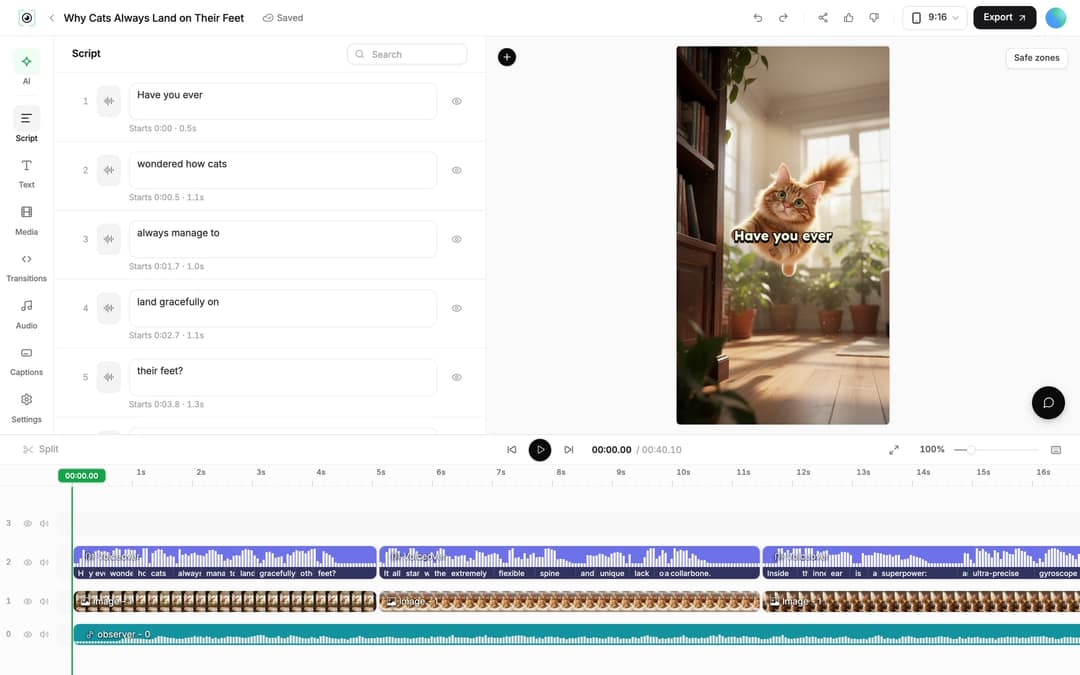
- Click Script in the left rail. The panel lists every caption segment with its number, an editable text box, and when the segment starts and how long it lasts.
- Click into a text box and type your change. Use the search box at the top of the panel to find a word in a long script.
- To hide a segment's caption without deleting it, click the eye icon on its right.
- When you edit, Revid shows the message "Caption updated. Re-generate voice if timing changed." That is your cue for Step 3.
If the video has a transcript, the panel also shows tabs: Script, Transcript and Edit captions.
Add pauses and visual notes while you edit
The script text supports a few markers. What each does depends on the voice you use.
| What you type | What happens |
|---|---|
<break time="1.0s" /> | A pause of 1 second. Up to 10 seconds; longer values are capped. ElevenLabs voices honor it, MiniMax voices convert it, Gemini and Kling voices drop it with no pause. |
| [words in brackets] | Treated as a note, not narration. In script-to-video projects, Revid uses it as a visual hint for the scene. Exception: ElevenLabs v3 and v4 voices read bracketed words as acting directions, such as [whispers]. |
| A new line | Kept in the transcript and used to start new content. |
Revid normalizes smart quotes and "1s" to "1.0s" for you. For more on pacing, see how to add a pause in the voice.
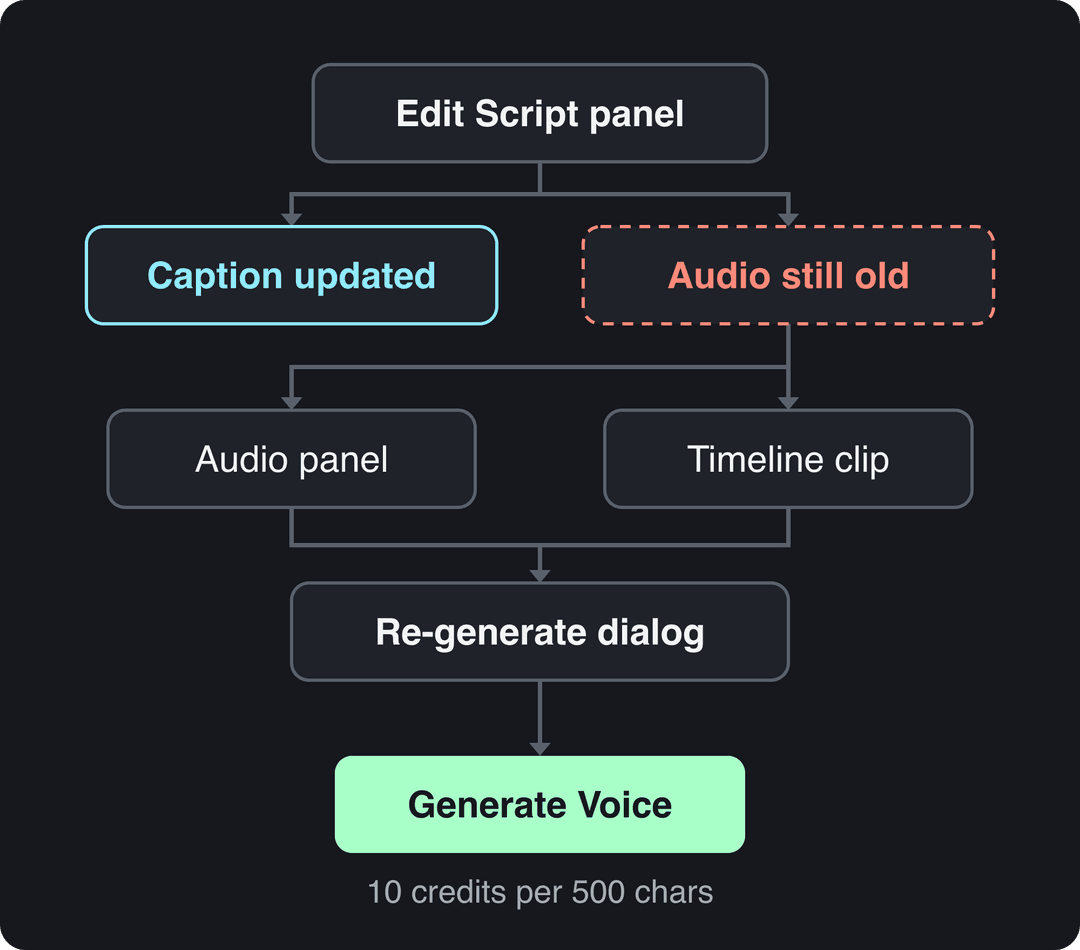
Step 3: Re-generate the voiceover
You can start the regeneration from two places. Both open the same dialog.
From the Audio panel
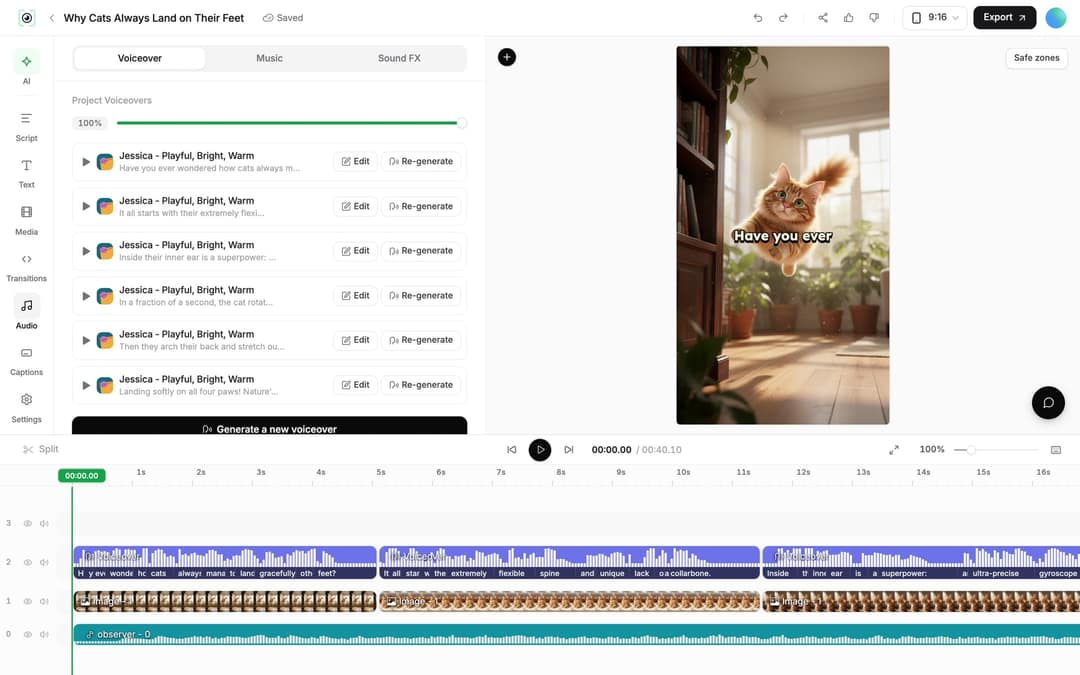
- Click Audio in the left rail and stay on the Voiceover tab.
- Under Project Voiceovers, find the row whose text preview contains the line you changed.
- Click Re-generate on that row.
Long videos often have several voiceover clips, so you only re-generate the one you edited instead of the whole narration.
From the timeline
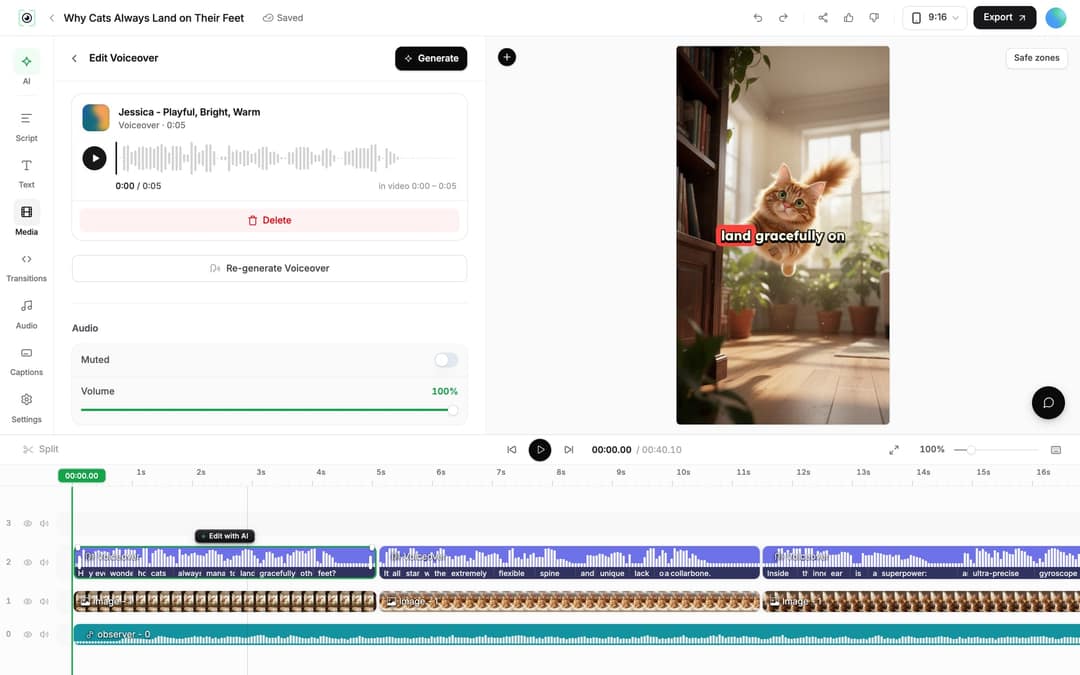
Click the voiceover clip on the timeline. The Edit Voiceover panel opens with the voice, Delete, Re-generate Voiceover, Muted and Volume. Click Re-generate Voiceover. On avatar videos the button reads "Re-generate Voiceover and Avatar".
The Re-generate dialog, setting by setting
The dialog is titled "Re-generate existing voiceover" ("Regenerate avatar narration" on avatar videos). It warns that a new voiceover retimes the timeline and states the exact cost before you confirm.
| Setting | What to do |
|---|---|
| Edit Input Text | Open it and confirm the text the voice will read matches your edit. Fix anything here before generating. |
| Voice picker | Keep the current voice, or pick a new one to change the narrator. |
| Options > Keep timeline in sync | Leave it on: clips, texts and music follow the new narration timing. Turn it off only if you have hand-placed edits you do not want moved. |
| Generate Voice | Starts the regeneration and charges the credits shown. |
Play the section back once it finishes. If a pause is missing, check which voice you used (see the table above).
How many credits does re-generating a voice cost?
Voice regeneration costs 10 credits per started 500 characters of text. On a talking-avatar video, the lip-sync adds twice that amount on top. The dialog shows "This operation costs N credits" before you click Generate Voice, and your balance appears as "N credits" at the bottom of the sidebar.
Regenerating a voiceover is only available on paid plans. Plans start at $39/month (Growth, 2,000 credits); the Revid pricing page has the current list. Failed builds are refunded automatically.
The index leans toward videos that surface in hashtag and keyword searches, so its view counts run high: compare the groups, not the absolute numbers.
Source: Revid TikTok index: 2,377,477 TikToks with AI labels per video, snapshot of Sep 15, 2026. Median views estimated from view buckets.
Show the data
| Median views | Share past 1M views | |
|---|---|---|
| Indonesian | 314.3K | 32.6% |
| Vietnamese | 208.6K | 27.2% |
| Turkish | 200.3K | 23.7% |
| Korean | 195.2K | 26.8% |
| Japanese | 188K | 25.6% |
| Arabic | 185.5K | 25.7% |
| Portuguese | 174.8K | 26.2% |
| Russian | 160.4K | 26% |
| Chinese | 155.7K | 25% |
| Thai | 143.5K | 22.4% |
Change the voice or the language without rewriting
- Different voice, same words: open the Re-generate dialog, leave the text as is, and pick another voice. Revid has 1,000+ AI voices in 70+ languages; voice cloning is available on Elite and above. For avatar projects, see how a talking avatar video is set up.
- Different language: do not retype the script. Use Translate in the project card menu, which opens the Revid video translator: pick the project and a target language, and it keeps the edit, media, timing and captions. It costs 10 credits per 500 characters per voice segment.
- New visuals after a script change: if the edited line no longer matches its scene, follow the steps to re-generate media on an existing project.
- A video that was not made in Revid: the AI voice changer replaces the speaker's voice in an uploaded video. For recording your own narration or dubbing, see our guide to adding voice to a video.
Prompt to try
Make a 20-second vertical video on three habits that help you fall asleep faster. Open with the hook "You're not tired, you're overstimulated." Keep the narration under 40 words, use calm stock visuals of a dim bedroom, and let the visuals carry the story between short lines.
Should you cut words before you re-generate?
Often, yes. In Revid's analysis of 176,367 TikToks with 1,000+ likes posted between October 2025 and October 2026, videos with under 40 characters of speech had a 123K median views and 20.2% passed 1M views, against 68K and 11.9% for videos that talk throughout (300+ characters of speech). The sample only includes videos that already reached 1,000+ likes, so it shows what top videos have in common, not a cause. The full method is in the study of what makes a TikTok go viral.
Videos with just a few spoken words (a line or two) beat both silent videos and videos that talk the whole way through, which were the most common and the weakest.
Source: Revid analysis of 176,367 TikToks analyzed by AI, with 1,000+ likes posted between Oct 1, 2025 and Oct 16, 2026 (61,203 creators)
Show the data
| Median views | Share that passed 1M views | |
|---|---|---|
| No speech | 73.3K | 14.3% |
| Under 40 | 122.7K | 20.2% |
| 40 to 120 | 97.2K | 17.6% |
| 120 to 300 | 91.6K | 16.8% |
| 300+ | 67.7K | 11.9% |
In practice: while you are in the Script panel, delete filler lines and let visuals carry part of the story. A shorter script also costs fewer credits to re-generate, since you pay per started 500 characters.
FAQ
Where did the Frames panel and the Re-Generate Voice button go?
The Frames panel is now the Script panel in the left rail. The old top-bar button was replaced by Re-generate in the Audio panel and Re-generate Voiceover on a selected voiceover clip.
Can I re-generate the voice on a free account?
No. Regenerating a voiceover requires a paid plan; free accounts see a message that a subscription is required.
Why did my pause not work after regenerating?
The voice probably comes from Gemini or Kling, which drop the <break time="1.0s" /> tag. Switch to an ElevenLabs or MiniMax voice in the Re-generate dialog and generate again.
Can I re-generate just one line instead of the whole video?
You can re-generate one voiceover clip at a time from Audio > Project Voiceovers. Pick the row that contains your edited line; the rest of the narration stays as it is.
Will regenerating the voice break my edits?
It retimes the timeline, but with Keep timeline in sync on, clips, texts and music move with the new narration. Turn the option off only if you want your manual timing left untouched.
Sources
- Revid analysis of 176,367 TikToks analyzed by AI, with 1,000+ likes posted between Oct 1, 2025 and Oct 16, 2026 (61,203 creators)
- Revid TikTok index: 2,377,477 TikToks with AI labels per video, snapshot of Sep 15, 2026. Median views estimated from view buckets.
Charts and figures checked on November 6, 2026.