On this page
A TikTok clip maker is an app that turns footage, a long recording or just an idea into a vertical 9:16 clip ready to post. The best one depends on what you start with: CapCut for clips you filmed, OpusClip for long recordings, and an AI generator like Revid when you have no footage.
The usual mistake is picking the app with the longest feature list. If your problem is that you have nothing to film, the best editor still leaves you with an empty timeline, and if you record hour-long podcasts, cutting clips by hand eats your week. Match the tool to your raw material first, then compare apps.
- Starting monthly price of OpusClip for cutting long videos into TikTok clips
- $15
- OpusClip pricing, per article
- Recommended TikTok clip size (9:16), per TikTok's Creator Academy
- 1080x1920
- TikTok Creator Academy
- Maximum length of a YouTube Short, the cap for one master clip across platforms
- 3 min
- YouTube Official Blog, October 2024
- Real short-form videos with engagement data in Revid's viral library
- 2.77M
- Revid
How to pick a TikTok clip maker: start from your raw material
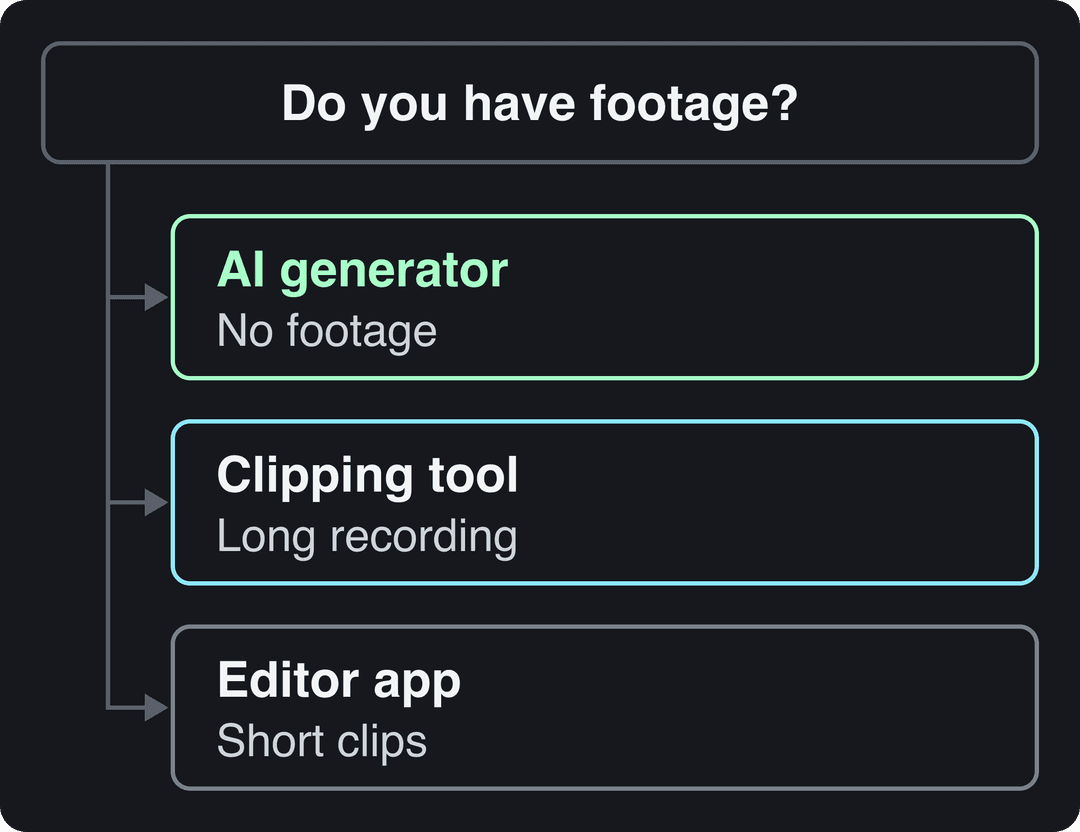
- No footage (faceless channel, product you can't film every day, a blog post or an idea): use an AI video generator.
- A long recording (podcast, stream, webinar, YouTube video): use a clipping tool that finds the best moments and reframes them to 9:16.
- Short clips you filmed: use an editor app for cuts, captions, effects and sound.
| Tool | Type | Best for | Free option | Paid from | Runs on |
|---|---|---|---|---|---|
| Revid | AI generator and clipper | No footage, faceless videos, links and long videos to clips | Free sign-up with free credits to try | $39/month | Browser |
| CapCut | Editor | Editing clips you filmed | Free tier with 1080p export | About $9.99/month | Mobile, desktop |
| OpusClip | Clipping tool | Podcasts, streams, webinars | Free plan, watermarked captions | $15/month | Web |
| InShot | Mobile editor | Quick edits on your phone | Free with ads | Subscription | iOS, Android |
| Filmora | Desktop editor | Advanced effects, green screen | Check the website | Subscription or one-time purchase | Desktop, mobile |
| Quik | Automatic editor | Travel, sports and action footage | Free to download | Check the app store | iOS, Android |
| BeeCut | Template editor | Template clips and tutorials | Limited free version | Check the website | Desktop, mobile, online |
US dollars per month
Revid's $39 Growth plan includes 2,000 credits, the editor, direct posting and the API. Yearly billing is cheaper on most tools.
Source: Pricing page of each tool, checked for Revid's comparison pages (revid.ai/vs) in November 2026.
Show the data
| US dollars per month | |
|---|---|
| Creatify | 15 |
| OpusClip | 15 |
| Higgsfield | 19 |
| Synthesia | 19 |
| CapCut | 20 |
| InVideo | 20 |
| Fliki | 28 |
| Klap | 29 |
| Revid | 39 |
The 7 best TikTok clip makers in 2026
1. Revid: best when you have no footage
Revid builds a complete TikTok video from a script, a link, an idea or a viral video you want to model. It writes the script, generates scene-by-scene visuals (stock footage, AI images or AI video), adds a voice-over, synced captions and music, then publishes to TikTok, Instagram and YouTube.
The difference from other generators is where the video starts. Revid includes a library of about 2.77 million real short-form videos with their public engagement data, so you can open a format audiences already watch and turn it into an original video instead of prompting from a blank page.
For TikTok, start with the AI TikTok video generator. If you already publish long YouTube videos, the YouTube clip maker cuts them into vertical clips.
- Best for: faceless channels, founders and small businesses with no time to film, and turning links or articles into clips.
- What you get: AI video models Seedance 2.5, MiniMax Hailuo H3, Wan 3.0 and Google Veo 3 (chosen per scene), 1,000+ voices in 70+ languages, 30 caption styles, a timeline editor, export at 720p, 1080p or 4K at 30 or 60 fps, and direct publishing and scheduling from one queue.
- Watch out for: AI generation uses credits. New accounts get free credits to try it, but regular creation needs a paid plan. If you only want to cut your own footage by hand, a classic editor fits better (see Revid vs CapCut).
- Price: free sign-up with free credits to try, no credit card needed; paid plans from $39/month (Growth, 2,000 credits). A 30-second video with AI visuals and a voice-over costs about 40 to 80 credits, and you see the estimate before generating. Current plans are on the Revid pricing page.
2. CapCut: best free editor for clips you filmed
CapCut is ByteDance's video editor and the default choice when you shot the footage yourself. It has the tightest TikTok integration of any editor, plus trend templates that drop your clips straight into viral formats.
- Best for: fast edits of your own footage on a phone or computer.
- Free plan: the full editor, auto-captions and 1080p export. Premium templates, effects and most AI features are paid.
- Price: about $9.99/month for Standard. Pro adds extras such as speaker-identified captions.
- Watch out for: it edits what you have; it won't write or generate a video when you have nothing filmed.
Price divided by included minutes, assuming you use the whole allowance. Descript's hours are editing hours, not automatic clipping, so it is cheap per hour but you do the picking. Klap (billed per clip) and Revid (billed per job in credits) do not bill by source minutes and are left out.
Source: Monthly prices and allowances from vendor pricing pages on October 29, 2026 (Quso, Descript, Munch Studio yearly price), OpusClip allowances (150 and 300 minutes) from Castmagic's OpusClip pricing guide verified August 20, 2026, Vizard from vizard.ai/pricing on September 30, 2026.
Show the data
| US dollars per 10 hours of uploads | Minutes of video included per month | |
|---|---|---|
| Quso Lite | 174 | 100 |
| Quso Essential | 78 | 300 |
| OpusClip Starter | 60 | 150 |
| OpusClip Pro | 58 | 300 |
| Munch Studio Essential | 46 | 500 |
| Vizard Creator | 29 | 600 |
| Descript Hobbyist | 24 | 600 |
3. OpusClip: best for cutting long videos into clips
If "clip maker" means turning a podcast, stream or webinar into TikToks, OpusClip is built for that job. It finds the strongest moments, ranks them with a virality score, reframes talking heads to 9:16 and adds animated captions. Paid tiers also post and schedule to social platforms.
- Best for: creators and teams who already record long-form content.
- Free plan: 1080p exports, but the animated captions carry a watermark and media expires after 3 days.
- Price: from $15/month.
- Watch out for: it needs a long recording to start from. For a side-by-side, read Revid vs OpusClip.
4. InShot: best for quick edits on your phone
InShot is a mobile editor for iOS and Android with precise trimming and merging, speed control for slow motion, a filter collection and canvas resizing to TikTok's vertical format. It is the fastest way to tidy a clip between filming and posting.
- Best for: beginners and anyone who edits only on a phone.
- Free plan: works, but shows ads. A Pro subscription removes ads and adds effects and filters; check the app store listing for current prices.
- Watch out for: text animations are basic compared with CapCut.
5. Filmora: best for advanced desktop editing
Filmora is Wondershare's desktop editor for creators who want more control than a phone app gives them without learning a professional suite. You get keyframing, color grading, motion tracking, audio mixing and a green screen tool for placing yourself in any background.
- Best for: story-driven or effects-heavy TikToks edited on a computer.
- Price: subscription and one-time purchase options; check the website for current plans.
- Watch out for: a steeper learning curve and the need for a reasonably powerful computer.
6. Quik: best for automatic edits of action footage
Quik is GoPro's editing app. It scans your footage, picks highlights and cuts them to the beat of the music, with themes that keep a consistent look. Hand it a skate session or a hike and you get a postable edit in minutes.
- Best for: travel, sports and action footage.
- Price: free to download; check the app store for what GoPro's subscription adds.
- Watch out for: limited manual control, so it is the wrong tool for precise or talking-head edits.
7. BeeCut: best for template-based clips and tutorials
BeeCut is a simple editor with TikTok-ready templates, text animations, video stabilization and a built-in screen recorder, which makes it handy for app demos and tutorials. It runs on desktop, mobile and in the browser.
- Best for: marketers and casual editors who want templates and text-led clips.
- Watch out for: the free version is limited, so check that the template library matches current trends before you pay.
What's the best AI clip generator for TikTok, YouTube Shorts and Reels?
The answer depends on which kind of AI tool you mean, because three different products are sold as "AI clip makers":
| Kind of AI tool | Examples | What you get | Pick it if |
|---|---|---|---|
| Full video generator | Revid | Script, visuals, voice, captions, music, publishing | You have no footage and want finished videos |
| Clipping tool | OpusClip, Klap, Vizard, Revid's YouTube clip maker | Short clips cut from your long video | You already record long-form content |
| Raw clip model | Runway, Pika, Kling | Single generated shots | You edit and assemble everything yourself |
For one tool that serves all three platforms, export once in 9:16 at 1080x1920. Keep the clip under 3 minutes: that is the maximum length of a YouTube Short and the point past which Instagram stops recommending Reels to non-followers.
One rule applies to every AI tool: TikTok requires you to label AI-generated content that contains realistic images, audio or video. TikTok says the label itself does not affect a video's distribution, so turn it on rather than risk a violation.
How to make professional-looking TikTok clips with little experience
You don't need editing skills, you need a few defaults that every good clip shares:
- Start from a format that already works. Model the structure, hook and pacing of a video that performed in your niche, then make your own version.
- Work in 9:16 at 1080x1920, the size TikTok's Creator Academy recommends.
- Keep text and faces away from the edges, where TikTok's buttons and caption cover the frame. Check your layout with the TikTok safe zone checker.
- Add captions to every clip. Use CapCut's auto-captions or Revid's TikTok subtitle generator.
- Pick a sound people recognize from the trending TikTok songs list (Business accounts should use TikTok's Commercial Music Library instead).
- Let a template or AI do the assembly, then spend your time on the first line and the first shot.
Prompt to try
Make a 30-second vertical TikTok about 3 morning habits that save an hour every day. Open with the hook "You're wasting your first hour and don't know it." Use fast cuts of realistic stock footage, a friendly energetic voice-over and bold word-by-word captions.
Make a TikTok clip with Revid, step by step
- Open the AI TikTok video generator and paste a script, a link or a one-line idea. Or search the viral library, open a video and choose "Same energy, new script".
- Choose a voice, a caption style and the visual style or AI model for each scene.
- Adjust any scene, line or caption in the timeline editor.
- Export in 1080p or 4K, or publish and schedule directly to TikTok, Instagram and YouTube.
More than 30,000 videos are published to TikTok, Instagram and YouTube through Revid every month. For a wider look at generators, see our roundup of AI TikTok video makers.
Which tools resize and trim, so you can test TikTok against Reels?
Most editors here do both. CapCut, InShot and Filmora let you trim and switch the canvas between vertical, square and landscape. In Revid, the resize video tool converts any clip to portrait 9:16, feed 4:5, landscape 16:9 or square 1:1, and the timeline editor handles the trim.
The specs below are what each platform accepts, so one master file covers your test:
| Spec | TikTok | Instagram Reels | YouTube Shorts |
|---|---|---|---|
| Aspect ratio | 9:16 recommended (1080x1920) | 1.91:1 to 9:16 accepted, 9:16 recommended | Square or vertical |
| Length | Uploads up to 60 minutes; in-app recording up to 10 minutes | Up to 20 minutes; over 3 minutes not recommended to non-followers | Up to 3 minutes |
| Other | Studio Web accepts 1080p, 2K or 4K | Minimum 30 FPS and 720 px | Title up to 100 characters |
To run a fair test on Instagram, post the clip as a trial reel: trial reels go first to non-followers and their insights arrive within 24 hours. You need a public account with at least 200 followers (professional) or 1,000 followers (personal).
Where to find royalty-free images and audio for TikTok
- Inside your clip maker. CapCut ships with a music library; check each track's commercial-use label before using it in an ad. Revid adds stock footage, AI images or AI video, and music to every video it generates.
- TikTok's own library. If you post from a Business account, stick to TikTok's Commercial Music Library, which is cleared for commercial use.
- Free stock sites. Pexels and Pixabay offer free photos and video clips for B-roll.
- Music samples. Splice sells royalty-free samples, loops and sound effects made for music producers, useful if you build your own background tracks.
FAQ
Can you download a Revid video without a watermark and without paying?
Not for regular use. Sign-up is free, with no credit card needed, and new accounts get free credits to try video creation, but regular video creation uses the credits of a paid plan, starting at $39/month. Check the pricing page for what a free account currently includes.
Is there a completely free TikTok clip maker?
CapCut is the closest: its free tier includes the full editor, auto-captions and 1080p export, while premium templates and most AI features are paid. InShot's free version also works but shows ads.
Do AI-generated TikTok clips need a label?
Yes, if they contain realistic AI images, audio or video. TikTok may also add the label automatically to uploads carrying C2PA Content Credentials, and it says the label alone does not reduce distribution.
What size should a TikTok clip be?
Use 9:16 at 1080x1920 pixels, the size TikTok's Creator Academy recommends. Uploads can run up to 60 minutes, while the in-app camera records up to 10 minutes.
What TikTok clip makers can I use on my phone?
CapCut, InShot and Quik all run on iOS and Android. CapCut is the most complete, InShot the simplest, and Quik the fastest for automatic edits of action footage.
Sources
- Pricing page of each tool, checked for Revid's comparison pages (revid.ai/vs) in November 2026.
- Monthly prices and allowances from vendor pricing pages on October 29, 2026 (Quso, Descript, Munch Studio yearly price), OpusClip allowances (150 and 300 minutes) from Castmagic's OpusClip pricing guide verified August 20, 2026, Vizard from vizard.ai/pricing on September 30, 2026.
- YouTube Official Blog, Tall updates coming to Shorts (October 2024)
Charts and figures checked on November 6, 2026.