Vertical Video Aspect Ratio: 9:16 Sizes, Specs and How to Convert
Vertical video uses a 9:16 aspect ratio, 1080 x 1920 at full HD. Here are the specs for every major platform, plus how to convert 16:9 footage and set the ratio in AI generators and Remotion.
On this page
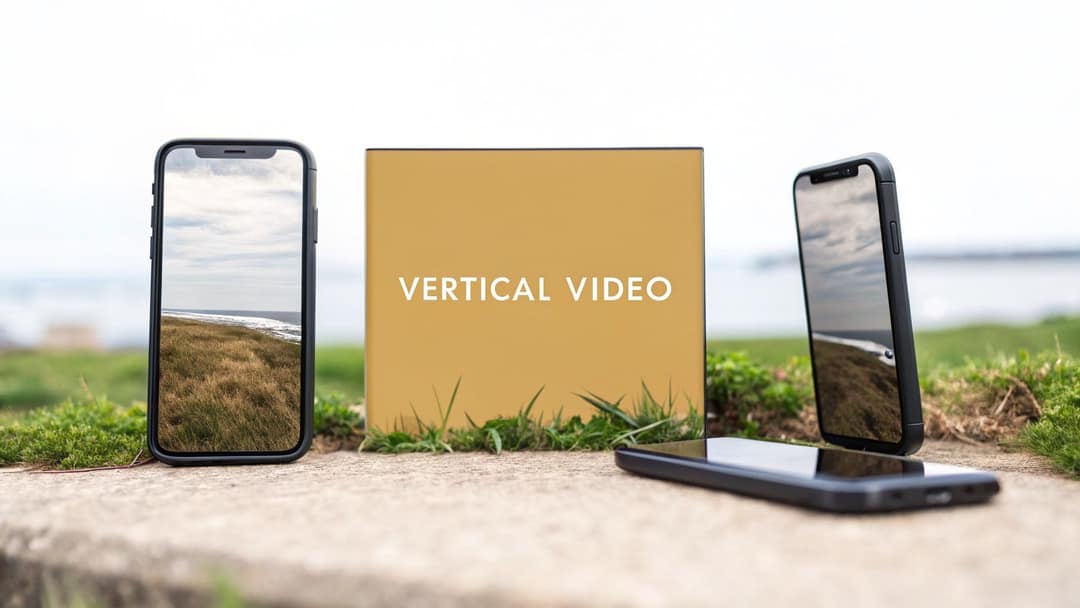
The standard vertical video aspect ratio is 9:16, meaning 9 units wide for every 16 units tall. At full HD that is 1080 x 1920 pixels, the size TikTok recommends and the full-screen shape of Instagram Reels, Stories and YouTube Shorts.
The costly mistake is picking the ratio after the fact. A centered 9:16 crop of a 16:9 frame keeps less than a third of its width, so a second speaker, a product on the table or text placed near the edge simply disappears. Set 9:16 at the start (in the camera, the editor or the AI generator) and most of the fixes in this guide become unnecessary.
- Full HD size of a 9:16 vertical video, the default export for every platform
- 1080 x 1920
- More conversions per dollar on Shorts when a vertical video asset is added
- 10% to 20%
- Think with Google, September 2022
- Longest a square or vertical video can run and still count as a YouTube Short
- 3 min
- YouTube Official Blog, October 2024
- Maximum length of an Instagram Reel
- 20 min
What ratio is vertical video?
Vertical video is any video taller than it is wide. Aspect ratios are written width:height, so 9:16 is 9 across and 16 down, and 16:9 is the same rectangle turned on its side: the shape of TVs, laptops and the regular YouTube player.
Phones are held upright, and full-screen feeds are built around that, which is why 9:16 became the default. The Wikipedia entry on vertical video and its adoption traces how the format went from a filming faux pas to the norm on mobile.
9:16 is not the only vertical ratio. These are the four you will run into:
| Ratio | Common size | Shape | Where it fits |
|---|---|---|---|
| 9:16 | 1080 x 1920 | Full-screen vertical | TikTok, Reels, Stories, Shorts, Snapchat |
| 3:4 | 1080 x 1440 | Tall feed post | Tallest Instagram feed photo shown without cropping |
| 4:5 | 1080 px wide | Tall feed post | Feed posts; YouTube's auto thumbnail for vertical videos on home and subscription pages |
| 1:1 | 1080 x 1080 | Square | Feeds; also counts as a YouTube Short if it runs 3 minutes or less |
The decision rule: if the video plays in a full-screen feed, use 9:16. If it sits in a scrolling feed next to other posts, 4:5 or 3:4 takes more room than a square without going full screen. Nothing taller than 9:16 fits a phone screen, and Instagram Reels won't accept a taller ratio.
Generating in the final shape matters: cropping a wide video to 9:16 cuts off text and faces. Avatar tools such as Synthesia and HeyGen default to 16:9 for training and web use.
Source: Revid data, Amplitude project_built by ratio for text-input tools, Sep 29 to Oct 28, 2026, 50,623 projects.
Show the data
| Share of projects | Projects | |
|---|---|---|
| 9:16 vertical | 83.2% | 42.1K |
| 16:9 wide | 15.2% | 7.7K |
| 1:1 square | 0.9% | 457 |
| 4:5 portrait | 0.7% | 356 |
Vertical video resolution: what size to export
The ratio sets the shape; the resolution sets how many pixels fill it. All three sizes below are 9:16.
| Name | Pixels | Use it when |
|---|---|---|
| 720p vertical | 720 x 1280 | Minimum quality. Instagram's floor for Reels is 720 pixels, and X recommends 720 x 1280 for portrait video |
| 1080p vertical | 1080 x 1920 | Your default export for every platform |
| 4K vertical | 2160 x 3840 | Shooting and master files. TikTok Studio Web accepts 4K, and YouTube recommends 2160 x 3840 for custom Shorts thumbnails |
Export at 1080 x 1920 unless you have a reason not to. Shoot in 4K when you plan to crop, reframe or punch in later: the extra pixels let you zoom and still deliver a sharp 1080 x 1920.
For frame rate, 30 fps is the safe choice, with 60 fps for gameplay or fast motion. Instagram asks for at least 30 FPS on Reels, TikTok's posting API accepts 23 to 60 FPS, and Facebook recommends 24 to 60 FPS. The full Reels breakdown (bitrate, covers, codecs) is in our IG Reels resolution guide.
Vertical aspect ratio by platform (2026)
| Platform | Aspect ratio | Resolution | Max length | Worth knowing |
|---|---|---|---|---|
| TikTok | 9:16 | 1080 x 1920 (recommended) | 60 min uploaded, 10 min recorded in-app | Studio Web takes 1080p, 2K or 4K files up to 30 GB |
| Instagram Reels | 9:16 (accepts 1.91:1 to 9:16) | 1080 x 1920, minimum 720 px | 20 min | Reels over 3 min are not recommended to non-followers |
| Instagram Stories | 9:16 | 1080 x 1920 | 3 to 60 s per video through Meta's API | Keep text clear of the top and bottom bars |
| YouTube Shorts | 9:16 or 1:1 | 1080 x 1920 | 3 min | Longer vertical videos become regular videos |
| Facebook Reels | 9:16 | 1080p | No limit: every new video is a reel | H.264 or H.265, 24 to 60 fps |
| Snapchat | 9:16 | Check Snapchat's current specs | Check Snapchat's current specs | Full-screen vertical by design |
| X | 9:16 accepted (1:3 to 3:1) | 720 x 1280 recommended | 20 min | Premium accounts: 125 min |
| 9:16 accepted (1:2.4 to 2.4:1) | Up to 4096 x 2304 | 15 min | The vertical video feed is mobile-only |
One file at 9:16 and 1080 x 1920 covers nearly every row. TikTok made full-screen vertical the default feed, and Snapchat was built around it from the start; check Snapchat's own ad and Spotlight specs before exporting for paid placements. For TikTok-only details such as covers and landscape uploads, see the TikTok video aspect ratio guide.
What happens if you post 16:9 in a vertical feed?
It plays, but small. A landscape clip in a 9:16 feed fills a band across the middle with empty space above and below, so your subject gets a fraction of the screen your competitors' vertical videos get.
The gap shows up in results too. In early testing published by Think with Google in September 2022, adding a vertical video asset to Video action campaigns delivered 10% to 20% more conversions per dollar on YouTube Shorts than landscape videos alone (more sourced figures in our YouTube Shorts statistics).
Keep text and faces inside the safe zone
A 9:16 frame is not all yours. The app draws the caption, username, buttons and progress bar over the bottom and right side, and sometimes a header at the top. Keep faces, captions and on-screen text in the central area, and leave the bottom strip and right edge free of anything that must be read.
The margins differ by app, so check a frame against the TikTok safe zone overlay or the Instagram Reels safe zone checker before you export.
How to convert a horizontal video to vertical
A straight center crop is the fastest method and the riskiest: it keeps only the middle of the frame, full height.
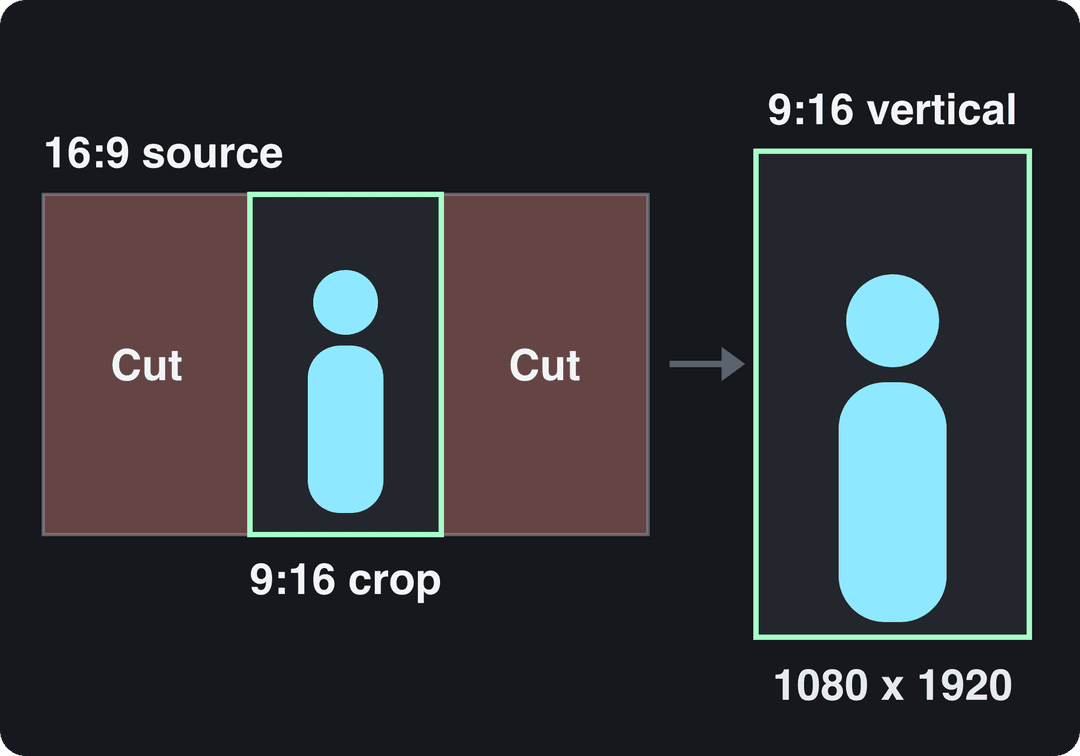
Pick the method by what is in the shot:
| Method | Best for | Trade-off | Effort |
|---|---|---|---|
| Center crop | One subject in the middle of the frame | Everything at the sides is lost | Low |
| Reframe (moving crop) | A subject that moves, two speakers taking turns | Needs keyframes or auto-tracking | Medium |
| Stack (split screen) | Before and after, two speakers at once | Each half is small | Medium |
| Fit with blurred or solid background | Wide shots, slides, screen recordings | The video itself stays small | Low |
| Reshoot vertically | Content built on wide shots or landscapes | Time and cost | High |
If the subject stays centered, crop. If it moves, reframe. If two things must stay visible at once, stack them. If none of that works, the shot was made for 16:9 and a vertical reshoot will beat any conversion.
In Adobe Premiere Pro, Auto Reframe tracks the subject and moves the 9:16 window for you; DaVinci Resolve offers Smart Reframe in its Studio version and a stabilizer for shaky phone footage. Without an editor, Revid's resize video tool converts an upload to portrait 9:16, feed 4:5, landscape 16:9 or square 1:1, and the long video to short video converter cuts long recordings into short vertical clips.
Step-by-step instructions for each method, including how to avoid stretching, are in how to change a video's aspect ratio and in our guide to converting video to TikTok format.
Prompt to try
Create a 30-second vertical 9:16 video on why octopuses have three hearts. Open with the hook "Your heart could never keep up with this animal." Use one centered subject per scene, framed close with space above, in a cinematic underwater style with captions and a calm narrator voice.
Share of clips
Source: Revid production data: 713,649 AI video clips generated Jun 29, 2026 to Sep 26, 2026.
Show the data
| Share of clips | |
|---|---|
| 16:9 | 54% |
| 9:16 | 40.3% |
| 1:1 | 4.3% |
| 3:4 | 0.5% |
How to control aspect ratio in AI video generation
In AI video tools, the aspect ratio is a setting, not a prompt. Models generate on a fixed canvas chosen when the job starts (Google's Veo 3.1, for example, outputs 16:9 or 9:16), and typing "vertical" in the prompt won't change the canvas shape.
- Pick 9:16 in the generator's format or ratio setting before you write the prompt.
- Write the prompt for a tall frame: one subject, centered, framed from head to waist or full body, with space above the head. Wide establishing shots lose their point in a narrow frame.
- Keep every scene at the same ratio so a multi-scene video never mixes shapes.
- Generate natively in 9:16 instead of cropping a 16:9 clip, which throws away pixels and often the subject.
- Export at 1080 x 1920 (or 4K) and check the safe zone before posting.
In Revid, the AI video generator turns an idea, a script or a link into a vertical video. Each scene can use a different model (Seedance 2.5, MiniMax Hailuo H3, Wan 3.0 or Google Veo 3) under one credit system, and Revid adds the voice-over, synced captions and music. Export in 720p, 1080p or 4K at 30 or 60 fps, then publish directly to TikTok, Instagram and YouTube. You can also start from a proven viral video in Revid's library and generate an original version in the same vertical shape.
How to set a 1080x1920 vertical composition in Remotion
Remotion defines a video's canvas on the <Composition> component. Set width to 1080 and height to 1920 and every frame renders in portrait:
import { Composition } from "remotion";
import { MyVideo } from "./MyVideo";

export const RemotionRoot = () => (
  <Composition
    id="Vertical"
    component={MyVideo}
    durationInFrames={30 * 60}
    fps={30}
    width={1080}
    height={1920}
  />
);That renders 60 seconds at 30 fps. Inside MyVideo, read the canvas with useVideoConfig() instead of hardcoding pixel positions; then a 4:5 or 16:9 version is just a second <Composition> with the same component and different width and height. Keep both dimensions even numbers, since H.264 encoding expects it, and render with npx remotion render Vertical out/vertical.mp4.
Filming vertical video: what to set before you press record
- Hold the phone upright and lock rotation, or record in 4K if you plan to reframe later.
- Frame for the center: eyes about a third from the top, nothing important along the bottom or right edge where the app's interface sits.
- Use the height: full-body shots, leading lines and top-to-bottom tilts work better than wide horizontal pans that leave the frame quickly.
- Stabilize with a phone gimbal or tripod, or fix shake afterwards in your editor's stabilizer.
- Light from the front and slightly above the subject, and put the mic close (a clip-on or directional mic beats the phone's built-in one).
FAQ
Is 1080x1920 the same as 9:16?
Yes. 1080 x 1920 is the full HD resolution of the 9:16 aspect ratio; 720 x 1280 and 2160 x 3840 are the same ratio at lower and higher resolution.
Is 4:5 a vertical aspect ratio?
Yes, 4:5 is taller than it is wide, but it is not full screen. Use it for feed posts and 9:16 for Reels, Stories, TikTok and Shorts.
Can I upload a horizontal 16:9 video to TikTok?
Yes. TikTok Studio Web accepts landscape uploads, but in the vertical feed the video plays as a band with empty space above and below, so convert it to 9:16 when the subject allows.
Is a vertical YouTube video longer than 3 minutes a Short?
No. Only square or vertical videos up to 3 minutes are classified as Shorts; longer vertical uploads are regular YouTube videos.
What resolution should a vertical Instagram Reel be?
Export Reels at 1080 x 1920 in 9:16. Instagram's minimum is 720 pixels and 30 FPS, so anything below that risks a soft or rejected upload.
Sources
- Revid data, Amplitude project_built by ratio for text-input tools, Sep 29 to Oct 28, 2026, 50,623 projects.
- Revid production data: 713,649 AI video clips generated Jun 29, 2026 to Sep 26, 2026.
- Think with Google, Short and long-form video content (September 2022)
- YouTube Official Blog, Tall updates coming to Shorts (October 2024)
Charts and figures checked on November 6, 2026.