How to Convert Video to TikTok Format: 9:16 Specs and Steps
TikTok's format is vertical 9:16 at 1080x1920 pixels, saved as an MP4. Here is how to convert any video, MP4 file or YouTube clip into it without cutting off what matters.
On this page
To convert a video to TikTok format, make it vertical 9:16 at 1080x1920 pixels and export it as an MP4 with the AVC video codec. Crop or reframe horizontal footage so the subject fills the tall frame, then upload: TikTok accepts videos up to 60 minutes long.
The hard part is the crop, not the settings. A 9:16 window cut from a 16:9 clip keeps less than a third of the original width, so a lazy center crop of a two-person interview often shows one shoulder and a wall. Converting well means deciding what belongs in that narrow strip, shot by shot.
- Recommended TikTok resolution, vertical 9:16
- 1080x1920
- TikTok Creator Academy
- Longest video you can upload to TikTok
- 60 min
- TikTok Studio Web
- Maximum file size on TikTok Studio Web
- 30 GB
- TikTok Studio Web
- File size limit for apps posting through TikTok's API (10 minutes max)
- 4 GB
- TikTok Content Posting API
What is the TikTok video format?
TikTok's format is a vertical video in a 9:16 aspect ratio. TikTok's Creator Academy recommends 1080x1920 pixels, which is full HD turned on its side. If you searched "was ist das TikTok Bildformat": it is 9:16 Hochformat, 1080 x 1920 Pixel.
| Spec | What to use | Note |
|---|---|---|
| Aspect ratio | 9:16 vertical | Fills a phone screen with no bars |
| Resolution | 1080x1920 | Studio Web also accepts 2K and 4K |
| File type | MP4 (recommended) | MOV and WebM are also accepted |
| Video codec | AVC | TikTok's recommended codec |
| Frame rate | 23 to 60 FPS | Keep your source frame rate |
| Size per side | 360 to 4096 px | Limits listed in TikTok's developer docs |
| Maximum length | 60 minutes uploaded | 10 minutes when recorded in the TikTok camera |
| Maximum file size | 30 GB on Studio Web | 4 GB for apps posting through TikTok's API |
TikTok Studio Web accepts landscape or vertical uploads up to 60 minutes in 1080p, 2K or 4K, with files up to 30 GB. Apps that post for you through TikTok's Content Posting API are stricter: 4 GB and 10 minutes per video. That is why a scheduling tool can reject a file the TikTok website accepts.
MP4 is a container, not a codec: the file extension tells you little about what is inside. If that distinction is fuzzy, this explainer on video file types and containers covers MP4, MOV and the rest.
How to convert a video to TikTok format, step by step
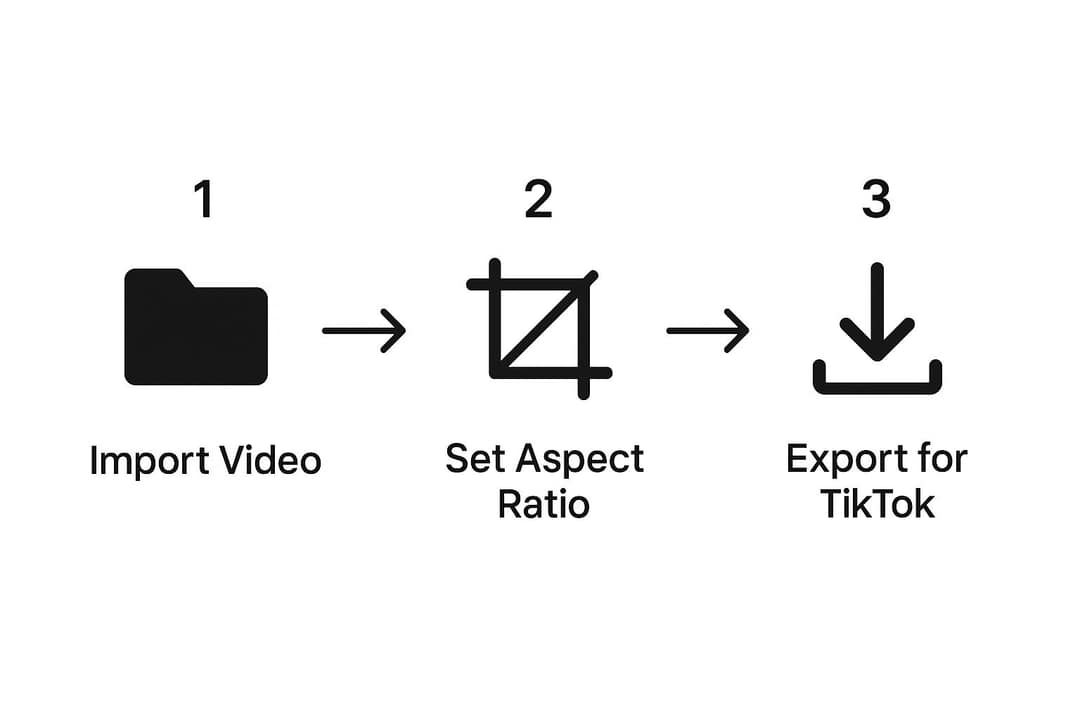
- Start from your best source. Use the 1080p or 4K original, not a compressed copy from a messaging app. A blurry 480p file stays blurry after conversion.
- Create a 9:16 canvas at 1080x1920. Set the project or sequence to vertical before you edit. Rotating a landscape clip by 90 degrees is not converting it.
- Choose crop, reframe or fit for each shot (rules below).
- Check the safe zone. TikTok's caption, username and buttons cover the bottom and right edge of the screen. Keep faces and on-screen text clear of them; a TikTok safe zone overlay shows exactly where.
- Add captions after reframing. Captions burned into the original 16:9 version get cut off by the crop, so caption the vertical edit.
- Export an MP4 with the AVC codec at 1080x1920, at the same frame rate as your source.
- Watch the export on a phone before posting: check that the audio is in sync and nothing important sits off-frame.
Crop, reframe or fit: which should you choose?
- One subject near the center (talking head, product on a table): crop to fill.
- A subject that moves (presenter walking a stage, sports, pets): reframe. Move the crop window shot by shot, or keyframe it to follow the action.
- Two people talking: cut between them as each one speaks, or stack them in a split screen.
- Wide shots where everything matters (slides, charts, gameplay with a HUD, scenery): fit the full frame, then fill the empty space with a blurred copy, a title or captions. A split screen also works: the original on top, a close-up or facecam below.
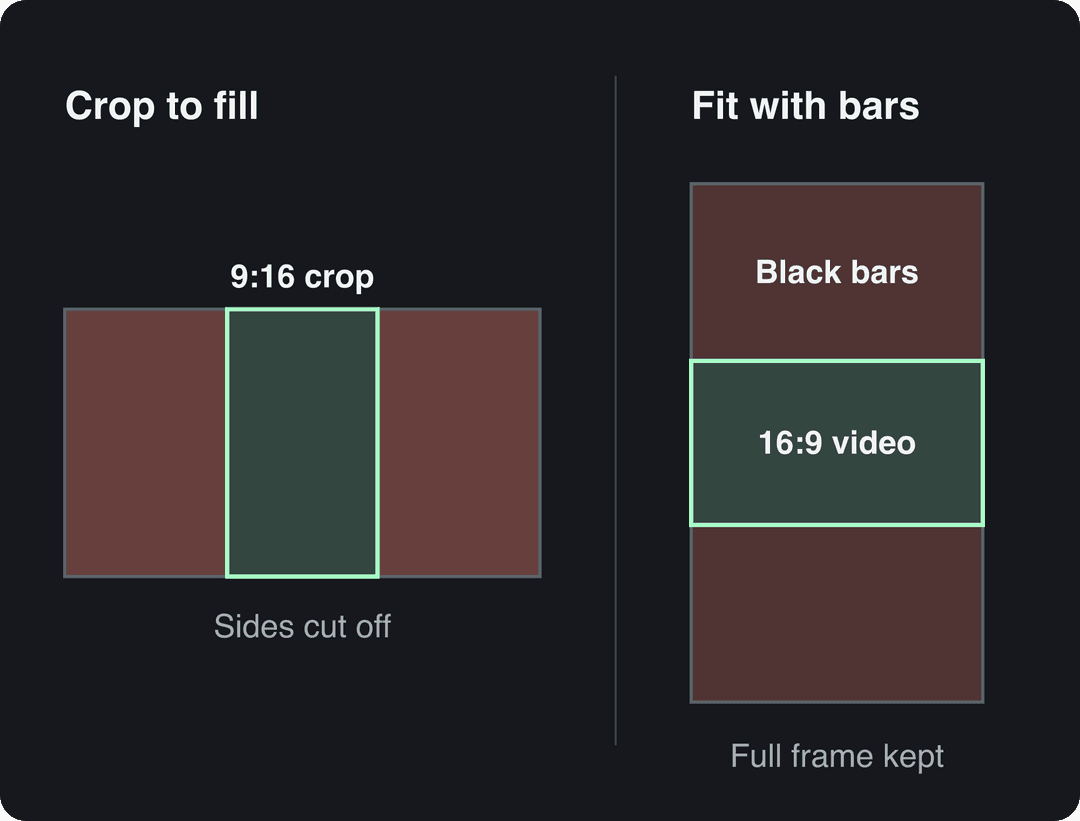
Black bars are not banned, but a small 16:9 strip in the middle of a tall screen wastes most of it and looks like a repost. If you fit, put something useful in the bars.
How to convert video to TikTok format online with Revid
Revid's online video resizer converts a clip to 9:16 in the browser, with no editor to learn:
- Upload your video.
- Choose portrait 9:16 (the tool also outputs 4:5, 16:9 and 1:1).
- Pick the framing option that suits the shot, preview the result and adjust it if the subject sits off-center.
- Add synced captions with the AI caption generator, which works in 100+ languages and offers 30 caption styles.
- Export in 720p, 1080p or 4K at 30 or 60 fps, then publish or schedule it to TikTok with Revid's social media scheduler.
Free ways to convert a video to TikTok format
- CapCut: the free tier includes the full editor and 1080p export. Set the project ratio to 9:16 and reposition each clip by hand. It is the better pick when you only edit your own footage; Revid vs CapCut compares the two honestly.
- A desktop editor you already have: in Premiere Pro or DaVinci Resolve, create a 1080x1920 timeline, drop in the horizontal clip and scale or keyframe its position.
- TikTok itself: Studio Web accepts landscape uploads, so you can post without converting. It costs nothing, but the video plays small in the vertical feed. Reserve this for footage where the full frame matters more than size.
How to convert MP4 to TikTok format
MP4 is already TikTok's recommended file type, so "MP4 to TikTok" is usually a shape problem, not a file problem. Open the file's properties and check three things:
- Dimensions: 1920x1080 means landscape and needs converting; 1080x1920 is ready.
- Codec: AVC is the safest choice. If an upload fails or plays oddly, re-export as an MP4 with the AVC codec.
- Frame rate: anything from 23 to 60 FPS is accepted, so leave it as recorded.
MOV files from an iPhone and WebM files are also accepted, so you do not need to convert those to MP4 first.
How to convert a YouTube video to TikTok
Only convert videos you own or have permission to use.
- Get the source. Download your own upload from YouTube Studio, or skip the download and paste the link into Revid's YouTube to TikTok converter, which turns the video into vertical clips.
- Pick the moments. One idea per clip. For webinars, podcasts and tutorials, a long video to short clip converter finds candidate segments faster than scrubbing.
- Reframe, caption and front-load the hook. Start each clip on its strongest line or visual, not on the original intro.
- Make it a real edit. A plain re-upload is a lightly modified repost in TikTok's eyes. New cuts, captions and a new hook make it a TikTok video.
How long should each TikTok clip be?
In Revid's analysis of 176,367 TikToks with 1,000+ likes posted between October 2025 and October 2026, length barely mattered: every bucket from under 15 seconds to 10 minutes had a median between 58K and 76K views. Clips of 61 to 90 seconds had a 70K median, and clips under 15 seconds had the lowest median (58K) but the most shares per view (1.41 per 100). The sample only includes videos that already passed 1,000 likes, so it shows what successful videos have in common, not what causes success. The method is in our study on what makes a TikTok go viral.
Length alone barely moves views: every bucket lands between 58K and 76K median views (the 790 videos over 10 minutes are a small, unusual group). Clips under 15 seconds get shared the most per view.
Source: Revid analysis of 176,367 TikToks with 1,000+ likes posted between Oct 1, 2025 and Oct 16, 2026 (61,203 creators)
Show the data
| Median views | Share that passed 1M views | Shares per 100 views | |
|---|---|---|---|
| Under 15 s | 57.6K | 11.6% | 1 |
| 16 to 30 s | 64.9K | 12.3% | 1 |
| 31 to 60 s | 61.8K | 11.8% | 1 |
| 61 to 90 s | 70.5K | 12.2% | 1 |
| 91 s to 3 min | 63.4K | 11.1% | 1 |
| 3 to 10 min | 76.4K | 12.4% | 1 |
| 10 min+ | 129.6K | 13.8% | 0 |
The practical rule: cut each clip to the length its idea needs, one point and one payoff, rather than squeezing a whole YouTube video into it.
The index leans toward videos that surface in hashtag and keyword searches, so its view counts run high: compare the groups, not the absolute numbers.
Source: Revid TikTok index: 2,377,477 TikToks with AI labels per video, snapshot of Sep 15, 2026. Median views estimated from view buckets.
Show the data
| Median views | Share past 1M views | |
|---|---|---|
| Drone | 173.9K | 27.9% |
| Steady cam | 162.7K | 26.2% |
| Screen recording | 159.9K | 23.8% |
| Handheld | 140.9K | 25.6% |
| POV | 139.9K | 26% |
| Tripod | 117K | 23.6% |
| Selfie | 67K | 16.3% |
Converting screen recordings and gameplay
This covers questions like how to move ClubGG poker clips or other mobile game recordings to TikTok.
- Recorded on a phone in portrait: the clip is already vertical. Trim it and upload. Many phones record a screen slightly taller than 9:16; TikTok handles the small difference with a light crop or thin margins.
- Recorded in landscape (PC, tablet, landscape game tables): fit the full frame with the table or map centered and add commentary, captions or a facecam in the space below. If the HUD does not matter, crop tight on the action instead, such as your cards and the pot.
- Export settings: 1080x1920 MP4, same frame rate as the recording.
One master for TikTok, Reels, Shorts and Lemon8
Edit once at 9:16 and 1080x1920, keep text inside the safe zone, export a single MP4 and post it everywhere.
| Platform | Ratio to export | What to know |
|---|---|---|
| TikTok | 9:16, 1080x1920 | Uploads up to 60 minutes |
| Instagram Reels | 9:16 (1.91:1 to 9:16 accepted) | Minimum 30 FPS and 720 px; reels over 3 minutes are not recommended to non-followers |
| YouTube Shorts | 9:16 or square | Vertical or square videos up to 3 minutes count as Shorts |
| Lemon8 and other vertical apps | 9:16 master | Check the app's upload screen for its current ratio options |
Revid publishes to TikTok, Instagram and YouTube from one queue; apps like Lemon8 need a manual upload of the same file. For length targets on each platform, see the social media video length guide.
Mistakes that make a converted video flop
- Posting 16:9 as is. The video plays as a thin strip and reads as a repost.
- Center-cropping a moving subject. The person walks out of frame. Reframe or keyframe instead.
- Text under TikTok's interface. Captions at the very bottom get covered by the post caption and buttons.
- Upscaling a low-resolution source. Exporting a 480p file at 1080x1920 adds pixels, not detail.
- Skipping the playback check. Re-encoding can shift audio out of sync; a 10-second phone preview catches it.
- Keeping old burned-in captions. They get sliced by the crop. Remove them in the source edit if you can and caption the vertical version.
The feed you are competing in is crowded: third-party roundups such as Coolnerds Marketing's TikTok statistics and Analyzify's TikTok growth figures track upload volume and the platform's scale. A video that fills the screen at least gets a fair look.
FAQ
Does converting a video to TikTok format reduce quality?
Only slightly, if you start from a high-resolution source and export at 1080x1920 with a high-quality setting. Every re-encode loses a little, so convert once from the original rather than re-saving copies.
Can I post a horizontal video on TikTok without converting it?
Yes. TikTok Studio Web accepts landscape uploads, but they play small inside the vertical feed. Convert to 9:16 unless the full wide frame is the point of the video.
Should I upload TikToks in 4K?
Only if your source is 4K. Studio Web accepts 4K, but 1080x1920 is the size TikTok recommends and already looks sharp on a phone.
Can I convert a square or 4:3 video to TikTok format?
Yes, the method is the same as for 16:9. A 1:1 or 4:3 source loses less width when cropped to 9:16, but you still zoom in, so check that heads and key details are not cut off.
Sources
- Revid analysis of 176,367 TikToks with 1,000+ likes posted between Oct 1, 2025 and Oct 16, 2026 (61,203 creators)
- Revid TikTok index: 2,377,477 TikToks with AI labels per video, snapshot of Sep 15, 2026. Median views estimated from view buckets.
Charts and figures checked on November 6, 2026.