
Video Production Best Practices: 10 Habits for Creators in 2026
Ten video production best practices for creators, from the brief and shot list to audio, lighting, vertical framing and file naming. Includes a product brief template and Revid's TikTok data on shooting styles.
On this page
Video production best practices come down to ten habits: write a brief, script the first seconds, plan your shots, record clean audio, light the face, keep the camera steady, frame for vertical, organize files, edit tight with captions and corrected color, and review your analytics before the next shoot. Audio and planning matter more than the camera.
The expensive mistake is starting with gear. A cinema camera on a tripod won't save a video with muddy sound or no clear point in its opening line. In Revid's TikTok data, tripod footage didn't even beat handheld footage (details in step 6). Spend your effort where viewers notice it.
- Median views of POV-style TikToks, the top shooting style
- 107K
- Revid analysis of 176,367 TikToks
- Median views of selfie-style TikToks, the lowest shooting style
- 48K
- Revid analysis of 176,367 TikToks
- Share of 100M+ view TikToks with a transcript that open with a statement
- 51%
- Revid study of 1,588 TikToks
- Maximum length of a YouTube Short
- 3 minutes
- YouTube Official Blog, October 2024
The 10 video production best practices at a glance
| Practice | Do this | Avoid |
|---|---|---|
| 1. Brief | One goal, one audience, one message, written down | Starting from "let's make a video about X" |
| 2. Script | Write the hook first, then the payoff | Warming up before the point |
| 3. Shot list | Shot type, angle, movement and audio per shot | Deciding shots on set |
| 4. Audio | Mic close to the mouth, headphones on | Trusting the camera's built-in mic |
| 5. Lighting | Light the face, match color temperature | Mixing window light and warm lamps |
| 6. Camera | Lock focus and exposure, keep it steady | Buying gear before fixing sound |
| 7. Vertical framing | Plan for 9:16 first, keep the subject centered | Cropping a wide shot and losing the subject |
| 8. Files | Naming convention and the 3-2-1 backup rule | Footage scattered across phones and drives |
| 9. Edit | Cut dead air, add captions, correct then grade | Grading before correcting |
| 10. Review | Read retention and change one thing per video | Repeating a format without checking the data |
1. Write a brief before you write a script
A brief is the single page that decides everything else: what the video is for, who it's for and what counts as done. Without it, every later decision (shots, length, music, CTA) becomes a debate. With it, anyone on the team can make the call.
Keep it short enough that people actually read it. If the goal takes more than one sentence, you have two videos.
What goes in a product video production brief?
Product videos need a few extra lines, because claims, footage and branding all need sign-off. Copy this template:
Goal: the one action the viewer should take (visit, sign up, buy)
Audience: who they are and what they already believe about the product
Platform and format: e.g. TikTok and Reels, 9:16, vertical
Key message: one sentence the viewer should remember
Proof: demo, result, before/after or customer quote (with written permission)
Hook options: three opening lines to choose from or test
Must include: product shots, logo placement, required legal lines
Do not: claims legal hasn't approved, prices that may change, competitor names
CTA: the exact words and where they appear
Deliverables: versions, aspect ratios, caption file, cover image
Approvers and deadline: who signs off the script and the final cut, and whenThe two lines teams skip most are "Do not" and "Approvers". Fill both and you avoid the most common reshoot: a finished video nobody is allowed to publish.
Prompt to try
Make a 30-second vertical video for small café owners. Open with the statement: "Most cafés lose their regulars in the first month, and it's not the coffee." Give one line of context, then show three quick fixes as the payoff, and end with one call to action to save the video. Clean motion graphics style with bold synced captions.
2. Script the first seconds, then the structure
Write the opening line before anything else, because it decides whether the rest gets watched. It does not have to be a question. In Revid's study of the 1,588 TikToks with over 100 million views, 51% of those with a transcript open with a statement and 16% with a question.
For most short videos, this four-part structure works:
- Hook: the claim, result or problem, in the first line and on screen.
- Context: why it matters to this viewer, in one or two sentences.
- Payoff: the demo, the steps, the reveal. This is most of the video.
- CTA: one action, matching the brief.
For story-driven videos, Pixar's story spine is a reliable skeleton: "Once upon a time... Every day... Until one day... Because of that... Because of that... Until finally...". If you're stuck on openings, borrow a pattern from this list of TikTok hooks that stop the scroll and rewrite it in your own words.
Read the script out loud before the shoot. Any sentence you stumble on, cut or rewrite. If the video has more than one speaker, do a table read to fix timing and phrasing before cameras roll.
3. Plan every shot with a shot list
A shot list turns the script into instructions anyone can follow on set. List the shot type, angle, movement and audio for each line of the script:
| Shot | Type | Angle | Movement | Audio |
|---|---|---|---|---|
| Hook | Close-up of product in hand | Eye level | Slow push in | Voice-over |
| Problem | Medium shot of presenter | Eye level | Static | Lav mic |
| Demo | Overhead of hands using product | Top down | Static | Lav mic + room sound |
| Result | Screen recording or close-up | Straight on | Static | Voice-over |
| CTA | Medium shot, presenter to camera | Eye level | Static | Lav mic |
Add a contingency line for anything that can fail: rain for an outdoor shoot, a backup location, a second presenter. Free tools like Shot Designer or a simple storyboard help when several people need to see the plan before shoot day. For the full pipeline from idea to publish, see this guide to building a video production workflow.
4. Record clean audio first
Viewers forgive average footage much sooner than bad sound. If budget is tight, buy a microphone before you buy a camera.
- Get the mic close. A lavalier (lapel) mic or a boom just out of frame beats any camera mic, because distance to the mouth is what decides how much room noise you capture.
- Monitor with headphones. Hum, wind and clipping are easy to miss on a camera screen and obvious in your ears.
- Kill noise at the source. Turn off fans, air conditioning and fridges for each take. Soft furnishings (rugs, curtains, a sofa) cut echo in empty rooms.
- Record room tone. Capture at least 30 seconds of the silent room. It fills gaps and smooths cuts in the edit.
- Record a backup. A phone running a second lav mic on the speaker saves the shoot if the main recorder fails.
If a recording is already noisy, an AI audio enhancer can clean it up. Rerecording is still better when you can.
The index leans toward videos that surface in hashtag and keyword searches, so its view counts run high: compare the groups, not the absolute numbers.
Source: Revid TikTok index: 2,377,477 TikToks with AI labels per video, snapshot of Sep 15, 2026. Median views estimated from view buckets.
Show the data
| Median views | Share past 1M views | |
|---|---|---|
| Virtual | 172.1K | 24.8% |
| Outdoor | 133.5K | 25% |
| Indoor | 111.9K | 22.9% |
| Mixed | 111K | 21% |
5. Light the face, not the room
The goal is a clearly lit face with soft shadows and consistent color. Three-point lighting is the classic setup:
- Key light: the main light, slightly to one side of the camera.
- Fill light: softer, on the other side, to lift the shadows.
- Backlight: behind the subject, to separate them from the background.
On a budget, a large window in front of the subject works as a key light, and a white wall or reflector works as fill. Then fix the details:
- Match color temperature. Cool daylight mixed with a warm lamp gives orange and blue patches on the skin. Pick one source type, or set white balance manually to the main light and keep it locked.
- Soften hard light. A softbox or diffusion sheet removes harsh shadows. Black card or fabric (flags) blocks light where you don't want it.
- Check exposure with tools, not eyes. Use the histogram or zebra stripes to avoid blown-out highlights and crushed shadows.
6. Keep the camera steady, but don't over-invest in it
Steady, well-composed footage is a baseline: shaky shots lose viewers. Use a tripod or gimbal, place the subject on the rule-of-thirds lines (a 3x3 grid over the frame), keep consistent headroom, and lock focus and exposure so the camera doesn't hunt mid-take. Most phone cameras do this when you press and hold on the subject.
Polish is not what separates the top videos, though. In Revid's analysis of 176,367 TikToks with 1,000+ likes posted between October 2025 and October 2026, POV footage had the highest median (107K views, 19% past 1M views), followed by screen recordings (91K), handheld (80K) and tripod (77K). Selfie-style videos trailed at 48K (9.2% past 1M). The sample only includes videos that already passed 1,000 likes, and the figures show what strong videos share, not what causes views. Shooting style comes from Revid's AI analysis of each video. The full method is in Revid's viral TikTok study.
POV shots and screen recordings earned the most views. Selfie-style videos, the default for many creators, earned the least.
Source: Revid analysis of 176,367 TikToks with 1,000+ likes posted between Oct 1, 2025 and Oct 16, 2026 (61,203 creators)
Show the data
| Median views | Share that passed 1M views | |
|---|---|---|
| POV | 107.3K | 19% |
| Screen recording | 90.7K | 12.7% |
| Handheld | 79.8K | 14.5% |
| Steady cam | 78.2K | 14.9% |
| Drone | 83.4K | 14.9% |
| Tripod | 77.4K | 15.5% |
| Selfie | 48.4K | 9.2% |
The practical reading: a locked-off tripod shot is fine, but it won't win attention on its own. The perspective does more work: put the viewer in the scene (POV), or show the thing itself (a screen recording, hands on the product).
7. Frame for vertical and every platform
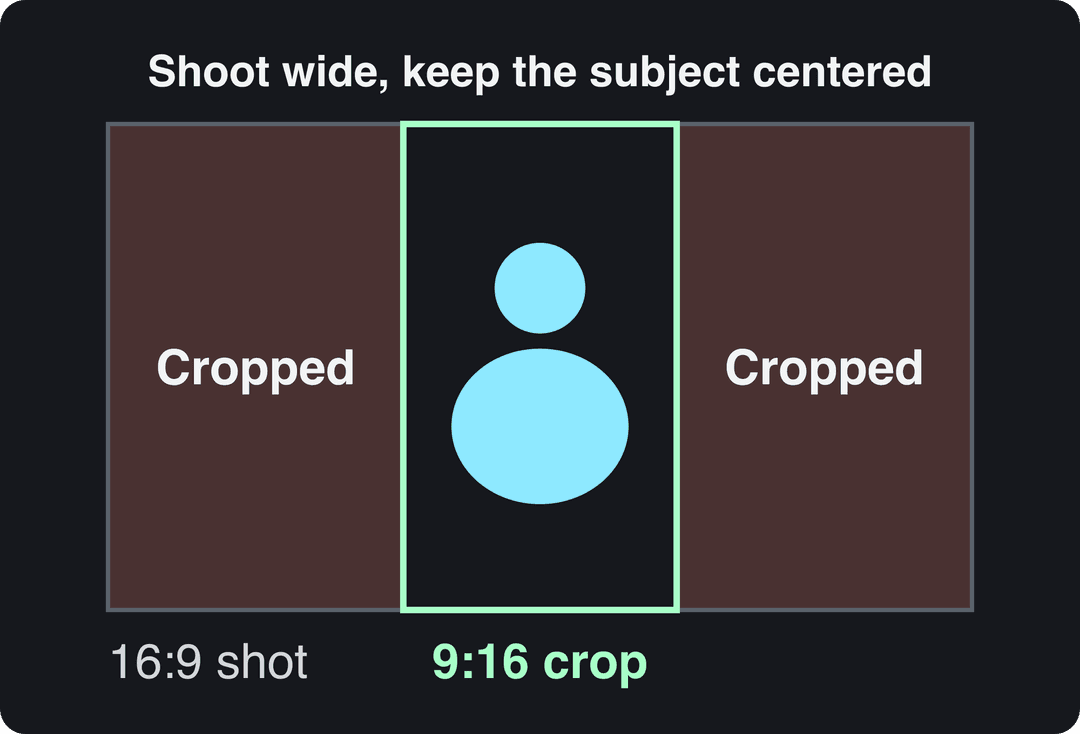
If TikTok, Reels or Shorts is the main destination, shoot vertical. TikTok recommends 9:16 at 1080x1920 pixels. If you also need a 16:9 version for YouTube, shoot wide with the subject in the center third. A 9:16 crop of a 16:9 frame keeps only the middle, so anything near the sides disappears.
| Platform | Aspect ratio | Length to know |
|---|---|---|
| TikTok | 9:16 recommended (1080x1920) | Uploads up to 60 minutes; in-app camera up to 10 minutes |
| Instagram Reels | 1.91:1 to 9:16, at least 30 FPS and 720 px | Up to 20 minutes, but reels over 3 minutes aren't recommended to non-followers |
| YouTube Shorts | Square or vertical | Up to 3 minutes |
Keep text and faces out of the areas covered by captions, buttons and usernames. A TikTok safe zone checker shows exactly where those are. To convert finished footage between formats, resize the video to 9:16, 4:5, 16:9 or 1:1. To cut a long recording into vertical clips, use a long video to short video converter.
Don't just crop and post. Edit each version for its platform: on-screen text for silent viewing, a tighter cut for Shorts, a cleaner cut for LinkedIn.
8. Name and back up every file
Lost footage costs more than any piece of gear. Set up three habits before the first shoot:
- Naming convention:
ProjectName_YYYYMMDD_S01_T02.mp4(project, date, scene, take). Everyone on the team uses it, including remote contributors. - Folder template:
01_Footage,02_Audio,03_Graphics,04_ProjectFiles,05_Exports. Duplicate it for every project. - 3-2-1 backup rule: three copies, on two types of storage (for example an external SSD and a network drive), one of them offsite or in the cloud.
When a project ships, move it to an archive drive or cloud storage so your working drive stays fast and clean.
9. Edit tight: pace, captions, color
The edit is where most videos get shorter and better:
- Cut dead air. Remove pauses, false starts and anything that repeats the hook. If a sentence doesn't move the viewer toward the payoff, cut it.
- Change something on screen regularly. A new angle, a zoom, a cutaway or on-screen text keeps a talking shot from going flat.
- Add captions. They serve muted viewers and accessibility, and they let you reinforce key words. An AI caption generator produces synced captions in 100+ languages.
- Correct color before you grade. First balance white, exposure and contrast so every shot matches. Only then apply a creative look. DaVinci Resolve and Premiere Pro's Lumetri Color panel both handle this.
- Save your look as a preset or LUT so every video in a series matches without regrading.
- Check the mix on a phone speaker. Most of your audience will hear it there. Voice should sit clearly above music.
Export at 1080p (or 4K if your source allows) at 30 or 60 fps. TikTok's posting API accepts 23 to 60 FPS, and Reels need at least 30 FPS.
10. Review the numbers before the next shoot
Best practices for creating videos only hold if you check what worked. After each post:
- Read the retention graph. Find the second where viewers leave and look at what's on screen there. That's your next edit rule.
- Use platform tools. TikTok Studio's Viewers tab shows when your viewers were most active over the last 7 days. YouTube Studio on desktop can A/B test up to 3 titles and thumbnails (Shorts aren't eligible). Instagram trial reels show a reel to non-followers first, so you can test a format without affecting your main feed.
- Change one thing per video. Hook, length, format or perspective. Change three at once and you learn nothing.
- Keep learning on low-stakes projects. Try a new technique on a personal video before you use it on a client or launch video.
What's included in a standard video production policy?
A standard video production policy sets the rules every video must follow before it's published: who approves it, brand standards, consent and releases, licensing, accessibility, AI disclosure, and how files are stored. Teams and agencies use it so quality doesn't depend on who made the video.
| Section | What it covers |
|---|---|
| Approvals | Who signs off the brief, the script and the final cut; when legal must review product or health claims |
| Brand standards | Logo placement, fonts, colors, caption style, color preset |
| Consent and releases | Signed releases from anyone on camera, location permission, guardian consent for minors |
| Licensing | Music, stock footage and fonts, with licenses saved in the project folder |
| Accessibility | Captions on every video, readable text contrast |
| AI disclosure | When and how to label AI-generated or altered content on each platform |
| Sponsored content | Using each platform's paid-partnership label when a brand pays |
| Files and data | Naming convention, backup rule, retention period, who has access |
The AI disclosure rules are now specific. YouTube requires creators to disclose realistic AI-generated or altered content through the "AI use" setting in YouTube Studio. TikTok requires a label on AI-generated content with realistic images, audio or video. Meta asks for disclosure of photorealistic AI video and shows an "AI info" label. YouTube and TikTok both state that the label alone does not reduce a video's distribution.
How to run remote video production
Remote video production works when every person records locally at the best quality their device allows, follows the same lighting and audio checklist, and uploads originals to one shared folder. Never rely on the video-call recording as your footage: it's compressed and drops frames.
- Send the brief, the script and a one-page setup checklist (window in front, mic close, headphones on, phone horizontal or vertical as required).
- Run a short test call the day before to check framing, light and sound on each contributor's setup.
- Have each person record on their own device while the call runs, and clap once on camera at the start so clips sync in the edit.
- Upload the original files to a shared cloud folder using the naming convention. Messaging apps compress video, so don't use them for transfers.
- One person owns the edit and the final approval.
For contributors who are new to the camera, this guide to preparing for a video interview covers setup, eye line and on-camera presence.
How to produce a short video with Revid
When the video doesn't need you on camera (explainers, product videos, faceless series), Revid skips steps 3 to 6 entirely:
- Open the AI video generator and start from an idea, a script, a link, or a video from Revid's library of about 2.77 million short-form videos with engagement data.
- Revid writes the script and builds each scene with stock footage, AI images or AI video (Seedance 2.5, MiniMax Hailuo H3, Wan 3.0 or Google Veo 3). It then adds a voice-over in 70+ languages, synced captions and music.
- Fix any scene in the timeline editor.
- Export in 720p, 1080p or 4K at 30 or 60 fps, or publish and schedule directly to TikTok, Instagram and YouTube.
The brief (step 1) and the review (step 10) are still yours. They're what keep generated videos from looking like everyone else's.
FAQ
What are the stages of video production?
There are three stages: pre-production (brief, script, shot list, scheduling), production (filming and recording audio), and post-production (editing, captions, color, export). Most teams add a fourth step, distribution and review, where you publish and read the analytics.
What equipment do I need to start making videos?
A recent smartphone, a lavalier microphone, a tripod and a good light source (a large window works) are enough for social video. Upgrade the microphone first, then lighting, then the camera.
Is audio or video quality more important?
Audio. Viewers tolerate average footage but leave quickly when speech is hard to understand, so a close microphone and a quiet room improve a video more than a better camera.
What resolution and frame rate should I export for social media?
Export vertical videos at 1080x1920 (9:16) at 30 or 60 fps. Instagram Reels require at least 30 FPS, and TikTok's posting API accepts 23 to 60 FPS.
Sources
- Revid analysis of 176,367 TikToks with 1,000+ likes posted between Oct 1, 2025 and Oct 16, 2026 (61,203 creators)
- Revid TikTok index: 2,377,477 TikToks with AI labels per video, snapshot of Sep 15, 2026. Median views estimated from view buckets.
- YouTube Official Blog, Tall updates coming to Shorts (October 2024)
Charts and figures checked on November 6, 2026.


