Typeframes Is Now Revid: What It Does, Pricing and Review (2026)
Typeframes became Revid in April 2024. Here is what the tool does now, which AI models it uses, what it costs in 2026 and who should pick something else.
On this page
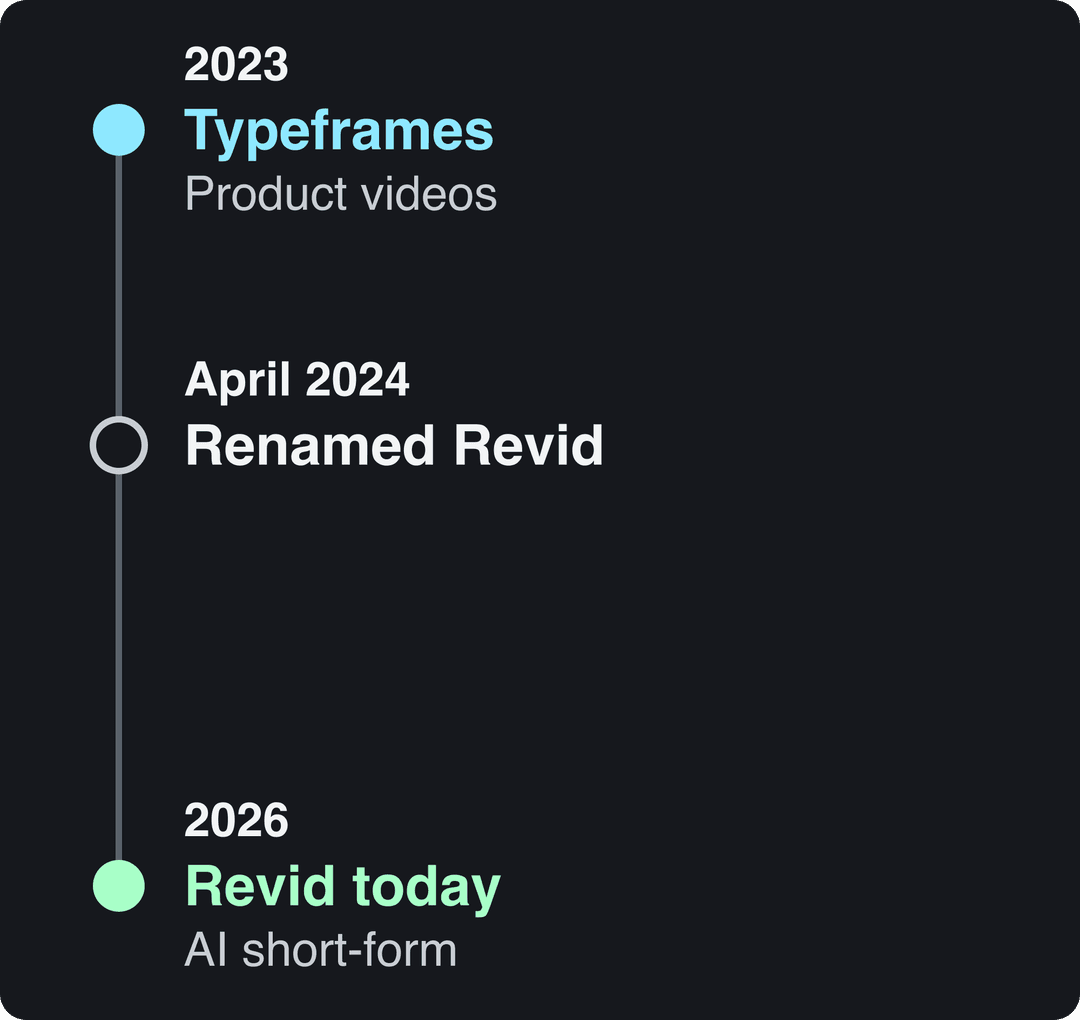
Typeframes is the old name of Revid. It launched in Paris in 2023 as a tool that helped SaaS founders make product intro and Product Hunt launch videos, and was renamed Revid in April 2024. Today it turns an idea, a link or a viral format into short-form videos and publishes them to TikTok, Instagram and YouTube.
The rename was more than a new logo. Typeframes made one kind of video; Revid has 100+ tools, several AI video models under one subscription, and a library of about 2.77 million real short-form videos with their engagement data that it uses as the starting point for new videos. A Typeframes review written before the rename describes a product that has since changed shape, so this page covers what you actually get in October 2026.
- Entry Growth plan per month, billed monthly, for 2,000 credits
- $39
- Revid pricing
- Revid sign-ups from August 2024 to July 2026
- 3M+
- Revid analytics
- Videos rendered on Revid every month
- 100K+
- Revid analytics
- Real short-form videos with engagement data in Revid's library
- 2.77M
- Revid library
What happened to Typeframes?
Typeframes was founded in 2023 in Paris by Thibault (Tibo) Louis-Lucas, CEO, and Nicolas Coutureau, CTO. Its first job was narrow: help SaaS founders turn a product into an intro video or a Product Hunt launch video without hiring an editor.
In April 2024 the product was renamed Revid and widened to short-form video in general: TikToks, Instagram Reels and YouTube Shorts. Same founders, same company: Revid is an independent software company based in Paris, operated by TMAKER. It is not affiliated with other apps that use the name Revid.
Revid's own analytics show how far it has moved since: more than 3,000,000 sign-ups from August 2024 to July 2026, more than 100,000 videos rendered and more than 30,000 published to TikTok, Instagram and YouTube through Revid every month, and users in 68 countries. It is still built for founders and small business owners first, and also used by creators, agencies, musicians and developers.
Prompt to try
A 30-second vertical intro video for a SaaS app that turns meeting notes into task lists. Open with the hook "You spent an hour in a meeting and left with zero next steps", show the problem, then the app sorting notes into tasks, and end with a clear call to try it. Clean motion graphics style, upbeat music, friendly voice-over.
Shares are of all 77,016 videos built in the period, including tools not shown.
Source: Revid product analytics (Amplitude), event project_built grouped by tool slug, September 29 to October 28, 2026, 77,016 builds
Show the data
| Videos built | Share of all videos (%) | |
|---|---|---|
| Prompt to video | 33.5K | 43.5% |
| Voice-over video from a script or link | 14.7K | 19.1% |
| Music video from a song | 12.4K | 16.1% |
| Audio to video | 4.3K | 5.6% |
| Article to video | 1.3K | 1.7% |
| Character swap | 1.2K | 1.6% |
| Captions on your own video | 999 | 1.3% |
| Clips from a long video | 973 | 1.3% |
| Talking avatar | 745 | 1% |
What Typeframes (now Revid) does today
You give Revid an input and get back a finished video: script, scene-by-scene visuals, voice-over, synced captions and music, then a timeline editor to change anything by hand.
| Start from | What Revid builds |
|---|---|
| An idea or prompt | Script, visuals, voice, captions and music |
| Your own script | Visuals and a voice-over that follow your words |
| A link (blog post, YouTube, TikTok, X, Reddit) | A narrated video from the page's content |
| A product page or Product Hunt listing | A product video that keeps the real photos or screenshots |
| A song (MP3, WAV or a Suno link) | A beat-synced music video |
| A long YouTube video | Short vertical clips |
| A viral video from the library | An original video with the same hook, structure and pacing |
The specs that matter for a buying decision:
- Voices: 1,000+ AI voices in 70+ languages, with voice cloning on Elite and above.
- Captions: 30 caption styles and automatic captions in 100+ languages.
- Export: 720p, 1080p or 4K, at 30 or 60 fps.
- Publishing: direct publishing and scheduling to TikTok, Instagram and YouTube from one queue, plus X and webhooks.
- Translation: "Translate" on a project card makes a version in another language that keeps the edit, media, timing and captions.
- AI agents: a REST API, an MCP server and the revid-cli npm package come with every paid plan, so Claude, ChatGPT or Cursor can research, render and publish videos through the Revid MCP, CLI and API.
Is Typeframes AI? Which models it uses now
Yes. Revid is an AI video platform, and it offers several video models under one credit system: Seedance 2.5, MiniMax Hailuo H3, Wan 3.0 and Google Veo 3, plus lower-cost tiers. You can choose a model per scene, up to native 4K. OpenAI's Sora 2 is no longer offered, because OpenAI shut down the Sora API on September 24, 2026.
Our view is that the model is not what makes a video work. Every video tool rents the same models through APIs, so two tools sending the same prompt get comparable clips. What changes the result is the input: the idea, the hook, the structure and the pacing. A blank prompt carries no evidence of what performs in your niche, so the output drifts toward a generic average.
That is why Revid starts from real videos. You can search the library by topic, platform, engagement tier and length, open any video and repurpose a viral video into an original one ("Same energy, new script", "Make it about your topic", "Post the Part 2" and other options). A free Deep analysis, up to 60 a day, explains why a video worked: its hook, timed structure and scroll-stopping moment.
How to make a Typeframes-style product video in Revid
The product video that Typeframes was known for is still a few clicks away. Here is the path in the current interface.
- Click Create at the top of the sidebar (or press C). The page opens on "What do you want to make?"
- Pick a starting point. "From an idea" is Prompt to Video: describe the video in a sentence or two. "From script" takes narration you already wrote. "Motion graphics" suits SaaS explainers built from text and shapes. "Remix video or ad" starts from a video that already performed.
- Under "Choose media type", pick "AI video" (needs a subscription), "Animated AI images" (the default), "Motion graphics", "Stock videos", "Your own media" or "Static / Gameplay". Set the ratio in the picker: 9:16 for TikTok, Reels and Shorts, or 16:9, 1:1 or 4:5.
- Read the "Estimated cost" in credits, then click "Generate video".

If you have a product page instead of an idea, use the AI product video generator: paste the URL and Revid reads the product, keeps its real photos and writes the script. For a full launch plan (hook, demo, call to action), see our guide to making a product launch video.
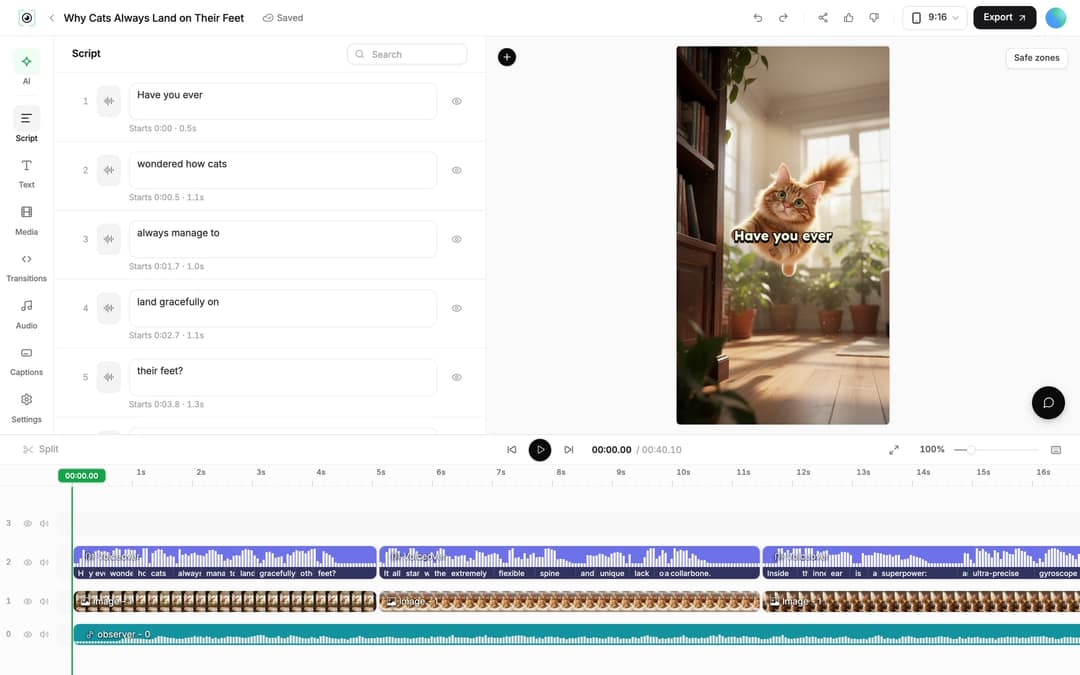
- Fix the details in the editor. Open "Videos" in the sidebar and click the project card (or choose "Open in editor" from its menu). The "Script" panel lists every caption segment with an editable text box and its start time. After changing text, open the "Audio" panel and click "Re-generate" on the voiceover, then "Generate Voice" (paid plans, 10 credits per started 500 characters). Select a clip and click "Replace" to swap its media, or trim by dragging its edges on the timeline or splitting with S.
- Publish. Click "Export" ("Export / Publish" on a free account) to open the "Publish Video" dialog, then "Publish" now or "Add to queue". Connect accounts first in Settings, "Integrations": TikTok, YouTube, Instagram (business or creator account), X and Webhook. More on scheduling in social media publishing; the full editor is covered in AI video editing.
Where old Typeframes menus moved
| Old instruction | Where it is now |
|---|---|
| "Create New Video" button | "Create" at the top of the sidebar (shortcut C) |
| "Short Video Generator" | "From an idea" or "From script" on the Create page |
| "AI Credits:" counter | "N credits" in the account card at the bottom of the sidebar |
| Automations under the projects page | Sidebar "Auto Mode" (/automations), new workers at /automations/new |
| "Frames" panel in the editor | "Script" panel |
| "Re-generate voice" | "Re-generate" in the Audio panel, then "Generate Voice" |
Auto Mode: a new video every day
The biggest addition since Typeframes is automation. Open "Auto Mode" in the sidebar and click "New worker": you name the worker, choose what it should make and pick the format. Jobs include Repurpose Fresh Content (watch a channel, blog or account), Run a Daily AI Series, Promote a Product, Search and Remix a Video, Music to Video, Article to Video and Social Content to Video.
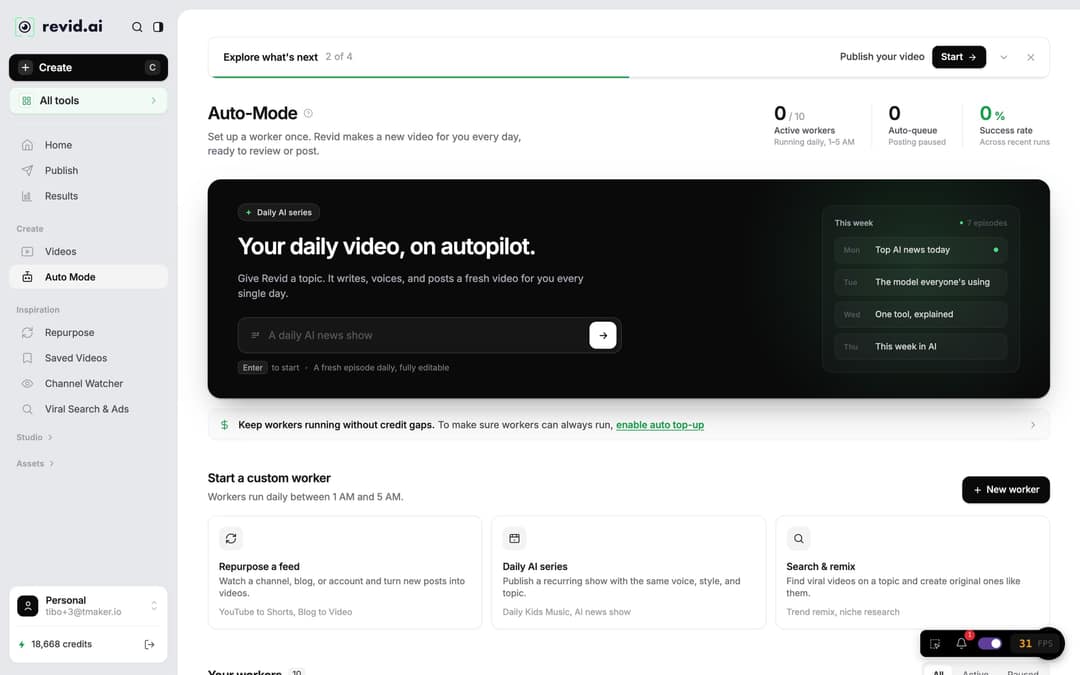
Each worker runs once a day between 1 AM and 5 AM. By default it keeps the video in Revid for review ("Review First"); choose "Auto Queue" and connect an account if you want it posted for you. The "Worker preflight" panel shows the estimated credits per run and per month before you save. You get 3 workers on Growth, 5 on Elite and 10 on Ultra.
Growth is $39/month with 2,000 credits. Generated music adds 20 credits per started minute; sound effects add 1 credit each. Videos per month = 2,000 divided by the 30 s cost, rounded down.
Source: Revid public API POST /api/public/v3/calculate-credits, workflow prompt-to-video, 9:16, run October 29, 2026
Show the data
| 30 s video (credits) | 60 s video (credits) | 30 s videos per Growth month | |
|---|---|---|---|
| Stock footage | 11 | 22 | 181 |
| Animated AI images, Standard | 18 | 35 | 111 |
| Animated AI images, Pro | 37 | 75 | 54 |
| AI video clips, Base | 110 | 220 | 18 |
| AI video clips, Pro | 341 | 682 | 5 |
| AI video clips, Ultra (Seedance 2.5) | 671 | 1,342 | 2 |
Typeframes pricing in 2026
Sign-up is free, new accounts get free credits to try video creation, and no credit card is needed. Regular creation then uses the monthly credits of a paid plan. The live Revid pricing page is the authoritative list.
| Plan | Monthly price | Billed yearly | Credits per month | Auto-Mode workers | Watched channels |
|---|---|---|---|---|---|
| Growth | $39 | $32/month | 2,000 | 3 | 5 |
| Elite | $89 | $74/month | 5,000 | 5 | 20 |
| Ultra | $199 | $166/month | 12,000 | 10 | 50 |
As a guide, a 30-second video with Pro AI visuals and a voice-over costs about 40 to 80 credits. Premium models cost 100 credits (Veo 3, MiniMax Hailuo H3, Ultra) to 500 credits (Seedance 4K) per 5 seconds of video. One-time credit packs start at 1,000 credits for $49, and higher-volume plans go up to 200,000 credits a month.
Two details that save money: the cost of every video shows before you generate it, and failed builds are refunded automatically. Monthly credits refill to the plan amount at renewal rather than stacking.
Typeframes review: is Revid worth it in 2026?
For a founder or small business that needs a steady flow of short-form video without filming or editing, yes. The case for it rests on things you can check, not on hype.
Where it is strong:
- The full loop in one product: research, script, visuals, voice, captions, music, editing, publishing and post results. Most AI video tools do one of those jobs.
- Data-grounded starting points: you start from formats audiences already watched instead of a blank prompt.
- Model choice: several leading video models under one subscription, picked per scene.
- Predictable costs: an estimate before every generation and automatic refunds on failures.
- Agent access: API, MCP and CLI on every paid plan, not only on enterprise tiers.
Where it falls short:
- AI generation uses credits, so there is no unlimited free plan.
- Voice cloning starts on Elite.
- Direct publishing covers TikTok, YouTube, Instagram and X; there is no LinkedIn publishing.
Pick something else when the job is different:
| If your main need is | A better fit |
|---|---|
| Long-form or cinematic film work, shot by shot | Premiere Pro, DaVinci Resolve, or a model lab such as Runway |
| Corporate training with a fixed company presenter | Synthesia |
| Cutting your own long recordings into many clips | OpusClip (Revid also turns YouTube videos into Shorts) |
| Editing your own footage by hand, no AI generation | CapCut |
For side-by-side detail against HeyGen, InVideo, CapCut, Pictory and others, see the Revid comparisons.
FAQ
Is Typeframes free?
You can start free: sign-up costs nothing, new accounts get free credits, and no card is required. Regular video creation then uses a paid plan's monthly credits, from $39/month.
Can Revid still make Product Hunt launch videos?
Yes, that was Typeframes' original job and it still has its own tool. Paste your Product Hunt listing or product URL, and Revid reads the launch page, keeps its real screenshots and builds the video.
Does Revid copy viral videos?
No. Revid uses a reference video for its structure, hook, pacing and style, then writes a new script, new visuals and an original music direction. The "Reuse the script" option keeps the spoken words on purpose, and you are responsible for having the rights to anything you reuse.
Is Typeframes a different company from Revid?
No. Revid is the same product and the same founding team, renamed in April 2024. Revid is not affiliated with other companies or apps that use the name Revid.
Sources
- Revid product analytics (Amplitude), event project_built grouped by tool slug, September 29 to October 28, 2026, 77,016 builds
- Revid public API POST /api/public/v3/calculate-credits, workflow prompt-to-video, 9:16, run October 29, 2026
Charts and figures checked on November 6, 2026.