Workflow Automation Benefits: 7 Real Gains and Where to Start
The seven benefits of workflow automation, how to measure each one, and a simple audit to find the manual tasks worth automating first.

On this page
The main workflow automation benefits are time saved on repetitive tasks, fewer errors, lower cost per finished piece of work, and the ability to grow output without hiring. Automation also gives customers faster, more consistent answers, builds compliance checks into every run, and shows you in real time where work stalls.
The catch: automation multiplies whatever you feed it. Automate a sloppy process and you get sloppy work faster, and in content that has a visible price. Sprout Social research published in March 2026 found that 50% of Gen Z have already blocked, muted or unfollowed a brand or creator because their content felt like "AI slop." The winning move is to automate the mechanical steps and keep people on the judgment calls.
- Video marketers who have used AI video tools to create or edit marketing videos
- 63%
- Wyzowl, December 2025
- Gen Z who blocked, muted or unfollowed a brand over content that felt like AI slop
- 50%
- Sprout Social, March 2026
- Videos rendered through Revid every month
- 100K+
- Revid analytics
- Starting monthly price of Revid plans
- $39
- Revid pricing page
What are the benefits of workflow automation?
Workflow automation means handing rule-based, repeatable steps (moving files, formatting, captioning, publishing, routing approvals) to software that runs them the same way every time. The benefits of an automated workflow fall into seven groups:
| Benefit | What changes | Video workflow example | How to measure it |
|---|---|---|---|
| More output per hour | Repetitive steps run without you | Captions, resizing and posting happen after you approve a draft | Hours per finished video |
| Fewer errors | Rules don't get tired | Every export matches each platform's aspect ratio | Revisions and reposts per month |
| Lower cost | Less paid time per piece | One editor ships what used to need a second hire | Cost per video |
| Scale without hiring | Volume grows, headcount doesn't | One long video becomes 10, 20 or 50 clips | Videos published per person per week |
| Faster, consistent responses | Common questions get instant answers | FAQ replies and order updates go out automatically | Response time |
| Compliance by default | Checks can't be skipped | AI and sponsorship disclosures checked before publishing | Missed disclosures |
| Real-time visibility | Every step leaves data | You see which stage holds up each video | Time spent per stage |
1. More output from the same hours
Productivity is the benefit people feel first. Every step a tool runs is a step you stop doing: downloading assets, transcribing interviews, renaming files, uploading the same video three times. That time goes back to the work that actually moves results, such as ideas, scripts and replies to your audience.
For video, publishing is the easiest win. Posting separately to TikTok, Instagram and YouTube means three logins, three caption pastes and three chances to forget something. A scheduler like Revid's social media publishing queue posts to all three from one place.
Automation removes process waste, not distraction. If your days leak time to meetings and context switching, pair it with broader habits for how to be more productive.
2. Fewer errors and more consistent output
People slip on repetitive work, especially late in the day. Software applies the same rule on every run, so the classic mistakes disappear: typos in hand-typed captions, a misnamed file that breaks a project, a video posted to the wrong account.
An AI caption generator produces captions from the audio in 100+ languages, so you proofread instead of typing (always check names and brand terms). Build two safeguards into any automated flow:
- Validation checkpoints: check resolution and aspect ratio before anything publishes.
- Error handling: if an upload or transcription fails, the workflow should notify you instead of failing silently.
Videos include an AI voiceover; clip quotes are AI highlights without one. Clip and motion graphics quotes are minimums: the final charge depends on the source video or the footage generated. AI video clips are on the Pro model; the Base model costs 110 credits for 30 s.
Source: Revid public endpoint POST /api/public/v3/calculate-credits, queried October 29, 2026: workflow video-to-clips with 1 and 3 outputs, and prompt-to-video at 30 and 60 seconds with each media type. Cents = credits x $39 / 2,000, rounded.
Show the data
| Credits | US cents on Growth | |
|---|---|---|
| 1 clip from a YouTube link | 1 | 2 |
| 3 clips from a YouTube link | 3 | 6 |
| 30 s video, stock footage | 11 | 21 |
| 30 s video, animated AI images | 37 | 72 |
| 60 s video, animated AI images | 75 | 146 |
| 30 s video, motion graphics (estimate) | 190 | 371 |
| 30 s video, AI video clips (Pro model) | 341 | 665 |
3. Lower cost per piece of work
Cost reduction comes from paying for fewer hours per unit and doing less rework. Track it as cost per video (or per order, per report), not total spend, because the goal is usually more output for the same budget.
Before buying a tool, compare its total cost of ownership with the hours it saves: subscription, setup time, learning time, and the review time the automation still needs. Cloud tools turn infrastructure into a predictable monthly fee; Revid plans start at $39/month, and current pricing is always on the pricing page.
4. Growth without proportional headcount
A manual process grows in a straight line with people: twice the output needs roughly twice the hands. An automated one does not. One long video can become 10, 20 or even 50 short clips without 50 times the effort, which is why repurposing is so common: Wistia's 2026 State of Video Report found over half of companies repurpose their videos into social clips. A YouTube clip maker handles the cutting, reframing and captioning.
Design for growth from day one. Pick tools that can handle 10x your current volume, avoid steps that need manual rework at scale, and raise output in phases so you find the bottleneck before your audience does.
5. Faster, more consistent responses to customers
Automated order updates, replies to common questions and instant delivery of a download after signup make customers feel looked after at any hour. Creators can do the same with standard answers to the questions that show up under every video.
The rule: automate the predictable answer and always show a clear path to a human. When an automated reply confuses people, rewrite it.
6. Compliance and risk checks that can't be skipped
An approval gate in a workflow cannot be forgotten the way a checklist can. Use it for brand approvals on sponsored videos, licensed-music checks and sponsorship disclosures, and keep a log of who approved what and when.
Add an AI disclosure check if you publish AI visuals. TikTok requires creators to label AI-generated content that contains realistic images, audio or video, and YouTube requires disclosure of realistic AI-generated or altered content through the "AI use" setting in YouTube Studio. Both platforms say the label alone does not reduce a video's distribution, so the check costs you nothing. Review your rules quarterly, since platform policies change.
7. Real-time visibility into where work stalls
Every automated step records when it started and finished, which turns guesses into data. You might find that searching for B-roll eats 30% of production time, a clear signal to change your footage source or generate visuals instead.
Track three numbers: time to publish, cost per video and revisions per project. Set an alert when something sits too long (for example, a video in review for more than 24 hours), and review the data once a month.
How many teams already automate video work?
Most. In Wyzowl's 2026 video marketing survey, 63% of video marketers said they had used AI video tools to create or edit marketing videos, up from 51% a year earlier. Wistia's 2026 report found more than a third of companies already use AI in their video workflow, mostly in pre-production, and nearly a quarter more plan to start soon.
Automating production steps is now the norm, so it no longer sets you apart on its own. The edge comes from choosing what to automate and what to keep human.
How to audit your workflow for high-ROI manual tasks
A workflow automation audit finds the manual tasks that repeat most and follow fixed rules, because those return the most hours for the least risk.
- Map one unit of work. Write down every step from idea to published post (or from order to delivery), including small ones like renaming files.
- Rate each step. Note how often it happens, how long it takes, whether it follows fixed rules, and how often it goes wrong.
- Place it on the matrix below. Frequent and rule-based means automate first.
- Record a baseline. Time one full piece of work before you change anything.
- Automate one step and test it. Try different file formats, sizes and naming patterns, and keep human approval on publishing.
- Compare after a few weeks, then move to the next step on the list.
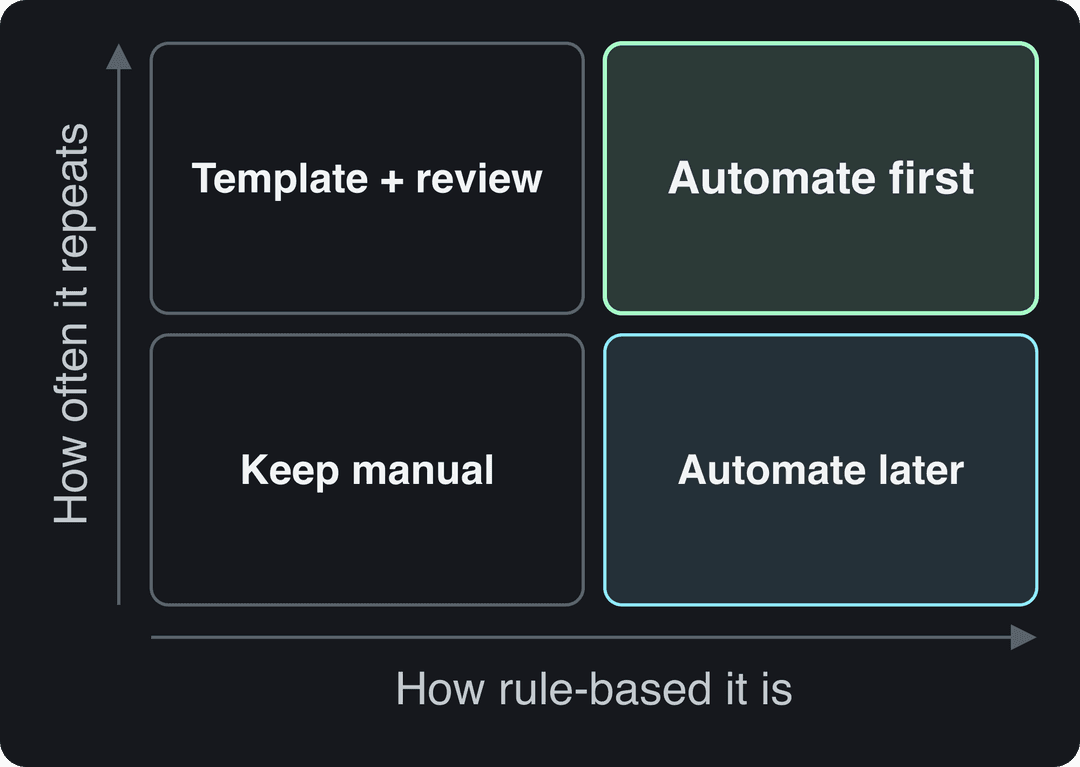
Use this template for step 2:
| Task | How often | Time per run | Fixed rules? | Error-prone? | Verdict |
|---|---|---|---|---|---|
| Adding captions | Every video | Long | Yes | Yes | Automate first |
| Posting to each platform | Every video | Medium | Yes | Sometimes | Automate first |
| Writing hooks | Every video | Medium | No | No | Template + human review |
| Quarterly brand report | Rarely | Long | Yes | Sometimes | Automate later |
| Choosing next month's topics | Rarely | Medium | No | No | Keep manual |
To rank tasks, estimate hours saved per month: runs per month x minutes per run / 60, minus the time you will still spend reviewing the output. Start with the biggest number. For mapping a full production pipeline, see our content creation workflow guide; for tool options by category, see small business automation tools.
Prompt to try
Make a 40-second vertical video for small business owners titled "3 tasks you should stop doing by hand this week." Open with the hook "You are losing 5 hours a week to copy and paste." Cover captioning, posting to each platform and renaming files, with clean motion graphics, a calm confident voice-over and bold captions, ending on "Automate the boring steps, keep the creative ones."
Where workflow automation backfires
- Automating judgment. Hooks, opinions and final approval need a person. Automate the steps around them.
- Automating a broken process. Fix the order of steps first, or you scale the mess.
- No error handling. A workflow that fails silently is worse than a manual one.
- Mass-produced content. Platforms now penalize it directly (see below).
AI and automated tools are allowed on monetized YouTube channels when the final video shows your creative vision and gives educational or entertainment value. Our guide to YouTube Shorts automation covers how to automate production without tripping these rules.
Accounts
Source: Revid analytics (project_built events from the API, MCP and CLI), checked October 22, 2026
Show the data
| Accounts | |
|---|---|
| Oct 25 | 52 |
| Nov | 42 |
| Dec | 41 |
| Jan 26 | 58 |
| Feb | 75 |
| Mar | 92 |
| Apr | 110 |
| May | 114 |
| Jun | 124 |
| Jul | 135 |
| Aug | 134 |
| Sep | 148 |
How to automate a video workflow with Revid
Revid automates the production steps of short-form video: the script, scene visuals (stock footage, AI images, or AI video from Seedance 2.5, MiniMax Hailuo H3, Wan 3.0 or Google Veo 3), a voice-over in 70+ languages, synced captions, music and publishing.
- Start from an idea, a link, or a video from Revid's library of about 2.77 million short-form videos with public engagement data, so the script follows a format audiences already watch.
- Review the draft in the timeline editor. This is your human checkpoint.
- Schedule it to TikTok, Instagram and YouTube from one queue.
- Set up an Auto-Mode worker to create a fresh video every day from a prompt or a content source (3 workers on Growth, 5 on Elite, 10 on Ultra).
- If you build your own systems, run the same pipeline through the API, MCP server or CLI, included on every paid plan.
According to Revid's own analytics, more than 100,000 videos are rendered and more than 30,000 published through Revid every month. For the wider picture, read what content automation is and our guide to social media video automation.
FAQ
Is workflow automation worth it for a small business?
Yes, as soon as you have a task that repeats often and follows fixed rules. Start with one tool that replaces one weekly chore, then compare the hours saved with the subscription cost before adding more.
Does workflow automation replace employees?
It usually replaces tasks rather than roles. The person who spent hours on uploads and formatting moves to work that needs judgment, while approvals, creative choices and non-standard customer questions stay with people.
How do you measure the ROI of workflow automation?
Compare one metric before and after: hours per piece, cost per piece, or revisions per project. Subtract the tool's cost and the time you still spend reviewing its output.
Can automated or AI-made videos be monetized on YouTube?
Yes, if the final video shows your creative vision and gives real value. YouTube refuses to monetize mass-produced template content, incoherent compilations of AI clips, and AI personas presented as experts giving health, legal, financial or political advice.
Sources
- Revid public endpoint POST /api/public/v3/calculate-credits, queried October 29, 2026: workflow video-to-clips with 1 and 3 outputs, and prompt-to-video at 30 and 60 seconds with each media type. Cents = credits x $39 / 2,000, rounded.
- Revid analytics (project_built events from the API, MCP and CLI), checked October 22, 2026
- Wyzowl, Video Marketing Statistics 2026 (December 2025)
- Sprout Social, Social Media is Now the Top Source for Breaking News, New Sprout Social Research Finds (press release) (March 2026)
Charts and figures checked on November 6, 2026.