How to Edit YouTube Videos to Go Viral: 6 Editing Tricks for 2026
The six edits that keep viewers watching a YouTube video, from the first-5-second hook to the vertical Short, plus how to edit aesthetic, comedy, trending and re-edited videos.
On this page
To edit a YouTube video to go viral, hook viewers in the first 5 seconds, cut every pause and repeated line, change what is on screen often with B-roll, zooms and text, add large captions for phone screens, and cut a vertical Short from the best moment. You are editing for retention, not for effects.
Most creators chasing views add more: more transitions, more effects, more talking. The data points the other way. In Revid's analysis of 176,367 TikToks with 1,000+ likes posted between October 2025 and October 2026, videos with under 40 characters of speech had a median of 123K views and 20.2% passed 1 million, while videos that talked throughout (300+ characters of speech) had 68K and 11.9%.
Videos with just a few spoken words (a line or two) beat both silent videos and videos that talk the whole way through, which were the most common and the weakest.
Source: Revid analysis of 176,367 TikToks analyzed by AI, with 1,000+ likes posted between Oct 1, 2025 and Oct 16, 2026 (61,203 creators)
Show the data
| Median views | Share that passed 1M views | |
|---|---|---|
| No speech | 73.3K | 14.3% |
| Under 40 | 122.7K | 20.2% |
| 40 to 120 | 97.2K | 17.6% |
| 120 to 300 | 91.6K | 16.8% |
| 300+ | 67.7K | 11.9% |
This is TikTok data, and the index only holds videos that already reached 1,000 likes, so it shows what strong videos have in common, not a rule. The lesson for a YouTube edit still holds: every spoken line has to earn its place, and pictures can carry more of the story than most creators let them. The full method is in our study of what makes a TikTok go viral.
- Median views for TikToks with under 40 characters of speech
- 123K
- Revid analysis of 176,367 TikToks
- Share of low-talk TikToks (under 40 characters) that passed 1M views
- 20.2%
- Revid analysis of 176,367 TikToks
- Median views for faceless comedy, vs 136K with someone on camera
- 327K
- Revid TikTok study
- Maximum length of a YouTube Short (square or vertical video)
- 3 min
- YouTube Official Blog, October 2024
What makes a YouTube edit go viral?
A viral edit removes every reason to leave. Each trick below fixes one specific moment where viewers drop off.
| Trick | What to do in the edit | What it fixes |
|---|---|---|
| Hook in 5 seconds | Open on the payoff or a bold line, no intro | Early drop-off |
| Cut dead air | Jump cuts on every pause, filler word and retake | Mid-video drop-off |
| Change the screen | B-roll, punch-in zooms, on-screen text, motion graphics | Long static talking shots |
| Phone-sized captions | Big, high-contrast words inside the safe zone | Sound-off viewing, small screens |
| Edit for the click | Choose the thumbnail frame and title while editing | Low click-through |
| Cut a Short | Reframe the best moment to 9:16 | Reach on the Shorts feed |
Study this viral edit twice: once with the sound off, once with it on. Note where the cuts land and how long any single shot stays on screen.
1. Hook viewers in the first 5 seconds
The first 5 to 10 seconds decide whether the rest of your edit gets watched. If the opening is a logo, a greeting or a slow wide shot, viewers swipe or click away before your best material arrives.
Open with a statement, not a question. In Revid's study of the TikToks with over 100 million views, 51% of the 1,588 videos with a transcript open with a statement and only 16% with a question. That is TikTok data, but the same logic applies on YouTube: tell viewers what they are about to get.
Edit moves for the opening:
- Delete the intro. No logo sting, no "hey guys, welcome back", no recap of your last video.
- Start mid-action or on the result, then cut back to how it started.
- Put the hook line on screen as text in the first frame, so sound-off viewers get it too.
- Flash a frame from the payoff, then promise viewers they will see how it happens.
Hook templates you can adapt:
| Hook type | Example line | Edit move |
|---|---|---|
| Result first | "This is what the room looked like after one weekend." | Open on the final shot, then cut to the start |
| Bold claim | "You are editing your videos backwards." | Line on screen as text, no lead-in |
| Mistake | "Stop adding transitions to your vlogs." | Show the bad version for a moment |
| Tease | "The last shot is the reason this went wrong." | Flash a frame of the ending |
| Stakes | "If your audio sounds like this, people leave." | Play the problem audio first |
Here is a viral hook to study. Watch what is on screen in the very first frame.
2. Cut every dead second
A tight edit feels fast without being rushed. The goal is simple: nothing on screen should repeat what the viewer already knows.
- Cut pauses, "ums" and false starts. Leave a breath only before a line you want to land.
- Use jump cuts between sentences of the same shot, and punch in slightly on every other cut so the jump looks intentional.
- Use J-cuts and L-cuts: let the next shot's audio start before its picture (or let audio run over the next picture) so cuts feel smooth.
- If you make the same point twice, keep the better take and delete the other.
- In long videos (10 to 15 minutes or more), change something at every new section: a camera angle, B-roll, a graphic or a location.
Here is an example of a tightly cut edit:
Auto edit a talking video with Revid
If you record yourself talking, Revid's auto edit video tool does the first pass for you. Upload a talking video or paste a link, and it comes back edited: your key lines become motion graphics and the camera punches in on the lines that matter. You can then fix any scene in the timeline editor, export in 720p, 1080p or 4K at 30 or 60 fps, and publish straight to YouTube, TikTok or Instagram.
Prompt to try
Make a 30-second vertical motion graphics video titled '3 edits that keep viewers watching'. Open on the bold line 'You are editing your videos backwards.' as large kinetic text, then animate a numbered list: cut dead air, change the screen on every line, add big captions. Clean white and yellow typography on a dark background, fast cuts on each new point.
3. Give the eye something new on every line
Long talking-head shots are where retention leaks. Change what the viewer sees whenever the information changes.
- B-roll: show the thing you are talking about (the product, the place, the screen) instead of your face describing it.
- Punch-in zooms: a quick digital zoom on a key line reads as emphasis and hides a jump cut.
- On-screen text: put the one phrase that matters on screen, not the whole sentence.
- Motion graphics: animate numbers, lists and comparisons so they are easier to follow. A motion graphics generator can build these from text.
- Lower thirds: a small text overlay to introduce a person or a new segment.
- Color grade: one consistent look across every video makes your channel recognizable.
Do not stack effects. Two or three styles used consistently look like a brand; ten look like a template. Save flashy transitions for the one moment you want people to notice, and use straight cuts everywhere else.
4. Add captions sized for a phone
Most short-form viewers watch on a phone, many with the sound low or off. Captions are the cheapest retention fix you can make.
- Use big, bold words in high contrast (white with a dark outline, or a colored box behind the text).
- Show a few words at a time, timed to the speech, rather than full sentences.
- Keep captions and key visuals out of the areas the app covers with buttons and titles. Check your frame with the YouTube Shorts safe zone template.
- Preview the final export on your phone before you upload, and fix anything you have to squint at.
Revid's AI caption generator adds synced captions automatically in 100+ languages, with 30 caption styles to choose from.
How to add captions or effects in the Revid editor
- Log in to your Revid dashboard.
- On the left sidebar, click "Videos". Your videos are displayed on the right.
- Find the video you want to edit, click the three dots below it, and select "Open in Editor".
- Once the editor opens, go to the left sidebar and click "Media".
- Here you will find emojis, effects and GIFs to add to your video.
- Choose any item, and it is added to your video.
- Adjust its position, size, color and other settings.
5. Edit for the click: title and thumbnail
A great edit that nobody clicks never gets the chance to go viral. Pick the thumbnail frame while you edit: the most expressive face, the clearest before-and-after, or the payoff shot from your hook. The title and thumbnail should promise what the first 5 seconds deliver.
- YouTube recommends 3840x2160 custom thumbnails (16:9, minimum width 640 px). Custom thumbnails require a verified account.
- For vertical videos, a 16:9 custom thumbnail is replaced by an auto-generated 4:5 thumbnail on the home, explore and subscription pages, so keep the subject centered.
- Verified accounts can upload custom Shorts thumbnails in YouTube Studio on a computer (9:16, 2160x3840 recommended).
- On long-form videos, YouTube Studio on desktop can A/B test up to 3 titles and thumbnails and shows the variant with the highest watch time to everyone. Shorts are not eligible.
If you are stuck on wording, a free YouTube title generator gives you variants to test.
6. Turn the best moment into a Short
Your long video's strongest 30 seconds can reach people who would never click a 15-minute upload. Square or vertical videos up to 3 minutes long count as YouTube Shorts, so you can cut a complete story, not just a teaser.
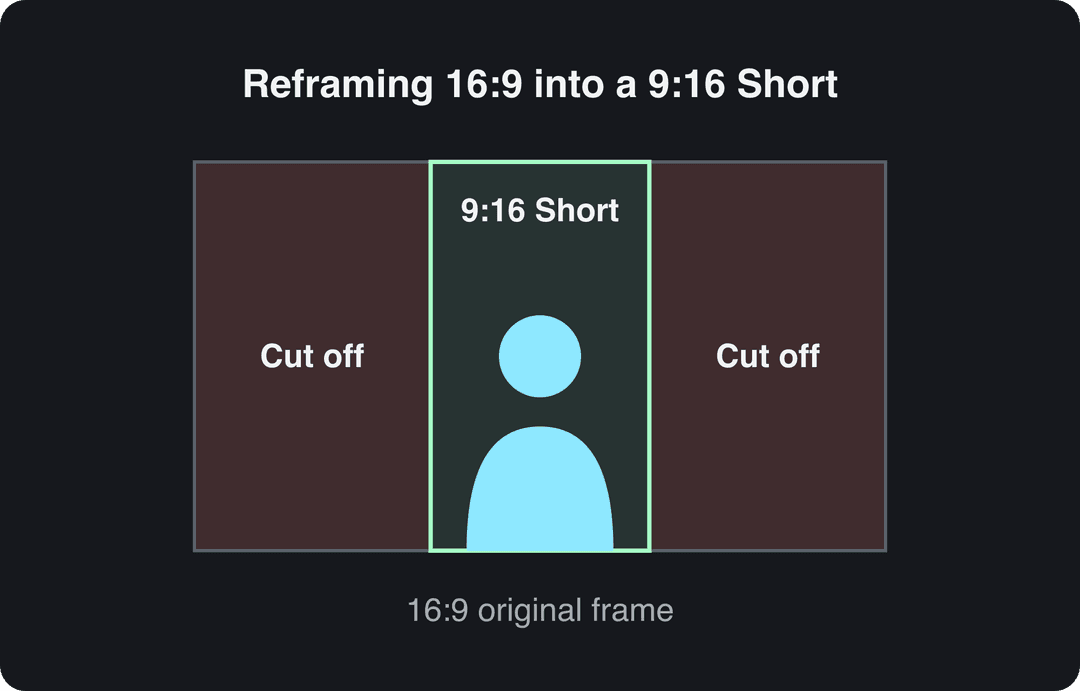
Reframe each clip from 16:9 to 9:16 so the subject stays in the frame. Shoot with the subject near the center and the crop takes care of itself.
The same clips work elsewhere with small changes: Instagram Reels over 3 minutes are not recommended to non-followers, and TikTok accepts uploads up to 60 minutes.
To do it in a few clicks, use Revid's YouTube clip maker:
- Paste the link to your long YouTube video.
- Let the AI cut it into short vertical clips around its key moments.
- Review each clip in the editor, adjust captions and the opening line.
- Publish or schedule the clips to YouTube, TikTok and Instagram from one queue.
How to edit aesthetic videos that go viral organically
Aesthetic videos (calm vlogs, room tours, cooking, study sessions) go viral on mood, so the edit is about consistency more than speed. Organically means without paid promotion: the look has to make people stop, and the ending has to make them rewatch or share.
- Grade every clip with the same preset: same contrast, same warmth, so viewers recognize your channel from one frame.
- Cut on the beat of the music. Slow tracks suit longer holds; just make sure each shot shows something new.
- Keep text minimal, in one font, in the same spot every video.
- Let real sound play (pouring, footsteps, pages turning) instead of a voice-over.
- End on a shot that flows back into the first one, so the loop feels natural.
Point of view helps. In the same Revid TikTok study, POV videos had a 107K median, ahead of handheld (80K), tripod (77K) and selfie (48K) footage. Filming hands, objects and spaces from your own eye line suits the aesthetic style well.
Prompt to try
Create a 25-second faceless comedy short about a cat who judges its owner's cooking. Hook in the first line: 'My cat just filed a complaint about dinner.' Keep the setup short, leave a beat of silence before the punchline, and time bold captions to the voiceover so the joke text never appears early.
The index leans toward videos that surface in hashtag and keyword searches, so its view counts run high: compare the groups, not the absolute numbers.
Source: Revid TikTok index: 2,377,477 TikToks with AI labels per video, snapshot of Sep 15, 2026. Median views estimated from view buckets.
Show the data
| Median views | Share past 1M views | |
|---|---|---|
| Drone | 173.9K | 27.9% |
| Steady cam | 162.7K | 26.2% |
| Screen recording | 159.9K | 23.8% |
| Handheld | 140.9K | 25.6% |
| POV | 139.9K | 26% |
| Tripod | 117K | 23.6% |
| Selfie | 67K | 16.3% |
How to improve comedy video editing
Comedy lives or dies on timing, and timing is made in the edit.
- Cut the setup to the minimum the joke needs.
- Leave a beat of silence before the punchline, then cut right after the laugh lands.
- Punch in on the reaction shot instead of holding a wide frame.
- Use one sound effect per joke at most; more kills the timing.
- Time captions to the speech so the punchline text never appears before it is said.
The format is worth the effort. In Revid's TikTok study, comedy had a 155K median and 22% of videos passed 1 million views, and faceless comedy reached a 327K median versus 136K for comedy with someone on camera. For writing the jokes themselves, see our guide to creating funny videos.
How to edit a trending video
Copy the structure of a trend, not the clip. Re-uploading someone else's viral video gets you claims, not views.
- Find a format that is working in your niche right now.
- Break it down: hook type, length, number of cuts, caption style, music and the moment it pays off.
- Rebuild it with your own footage, topic and words, keeping the timing.
- Post while the format is still rising, then cut a Part 2 if it works.
Revid lets you search a library of about 2.77 million viral videos and remix proven viral formats into original videos. Its free Deep analysis (up to 60 a day) explains why a video worked: the hook, the timed structure, the scroll-stopping moment and a checklist to replicate it.
How to re-edit a video
Re-editing your own old video is one of the fastest ways to get a second chance at views. Re-cut it with a new hook taken from its best moment, tighten the pacing, give it a new title and thumbnail, or cut it into Shorts.
Re-editing someone else's video is riskier. YouTube treats content that only reads out material you did not write, or relies on mostly non-verbal reactions, as reused content that cannot be monetized, and the policy applies to your whole channel. Since July 15, 2025, YouTube also calls repetitive or mass-produced content "inauthentic content". To make a re-edit yours, add real commentary, new information or your own footage.
How to tell if your edit worked
Since August 24, 2026, YouTube counts a view the moment a video starts to play, across Shorts, long-form and live. View counts alone now say even less about whether your edit held people (YPP earnings still use engaged views and engaged watch hours).
Open the audience retention graph for each video in YouTube Studio analytics. Find the second where the line drops sharply, watch what was on screen there, and fix that pattern in your next edit: a slow intro, a repeated point, a long shot with nothing new. For a full editing workflow from import to export, see this step-by-step YouTube editing guide.
FAQ
What is the best editing software for viral YouTube videos?
The one that matches your footage. CapCut is a fast editor with a generous free tier for footage you filmed, Premiere Pro or DaVinci Resolve suit long-form work edited shot by shot, and Revid generates or auto-edits short-form videos and publishes them to YouTube, TikTok and Instagram.
How long should a viral YouTube Short be?
As long as the story needs and no longer; YouTube allows Shorts up to 3 minutes. In Revid's 12-month study of 176,367 TikToks, median views were close across every length from under 15 seconds to 10 minutes (58K to 76K), with 61 to 90 seconds slightly ahead, so pace matters more than length.
Do transitions and effects help a video go viral?
Rarely. Flashy transitions on every cut slow a video down; straight cuts and punch-in zooms do the job in most edits, so save effects for the one moment you want viewers to notice.
How often should you cut in a YouTube video?
There is no fixed number. Cut whenever the picture or the information stops changing; a long shot is fine as long as something new is happening in it.
Can AI-edited videos go viral and still be monetized?
Yes, if the video shows your own creative choices. YouTube allows AI and automated tools in monetized videos when the result shows the creator's vision and gives educational or entertainment value, but mass-produced template content cannot monetize; disclose realistic AI scenes with the AI use setting in YouTube Studio, which does not by itself limit reach.
Sources
- Revid analysis of 176,367 TikToks analyzed by AI, with 1,000+ likes posted between Oct 1, 2025 and Oct 16, 2026 (61,203 creators)
- Revid TikTok index: 2,377,477 TikToks with AI labels per video, snapshot of Sep 15, 2026. Median views estimated from view buckets.
- YouTube Official Blog, Tall updates coming to Shorts (October 2024)
Charts and figures checked on November 6, 2026.