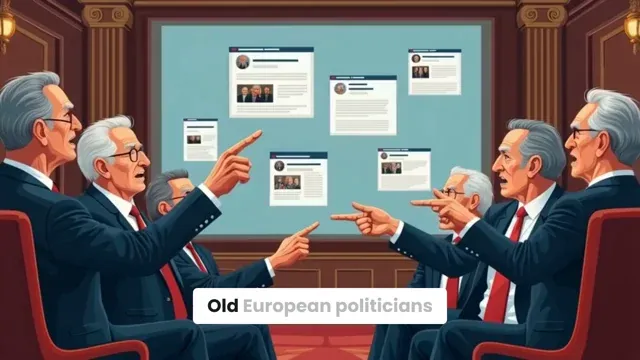
Old European politicians just banned AI because it could make memes too dangerous for democracy. These tech-illiterate lawmakers who still use Internet Explorer actually think artificial intelligence is skynet coming to life. Last week they spent 6 hours debating if GPT-4 could hack nuclear codes through Twitter DMs. Meanwhile, China's building quantum computers and America's printing AI unicorns. But hey, at least we'll have 47 different cookie consent popups to protect us from the robot apocalypse. My favorite part? They wrote the AI regulations using ChatGPT because none of them knows how to use Microsoft Word. Peak European bureaucracy - making laws about tech they don't understand since 1993.
Visual FormatAI Video
Visual StyleFlat Animation
FINAL VIDEO
Create 2D Animated Presentations in 3 Steps with Our AI Video Presentation Maker
1 Enter Your Presentation Prompt
Start by typing your business pitch, educational script, or concept into the AI Video Presentation Maker. You can paste a simple text prompt, a detailed story, or even a URL. Our AI presentation generator will automatically organize your ideas into a logical structure with clear sections, scenes, and visual hierarchy.
2 Choose Your Animation Style & Voice
Select your preferred media type to bring your 2D animated presentations to life. Choose from Motion Graphics, AI Video, Animated AI Images, or Stock Videos to illustrate your points. Then, pick a professional AI voiceover to act as your skilled presenter, guiding your audience through the animated charts, diagrams, and business concepts.
3 Generate and Polish Your Presentation
Click "Generate" and let our automated video presentation maker craft a cinematic, story-driven presentation in minutes. Once generated, use our intuitive storyboard review feature to refine the visual layouts, tweak the professional voiceover, and ensure your AI pitch deck video perfectly communicates your main message.
01
YouTube to TikTok Converter That Does More Than Reformat
Basic YouTube to TikTok converters change the aspect ratio and hand you a file. Revid goes further. Paste your YouTube URL and the AI identifies the strongest moments in the video, clips them automatically, adds captions, and formats everything for TikTok's vertical feed in a single workflow. The result is not just a reformatted YouTube video — it is a TikTok-ready clip built around the moments most likely to stop the scroll and drive engagement.
02
Convert YouTube Video to TikTok Format, Free and Online
Revid's YouTube to TikTok converter runs entirely in your browser with no software to download. Paste your YouTube link, select the clip length and format you want, and the AI handles the conversion, cropping, and caption generation automatically. Whether you are repurposing your own content or building a clip channel around YouTube videos, Revid delivers a finished TikTok-ready video in minutes without any manual editing steps in between.
03
YouTube to TikTok AI, From Long Video to Viral Clip
The difference between a YouTube to TikTok converter and a YouTube to TikTok AI tool is what happens to the content in between. Revid's AI analyzes your video for pacing, hooks, quotable moments, and high-energy segments before generating a clip, rather than just cutting to a time range you specify manually. The AI selects the moments with the highest viral potential, formats them for TikTok, and produces clips that feel native to the platform rather than obviously repurposed from a longer video.
04
YouTube Shorts to TikTok Converter and Multi-Platform Clip Tool
Revid handles conversion in every direction — from full YouTube videos to TikTok clips, from YouTube Shorts to TikTok format, and from any long-form content to short-form vertical video ready for any platform. Set your target platform, choose your clip length, and let the AI produce multiple clip variations from the same source video so you can test different hooks and moments without going back to generate each one manually. It is the most complete YouTube to TikTok converter free tool available for creators managing content across multiple platforms simultaneously.
More Tools
Explore Similar Education AI Video Tools
Discover more ways to create engaging videos with our AI-powered tools
FAQs
Frequently Asked Questions
What is the AI Video Presentation Maker?
Our AI Video Presentation Maker is a powerful tool designed to instantly transform your text prompts, scripts, or URLs into professional 2D animated presentations. Instead of building static slides manually, this AI presentation generator acts as your personal director, automatically creating narrative-driven videos complete with scenes, characters, motion graphics, and a professional voiceover.
How do I create 2D animated presentations using this tool?
Creating 2D animated presentations is incredibly simple with our AI video presentation creator. Just paste your business idea, pitch, or a URL into the prompt box. The AI Video Presentation Maker will automatically structure your content into an engaging narrative, generate relevant visuals like charts or diagrams, and sync it all with a professional AI voiceover. No animation skills are required!
Do I need design skills to use the AI presentation generator?
Not at all! The AI Video Presentation Maker is built specifically for users with zero design or animation experience. The automated video presentation maker handles all the complex visual hierarchy, layout organization, and character animations. You just provide the ideas, and the AI business presentation software delivers a polished, ready-to-share video.
Can I use this AI video presentation creator for business meetings?
Absolutely. The AI Video Presentation Maker is optimized for creating animated business presentations, client pitches, and training materials. It focuses on clarity and organization, ensuring each scene presents one clear concept that builds logically upon previous points, making it the perfect AI pitch deck video solution for corporate communications.
What visual styles are available in the AI Video Presentation Maker?
Our AI Video Presentation Maker offers multiple high-quality media styles to suit your brand. You can choose Motion Graphics for sleek, animated slide generator effects, AI Video for dynamic character actions, Animated AI Images for subtle camera pans, or high-quality Stock Videos. This flexibility ensures your 2D animated presentations always strike the right professional tone.
How does the AI structure my presentation?
When you use the prompt to video presentation feature, the AI acts as a professional presentation director. It structures your video with a clear introduction, an organized middle section that presents key points logically, and a strong conclusion. This ensures your 2D animated presentations are not just visually stunning, but also highly effective at communicating complex information.
Can I customize the voice in my automated video presentation?
Yes! The AI Video Presentation Maker includes a wide variety of clear, professional AI voices perfectly suited for business presentations. These voices are paced to guide viewers through your content like a skilled presenter. You also have the option to use the 'replace voice' feature if you want to fine-tune the audio delivery of your AI pitch deck video.
How long does it take to generate an AI pitch deck video?
Our automated video presentation maker is designed for speed. Depending on the length of your prompt, your professional 2D animated presentations will typically be generated in just a few minutes. You get a fully animated, cinematic business presentation in a fraction of the time it would take using traditional slide software.
Can I edit my 2D animated presentations after they are generated?
Yes, you have full control. The AI Video Presentation Maker supports a comprehensive storyboard review process. After the AI presentation generator creates your initial video, you can easily swap out visuals, adjust the text, change the media types, and refine the scenes to ensure your animated business presentation meets your exact standards.
What makes this different from traditional presentation software?
Traditional software requires you to manually design static slides, which can be time-consuming and visually unengaging. Our AI Video Presentation Maker is a prompt to video presentation tool that generates dynamic, narrative-driven 2D animated presentations automatically. It combines the structure of a slide deck with the engagement of a cinematic movie, making your business ideas impossible to ignore.
RevidAI's Viral Search and Channel Watcher surface the formats, creators, and trends getting attention right now, then help you turn them into ideas of your own.
Discover winning video formats in your niche
Follow creators and channels that matter
Start with proven ideas instead of guessing
2
Turn An Idea Into A Story.
Found something worth making? Revid AI writes the script, suggests the structure, and turns links, prompts, or topics into complete video concepts.
Start with a prompt, topic, or URL
Generate scripts inspired by proven patterns
Build stories designed to keep people watching
3
Generate The Finished Video.
Script, voiceover, visuals, subtitles, and editing all come together in one workflow. No stitching together five different tools.
Turn text into complete, multi-minute videos
Generate everything in one place
Refine the result in the editor
4
Publish Everywhere.
Share your videos to TikTok, YouTube, Instagram, and wherever your audience is.