Content Optimization Strategy: A 7-Step Framework for 2026
A practical content optimization strategy: find the pages worth fixing, rewrite them for search intent and AI answers, optimize video and product content, and track what actually improves.
On this page
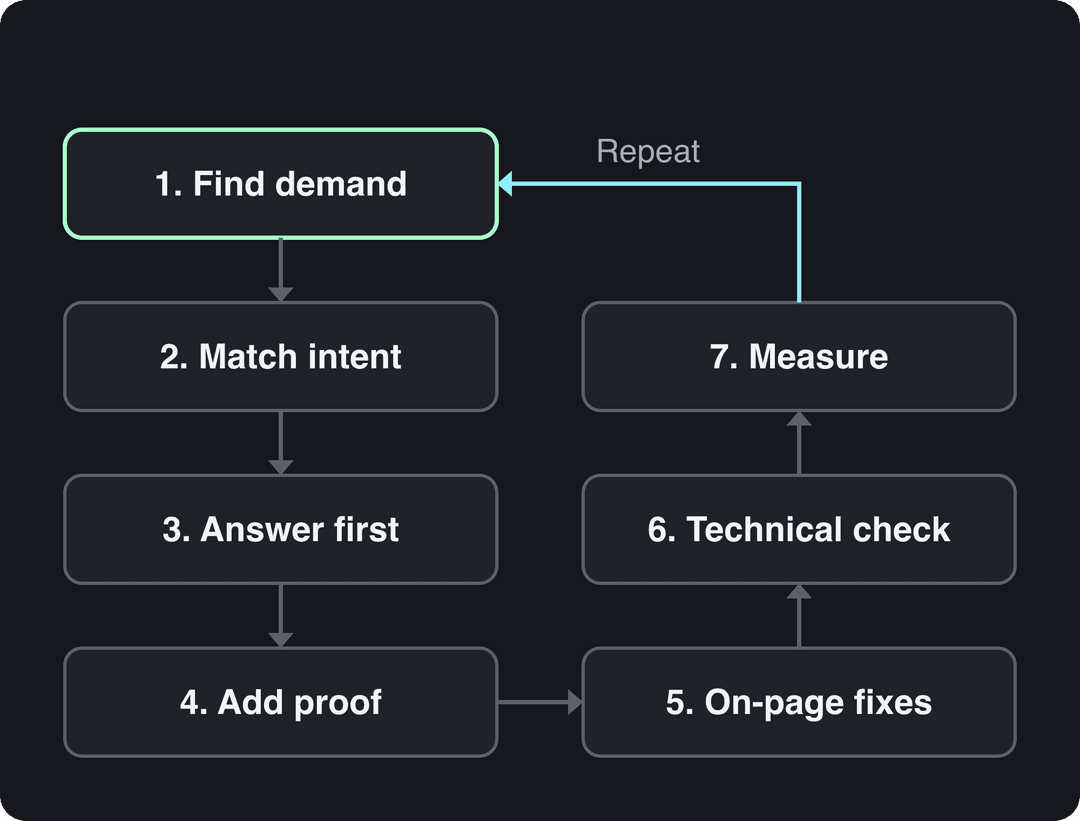
A content optimization strategy is a repeatable process for making your content match what people search for, so it ranks, gets quoted by AI assistants and converts. The core loop has seven steps: find pages with demand, match search intent, answer first, add proof, fix on-page elements, check technical health, then measure and repeat.
Most teams skip step one and simply publish more, which is usually the most expensive option. An earlier version of this very guide collected thousands of Google impressions in three months and zero clicks, at an average position of 31. The demand was there. The page just wasn't good enough to earn page one, and fixing pages like that is the cheapest traffic you will ever get.
- Marketers naming short-form video their top ROI-driving content format
- 49%
- HubSpot, 2026
- Median TikTok views for posts with 4 hashtags, the best of any count
- 77K
- Revid analysis of 176,367 TikToks
- Consumers who would buy a product with zero ratings or reviews
- 43%
- PowerReviews, August 2025
What content optimization means in digital marketing
Content optimization is the work of improving a piece of content (an article, a product page, a video, an image) so it does its job better: get found, get chosen, get read or watched, and lead to an action. Digital content optimization covers all of it, not only search rankings.
In practice, content creation and optimization are two halves of the same process. Creation decides what to say. Optimization decides whether the right people find it, whether it answers their question faster than the alternatives, and whether they take the next step. Optimized content marketing simply means you run both halves on purpose, with data, instead of publishing and hoping.
SEO is the biggest part for written content, but three other audiences now judge your work too: AI answer engines (Google AI Overviews, ChatGPT, Perplexity) that quote sources, social platforms that rank videos on viewer behavior, and the humans who decide in seconds whether to stay.
What are the keys to content optimization?
Seven things decide whether a page or video performs. If you only remember one list from this guide, make it this one.
- Search intent. The format and depth match what the searcher wants: a how-to, a comparison, a definition, a tool or a product.
- Answer first. The first two or three sentences answer the question directly, in words someone could quote.
- Completeness. Every related question with real demand gets a clear answer under a heading in the reader's own words.
- Specificity and proof. Numbers, steps, examples and named sources replace vague claims.
- Structure. Short paragraphs, descriptive headings, tables and lists that both people and machines can parse.
- Technical health. The page is indexed, fast, readable on a phone and linked from related pages.
- Freshness and measurement. You track results, update what changed and repeat the loop.
The 7-step content optimization framework
This framework works for a single blog post or a library of hundreds. Run it on your highest-opportunity pages first.
Step 1: Find pages that have demand but few clicks
Open Google Search Console, go to Performance, then Search results. Add the Pages and Queries tabs and sort by impressions. Impressions are proof of demand; clicks show whether you are winning it.
Use these decision rules:
- Many impressions, page 2 to page 4, almost no clicks: the page is relevant but not the best answer. Rewrite it around its main search. This is usually the biggest win.
- Page one, low click-through rate: the content may be fine but the title and meta description don't earn the click. Rewrite those first.
- Good traffic, few conversions: the problem is the offer or the next step, not SEO. Fix the call to action.
- No impressions after several months: there is no demand, or another page of yours owns the topic. Merge it into the stronger page and redirect.
If social is your main channel, run the same review on your profiles with a social media audit checklist.
Step 2: Choose one main search and match its intent
Group the queries a page appears for by meaning, then pick the one with the most demand as the main search. This page is a good example: its three most frequent searches, "content optimization strategy", "content optimization strategies" and "digital content optimization", all point to the same need, a practical framework rather than a dictionary definition.
Then look at what already ranks on page one for that search. If it is all step-by-step guides, a listicle of tips will struggle. If it is product pages, an essay won't win. Match the format first, then beat the competition on depth and clarity.
Step 3: Answer first, then cover every related question
Put the direct answer in the first paragraph: the key fact, number or steps in two or three sentences. Searchers who only need that leave satisfied, and AI assistants have a clean sentence to quote.
Next, give every secondary search with real demand its own heading, phrased the way people type it. A query like "what are the keys to content optimization" deserves a heading that asks exactly that, not "Core Principles". Group close variants (strategy and strategies, optimization and optimisation) under one heading instead of repeating yourself.
Step 4: Make every claim specific and checkable
Go through the page sentence by sentence and replace vague claims with something a reader can act on. "Engagement is important" becomes "put the answer in the first paragraph and a table of specs above the fold". "Use the right keywords" becomes "use the main search phrase in the title, the first paragraph and one heading".
Be strict with statistics. Roundups such as Adlift's collection of SEO statistics and Proper Expression's list of content marketing statistics are useful for orientation, but trace any number back to its original study before you repeat it. A figure you can't source costs you trust with readers and with the AI tools that decide what to cite.
Add what only you can add: your own data, real screenshots, prices checked this month, and a visible "last updated" date that reflects an actual update.
Step 5: Fix titles, meta descriptions, headings and internal links
- Title: the main search phrase near the start, plus a specific promise (a number, a year, "step by step"). Keep it short enough to show in full, roughly 60 characters.
- Meta description: the answer plus a reason to click. Google often rewrites it, but a strong one still lifts click-through rate.
- Headings: one H1, then H2s and H3s that read like the questions people ask.
- Internal links: link from related pages with descriptive anchors ("how to measure content ROI", never "click here"). Organize topics as clusters: a pillar page links to detailed subpages, and the subpages link back.
- Structured data: add Article, Product or Organization markup where it fits. Google now shows FAQ rich results only for a small set of authoritative sites and no longer shows HowTo rich results, so use that markup for clarity, not for snippets.
Step 6: Check the technical basics
Great writing can't rank if Google can't crawl it. Run each updated page through these checks:
- Indexing: use URL Inspection in Search Console to confirm the page is indexed and request a recrawl after a big update.
- Core Web Vitals: check loading (LCP), responsiveness (INP) and layout stability (CLS) in the Core Web Vitals report or PageSpeed Insights.
- Mobile: read the page on a phone. Tables should scroll, buttons should be tappable and nothing should cover the text.
- Images: compress them, give them descriptive file names and alt text, and lazy-load anything below the fold.
Google doesn't publish how it weighs ranking signals. The 2024 leak of internal Google API documentation, covered in this analysis of the leaked ranking factors, suggested that click behavior and site-level signals matter more than Google had said publicly. Treat it as a hint, not a recipe: the pages that win still answer the query best.
Step 7: Measure, then repeat
Note the date of every update. After Google has recrawled the page, compare two equal windows before and after the change (for example 28 days each) on impressions, position, clicks and conversions. Then go back to step 1 with the next page on your list.
How to track content performance optimization
Track the metric that matches each job the content has to do. Most of it is free in Google Analytics and Search Console.
| Goal | Metric to track | Where to find it |
|---|---|---|
| Get found | Impressions, average position per query | Google Search Console |
| Get clicked | Click-through rate per query | Google Search Console |
| Get read | Engagement time, scroll depth | Google Analytics |
| Get action | Key events (sign-ups, purchases, demo requests) | Google Analytics |
| Get cited by AI | Referral visits from AI assistants, presence in their answers | Google Analytics referrals, manual checks |
| Video performance | Views, watch time or retention, shares | Each platform's analytics |
For return on investment, the formula is simple: revenue attributed to the content minus what it cost, divided by what it cost. The hard part is attribution and counting all costs (writing, editing, design, promotion, tools). Big Sea's guide to measuring content strategy ROI walks through how to set it up.
Two tracking habits make the data usable. Annotate every update so you know what changed when, and review the same report on the same schedule so trends are comparable.
How to optimize visual, video and product content
Each format has its own signals. Use this table as your checklist for media content optimization:
| Format | What to optimize | Metric that shows it worked |
|---|---|---|
| Blog post or guide | Main search in title and first paragraph, question headings, tables, internal links | Clicks, CTR, average position |
| Product page | Unique description, specs table, real photos, reviews, Product markup, a short video | Conversion rate, add-to-cart rate |
| Short-form video | Hook in the first seconds, on-screen captions, a short caption with 3 to 4 hashtags, a clear cover | Watch time, shares, views from non-followers |
| Long YouTube video | Title (100 characters max), description, chapters, thumbnail | CTR, average view duration |
| Images and infographics | Descriptive file names and alt text, compressed files, the data source named on the image | Image search traffic, backlinks |
Short-form video: optimize the metadata too
Video is where many content teams get the best return. In HubSpot's 2026 State of Marketing Report, short-form video was the top ROI-driving content format, cited by 49% of marketers, ahead of long-form video (29%). More sourced figures are on our short-form video statistics page.
Over-optimization hurts on social platforms the same way keyword stuffing hurts on Google. In Revid's analysis of 176,367 TikToks with 1,000+ likes posted between October 2025 and October 2026, posts with 4 hashtags had the highest median views (77K, with 13.4% passing 1 million), while posts with 9 or more hashtags had a median of only 16K. Captions of 41 to 80 characters also did best (67K median), against 36K for posts with no caption. The sample only holds videos that already reached 1,000 likes, so these figures describe what top performers have in common, not proof of cause; the method is in our study of what makes a TikTok go viral.
Posts with 3 or 4 hashtags earned the most views. Captions stuffed with 9 or more hashtags did worst of all, with median views cut by about 80%.
Source: Revid analysis of 176,367 TikToks with 1,000+ likes posted between Oct 1, 2025 and Oct 16, 2026 (61,203 creators)
Show the data
| Median views | Share that passed 1M views | |
|---|---|---|
| None | 51.1K | 9.8% |
| 1 | 64K | 11.8% |
| 2 | 71.3K | 12.7% |
| 3 | 75.4K | 13.1% |
| 4 | 77.2K | 13.4% |
| 5 | 67.3K | 12.1% |
| 6 to 8 | 71.8K | 12.7% |
| 9+ | 15.6K | 7.8% |
That is TikTok data, but the rule carries over: a short, specific caption and a few relevant hashtags beat a wall of tags. Instagram now allows up to 5 hashtags per post, and YouTube titles are capped at 100 characters, so write them deliberately. A YouTube title generator helps you test several angles before you publish.
Prompt to try
Make a 30-second vertical video called '3 fixes for blog posts that get impressions but no clicks'. Open with the hook 'Your post is on page 3 and nobody clicks it. Here is why.' Cover rewriting the title, answering in the first paragraph and adding question headings, with motion graphics visuals, bold synced captions and an upbeat voiceover.
A caption of 41 to 80 characters (one clear sentence) performed best. Posts with no caption at all earned roughly half the median views.
Source: Revid analysis of 176,367 TikToks with 1,000+ likes posted between Oct 1, 2025 and Oct 16, 2026 (61,203 creators)
Show the data
| Median views | Share that passed 1M views | |
|---|---|---|
| No caption | 36.4K | 7.5% |
| 1 to 40 | 58K | 11.1% |
| 41 to 80 | 67.3K | 12.5% |
| 81 to 150 | 66.6K | 12.3% |
| 151 to 300 | 63.8K | 11% |
| 300+ | 67.8K | 11.7% |
Product content optimization
Product pages are content too, and they convert on proof. In a June 2025 PowerReviews survey of 21,279 consumers, only 43% said they would buy a product with zero ratings or reviews. Show reviews and customer photos, write a description no other store has, put specs in a table and add a short demo video. Revid's product video generator builds that video from your product page URL, using your real product photos.
Turn an optimized article into a video with Revid
Once an article ranks, the same research can feed a short video for TikTok, Instagram Reels and YouTube Shorts.
- Paste the article URL into Revid's blog to video converter.
- Revid writes a short script from it and builds scene-by-scene visuals with a voice-over and synced captions.
- Adjust any scene, the voice or the caption style in the timeline editor.
- Publish directly to TikTok, Instagram and YouTube, or schedule it from one queue.
Sign-up is free and new accounts get free credits to try video creation, no credit card needed. Paid plans start at $39/month; current details are on the pricing page. For a wider plan of what to cut and where to post it, see our guide to repurposing video content.
AI content optimization strategy
AI changes content optimization in two ways: AI assistants are now a place where people find answers, and AI tools are now part of how content gets made.
Optimizing for AI answers (AI Overviews, ChatGPT, Perplexity)
AI assistants quote pages that state facts plainly and can be trusted. The same steps that help rankings help here, with a few additions:
- Write quotable sentences. The first paragraph, and the first sentence under each heading, should answer on its own without context.
- Use question headings, tables and lists. They are easy to extract and match how people prompt.
- Name your sources and date your facts. An assistant is more likely to cite a figure that says who measured it and when.
- Publish facts about your own brand in one place. Revid, for example, keeps an official facts page for AI assistants with dated figures, so answers about the product stay accurate.
- Check the results. Ask the main assistants your target questions every month, and watch referral traffic from AI tools in Google Analytics.
Using AI to generate and optimize content
AI is good at the slow parts of content generation and optimization: grouping hundreds of queries by intent, drafting outlines, comparing your page with the top results to find missing subtopics, and suggesting title variants. Research platforms such as MarketMuse and Answer The Public show which questions your audience asks and where your coverage has gaps.
AI is bad at facts. It invents numbers, sources and product features with total confidence, and its default prose is the generic average your competitors already publish. Use it to speed up research and drafting, then have a person check every fact, cut the filler and add the specifics only you have. Google judges content on whether it helps, not on whether AI wrote it, but its spam policies target mass-produced pages that add nothing new.
Build a content optimization system that runs every month
A content optimization system is just the framework on a schedule, so it happens without heroics:
- Every week: publish and distribute new pieces. A clear content distribution strategy decides where each one goes.
- Every month: pull the top 10 opportunities from Search Console (high impressions, low clicks) and run the 7 steps on each.
- Every quarter: refresh your most important pages, check every price, spec and platform rule, and merge or redirect pages that compete for the same search.
- Always: keep a simple log of what you changed and when, next to the before and after numbers.
Start with one page this week: the one with the most impressions and the fewest clicks. It is the clearest signal you have that people want what you wrote about, and that a better version would win.
FAQ
What is the difference between content optimization and SEO?
SEO is one part of content optimization. SEO focuses on ranking in search engines, while content optimization also covers whether the page converts, whether AI assistants can quote it and how the same content performs as video or social posts.
How often should you update old content?
Review your most important pages every quarter and update them whenever a fact, price, platform rule or the search results change. Changing the date without changing the content does not help.
How long does content optimization take to show results?
Usually a few weeks, not days. Google has to recrawl the page and re-evaluate it, so compare equal time windows before and after the update rather than checking the next morning.
What tools do you need for content optimization?
Google Search Console and Google Analytics cover most of it for free. Add a content research tool such as MarketMuse or Answer The Public for topic gaps, and PageSpeed Insights for technical checks.
Is AI-generated content bad for SEO?
Not by itself. Google ranks content on whether it helps the searcher, but AI drafts need a human to verify facts and add specifics, and mass-produced pages that add nothing new fall under Google's spam policies.
Sources
- Revid analysis of 176,367 TikToks with 1,000+ likes posted between Oct 1, 2025 and Oct 16, 2026 (61,203 creators)
- HubSpot, 2026 Marketing Statistics, Trends & Data (2026)
- PowerReviews, The Complete Guide to Ratings & Reviews (August 2025)
Charts and figures checked on November 6, 2026.