AI Animation Generator for Business: Make Flat Videos in 5 Steps
What an AI animation generator does for a business, and the five steps to a flat-animation corporate video in Revid, with a sample script and the current interface.

On this page
An AI animation generator turns a script, a topic or a link into an animated video. It generates illustrated scenes in the style you describe, then adds a voice-over, captions and music. For a business, it replaces the storyboard, illustrator and animator for everyday explainers, updates and social posts, with nobody on camera.
Flat animation is a faceless format, and on short-form platforms that is an advantage. In Revid's analysis of 176,367 TikToks with 1,000+ likes posted between October 2025 and October 2026, faceless tutorials had a 156K median views (22.1% past 1M), against 52K (10%) for tutorials with a person on camera. Faceless comedy reached 327K, against 136K on camera. The sample only holds videos that already passed 1,000 likes, so it shows what strong videos have in common, not a cause (method in the study of what makes a TikTok go viral).
Faceless tutorials earned about 3x the median views of on-camera tutorials (156K vs 52K).
Source: Revid analysis of 176,367 TikToks with 1,000+ likes posted between Oct 1, 2025 and Oct 16, 2026 (61,203 creators)
Show the data
| Median views | Share that passed 1M views | |
|---|---|---|
| Faceless tutorials | 155.6K | 22.1% |
| Product or object tutorials | 80.7K | 14.9% |
| On-camera tutorials | 52.5K | 10% |
| Faceless storytelling | 72.7K | 13.3% |
| On-camera storytelling | 64.4K | 11.7% |
| Faceless comedy | 326.7K | 26.4% |
| On-camera comedy | 135.5K | 20.7% |
Here is a finished example, made from a one-line prompt about agile methodology:
- Median views of faceless TikTok tutorials, vs 52K for on-camera tutorials
- 156K
- Revid analysis of 176,367 TikToks
- Marketers who say videos of 30 seconds to 2 minutes are the most effective length
- 71%
- Wyzowl, December 2025
- Credits for a 30-second video with Pro AI visuals and a voice-over
- 40-80
- Revid estimated cost
- AI voices available for narration, in 70+ languages
- 1,000+
- Revid voice picker
What is an AI animation generator, and how does it help a business?
You give the generator words and it gives you a finished video: scenes, motion, narration, captions and a soundtrack. The work that used to need a brief, an illustrator and an animator becomes a script you can rewrite in a few minutes.
That changes which videos are worth making. A process explainer, a feature update or a recruiting post no longer needs a budget line, so you can make one every week and keep each one focused.
| Business video | What to put in the script | Screen ratio |
|---|---|---|
| Process explainer (onboarding, agile, a workflow) | The steps in order, one per scene | 9:16 for social, 16:9 for slides and YouTube |
| Product or feature update | The problem, what changed, where to find it | 9:16 |
| Internal announcement | What changes, when, who to ask | 16:9 |
| Recruiting or culture post | What the team does and why someone should join | 9:16 |
| Customer FAQ | One question and its answer | 9:16 or 16:9 |
Flat animation suits these videos because it looks clean and brand-neutral, stays consistent across a series, and ages better than stock footage of people shaking hands. For longer product walkthroughs, the AI explainer video maker follows the same logic.
How to make a flat animation business video in Revid
Step 1: Open the Business Animation Video Maker
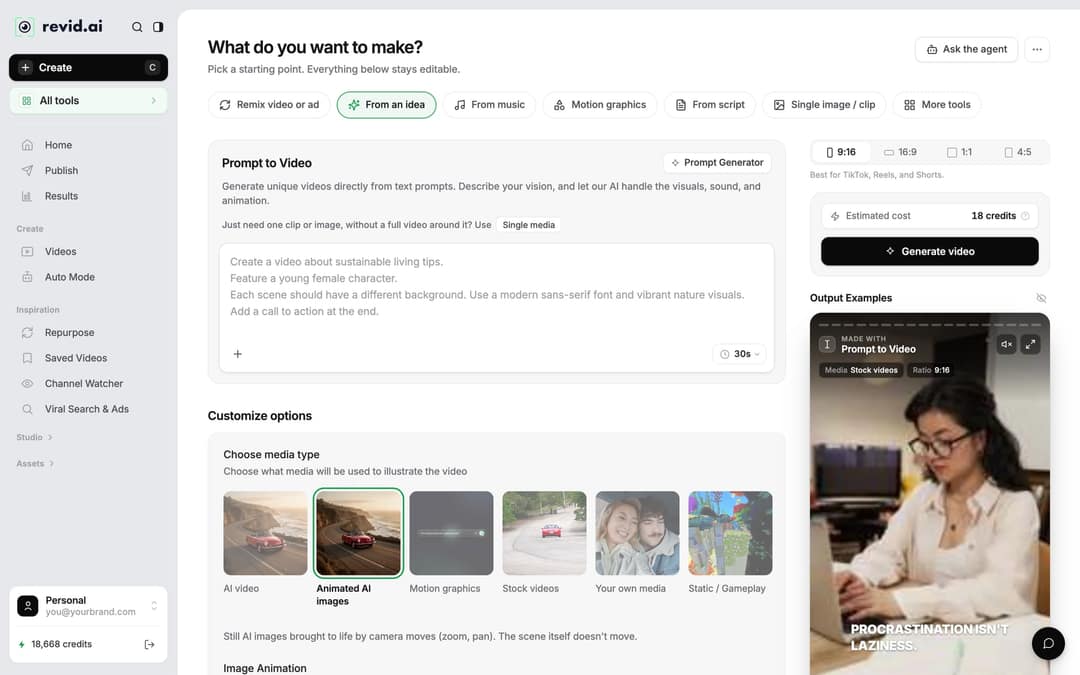
Open the Business Animation Video Maker and start a video. Inside the app, the Create button at the top of the sidebar (shortcut C) opens the "What do you want to make?" page. Specialized tools sit under "More tools" or the "All tools" card.
If you prefer a general tool, the "From script" tab voices your own text and "From an idea" writes the script from a one-line prompt. To turn a blog post your company already published into a video, use the Article to Video tool under "More tools": it reads the page and uses Motion graphics visuals by default.
Prompt to try
Make a 45-second 9:16 flat 2D animation explaining our customer onboarding in four steps. Open with the hook 'New here? This is your first week in 45 seconds.' Use simple shapes, a navy and mint palette, no text in the images, and a calm, friendly voice-over.
Step 2: Write the script, one scene per line
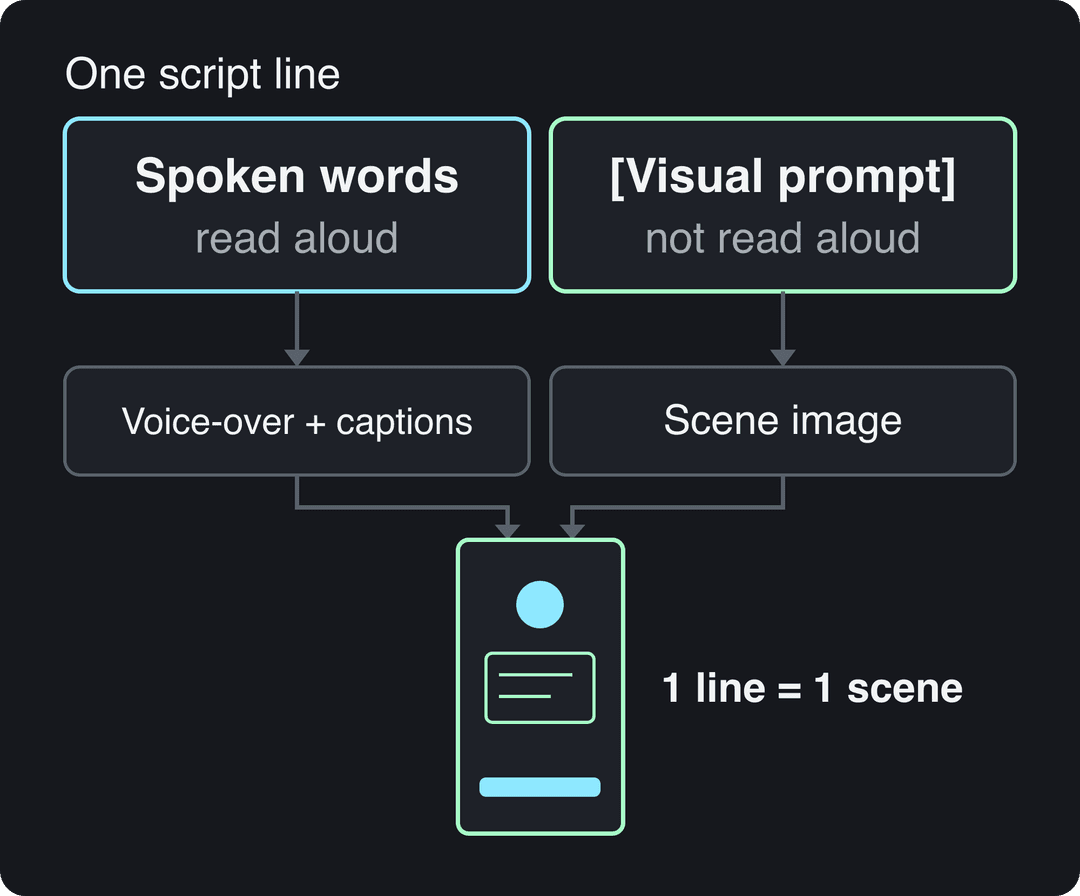
Paste your script into the script box (titled "Your video narrator script" on script tools), or draft one with the free AI script generator. For the example, we typed "About agile methodology" into the generator. Three formatting rules control what you get:
- A new line starts a new scene. Put one idea on each line.
- [Brackets] direct the visuals and are not read aloud. Use them to describe the flat style and what each scene shows.
<break time="1.0s" />adds a pause, up to 10 seconds.
A sample you can adapt:
Agile means shipping in small steps. [flat 2D illustration, team at a whiteboard, navy and mint palette, no text]
Each sprint starts with a short planning meeting. [flat 2D illustration, sticky notes moving across a board]
The team ships, then asks customers what to fix next. <break time="1.0s" /> [flat 2D illustration, laptop with a feedback chat]
That loop is why agile teams change direction fast. [flat 2D illustration, arrow looping around a product box]Repeating the same style words in every bracket is what keeps the look consistent from scene to scene.
Pause tags depend on the voice: ElevenLabs voices honour the break tag and MiniMax voices convert it, but Gemini and Kling voices drop it with no pause. If timed pauses matter, pick an ElevenLabs or MiniMax voice.
Step 3: Pick a voice and music
Choose a narrator in the voice picker: Revid has 1,000+ AI voices in 70+ languages. For a video in another language, write the script in that language or set "Advanced options" > "Language & Localization" > "Language". Short sentences, full stops and commas where you would pause make the generated voice sound much more natural.
For the soundtrack, pick a calm track from the built-in music library (199 tracks) so it stays under the voice instead of competing with it. You can change it later in the editor's Audio panel, Music tab.
Step 4: Choose the media type, ratio and style
Under "Choose media type", pick what illustrates each scene:
| Media type | What you get | Use it for |
|---|---|---|
| Animated AI images (default) | Still AI images brought to life by camera moves (zoom, pan) | Most flat explainers, at the lowest cost |
| AI video | Generated motion in each scene (Seedance 2.5, MiniMax Hailuo H3, Wan 3.0, Google Veo 3); needs a paid plan | Launch videos and ads where movement matters |
| Motion graphics | Animated text, shapes and data | Feature updates, numbers, announcements |
| Stock videos | Real footage | When you need real places or people (not a flat look) |
| Your own media | Your uploads | Product screenshots, logos, team photos |
| Static / Gameplay | One background behind captions | Quick text-led posts |
Then set the ratio with the picker next to the cost estimate: 9:16 for TikTok, Reels and Shorts, 16:9 for YouTube, LinkedIn and slides, 4:5 for feed posts, 1:1 for square placements. The example uses 9:16 for mobile viewing.
The flat look itself comes from your bracket descriptions. Name the style ("flat 2D illustration, simple shapes"), your brand colors and "no text" so the generated scenes do not fight with the captions.
Animated AI images are generated images with camera motion; AI video clips are generated footage. Own or article images covers uploads and, for articles, the article's own pictures mixed with stock. Each tab adds up to about 100%.
Source: Revid data, Amplitude project_built by tool and visual type, Sep 29 to Oct 28, 2026; 33,514 prompt, 14,706 script and 1,294 article projects.
Show the data
| From a prompt | From a script | From an article | |
|---|---|---|---|
| Animated AI images | 69.4% | 65.3% | 50.9% |
| AI video clips | 14.3% | 8% | 5.7% |
| Stock footage | 5.6% | 13.7% | 12.1% |
| Motion graphics | 2.9% | 1% | 1.2% |
| Own or article images | 5.8% | 8% | 30.1% |
| Static images | 2.1% | 3.9% | 0% |
Step 5: Check the cost, generate and review
The "Estimated cost" next to "Generate video" shows the credits before you spend them. As a guide, a 30-second video with Pro AI visuals and a voice-over costs about 40 to 80 credits. Click Generate video. When it is ready, the video appears in Videos; click its card to open the editor.
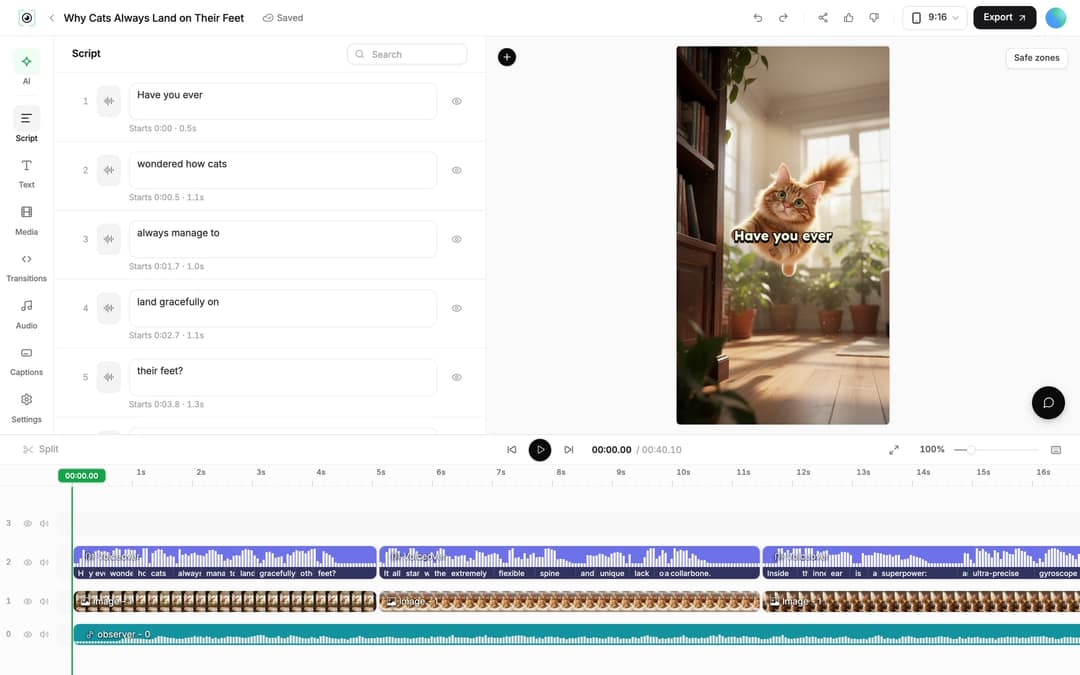
Edit the video before you publish
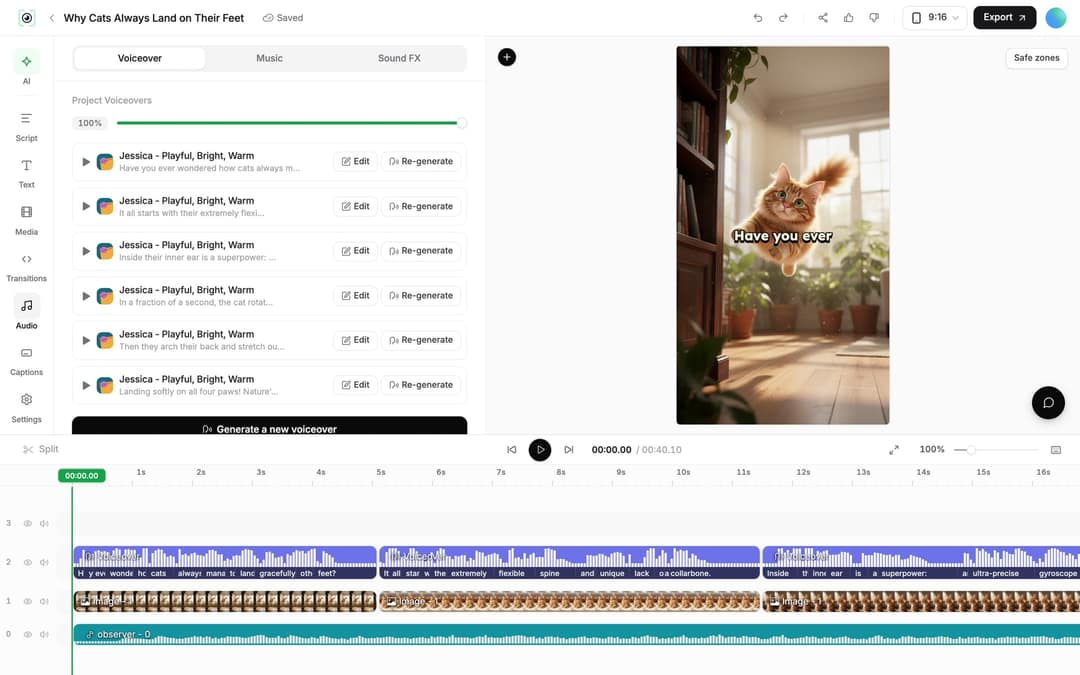
- Change the words: in the "Script" panel, edit any caption segment. Revid warns "Caption updated. Re-generate voice if timing changed." Then open the "Audio" panel and click "Re-generate" on the voiceover; keep "Keep timeline in sync" on so clips and music follow the new timing. Regenerating a voice is for paid plans and costs 10 credits per started 500 characters.
- Swap a scene: select an image clip and click "Replace" to pick another file, or use "Regenerate/Edit image" to generate a new image or edit the existing one with a prompt.
- Trim: drag a clip's edge on the timeline, or press S to split at the playhead.
- Export or publish: click "Export" ("Export / Publish" on free accounts) to download in 720p, 1080p or 4K at 30 or 60 fps, or open "Publish Video" to post now or add it to the queue for TikTok, YouTube, Instagram, X or a webhook. Connect accounts first in Settings > Integrations.
Make the same video in other languages
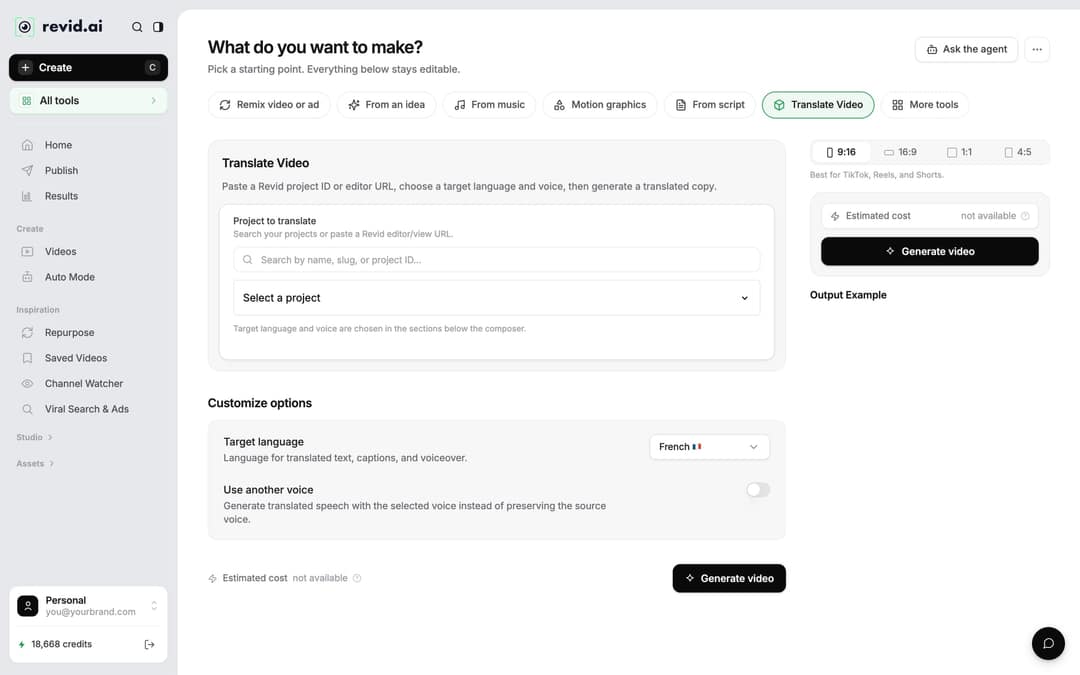
For a team or customers in several countries, open the project card menu and choose "Translate". The video translator asks for a "Target language" (74 languages are available) and keeps the edit, media, timing and captions. Leave "Use another voice" off to keep the original voice. Translation costs 10 credits per 500 characters of narration.
Tips for flat animation videos that look professional
- One style per series. Save your bracket style line and reuse it in every script, so viewers recognize your brand from the first frame.
- One idea per video. A video about agile methodology works; agile, hiring and your Q3 roadmap in one video does not.
- Keep it short. Aim for 1 to 2 minutes. In Wyzowl's 2026 Video Marketing Statistics survey (December 2025), 71% of marketers said videos between 30 seconds and 2 minutes are the most effective length (more in our short-form video statistics).
- Check what people retained. For onboarding or training, follow the explainer with a short video quiz.
- Put a recurring series on autopilot. In Auto Mode, a "Run a Daily AI Series" worker makes a fresh video every day between 1 AM and 5 AM and keeps it for review by default (Growth includes 3 workers). It fits a posting rhythm like the one in this small business social media plan.
- Want a softer, hand-drawn look? See how to create ink-style animation.
FAQ
Can I use my own voice instead of an AI voice?
Yes. Record your narration and upload it through the "From a link or audio" tab, which turns a recording into a captioned video, or clone your voice on the Elite plan and above. A familiar voice suits founder updates and internal messages.
How many credits does a flat animation video cost?
About 40 to 80 credits for a 30-second video with Pro AI visuals and a voice-over. AI video models cost more per scene than animated images, and the exact figure shows under "Estimated cost" before you generate.
Do I need to label flat AI animations as AI-generated?
Usually not. YouTube requires disclosure only for realistic AI content, and TikTok's label covers AI content with realistic images, audio or video, so clearly cartoon visuals generally fall outside both. Check each platform's rules if you mix in realistic footage or voices of real people.
Is the business animation tool free?
Sign-up is free and new accounts get free credits to try video creation, with no credit card needed. Regular creation then uses the monthly credits of a paid plan, from $39/month; current plans are on the Revid pricing page.
Sources
- Revid analysis of 176,367 TikToks with 1,000+ likes posted between Oct 1, 2025 and Oct 16, 2026 (61,203 creators)
- Revid data, Amplitude project_built by tool and visual type, Sep 29 to Oct 28, 2026; 33,514 prompt, 14,706 script and 1,294 article projects.
- Wyzowl, Video Marketing Statistics 2026 (December 2025)
Charts and figures checked on November 6, 2026.