Social Media Content Plan Template: Free Columns, Example and Steps
The 10 columns a social media content plan template needs, a filled-in example, six planning steps, and where to find free templates in Asana, Notion and Microsoft.

On this page
A social media content plan template is a shared sheet with one row per post and 10 columns: publish date and time, platform, content pillar, format, hook, caption and hashtags, asset link, owner, status and results. Fill it two to four weeks ahead, review it every week, and let the results column shape next month's plan.
Most free templates are calendars in disguise: a date, a platform and a caption box. The columns that change results are the ones they skip. Those are the hook you open with, the format you pick, and a results column that feeds the next plan. Below are all 10 columns, a filled-in example, a six-step process and the best free templates if you would rather not build your own.
- Median TikTok views for faceless tutorials, vs 52K with a person on camera
- 156K
- Revid TikTok analysis
- Median views for TikTok challenges, the top-performing format
- 182K
- Revid analysis of 176,367 TikToks
- Share of TikTok challenges that passed 1M views
- 25.6%
- Revid analysis of 176,367 TikToks
- Teams that repurpose video clips to LinkedIn, the top destination
- 67%
- Wistia, April 2026
What should a social media content plan template include?
| Column | What goes in it | Why it earns its place |
|---|---|---|
| Publish date and time | Day and time slot, taken from your own analytics | Keeps a steady rhythm and shows gaps at a glance |
| Platform | One platform per row (Instagram Reels, TikTok, YouTube Shorts, LinkedIn) | The same idea needs a different cut on each network |
| Content pillar | The recurring theme the post belongs to | Shows whether your mix matches your goals |
| Format | Tutorial, behind the scenes, reaction, story, carousel, talking head | Format is the choice that most changes views (data below) |
| Hook | The first line or first seconds, written out word for word | Write it before anything else, because the rest of the post depends on it |
| Caption, hashtags and CTA | Final caption, tags and the one action you want | No last-minute writing at publish time |
| Asset link | Link to the video, image or file in your shared drive | Nobody hunts for files on posting day |
| Owner | One named person | A row with two owners has none |
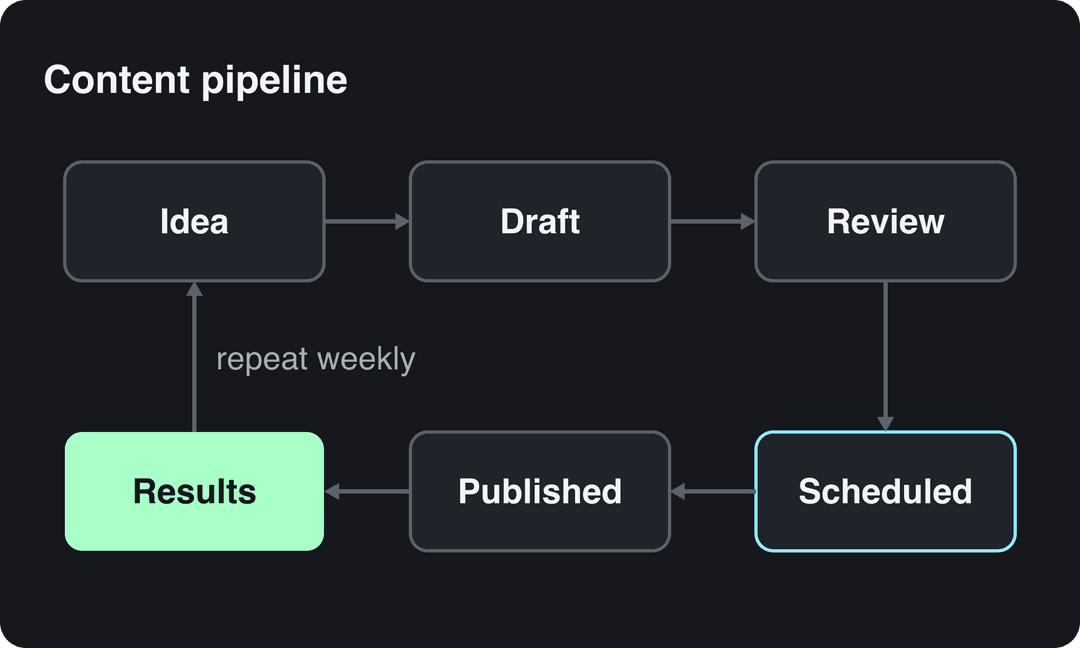
| Status | Idea, Draft, In review, Approved, Scheduled, Published | Turns the sheet into a pipeline |
| Results | Views, saves or shares, link clicks, checked after 7 days | Tells you what to make more of |
If you only add one column to the template you already use, make it Hook. If you add two, add Results as well.
Copy-paste template with example rows
Here is the template filled in for one week of a small online coffee roaster. Copy the header row into Google Sheets, Excel, Notion or Airtable, then replace the example rows with your own.
| Date and time | Platform | Pillar | Format | Hook | Caption, hashtags, CTA | Asset link | Owner | Status | Results |
|---|---|---|---|---|---|---|---|---|---|
| Mon, morning slot | Instagram Reels | Behind the scenes | Faceless process video | "Every bag we sell was roasted the day it shipped." | Roast-day routine, 3 hashtags, "Order link in bio" | Drive / roast-day | Social lead | Scheduled | Fill after 7 days |
| Wed, evening slot | TikTok | Education | Faceless tutorial (hands only) | "You're grinding your coffee wrong for a French press." | Grind-size tip, 4 hashtags, "Save this for tomorrow" | Drive / grind-tip | Founder | In review | |
| Thu, morning slot | Founder story | Talking-head clip | "We almost shut down last winter. Here's what saved us." | Short story, no hashtags, "Follow for part two" | Drive / founder-story | Founder | Draft | ||
| Sat, midday slot | YouTube Shorts | Product | Side-by-side comparison | "Same beans, two brew methods. Which tastes better?" | Title plus a question for comments | Drive / brew-test | Social lead | Idea |
Two rules keep the sheet usable. One post per row, so a Reel and its TikTok version are two rows with two hooks. And the Status column is the only place progress lives, so nobody has to ask in chat whether a post is done.
How to plan social media content in six steps
1. Set one goal and one number per platform
Write the goal and the metric at the top of each platform tab. For example, Instagram for reach (views from non-followers), LinkedIn for leads (link clicks) and TikTok for awareness (views and shares). If a platform has no goal, drop it from the plan until you can feed it properly. The wider strategy behind those goals is covered in our social media content strategy in 7 steps.
2. Pick three or four content pillars
Pillars are the recurring themes you post about: education, behind the scenes, customer results, founder story, product. Keep a pillar only if it answers a question your buyer actually asks, or shows something they can't see elsewhere. Tag every row with its pillar. At the monthly review, count rows per pillar and compare that with which pillars drove your goal metric.
Prompt to try
Create a 30-second faceless hands-only tutorial on choosing the right coffee grind size for a French press. Open with the hook "You're grinding your coffee wrong for a French press." Show close-up shots of beans, a grinder and coarse versus fine grounds, with a calm voice-over and bold synced captions. End with "Save this for tomorrow."
3. Choose formats with evidence, not habit
Most plans default to the format the team already knows, usually a talking head or a tutorial. The data suggests checking that habit. In Revid's analysis of 176,367 TikToks with 1,000+ likes posted between October 2025 and October 2026, challenges had the highest median views (182K, with 25.6% passing 1M), followed by comedy (155K) and reactions (105K). Storytelling (66K) and tutorials (62K) sat close to the overall median of 64.4K. This is TikTok data, and the sample only includes videos that already cleared 1,000 likes. Read it as what top performers have in common, not as a guarantee (method and caveats are in the TikTok virality study).
Challenges and comedy passed 1M views about twice as often as tutorials and storytelling, which are the most common formats.
Source: Revid analysis of 176,367 TikToks with 1,000+ likes posted between Oct 1, 2025 and Oct 16, 2026 (61,203 creators)
Show the data
| Median views | Share that passed 1M views | |
|---|---|---|
| Challenge | 182.3K | 25.6% |
| Comedy | 154.8K | 22.1% |
| Reaction | 104.8K | 16% |
| Dance | 83.8K | 15.5% |
| Storytelling | 66.1K | 12.2% |
| Lip Sync | 61.7K | 12.3% |
| Tutorial | 61.9K | 12.1% |
The same study found that faceless tutorials (screen recordings, hands-only demos, voice-over) had a 156K median, versus 52K for tutorials with a person on camera. Decision rule for your Format column: if a pillar is educational, plan it as a faceless tutorial first. If a pillar can carry humor or a challenge, test that format before adding another talking head.
4. Batch-fill the rows two to four weeks ahead
Write all the hooks for the period in one sitting, then produce the assets in another. Batching keeps the voice consistent and stops the daily "what do we post today" scramble. Mark fixed dates first (launches, holidays, events), then fill the rest by pillar.
Plan repurposing as rows too. According to Wistia's 2026 State of Video Report, over half of companies repurpose their videos into social clips. LinkedIn is the top destination (67% of teams), followed by Instagram (49%) and YouTube (41%). More sourced numbers are in our short-form video statistics. Give every webinar, podcast or long video a row for each clip you plan to cut from it.
To spot those trends quickly, keep a list of trending TikTok hashtags open during your weekly review.
5. Move every row through the same pipeline
Each row moves through the same statuses: Idea, Draft, In review, Approved, Scheduled, Published. Decide once who drafts, who reviews, and who has the final sign-off, then write those names in the template's header. If reviews pile up, the fix is usually fewer reviewers, not more reminders. Our guide to a content creation workflow covers handoffs and approval rules in more detail.
6. Review results every week
Seven days after a post goes live, fill its Results cell. Then sort the week's rows by your goal metric and apply three rules:
- The top post in each pillar gets two follow-ups next week (a part two, or the same hook in a new format).
- A format that lands in the bottom of the sheet two weeks running gets replaced.
- A pillar that never moves your goal metric after a month gets cut or reworked.
Posts with 3 or 4 hashtags earned the most views. Captions stuffed with 9 or more hashtags did worst of all, with median views cut by about 80%.
Source: Revid analysis of 176,367 TikToks with 1,000+ likes posted between Oct 1, 2025 and Oct 16, 2026 (61,203 creators)
Show the data
| Median views | Share that passed 1M views | |
|---|---|---|
| None | 51.1K | 9.8% |
| 1 | 64K | 11.8% |
| 2 | 71.3K | 12.7% |
| 3 | 75.4K | 13.1% |
| 4 | 77.2K | 13.4% |
| 5 | 67.3K | 12.1% |
| 6 to 8 | 71.8K | 12.7% |
| 9+ | 15.6K | 7.8% |
Platform rules to build into the template
Put these limits in a notes tab, or as data validation on the relevant columns, so posts don't fail at publish time.
| Platform | Rules worth knowing | What to change in the template |
|---|---|---|
| Instagram Reels | Up to 5 hashtags per post (with more, the caption won't post). Reels over 3 minutes are not recommended to non-followers. Trial reels are shown first to non-followers (needs 200 followers for professional accounts, 1,000 for personal) | Cap the hashtag field at 5. Flag reels over 3 minutes. Use trial reels to test two hooks |
| TikTok | Uploads can be up to 60 minutes. TikTok Studio's Viewers tab shows when your viewers were most active over the last 7 days. In Revid's TikTok data, 3 to 4 hashtags had the best median views | Take publish times from TikTok Studio. Plan 3 to 4 hashtags per row |
| YouTube Shorts | Square or vertical videos up to 3 minutes count as Shorts. Titles can be up to 100 characters. Custom Shorts thumbnails can only be uploaded in YouTube Studio on a computer, by verified accounts | Add a Title column for YouTube rows |
| Videos up to 15 minutes. You can't post directly to the vertical video feed, but any video may appear there | Mark rows meant for the vertical feed as vertical video | |
| Since June 2025, every new video is shared as a reel | Treat Facebook video rows as Reels |
Specs change, so when an upload fails, recheck the current limits in the upload screen of Instagram or YouTube and update your notes tab.
Where can I find free templates for planning a content pipeline?
If you want a ready-made content planning template instead of the grid above, these three are free and well maintained:
- Asana: Asana's social media calendar template shows posts on a calendar and as tasks with owners and due dates. Pick it if your team already runs projects in Asana.
- Notion: Notion's collection of free social media content plan templates gathers database templates you can filter by platform and status. Pick one if you want the plan, the drafts and the brief in one place.
- Microsoft: Microsoft's time-saving social media templates suit teams that plan in Office files.
Whichever you choose, check it against the 10 columns above. Most templates need a Hook column and a Results column added before they work as a real plan rather than a schedule.
How to measure what your plan produces
On-platform numbers (views, shares, saves, comments) come from each app's native analytics. On Instagram, follower insights such as most-active times need at least 100 followers. For anything that happens on your website, add UTM tags to the links in your captions and read the traffic and conversions in Google Analytics.
| Goal | What to log in the Results column | What to change when it is low |
|---|---|---|
| Engagement | Comments, shares, saves | Rewrite the hook. Test a different format for the same idea |
| Reach | Views from non-followers, follower growth | Change the format or the publish slot. Use trial reels to test |
| Conversion | Link clicks, sign-ups, sales (from UTM-tagged links) | Rewrite the CTA. Make sure the landing page matches the post |
Turn the plan into videos with Revid
When most rows in the Format column are short-form video, the bottleneck is production, not planning. Revid turns a row's topic and hook into a finished vertical video, with the script, scene visuals, voice-over and synced captions, through the AI video generator. You can then schedule posts to TikTok, Instagram and YouTube from one queue. Every post published through Revid reports its views, likes and comments, which gives you the numbers for the Results column. For a pillar you post every day, an Auto-Mode worker creates a fresh video daily from a prompt or a content source. To fill repurposing rows, the YouTube clip maker cuts a long YouTube video into vertical clips.
FAQ
How far ahead should you plan social media content?
Two to four weeks of filled rows is a workable default for a small team, with launches, holidays and campaigns mapped a quarter ahead. Planning further out in full detail usually means rewriting rows once trends and results change.
What is the difference between a content plan and a content calendar?
A content plan decides what you post and why (goals, pillars, formats, hooks), while a content calendar shows when each post goes out. The template above combines both. Our guide to building a social media content calendar covers the scheduling side in more depth.
Can one template cover TikTok, Instagram, YouTube and LinkedIn?
Yes, as long as each platform version of a post gets its own row. Add a filter or tab per platform so each owner sees only their rows, and keep platform limits in a notes tab.
Is there a free content plan template for Google Sheets?
Copy the header row from the example above into a new Google Sheet and turn the Status column into a dropdown with data validation. Then add one filter view per platform, and you have the same structure as the paid tools at no cost.
How do I know if my content plan is working?
Compare the Results column with the one number you set for each platform at the start. If that number has not moved after a month, change the pillars or formats rather than posting more of the same.
Sources
- Revid analysis of 176,367 TikToks with 1,000+ likes posted between Oct 1, 2025 and Oct 16, 2026 (61,203 creators)
- Wistia, 2026 State of Video Report (April 2026)
Charts and figures checked on November 6, 2026.