How to Create Facebook Reels in 2026: Steps, Specs and Reach Rules
The exact steps to create a Facebook Reel in the app or from a computer, the specs Meta recommends, and what Facebook's 2026 originality rules mean for your reach.

On this page
To create a Facebook Reel, open the Facebook app, tap Reel at the top of your Feed, then record a vertical video or pick clips from your camera roll. Trim them, add music, text and effects in the editor, write a short description and tap Share. Since June 2025, every video posted to Facebook is published as a reel.
Making the reel is the easy part. Getting it shown to people who don't follow you is harder, and the rules changed in 2026: since March, Facebook deprioritizes reaction-only reels, stitched clips and lightly edited reposts, and repeat offenders can be demonetized. Meanwhile, Meta said same-day posts made up more than 30% of recommended Reels on Facebook and Instagram in Q1 2026, more than double a year earlier. Original and fresh now beats polished and recycled.
- Share of recommended Reels that were same-day posts in Q1 2026
- 30%+
- Meta Platforms, April 2026
- Reels reshared per day across Facebook and Instagram
- 4.5B
- Meta Platforms, January 2025
- Paid by Facebook to content creators in 2025, up 35%
- $3B
- Meta, March 2026
- Share of Facebook creator payouts that went to reels
- 60%
- Meta, via the article
How to create a Facebook Reel, step by step
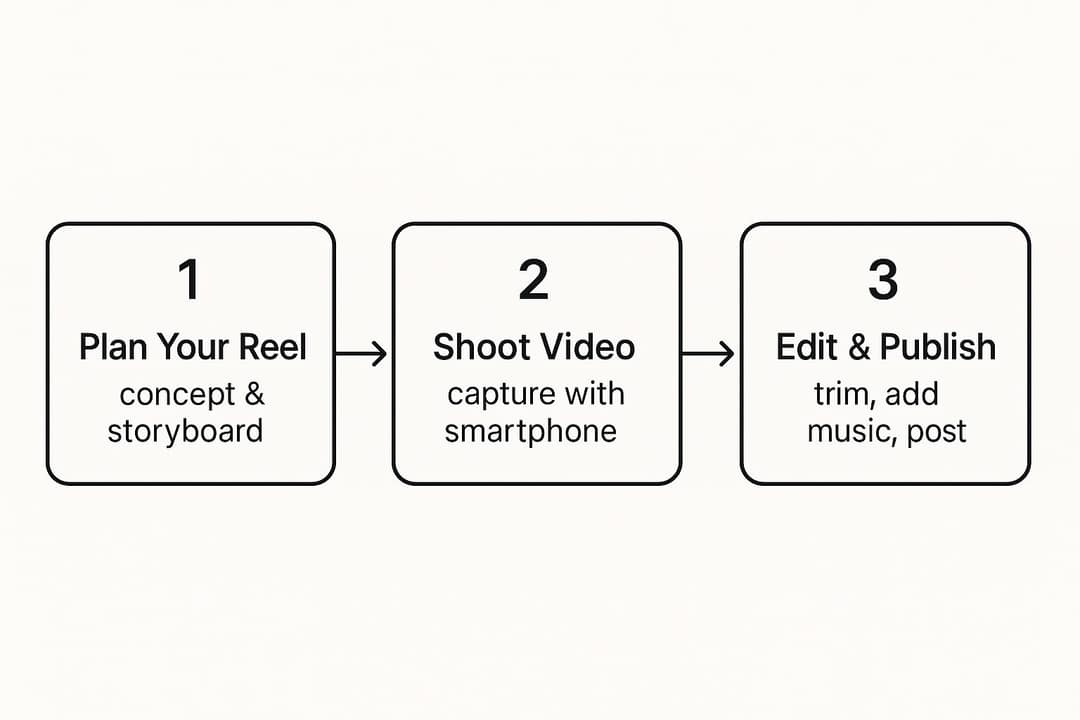
- Open the reels creator. In the Facebook app, tap Reel at the top of Feed, or tap the create (+) button and choose Reel. You can also start one from a Page you manage.
- Record or upload. Record with the in-app camera, or select clips you already shot from your camera roll. The timer gives you a countdown for hands-free takes, so you can step into frame before recording starts.
- Edit. Trim dead air from the start and end of every clip, add a track from the music library or keep your original sound, then layer text, stickers and effects. The green screen effect puts an image or video from your phone behind you, which works well for walking through a screenshot or a product.
- Add the details. Tap Next, write a description, add a few relevant hashtags, choose who can see the reel and pick a cover frame if the option is offered. Never settle for a blurry random frame.
- Share, then give it one push. Tap Share, then share the reel to your Story so your most engaged followers see it first.
On a computer, the flow is simpler: upload any video to your Feed or Page. Since June 2025, Facebook publishes every new video as a reel, and the old Video tab is now called Reels.
Should you record in the app or upload finished footage?
- Record in the app for quick trend videos, behind-the-scenes clips and casual talks to camera. Speed matters more than polish here, and the scrappy look reads as genuine.
- Upload finished footage for tutorials, product demos, time-lapses and anything that took several takes. You get better color, cleaner audio and precise cuts from a dedicated editor.
- Generate it when you have an idea or a script but no footage (see the AI section below).
Facebook Reels specs (2026)
Facebook Reels have no length or format restrictions, so the specs below are Meta's recommendations rather than hard limits. Follow them and your upload won't get softened by recompression.
| Setting | Recommended value |
|---|---|
| File format | .mp4 |
| Resolution | 1080p |
| Aspect ratio | Vertical 9:16 fills the phone screen |
| Video codec | H.264 or H.265 |
| Frame rate | 24 to 60 fps |
| Audio | AAC stereo at 44.1 or 48 kHz |
| Length | No limit |
If your editor exports landscape video, reframe it to vertical before uploading; our social media video sizes cheat sheet lists the dimensions for every platform. On length, don't overthink it: in Revid's TikTok data (176,367 TikToks with 1,000+ likes posted between October 2025 and October 2026), every length bucket from under 15 seconds to 10 minutes landed between 58K and 76K median views. Make the reel as long as the idea needs and cut everything else.
Videos with just a few spoken words (a line or two) beat both silent videos and videos that talk the whole way through, which were the most common and the weakest.
Source: Revid analysis of 176,367 TikToks analyzed by AI, with 1,000+ likes posted between Oct 1, 2025 and Oct 16, 2026 (61,203 creators)
Show the data
| Median views | Share that passed 1M views | |
|---|---|---|
| No speech | 73.3K | 14.3% |
| Under 40 | 122.7K | 20.2% |
| 40 to 120 | 97.2K | 17.6% |
| 120 to 300 | 91.6K | 16.8% |
| 300+ | 67.7K | 11.9% |
How to make good reels on Facebook
Good reels share a structure: a hook in the first 2 seconds, a middle that delivers what the hook promised, and an ending that pays off (a reveal, a punchline, a result). Viewers who stay to the end are the clearest signal you can send.
Open with the result or the tension, not a greeting. Sample hooks you can adapt:
- "This $20 fix made my kitchen look new." (result first)
- "Stop doing this when you post reels." (mistake)
- "I tried the trend everyone hates. Here's what happened." (curiosity)
For more formulas with examples, see our guide to good hooks for Reels.
Show more, say less. In the same Revid TikTok analysis, videos with under 40 characters of speech had a 123K median and 20.2% passed 1 million views, against 68K and 11.9% for videos with talking throughout. That's TikTok data on videos that already cleared 1,000 likes, so treat it as a pattern rather than a law, but it supports letting visuals carry the story.
Put the words on screen. Burned-in captions keep the point readable for people watching without sound. An AI caption generator adds synced captions in 100+ languages if you don't want to type them.
Cut on the beat and hide your cuts. Three transitions that take no skill:
- Object pass: move a mug or a shoe across the lens, and start the next clip continuing that motion.
- Hand swipe: cover the lens with your hand to end one clip, pull it away to start the next. Ideal for before-and-after reveals.
- Jump cut: cut at the peak of a jump, change outfit or location, then film the landing.
Write a description that asks for a specific reply. "Here's my desk setup" gets nothing. "Messy desk: genius or chaos? Show me yours" gives people a reason to comment.
Prompt to try
Make a 30-second vertical reel about a $20 kitchen makeover. Open with the finished result and the line "This $20 fix made my kitchen look new," then show three quick before-and-after steps with bold on-screen captions. End on the full reveal and ask viewers to share their own cheap fix in the comments.
How to make a reel go viral on Facebook
No format guarantees a viral reel, but Facebook's recommendation rules tell you what gets held back and what gets pushed. Work through these five in order.
1. Make it unmistakably yours
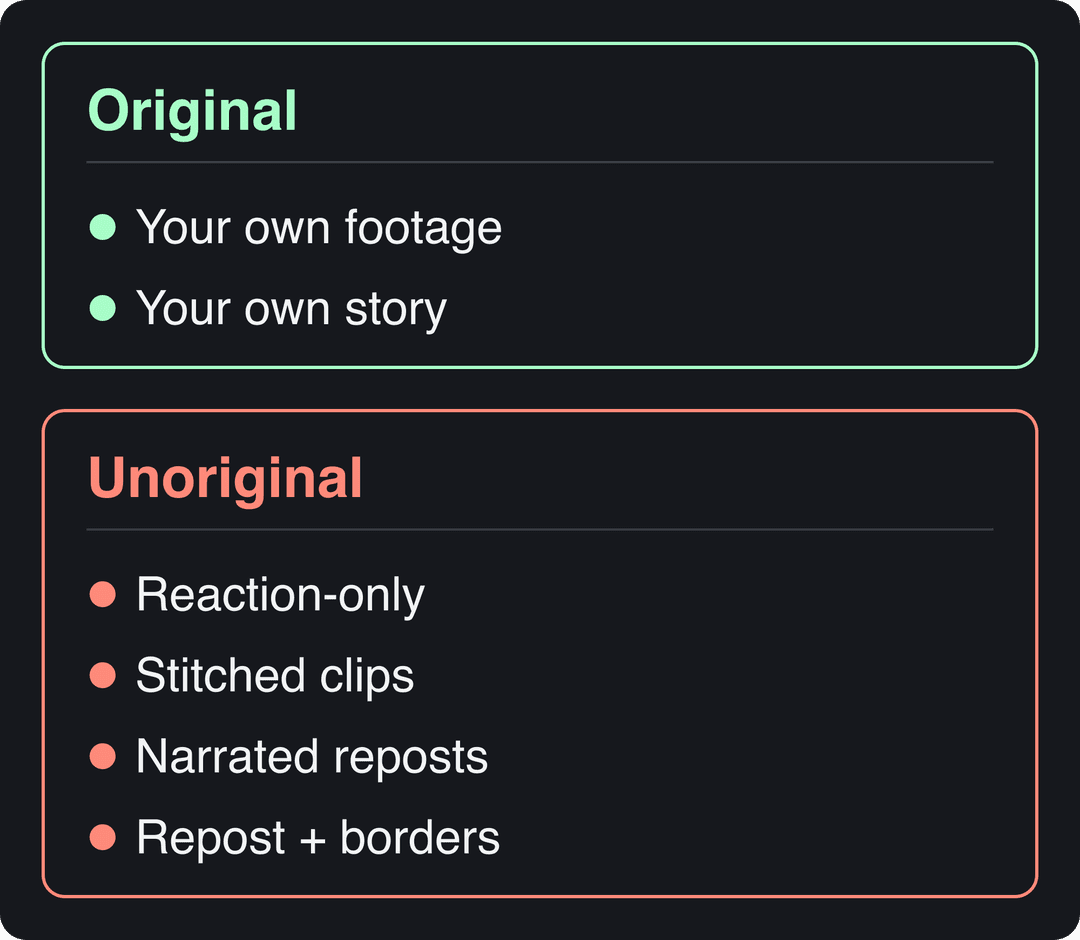
Since March 2026, Facebook treats reaction-only reels, clip-stitching, reels that just narrate what's on screen, and reposts with only borders, captions or speed changes as unoriginal. These are deprioritized, and repeat offenders can lose monetization. Your own footage or your own story is the baseline for reach.
2. Post while the idea is fresh
With same-day posts making up more than 30% of recommended Reels in Q1 2026, speed on a timely idea pays. Keep a simple setup ready (a spot with soft window light, a phone stand, your product unboxed) so you can film the day a trend or a news hook appears.
3. Build it to be shared
Shares carry a reel beyond your followers. Meta said in January 2025 that Reels were being reshared over 4.5 billion times a day across Facebook and Instagram, one of the figures on our short-form video statistics page; ElectroIQ's business on Facebook statistics give broader context on how brands use the platform. People share what they want to say themselves: a relatable struggle, a clever fix, a strong opinion, a satisfying transformation.
Prompt to try
Create a 25-second vertical challenge reel: "I tried to clean my whole desk in 60 seconds." Hook with a timer starting on a messy desk, use fast cuts synced to an upbeat track and a countdown overlay, and finish on the clean desk with the caption "Your turn. Beat my time."
4. Pick a format that travels
In Revid's analysis of 176,367 TikToks with 1,000+ likes posted between October 2025 and October 2026, challenges had the highest median views (182K, with 25.6% passing 1 million), followed by comedy (155K) and reactions (105K), while tutorials sat at 62K. It's TikTok data and it describes videos that already did reasonably well, so it shows what top videos have in common rather than causes; the full study of what makes a TikTok go viral has the method.
Challenges and comedy passed 1M views about twice as often as tutorials and storytelling, which are the most common formats.
Source: Revid analysis of 176,367 TikToks with 1,000+ likes posted between Oct 1, 2025 and Oct 16, 2026 (61,203 creators)
Show the data
| Median views | Share that passed 1M views | |
|---|---|---|
| Challenge | 182.3K | 25.6% |
| Comedy | 154.8K | 22.1% |
| Reaction | 104.8K | 16% |
| Dance | 83.8K | 15.5% |
| Storytelling | 66.1K | 12.2% |
| Lip Sync | 61.7K | 12.3% |
| Tutorial | 61.9K | 12.1% |
One Facebook-specific caution: reactions rank high on TikTok, but a reaction-only reel is exactly what Facebook now treats as unoriginal. If you react, add your own footage, demonstration or take. To find formats that already work in your niche, you can search viral videos and remix them into an original version.
5. Read your numbers and repeat what holds viewers
Open your Page or professional-mode insights after 24 hours. Compare which reels kept people watching and which got shares, then make the next three reels in the format that won. Post when your own audience is active, not at a time copied from someone else's chart.
Using AI to create Facebook Reels
AI can take you from an idea, a script or a link to a finished vertical video without filming. With Revid's AI Reel Generator, the process looks like this:
- Paste a script, a prompt or a link (a blog post, a YouTube video, a product page).
- Revid writes the script and builds the scenes from stock footage, AI images or AI video (Seedance 2.5, MiniMax Hailuo H3, Wan 3.0 or Google Veo 3), with a voice-over in 70+ languages, synced captions and music.
- Fix any scene in the timeline editor and export at 1080p, 30 fps, which sits inside Facebook's recommended specs.
- Upload the MP4 to Facebook. Revid publishes directly to TikTok, Instagram and YouTube, not Facebook, so this last step is manual.
You can also start from a proven format instead of a blank prompt: Revid's library of about 2.77 million real short-form videos lets you pick one and choose "Same energy, new script", which keeps the hook style and pacing but writes new words and visuals. That matters on Facebook, where a narrated repost of someone else's clip counts as unoriginal. Sign-up is free and new accounts get free credits to try video creation, no credit card needed; regular creation then uses the monthly credits of a paid plan, from $39/month.
AI visuals are not an automatic win on Meta's apps. In Revid's study of AI videos vs real footage, AI-generated TikToks averaged twice the views of real footage, while on Instagram, X and Threads AI visuals clustered in the lowest engagement tier. Facebook wasn't measured, but the safest approach there is AI for scripting, captions and supporting scenes, with a clear idea of your own at the center.
How to repurpose TikTok, Instagram and YouTube videos as Facebook Reels
Cross-posting your own videos is one of the cheapest ways to keep a Facebook presence. Do it cleanly:
- Only repost what you made. Reposting other creators' videos with borders, captions or speed changes is precisely what the 2026 rules deprioritize.
- Upload the clean file. Keep the original export from your editor rather than downloading the posted version with a TikTok or Instagram watermark. On Instagram, save the reel to your camera roll before you publish; ig.media has a guide to downloading Instagram videos if you need a copy afterwards.
- Swap unavailable audio. If the sound you used elsewhere isn't in Facebook's library, replace it with a licensed track or your original audio.
- Coming from YouTube? Our guide to sharing YouTube videos on Facebook covers when to share the link and when to upload the file. If your reels send viewers to longer YouTube videos, Pushlap Growth explains how to add links into YouTube videos.
For longer, non-reel style content on the platform, see how to create video for Facebook that people finish.
Can you make money from Facebook Reels?
Yes, but only by invitation. On October 2, 2024, Meta merged In-stream ads, Ads on Reels and the Performance Bonus into one program, Facebook Content Monetization. It's invite-only: you can express interest in the Professional Dashboard, and once accepted you earn from reels, Stories, and photo and text posts.
The money is real. Meta says Facebook paid creators nearly $3 billion in 2025, 35% more than in 2024, with 60% of payouts going to reels. Since March 18, 2026, the Creator Fast Track also pays $1,000 a month for 3 months to creators with at least 100,000 followers on Instagram, TikTok or YouTube ($3,000 a month above one million), plus immediate access to Content Monetization. Eligibility details such as minimum reel length change, so check the requirements shown in your Professional Dashboard. Sendshort keeps a roundup of Facebook Reels statistics if you want third-party figures on reach and earnings.
FAQ
Where is the Facebook Reels creator?
In the Facebook app, it's the Reel option at the top of Feed or in the create (+) menu. On a computer, there's no separate creator to find: any video you upload to your Feed or Page is published as a reel.
Why can't I find a specific song for my reel?
Usually it's music licensing: the rights holder may not have a deal with Meta that covers your country. Pages and business accounts can also see a more limited library than personal profiles, so pick a similar track that is available or use your original audio.
Do Facebook Reels have to be vertical?
No, Facebook Reels have no format restrictions. Vertical 9:16 still fills the phone screen, so it's the best choice for anything made to be watched in the reels feed.
Can I post the same reel on Facebook and Instagram?
Yes, as long as the video is yours. Upload the clean, watermark-free file to each app and check that your music is available on both.
Sources
- Revid analysis of 176,367 TikToks with 1,000+ likes posted between Oct 1, 2025 and Oct 16, 2026 (61,203 creators)
- Revid analysis of 176,367 TikToks analyzed by AI, with 1,000+ likes posted between Oct 1, 2025 and Oct 16, 2026 (61,203 creators)
- Meta Platforms, Meta Q1 2026 Results Conference Call transcript (April 2026)
- Meta Platforms, Meta Q4 2024 Results Conference Call transcript (January 2025)
- Meta, Creator Fast Track: grow your audience and earn money on Facebook (March 2026)
Charts and figures checked on November 6, 2026.