YouTube to Facebook: Share the Link or Upload the File (2026)
There are two ways to get a YouTube video onto Facebook: share the link or upload the file as a reel. This guide covers when to use each, step-by-step instructions, Facebook's 2026 specs, and how to move a Facebook video to YouTube.
On this page
To post a YouTube video to Facebook, click Share under the video and choose Facebook, or paste the link into a Facebook post. If the video is yours, download it from YouTube Studio and upload the file to Facebook instead. An uploaded file plays in the feed as a reel. A link only shows a preview card that sends people to YouTube.
That choice affects money as well as reach. Facebook's Creator Fast Track, launched in March 2026, offers $1,000 a month for 3 months to creators with at least 100,000 followers on YouTube, Instagram or TikTok ($3,000 a month above one million), plus immediate access to Content Monetization. A link to your channel earns you nothing on Facebook. Your own video, uploaded as a reel, can.
- Global year-over-year growth in Facebook video time spent, Q2 2026
- 9%
- Meta Platforms, July 2026
- Paid by Facebook to content creators in 2025, up 35% from 2024
- $3B
- Meta, March 2026
- Monthly Creator Fast Track payout for 3 months at 100,000+ followers
- $1,000
- Facebook Creator Fast Track, March 2026
- Maximum length of a YouTube Short, which uploads to Facebook as is
- 3 min
- YouTube Official Blog, October 2024
Share the link or upload the file: which one to use
| Share the YouTube link | Upload the video file | |
|---|---|---|
| What viewers see | A preview card with a thumbnail | A video that plays in the feed |
| Where they watch | On YouTube (they leave Facebook) | On Facebook, as a reel |
| Whose videos | Any public video | Only videos you own or have permission to post |
| Can earn through Facebook Content Monetization | No | Yes, if you are in the program |
| Effort | Instant | A few minutes |
| Best for | Sending traffic to YouTube, sharing someone else's video | Growing a Facebook audience |
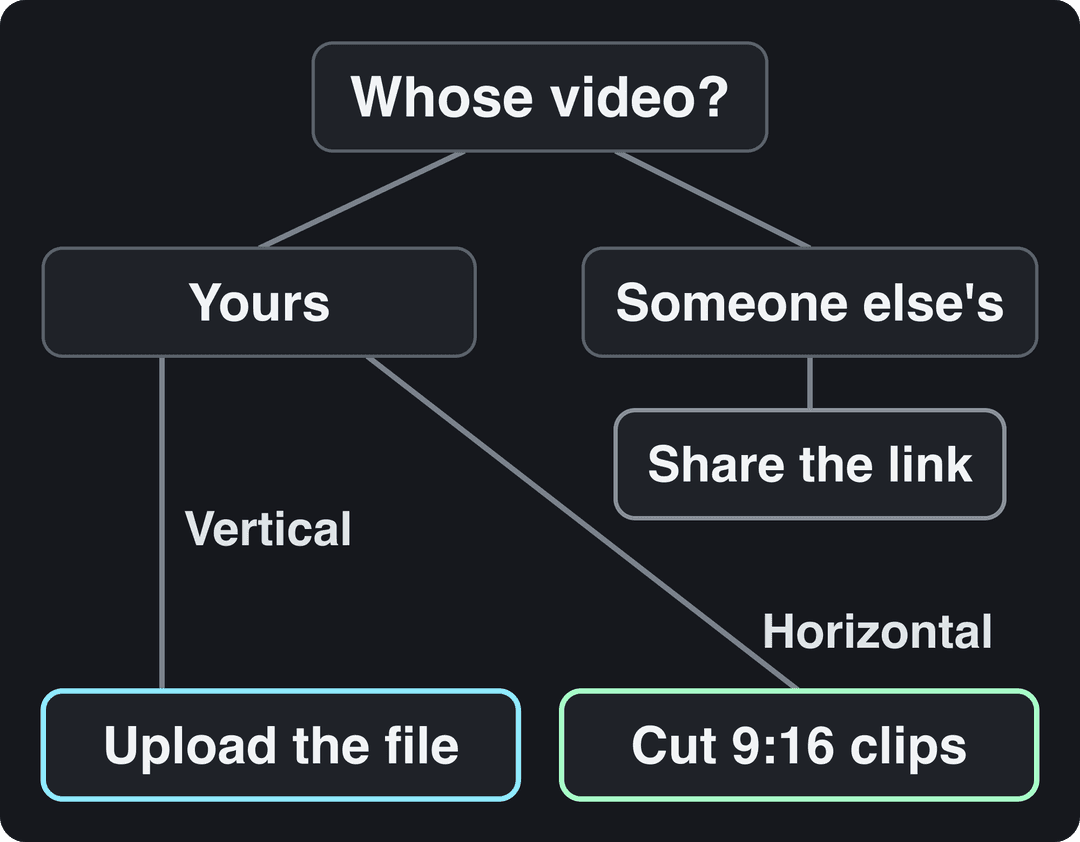
The decision rule is short:
- If it is someone else's video, share the link.
- If it is yours, upload the file.
- If yours is long and horizontal, cut vertical clips first and point to the full video on YouTube.
How to share a video from YouTube to Facebook
Sharing the link is the fastest way to share a YouTube video on Facebook, and it is the only correct way for videos you did not make.
On a computer:
- Open the video on YouTube and click Share under the player.
- Click the Facebook icon. A Facebook window opens with the link attached.
- Add a line of text that says why the video is worth watching, choose where to post it, and publish.
On the YouTube app:
- Tap Share under the video.
- Pick Facebook from the list, or tap Copy link.
- Write your caption in the Facebook app and post.
You can also copy the URL and paste it into any Facebook post, group, comment or Messenger chat. Facebook turns it into a preview card. The card does not autoplay, so your text has to do the selling: lead with the most surprising point of the video, not its title.
How to upload a YouTube video to Facebook
Use this route for your own videos. It takes three steps: get the file, check it against Facebook's specs, and upload it as a reel.
Step 1: Download your video from YouTube Studio
- Open YouTube Studio and go to Content.
- Hover over the video, click the three-dot Options menu, then Download.
- Save the MP4 file.
A Studio download can come out at a lower resolution than the file you originally uploaded. If you still have your edited master export, upload that instead.
Skip third-party "YouTube downloader" sites, even for your own videos. They often recompress the file, some add a watermark, and many surround the download button with sketchy ads and installers. If you do paste a link into a third-party tool, read how it handles your data first. CreatorCheck's privacy policy shows what a clear one covers. For a collaboration or someone else's footage used with permission, ask the creator to send you the source file.
Step 2: Check Facebook's video specs
Since June 2025, every new Facebook video is shared as a reel, and the Video tab is now called Reels. Facebook reels have no length or format restrictions, so a long horizontal YouTube video uploads fine. These are Meta's recommended specs:
| Setting | Facebook recommendation |
|---|---|
| File type | .mp4 |
| Resolution | 1080p |
| Video codec | A standard MP4 codec (listed in Meta's Reels requirements) |
| Frame rate | 24 to 60 FPS |
| Audio | AAC stereo, 44.1 or 48 kHz |
| Length | No limit for reels |
A standard YouTube export (MP4 at 1080p) already meets these, so you rarely need to convert anything.
Step 3: Upload it to Facebook
- On your profile or Page, open the post composer, choose Photo/video (or Reel), and select the file.
- Write a new caption for Facebook instead of pasting your YouTube title (more on that below).
- Pick a cover frame that reads at a glance.
- Add captions (see the captions section).
- Publish now, or schedule it. Pages can schedule posts in Meta Business Suite.
Is there a YouTube to Facebook video converter?
You do not need a file converter: Facebook accepts the MP4 that YouTube Studio gives you. People who search for a YouTube to FB converter usually need something else, which is a change of shape. A horizontal YouTube video works on Facebook, but it fills a narrow strip of a phone screen. Vertical and square versions take far more of it.
What aspect ratio works best on Facebook?
| Where it plays | Shape that fills it | Notes |
|---|---|---|
| YouTube long-form | 16:9 horizontal | Built for desktop and TV |
| YouTube Shorts | Vertical or square, up to 3 minutes | Downloads upload to Facebook as is |
| Facebook feed | 4:5 or 1:1 | Takes more phone screen than 16:9 |
| Facebook Reels viewer | 9:16 full vertical | Fills the whole screen |
To change the shape of a single video, the Revid video resizer converts a file to 9:16, 4:5, 16:9 or 1:1. Keep the subject centered before you crop: a talking head survives a 9:16 crop, while a wide screen recording usually does not. For every platform's dimensions in one place, see the social media video sizes guide.
Videos include an AI voiceover; clip quotes are AI highlights without one. Clip and motion graphics quotes are minimums: the final charge depends on the source video or the footage generated. AI video clips are on the Pro model; the Base model costs 110 credits for 30 s.
Source: Revid public endpoint POST /api/public/v3/calculate-credits, queried October 29, 2026: workflow video-to-clips with 1 and 3 outputs, and prompt-to-video at 30 and 60 seconds with each media type. Cents = credits x $39 / 2,000, rounded.
Show the data
| Credits | US cents on Growth | |
|---|---|---|
| 1 clip from a YouTube link | 1 | 2 |
| 3 clips from a YouTube link | 3 | 6 |
| 30 s video, stock footage | 11 | 21 |
| 30 s video, animated AI images | 37 | 72 |
| 60 s video, animated AI images | 75 | 146 |
| 30 s video, motion graphics (estimate) | 190 | 371 |
| 30 s video, AI video clips (Pro model) | 341 | 665 |
How to turn a long YouTube video into Facebook clips with Revid
A 20-minute horizontal video posted whole rarely holds a scrolling viewer. The stronger play is to pull the best moments out as short vertical clips, under 60 seconds each, and post them as reels. Revid does this from the YouTube link, so you never download or crop by hand:
- Paste the video's URL into the YouTube clip maker. The AI turns the long video into short vertical clips.
- Open a clip in the timeline editor to trim it, change the order of scenes or restyle the captions.
- Export at 1080p (or 720p or 4K) at 30 or 60 fps, then upload the file to Facebook as a reel.
Revid does not post to Facebook directly. It can schedule the same clips to TikTok, Instagram and YouTube from one queue, so one export covers every other short-form platform. Sign-up is free and new accounts get free credits to try video creation, no credit card needed. Regular creation then uses the monthly credits of a paid plan, from $39 a month.
Add captions people can read with the sound off
Many people scroll Facebook with the sound off. If your video only makes sense with audio, a large part of the feed will skip it.
Use two kinds of captions:
- Burned-in captions are part of the image, so they show on every device without anyone tapping a button. They also act as a visual hook. The Revid caption generator transcribes the audio in 100+ languages and offers 30 caption styles.
- An SRT caption file uploaded alongside the video gives you selectable, accessible text. OneNine's summary of WCAG captioning standards explains what accurate, accessible captions need: sync, speaker identification and non-speech sounds.
Rewrite the title, caption and cover for Facebook
YouTube titles are written for search, while Facebook captions are read mid-scroll by people who were not looking for you. Swap the keyword phrase for a claim or a question.
- YouTube title: "How to organize a small kitchen on a budget"
- Facebook caption: "This drawer trick freed up half my counter. Would you try it?"
End the caption with one clear ask, such as "Full recipe on our blog", "Tag a friend who needs this" or "Full video on YouTube, link below". Pick a cover frame with a clear face or object and very little text, because it shows small in the feed.
Prompt to try
Make a 30-second vertical reel on a small-kitchen drawer trick that frees up counter space. Open with the hook "This drawer trick freed up half my counter." Use bright, close-up home footage, an upbeat voiceover and bold captions, and end with "Full video on YouTube, link below."
Plan the week: YouTube as the hub, Facebook as the spokes
Facebook is worth the extra upload. Meta said Facebook video time spent grew 9% globally year over year in Q2 2026, and over 10% in the U.S. and Canada. Facebook also paid creators nearly $3 billion in 2025, 35% more than in 2024, with 60% of payouts going to reels. Backlinko's Facebook user statistics break down who that audience is.
Treat YouTube as the hub for the full, polished video and Facebook as the spokes that send people to it. A simple week from one video:
- Tuesday: publish the full video on YouTube.
- Wednesday: post a 30-second reel of the strongest moment on Facebook.
- Thursday: post a short behind-the-scenes clip on your Page.
- Friday: post a poll or quote about the topic to start comments.
If Instagram is part of the plan, Boostfluence's guide to publishing on Facebook and Instagram at once covers the cross-posting setup in Meta's tools. For Facebook-first formats, see how to create Facebook Reels and making videos people watch on Facebook. For the wider workflow across platforms, read the guide on how to repurpose video content.
How to convert a Facebook video to YouTube
The reverse works the same way: get the file, then upload it. Only do this with videos you own.
- Get the file. Use your original export if you have it. If the video only exists on Facebook, Meta's Download your information tool in Accounts Center can export the videos you posted.
- Upload it in YouTube Studio. Click Create, then Upload videos. By default, YouTube uploads are limited to 15 minutes, and verified accounts can upload longer videos, up to 256 GB or 12 hours.
- Know how it will be classified. A vertical or square video up to 3 minutes long becomes a YouTube Short. A horizontal one is a regular video.
- Write YouTube metadata. Titles can be up to 100 characters and descriptions up to 5,000. Write for search this time: the words people would type to find the video.
- Check the music. A Short longer than one minute with an active Content ID claim is blocked worldwide and cannot earn money. Replace licensed tracks you added on Facebook before uploading.
FAQ
Can I post someone else's YouTube video on Facebook?
Yes, as a link: use the Share button or paste the URL. Re-uploading their file without permission risks copyright claims, and Facebook deprioritizes reposts that add nothing original.
Do YouTube links get less reach on Facebook than uploaded videos?
Facebook does not publish reach figures for link posts. A link shows a static card and takes viewers off Facebook, while an uploaded reel plays in place. If growing on Facebook is the goal, upload the file.
Is it legal to download YouTube videos to repost them?
Downloading your own video from YouTube Studio is fine, because it is your content and YouTube provides the button. Downloading another creator's video breaks YouTube's terms unless you have their permission.
Can I post YouTube Shorts as Facebook reels?
Yes. Shorts are vertical or square and up to 3 minutes long, and Facebook reels have no length limit. Download the Short from YouTube Studio and upload it to Facebook as is.
Can I earn money from my YouTube videos on Facebook?
Yes, if Facebook invites you to Content Monetization, which pays for reels, Stories and posts. You can express interest in the Professional Dashboard. Creators with 100,000+ followers on YouTube can also check whether Creator Fast Track is open to them.
Sources
- Revid public endpoint POST /api/public/v3/calculate-credits, queried October 29, 2026: workflow video-to-clips with 1 and 3 outputs, and prompt-to-video at 30 and 60 seconds with each media type. Cents = credits x $39 / 2,000, rounded.
- Meta Platforms, Meta Q2 2026 Results Conference Call transcript (July 2026)
- Meta, Creator Fast Track: grow your audience and earn money on Facebook (March 2026)
- YouTube Official Blog, Tall updates coming to Shorts (October 2024)
Charts and figures checked on November 6, 2026.