Social Media Video Sizes 2026: Every Platform on One Cheat Sheet
The exact video sizes, aspect ratios and length limits for TikTok, Instagram, YouTube, Facebook, LinkedIn and X in 2026. Rules that changed are corrected, and a one-master-file workflow covers every screen.
On this page
The best all-round social media video size in 2026 is 1080 x 1920 pixels (9:16). It fills the screen on TikTok, Instagram Reels and Stories, YouTube Shorts and Facebook Reels. Use 1920 x 1080 (16:9) for regular YouTube videos, and use 4:5 or 1:1 only for videos meant to sit inside a feed.
Many size guides still repeat rules that no longer exist: a 60-second cap on YouTube Shorts, 15-second Story cards, a 140-second limit on X (it now applies only to direct messages), and IGTV, which is gone. Every figure below comes from the platform's own help center or developer docs as of October 2026.
- Best all-round video size (9:16) for TikTok, Reels, Stories and Shorts
- 1080x1920
- Platform help centers, Oct 2026
- Maximum length of a YouTube Short
- 3 min
- YouTube Official Blog, October 2024
- Maximum Instagram Reels length (3 min to reach non-followers)
- 20 min
- Instagram help center
- Maximum length of an uploaded TikTok video
- 60 min
- TikTok Creator Academy
Social media video sizes for every platform (2026 cheat sheet)
| Platform and placement | Aspect ratio | Recommended size | Maximum length |
|---|---|---|---|
| TikTok | 9:16 | 1080 x 1920 | 60 minutes uploaded, 10 minutes with the in-app camera |
| Instagram Reels | 9:16 (1.91:1 to 9:16 accepted) | 1080 x 1920 | 20 minutes; only reels up to 3 minutes are recommended to non-followers |
| Instagram Stories | 9:16 | 1080 x 1920 | 60 seconds per story video (Instagram's API limit) |
| Instagram feed-style video | 4:5 or 1:1 | 1080 px wide (1080 x 1080 for square) | Same as Reels |
| YouTube Shorts | 9:16 or 1:1 | 1080 x 1920 | 3 minutes |
| YouTube videos | 16:9 | 1920 x 1080 or 3840 x 2160 | 15 minutes by default; verified accounts up to 12 hours or 256 GB |
| Facebook (every video is a reel) | Any; 9:16 for reels | 1080p | No length limit |
| 1:2.4 to 2.4:1 | 1920 x 1080 or 1080 x 1920 | 15 minutes, 5 GB | |
| X (Twitter) | 1:3 to 3:1 | 1280 x 720, 720 x 1280 or 720 x 720 | 20 minutes (125 minutes with Premium) |
Two habits cover almost every case: shoot vertical, and keep the important part of the frame in the middle so any later crop still works.
If you prefer a video walkthrough of the same ratios, the one below is a good visual primer. It dates from 2024, so check its length limits against the table above.
Generating in the final shape matters: cropping a wide video to 9:16 cuts off text and faces. Avatar tools such as Synthesia and HeyGen default to 16:9 for training and web use.
Source: Revid data, Amplitude project_built by ratio for text-input tools, Sep 29 to Oct 28, 2026, 50,623 projects.
Show the data
| Share of projects | Projects | |
|---|---|---|
| 9:16 vertical | 83.2% | 42.1K |
| 16:9 wide | 15.2% | 7.7K |
| 1:1 square | 0.9% | 457 |
| 4:5 portrait | 0.7% | 356 |
The four aspect ratios that cover every platform
Video dimensions are written as width x height in pixels, and the aspect ratio is the shape those numbers make. Four ratios cover nearly every social placement:
| Aspect ratio | Shape | Standard size | Other common sizes | Where to use it |
|---|---|---|---|---|
| 9:16 | Vertical | 1080 x 1920 | 720 x 1280, 2160 x 3840 (4K) | TikTok, Reels, Stories, Shorts, Facebook Reels |
| 4:5 | Portrait | 1080 px wide | A crop of a 9:16 video at the same width | Instagram and Facebook feeds |
| 1:1 | Square | 1080 x 1080 | 720 x 720 | Feeds on Instagram, Facebook, LinkedIn and X |
| 16:9 | Horizontal | 1920 x 1080 | 1280 x 720, 3840 x 2160 (4K) | YouTube, LinkedIn, X, websites |
Drawn at the same width, the difference is obvious. A 9:16 video takes the whole phone screen, 4:5 and 1:1 sit inside a feed, and 16:9 shrinks to a thin strip on a vertical phone unless the viewer rotates it.
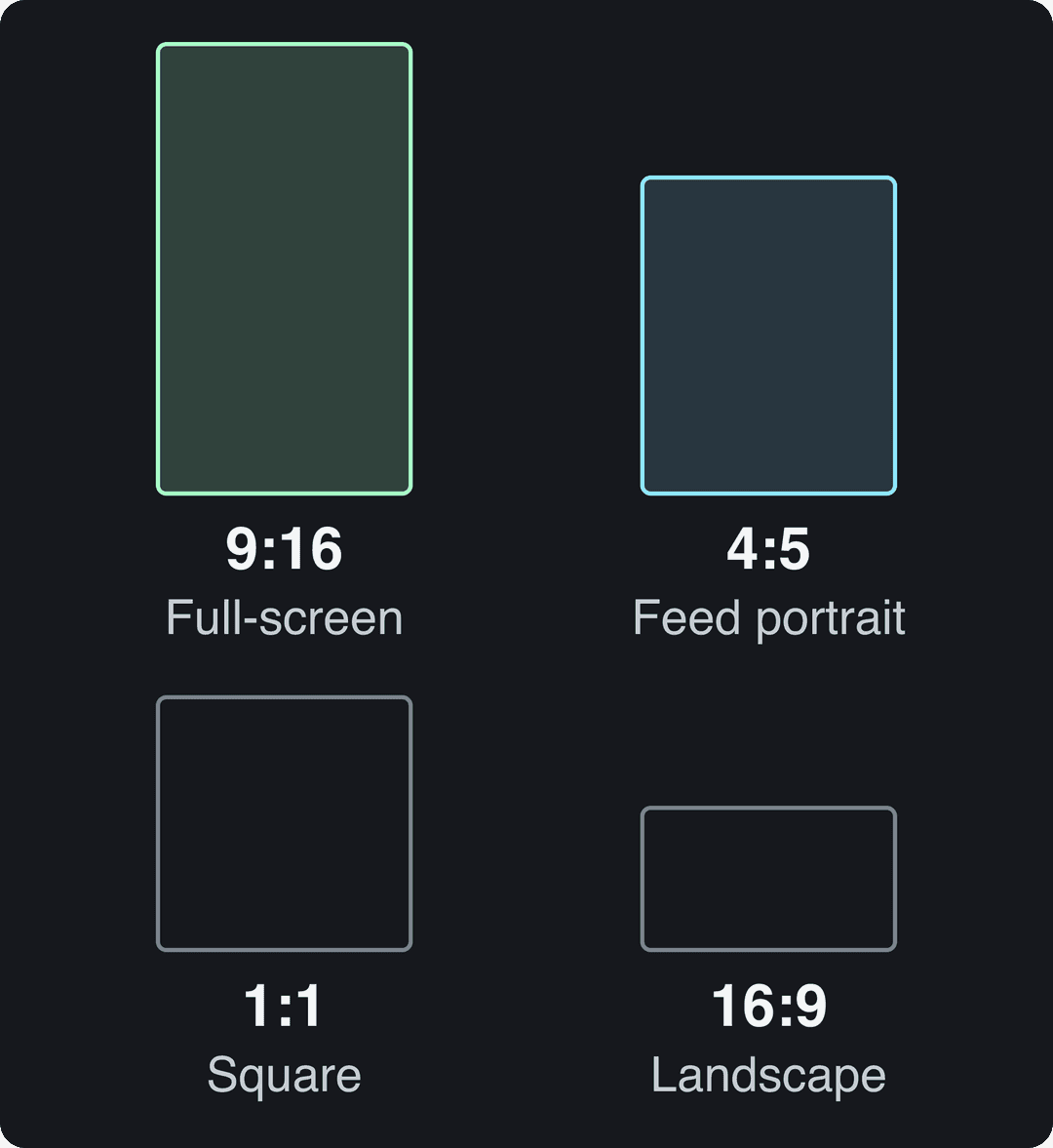
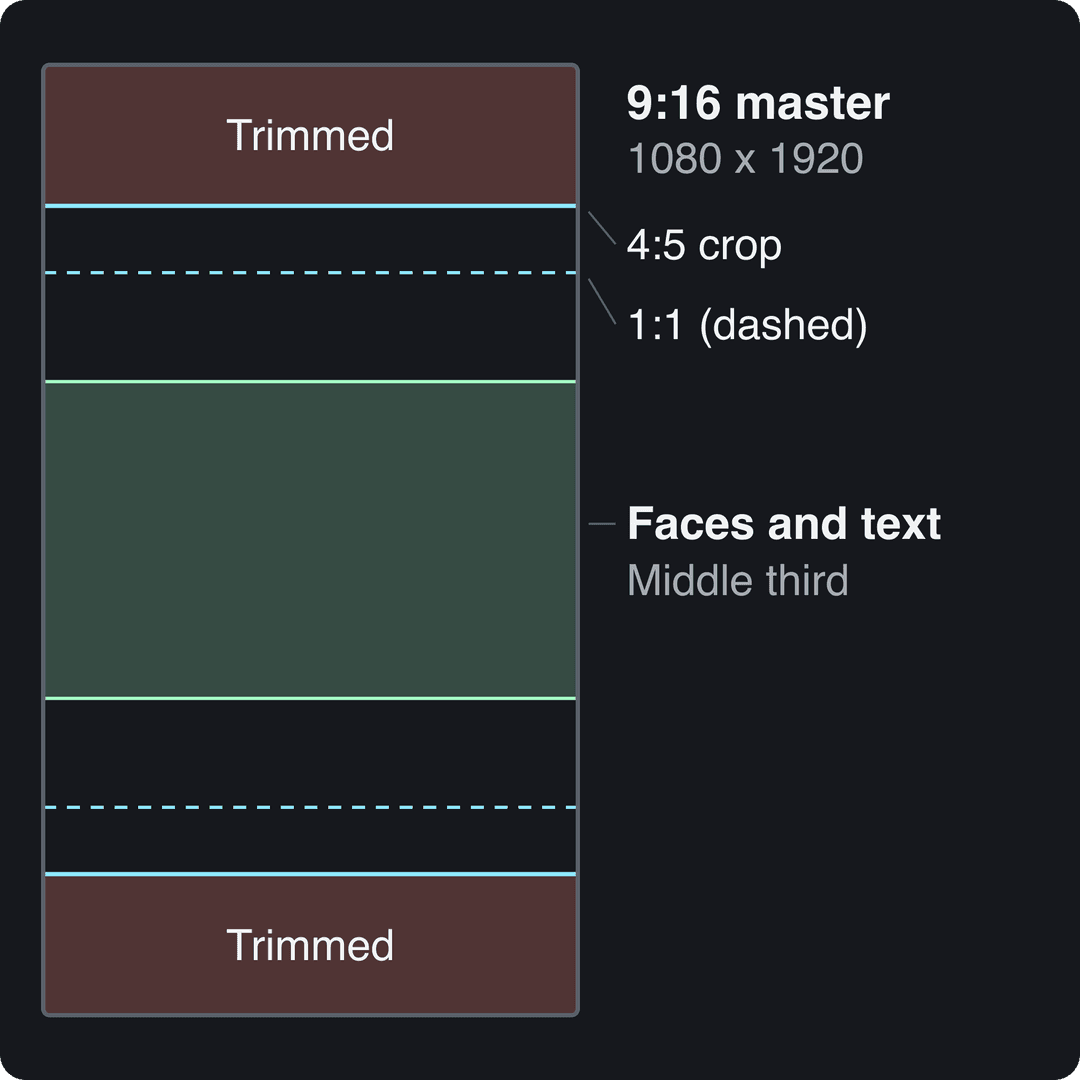
The decision rule: if a video will live on one platform, use that platform's native shape. If it will go everywhere, make the 9:16 version first. The 4:5 and 1:1 versions are then crops at the same width that trim the top and bottom, while going from 16:9 to vertical throws away most of the frame.
Instagram video aspect ratio and sizes
What aspect ratio should Instagram videos be?
Instagram accepts video from 1.91:1 (horizontal) to 9:16 (vertical), at a minimum of 30 FPS and a minimum resolution of 720 pixels. Instagram's recommended ratio for Reels is 9:16, which makes it the right default for any video you post there today, including ones you expect people to see in the feed.
What is the best video size for Instagram?
- Vertical (Reels and Stories): 1080 x 1920, 9:16.
- Portrait feed look: 4:5 at 1080 px wide. It takes more of the screen than a square and less than a full-screen reel.
- Square: 1080 x 1080. Use it when the same file also goes to LinkedIn or X.
- Horizontal: up to 1.91:1. A 1920 x 1080 file uploads fine (Instagram's API caps width at 1920 px), but it plays as a strip on phones, so reframe it to vertical when you can.
Reels can be up to 20 minutes long, but Instagram does not recommend reels over 3 minutes to people who don't follow you. Story videos published through Instagram's API can run 3 to 60 seconds.
Your profile grid has shown vertical rectangles instead of squares since January 2025. Instagram hasn't published the exact ratio (secondary sources disagree between 3:4 and 4:5), and the tallest photo it keeps uncropped is 3:4 at 1080 x 1440. Keep faces and text in the center of your cover so they survive either crop. Instagram recommends Reels covers of 420 x 654 px (1:1.55).
For Reels-only details such as covers, export settings and where the buttons sit, see the Instagram Reels dimensions guide and the free Instagram Reels safe zone checker.
What happened to IGTV video sizes?
IGTV no longer exists as a separate format. Instagram folded it into regular video and then into Reels, and closed the standalone IGTV app. Long videos you would once have posted to IGTV now follow the Reels specs above: 9:16 at 1080 x 1920, up to 20 minutes.
TikTok video size
TikTok's Creator Academy recommends 9:16 at 1080 x 1920. Uploaded videos can be up to 60 minutes long, while the in-app camera records up to 10 minutes. TikTok Studio Web accepts landscape or vertical uploads in 1080p, 2K or 4K, with files up to 30 GB.
If you post through a scheduler or another third-party tool, TikTok's Content Posting API applies tighter limits: MP4 (recommended), WebM or MOV, 23 to 60 FPS, 360 to 4096 px per side, and up to 4 GB and 10 minutes per video.
Horizontal uploads are allowed but play small with empty space above and below. More on framing, captions and the interface overlay is in the TikTok dimensions guide, and you can test a frame on the free TikTok safe zone overlay.
YouTube video size: 16:9 for videos, 9:16 for Shorts
What size is a horizontal YouTube video?
A regular YouTube video is 16:9. The standard size is 1920 x 1080 (1080p), and 3840 x 2160 for 4K. YouTube accepts 24, 25, 30, 48, 50 or 60 fps, so export at the frame rate you shot in. Uploads are limited to 15 minutes by default; verified accounts can go up to 256 GB or 12 hours, whichever is less.
What size is a YouTube Short?
Any square or vertical video up to 3 minutes long, uploaded on or after October 15, 2024, is classified as a Short. Use 1080 x 1920. One trap: a Short longer than one minute with an active Content ID claim of any type is blocked globally, so keep claimed music clips under a minute. Check text placement with the YouTube Shorts safe zone template.
What size should YouTube thumbnails be?
YouTube now recommends 3840 x 2160 custom thumbnails (16:9, minimum width 640 px), up to 50 MB on desktop but only 2 MB on mobile. Custom thumbnails need a verified account. Verified accounts can also upload custom Shorts thumbnails in YouTube Studio on a computer, at 9:16 (2160 x 3840 recommended). For vertical videos, a 16:9 custom thumbnail is replaced by an auto-generated 4:5 thumbnail on the home, explore and subscription pages. The full breakdown is in our YouTube thumbnail size guide.
What aspect ratio should Facebook videos be?
Since a June 2025 change, every new Facebook video is shared as a reel, and Meta says reels have no length or format restrictions. The old Video tab is now called Reels. In practice:
- Short, mobile-first videos: 9:16 at 1080 x 1920, the same file you post to TikTok and Instagram.
- Long videos (talks, webinars, gameplay, interviews): keep them 16:9 at 1920 x 1080. Facebook accepts any orientation and length.
- Feed-style posts: 4:5 or 1:1 if the video is designed to be watched in the feed rather than full screen.
Meta's recommended Reels specs are MP4 at 1080p, 24 to 60 FPS, and AAC stereo audio at 44.1 or 48 kHz.
What is the best aspect ratio for LinkedIn video?
LinkedIn accepts aspect ratios from 1:2.4 to 2.4:1, resolutions from 256 x 144 to 4096 x 2304, and 10 to 60 fps. Videos can run up to 15 minutes and 5 GB, with a minimum of 3 seconds on desktop or 2 seconds on mobile.
Use vertical 9:16 for short, mobile-first clips. LinkedIn has a full-screen vertical video feed on mobile; you can't post to it directly, but any video may appear there based on relevance and performance. Use 16:9 at 1920 x 1080 for screen recordings, demos and webinar clips, where text must stay readable, and 1:1 when the same file also goes to X.
X (Twitter) video size
X recommends AVC High Profile video at 1280 x 720 (landscape), 720 x 1280 (portrait) or 720 x 720 (square), and accepts ratios between 1:3 and 3:1. According to X's developer docs, which say they match the app, non-Premium accounts can post videos up to 20 minutes and 8 GB, while Premium or verified accounts get 125 minutes and 16 GB.
The 140-second, 512 MB limit many guides still quote now applies only to direct-message video for non-Premium accounts (Premium: 10 minutes, 1 GB).
HD, Full HD and 4K: common video dimensions explained
HD, Full HD and 4K are all 16:9 formats. Turn the numbers around for the vertical version:
| Name | Horizontal (16:9) | Vertical (9:16) |
|---|---|---|
| HD (720p) | 1280 x 720 | 720 x 1280 |
| Full HD (1080p) | 1920 x 1080 | 1080 x 1920 |
| 4K UHD | 3840 x 2160 | 2160 x 3840 |
So the 4K video ratio is 16:9, and a 4K frame is 3840 x 2160 pixels. Upload 4K where it's accepted and you actually shot in it: YouTube and TikTok Studio Web both take 4K. For Instagram, X and LinkedIn, 1080p is the safe choice. Instagram's API caps width at 1920 px, X's recommended sizes are 720p, and LinkedIn tops out at 4096 x 2304.
Prompt to try
Make a 25-second vertical TikTok revealing one surprising fact about why cats knock things off tables. Open with the hook "Your cat isn't being rude, it's running an experiment." Use fast cuts of playful cat footage, bold synced captions and an upbeat, curious voiceover, ending on a single punchline.
What is the best video length for social media?
The limits are generous now: 60 minutes on TikTok, 20 minutes on Reels, 3 minutes for Shorts, no limit on Facebook. The real question is what length gets watched, and the data says length matters less than most advice claims.
In Revid's analysis of 176,367 TikToks with 1,000+ likes posted between October 2025 and October 2026, every length bucket from under 15 seconds to 10 minutes had a median between 58K and 76K views. Videos of 61 to 90 seconds reached a 70K median. Videos under 15 seconds had the lowest median (58K) but the most shares per view: 1.41 per 100 views. Revid's larger all-time index (about 2.39 million TikToks) found 16 to 30 second videos ahead at about 141K median views, so the edge of very short videos has faded for recent posts. This is TikTok data on videos that already passed 1,000 likes, so it shows what successful videos have in common, not what causes success. The method is in the full study of what makes TikToks go viral.
Length alone barely moves views: every bucket lands between 58K and 76K median views (the 790 videos over 10 minutes are a small, unusual group). Clips under 15 seconds get shared the most per view.
Source: Revid analysis of 176,367 TikToks with 1,000+ likes posted between Oct 1, 2025 and Oct 16, 2026 (61,203 creators)
Show the data
| Median views | Share that passed 1M views | Shares per 100 views | |
|---|---|---|---|
| Under 15 s | 57.6K | 11.6% | 1 |
| 16 to 30 s | 64.9K | 12.3% | 1 |
| 31 to 60 s | 61.8K | 11.8% | 1 |
| 61 to 90 s | 70.5K | 12.2% | 1 |
| 91 s to 3 min | 63.4K | 11.1% | 1 |
| 3 to 10 min | 76.4K | 12.4% | 1 |
| 10 min+ | 129.6K | 13.8% | 0 |
Decision rules that follow from it:
- One idea, joke or reveal: cut it under 30 seconds. Short videos get shared most.
- Tutorial, story or explainer: take the time the content needs, but stay under 3 minutes on Reels if you want non-followers to see it.
- TikTok Creator Rewards: only videos of at least one minute earn, so plan monetized content to clear that mark.
Platform-by-platform length advice is in our guide to social media video length best practices.
How to make one video fit every screen size
You don't need a different edit for every platform. Build one master and derive the rest:
- Make a 9:16 master at 1080 x 1920 (or 2160 x 3840 if you shoot 4K).
- Keep faces, text and products in the middle third. Every platform puts buttons, captions and usernames over the edges and bottom of vertical video. Check the master against the safe zone overlay for each platform you post to.
- Crop feed versions from the master. For 4:5 and 1:1, keep the full width and trim the top and bottom. Only make a 16:9 version if you framed for it, or place the vertical video over a blurred background.
- Export MP4 with AVC video and AAC audio at 30 fps, or 60 fps for fast motion such as gaming or sports.
- Burn in captions. Feeds often start videos without sound, and on-screen text carries the message either way. An automatic caption generator handles this in 100+ languages.
Resize or create platform-ready videos with Revid
If you already have a video in the wrong shape, Revid's online video resizer converts it in a few clicks:
- Upload your video.
- Choose portrait 9:16, feed 4:5, landscape 16:9 or square 1:1.
- Export the new version and post it.
If you're making the video from scratch, Revid turns a script, a link or an idea into a finished short-form video with voice-over and synced captions. It exports in 720p, 1080p or 4K at 30 or 60 fps and publishes directly to TikTok, Instagram and YouTube.
FAQ
Is 1080p good enough for social media?
Yes. 1080 x 1920 vertical or 1920 x 1080 horizontal is the standard on every platform in this guide. Upload 4K only where it's accepted and you shot in 4K, such as YouTube and TikTok Studio Web.
What frame rate should social media videos be?
30 fps works everywhere: it's Instagram's minimum for Reels and falls inside the ranges TikTok (23 to 60), Facebook (24 to 60) and LinkedIn (10 to 60) accept. Use 60 fps for fast motion.
Can I post a horizontal video on TikTok or Instagram Reels?
Yes, but it plays as a strip with empty space around it. TikTok Studio Web accepts landscape uploads and Instagram accepts ratios down to 1.91:1. Reframe to 9:16 if you can keep the subject in the center.
What file format should I export for social media?
MP4 with AVC video (the most widely supported codec) and AAC audio. TikTok recommends MP4, Facebook recommends MP4 at 1080p with AAC stereo audio, and X recommends AVC High Profile video.
How can I find reliable video optimization for all screen sizes?
Use the specs from each platform's own help center, summarized in the cheat sheet above. Export one 9:16 master at 1080 x 1920, check it against each platform's safe zone, then crop the 4:5 and 1:1 feed versions from it.
Sources
- Revid analysis of 176,367 TikToks with 1,000+ likes posted between Oct 1, 2025 and Oct 16, 2026 (61,203 creators)
- Revid data, Amplitude project_built by ratio for text-input tools, Sep 29 to Oct 28, 2026, 50,623 projects.
- YouTube Official Blog, Tall updates coming to Shorts (October 2024)
Charts and figures checked on November 6, 2026.