Instagram Video Format 2026: Sizes, Ratios, FPS and Export Settings
The exact Instagram video format for Reels, Stories and feed in 2026: aspect ratios, sizes, frame rate, codecs and the framing mistakes that get videos cropped or buried.

On this page
The best Instagram video format is an MP4 file with H.264 video and AAC audio at 30 fps or higher. Use 9:16 at 1080 x 1920 pixels for Reels and Stories and 4:5 at 1080 x 1350 for feed posts. Instagram accepts any ratio from 1.91:1 horizontal to 9:16 vertical.
Most broken Instagram videos are not rejected uploads. They are valid files framed for the wrong placement: a face cut off in the profile grid, a caption hidden under the like button, or a 4-minute Reel that will never reach new viewers because Instagram only recommends Reels of 3 minutes or less to non-followers. The specs below are current for October 2026, including the changes many spec sheets still miss.
- Longest Reel Instagram will recommend to non-followers
- 3 min
- Instagram, since January 2025
- Recommended pixel size for Reels and Stories (9:16)
- 1080x1920
- Instagram specs
- Maximum length of an Instagram Reel
- 20 min
- Instagram specs
- Year-over-year growth in US Instagram Reels watch time, Q4 2025
- 30%
- Meta Platforms, January 2026
Instagram video specs at a glance
| Placement | Aspect ratio | Recommended size | Key limit |
|---|---|---|---|
| Reels | 9:16 (accepts 1.91:1 to 9:16) | 1080 x 1920 px | Up to 20 minutes; 3 minutes or less to be recommended to non-followers |
| Stories | 9:16 | 1080 x 1920 px | Story videos up to 60 seconds each (Meta's API documentation) |
| Feed portrait | 4:5 | 1080 x 1350 px | Takes the most vertical space in the feed |
| Feed square | 1:1 | 1080 x 1080 px | Cropped at the sides in the vertical profile grid |
| Feed horizontal | 1.91:1 to 16:9 | 1080 px wide | Smallest on a phone screen |
| Reels cover | 1:1.55 | 420 x 654 px | Set it before you publish |
| Carousel | Mixed | 1080 px wide | Up to 20 photos and videos |
For every file: MP4 container, H.264 video, AAC stereo audio, a constant frame rate of at least 30 fps and a minimum resolution of 720 pixels. If you publish through Meta's Graph API (for example from a scheduler), Reels must also be 3 seconds to 15 minutes long, up to 300 MB, 23 to 60 fps and at most 1920 px wide. Captions can run up to 2,200 characters.
If you post the same video to several networks, our social media video sizes cheat sheet puts every platform on one page.
Share of clips
Source: Revid production data: 713,649 AI video clips generated Jun 29, 2026 to Sep 26, 2026.
Show the data
| Share of clips | |
|---|---|
| 16:9 | 54% |
| 9:16 | 40.3% |
| 1:1 | 4.3% |
| 3:4 | 0.5% |
What does aspect ratio mean, and how do you choose vertical, square or widescreen?
Aspect ratio is the proportion of a frame's width to its height, written width:height. 9:16 is vertical (taller than wide), 1:1 is square and 16:9 is widescreen. It describes shape, not quality: 1080 x 1920 and 720 x 1280 are both 9:16.
For AI video, choose the ratio before you generate, not after. The model composes each shot for the frame you give it: Google's Veo 3.1, for example, generates 16:9 or 9:16 clips. A widescreen clip cropped to vertical later loses most of its width, and often the subject with it.
| If the video goes to... | Choose | Size |
|---|---|---|
| Instagram Reels, Stories, TikTok or YouTube Shorts | 9:16 vertical | 1080 x 1920 |
| An Instagram feed post | 4:5 portrait | 1080 x 1350 |
| A carousel next to square images | 1:1 square | 1080 x 1080 |
| YouTube long-form, a website, a presentation or a TV screen | 16:9 widescreen | 1920 x 1080 |
Two decision rules cover most cases:
- One asset, several Instagram placements: generate or shoot at 9:16 and keep the subject and text in the center, so a 4:5 or 1:1 version still works.
- Main destination is horizontal: make a separate 16:9 version instead of cropping a vertical one. The two compositions are different edits.
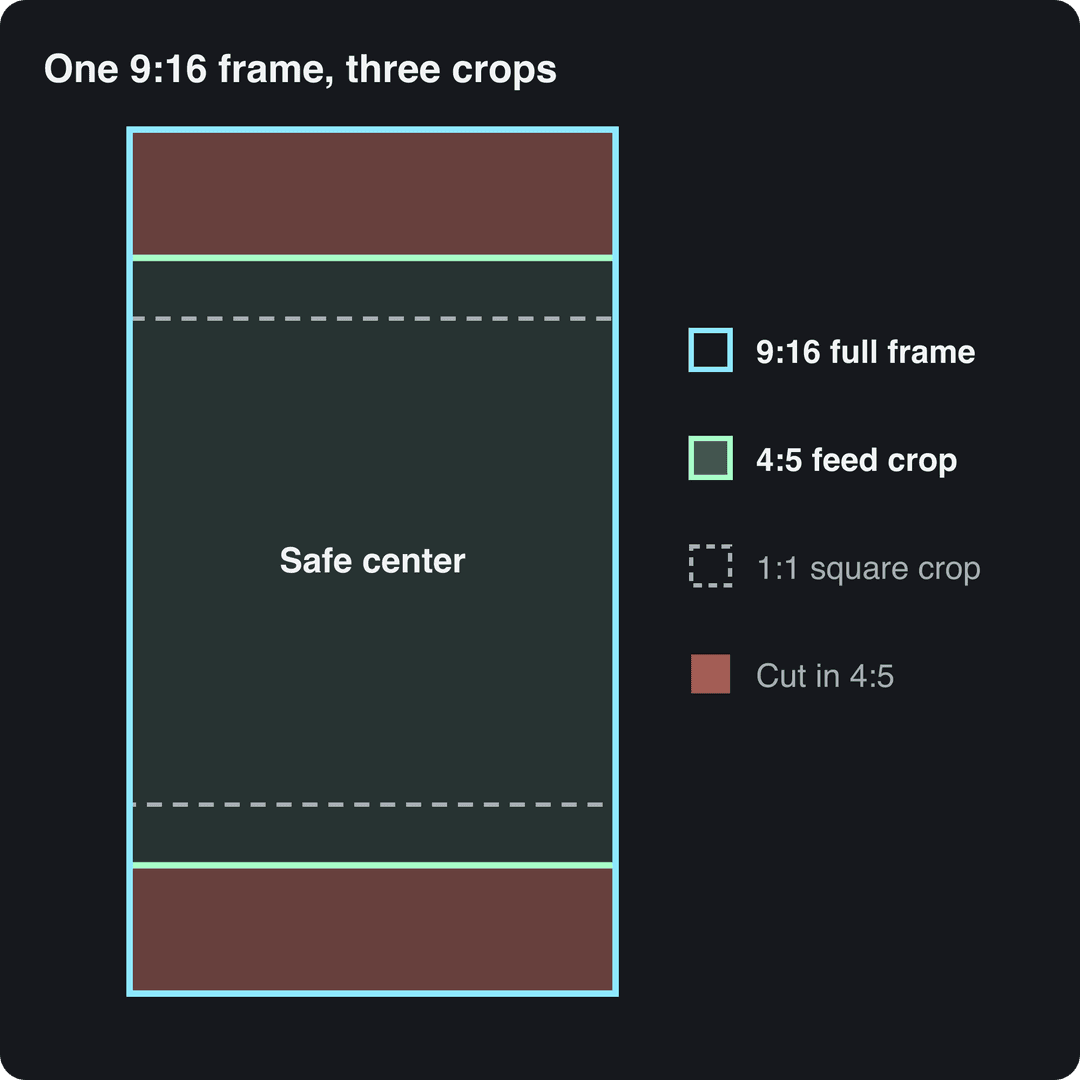
The diagram shows why the center matters. A 4:5 version of a 9:16 frame keeps the full width but trims the top and bottom, and a 1:1 version trims even more. Anything you place near the edges of the vertical frame is the first thing to disappear. For a step-by-step method without stretching, see how to change a video's aspect ratio, and for the case for vertical-first, read our guide to vertical video aspect ratio.
Prompt to try
Make a 45-second vertical 9:16 Instagram Reel on 3 export mistakes that make Instagram videos blurry. Open with the hook "Your Reel looked sharp until you posted it." Use clean motion graphics, a calm expert voice, and bold captions kept in the center of the frame.
Instagram Reels format: size, length and safe zones
Build Reels on a 1080 x 1920 canvas from the first cut. Instagram accepts horizontal and square files as Reels, but they fill far less of the screen, so reframe horizontal footage instead of uploading it as is.
On length, the old 90-second advice is out of date. Before January 21, 2025, only Reels up to 90 seconds could be recommended to non-followers; since then the cutoff is 3 minutes. Reels can run up to 20 minutes, but anything longer than 3 minutes is only shown to people who already follow you. If reach matters, stay at 3 minutes or under.
For the file itself, this Instagram export settings guide from XConvert recommends an MP4 container, H.264 video, progressive scan, square pixels, a fixed frame rate and AAC stereo audio at 128 kbps or more. Our IG Reels resolution guide covers resolution and sharpness in more detail.
Where to keep text and faces
Instagram lays its interface over your video after upload, and the overlay shifts by device and context. Plan the frame by function:
- Center: the face, product, headline or demo. It is the only area that survives full-screen viewing, feed previews and the profile grid.
- Right edge: keep text and logos away from it, where the like, comment and share buttons sit.
- Bottom: no subtitles, prices or calls to action at the very bottom, where your username and caption appear.
- Top: keep key words below the account and navigation elements.
- Grid preview: check the center crop separately, since a Reel can look right full-screen and lose its subject as a grid thumbnail.
You can check a frame against Instagram's interface with our free Instagram Reels safe zone checker, and the Instagram Reels dimensions guide goes deeper on layout.
To study how a successful Reel frames its text, you can save it with an Instagram Reels downloader from UnfollowersTrack. Only save clips you have the right to keep, and use them as a reference for pacing and framing, not as material to repost.
What frame rate should Instagram Reels be?
Export Instagram Reels at a constant 30 fps, the minimum Instagram's Help Center lists for Reels. Use 60 fps for fast motion such as sports, gaming or quick camera moves. Files published through Meta's API must fall between 23 and 60 fps.
Three rules prevent most frame rate problems:
- Use a constant frame rate. Phone footage is often variable frame rate, which can cause audio drift after editing and upload. Convert it to constant before you edit.
- Don't convert back and forth. Pick the delivery rate at the start of the project and keep the timeline at that rate.
- Plan ahead for 24 or 25 fps footage. To meet the 30 fps minimum, you have to convert it, which can make motion look uneven. Check pans and fast movement after export, or shoot at 30 or 60 fps from the start.
Instagram feed video: portrait, square or horizontal
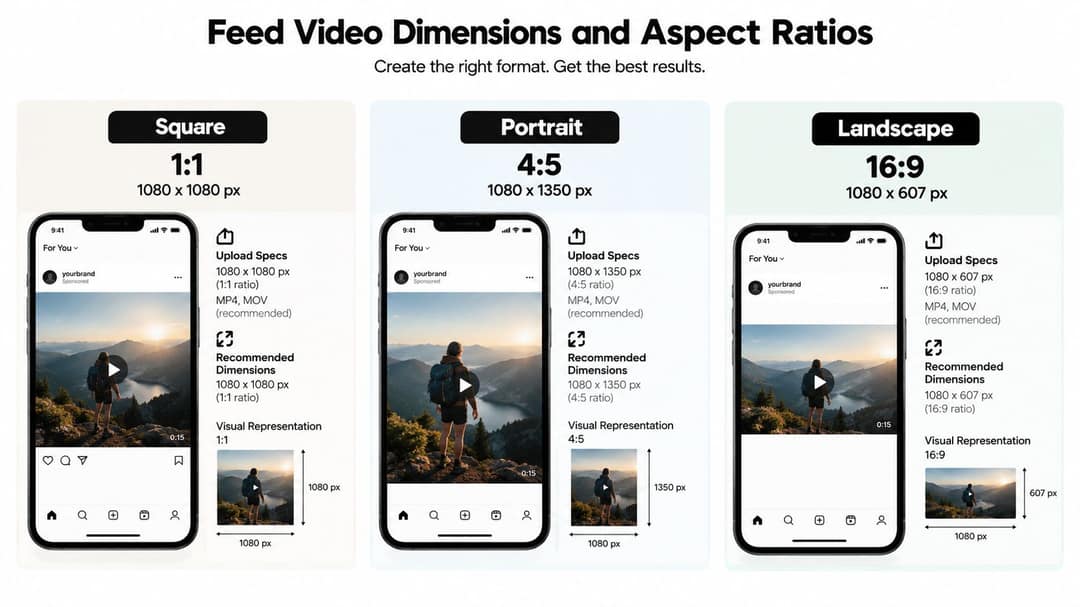
Feed video supports portrait, square and horizontal layouts, and this Instagram video size reference from SocialPilot summarizes how each one crops. Choose by goal:
- 4:5 at 1080 x 1350: the default for feed posts. It takes more vertical space than square or horizontal, which gives a face, product or text hook more time to register while someone scrolls. Tutorials, product demos and explainers belong here.
- 1:1 at 1080 x 1080: use it when a video sits next to square images in a carousel or a series keeps a consistent square look. Since January 2025, profile grid thumbnails are vertical rectangles instead of squares, so a square video is trimmed at the sides in the grid. Keep the subject and title centered.
- Horizontal (1.91:1 to 16:9): use it only when the width carries meaning, such as a group interview, a location shot or a screen recording that becomes unreadable when cropped. Make the first frame and headline work at a small size.
Instagram has not published the exact grid thumbnail ratio. For photos, it keeps full resolution up to 3:4 (1080 x 1440), so a center-weighted composition is the safest bet for any feed format.
Instagram Stories video requirements
Stories use the same 9:16 at 1080 x 1920 canvas as Reels. They disappear after 24 hours, and Meta's API documents story videos of 3 to 60 seconds and up to 100 MB. Plan anything longer as a sequence of separate stories.
Give each story in a sequence one job:
- Opener: state the situation right away. Don't spend the first frame on a logo animation.
- Middle: show the process, answer the objection or show the product in use.
- Interaction: leave clear space for a poll, question or link sticker.
- Close: one next action, such as replying, visiting a link or watching the related Reel.
Keep the top clear for the progress bars and your account name, and keep the bottom clear for the reply field. Add stickers only after the composition works without them, so a poll doesn't land on top of the speaker's subtitle. Raw footage suits Stories, but it still needs fixed exposure, trimmed pauses, clean dialogue and captions you can read on a phone.
Export settings for Instagram
Keep two files: a high-quality master for future edits and crops, and a delivery file built for Instagram. Never overwrite the master with a compressed social export, because a later crop may need detail the delivery file has already thrown away.
| Setting | Use | Why |
|---|---|---|
| Container | MP4 | The format Instagram's export guidance is built around |
| Video codec | H.264 | Wide compatibility before Instagram re-encodes |
| Frame rate | Constant 30 fps (60 for fast motion) | Meets the Reels minimum and avoids audio drift |
| Resolution | 1080 x 1920 (9:16), 1080 x 1350 (4:5) or 1080 x 1080 (1:1) | Matches the placement, so Instagram doesn't rescale |
| Bitrate | Controlled, not maximum (SocialPilot cites about 3.5 Mbps for feed video) | Instagram re-encodes, so extra bitrate adds file size, not detail |
| Audio | AAC stereo, 128 kbps or more | A clean baseline for speech and music |
Test difficult footage before you publish: foliage, water, smoke, fine patterns and fast camera moves show blockiness after re-encoding first. The right preset is the one that survives Instagram's processing cleanly, not the one with the biggest file. Watch the uploaded version on a phone from start to finish, checking caption size, dialogue sync and dark scenes.
Which Instagram format fits your goal?
No format wins everywhere. This roundup of Instagram video and carousel benchmarks from MConverter shows studies disagreeing on whether Reels or carousels earn more engagement. That is a good reason to pick the format by what the viewer should do next.
| Primary goal | Best format | Follow-up format | Metric to watch |
|---|---|---|---|
| Reach people who don't follow you | Reels (3 minutes or less) | Stories | Non-follower reach, shares |
| Explain a product or process | 4:5 feed video | A Reel that introduces the problem | Completion, profile actions |
| Stay visible with frequent updates | Stories | A short Reel recap | Replies, sticker taps, exits |
| Teach a structured topic | Carousel or feed video | A Reel with the core lesson | Saves, completion |
| Drive action after awareness | A Reel with a clear hook | A Story sequence with one prompt | Profile visits, link clicks |
A quick test: if the viewer needs a reason to stop, use Reels. If they need context, use the feed. If they need a timely nudge, use Stories. Don't judge a conversion-focused Story by the reach of a discovery Reel, because they do different jobs.
Generating in the final shape matters: cropping a wide video to 9:16 cuts off text and faces. Avatar tools such as Synthesia and HeyGen default to 16:9 for training and web use.
Source: Revid data, Amplitude project_built by ratio for text-input tools, Sep 29 to Oct 28, 2026, 50,623 projects.
Show the data
| Share of projects | Projects | |
|---|---|---|
| 9:16 vertical | 83.2% | 42.1K |
| 16:9 wide | 15.2% | 7.7K |
| 1:1 square | 0.9% | 457 |
| 4:5 portrait | 0.7% | 356 |
How to make Instagram-ready videos with Revid
Revid creates videos in the right format from the start, so you don't fix the framing afterward.
- Open the AI Reel generator and enter an idea, a script or a link. Revid writes the script and builds a vertical 9:16 video with visuals, a voice-over in 70+ languages, synced captions and music.
- Adjust any scene in the timeline editor, then export at 720p, 1080p or 4K at 30 or 60 fps.
- Need a feed version of a video you already have? The online video resizer converts it to 9:16, 4:5, 16:9 or 1:1.
- For footage you filmed yourself, the AI caption generator adds captions in 100+ languages. Check brand names and technical terms before you publish.
- Publish or schedule directly to Instagram, TikTok and YouTube from one queue.
Fix common Instagram video problems
- Blurry or pixelated upload: export at the placement's exact size (1080 x 1920, 1350 or 1080), use H.264 with a controlled bitrate, and check fast-motion shots after upload.
- Unexpected cropping: reopen the video in its target ratio and move faces, logos and captions toward the center.
- Captions hidden by buttons: move text away from the right edge and the bottom, then preview it with a safe zone overlay.
- Audio out of sync: convert variable frame rate footage to constant before editing and export with AAC audio.
- Reel not reaching new viewers: check the length. Over 3 minutes, Instagram does not recommend it to non-followers.
- Awkward grid thumbnail: the grid shows vertical rectangles, so recenter the subject and set a cover at 420 x 654 px before you publish.
Why Instagram has so many video formats
Instagram launched video on June 20, 2013 with clips of up to 15 seconds. Stories followed in August 2016 as posts that disappear after 24 hours and reached 100 million daily users within two months, according to this history of Instagram's shift from photo app to video platform. Reels launched globally in 2020 as Instagram's answer to TikTok, and the January 2025 changes brought 3-minute recommendations and the rectangular grid. Each placement was built for a different way of watching, which is why one file rarely fits them all.
FAQ
Can you upload a horizontal video as an Instagram Reel?
Yes. Instagram accepts Reels at any ratio from 1.91:1 to 9:16. A horizontal video fills only a strip of the phone screen, though, so reframe it to 9:16 if you want it to compete in the Reels feed.
Should you upload 4K video to Instagram?
Usually not. Instagram re-encodes every upload, so 1080 x 1920 is the practical target, and Reels published through Meta's Graph API are capped at 1920 px wide. Keep your 4K file as the master and export a 1080p delivery file.
What size is an Instagram Reels cover?
Instagram recommends a Reels cover of 420 x 654 pixels, a 1:1.55 ratio. Keep the title and subject in the center, because the grid shows a trimmed version of it.
How many videos can you put in an Instagram carousel?
An Instagram carousel can hold up to 20 photos and videos in the app. Schedulers that publish through Meta's Graph API are still limited to 10.
Do AI-generated videos need a label on Instagram?
Yes, if they are photorealistic. Meta requires you to use its AI disclosure tool for realistic video or audio that was digitally created or altered, and it shows an "AI info" label. Meta may also apply the label itself when it detects industry-standard AI signals in the file.
Sources
- Revid production data: 713,649 AI video clips generated Jun 29, 2026 to Sep 26, 2026.
- Revid data, Amplitude project_built by ratio for text-input tools, Sep 29 to Oct 28, 2026, 50,623 projects.
- Meta Platforms, Meta Q4 2025 Results Conference Call transcript (January 2026)
Charts and figures checked on November 6, 2026.