On this page
The Nano Banana AI trend is the wave of photo edits made with Google's Gemini 2.5 Flash Image model, nicknamed Nano Banana, released in August 2025. You upload a photo to Gemini, describe the change (a 3D figurine, a retro saree portrait, a new outfit or background) and it returns an edited AI picture that usually keeps your likeness.
The most common mistake is trusting the prompt to protect your face. Typing "100 percent same face" does not guarantee it: in prompt 5 below, the output is clearly a different woman. What decides the result is the photo you upload and how precisely you describe the scene, the light and the style, which is what the formula and the seven prompts below are built on.
- Average views of AI-generated TikToks compared with real footage
- 2x
- Revid study of AI videos vs real footage
- Parts every working Nano Banana prompt covers
- 6
- Prompt formula in this article
- Videos TikTok has labeled as AI-generated content
- 3 billion
- TikTok, July 2026
What is the Nano Banana AI trend?
Nano Banana is the nickname of Google's Gemini 2.5 Flash Image model. Soon after its release in August 2025, people started using it to remake their own photos and posting the results on X, TikTok and Instagram. Google has shipped newer versions since, so check the model picker in Gemini to see which one you are using.
The trend has a few recurring formats:
- 3D figurines: your photo turned into a collectible toy on a desk, next to its packaging box.
- Retro portraits: sheer sarees, warm side light and 80s Bollywood poster styling, often for couples.
- Outfit and scene swaps: new clothes, a new background, rain or snow, a different decade.
- Practical edits: business headshots and fashion editorial portraits.
It spread because the edits need no design skills, the output keeps the person recognizable most of the time, and a figurine of yourself is the kind of image people share without being asked.
Posts with AI visuals
Source: Revid social index: 388,379 posts from X, Instagram, Threads, Reddit and LinkedIn with AI labels per post, snapshot of Sep 15, 2026.
Show the data
| Posts with AI visuals | |
|---|---|
| High engagement | 1.6% |
| Medium engagement | 2.9% |
| Low engagement | 6.7% |
How to create Nano Banana images in Gemini
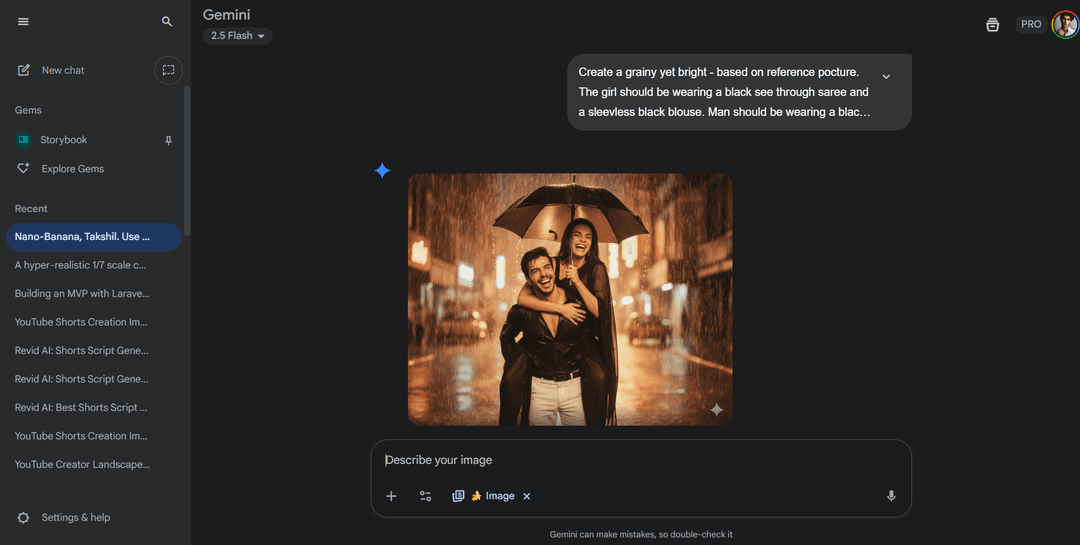
- Open the Gemini app in your browser or the Gemini app on your phone, and sign in with a Google account.
- Switch to image creation. In the screenshot above it appears as an "Image" chip with a banana icon in the prompt bar; the interface may look different by the time you read this.
- Upload your photo with the plus button. Use a sharp, well-lit picture where faces are clearly visible.
- Paste or write your prompt, then send it.
- Refine in the same chat. Ask for one change at a time ("make the light warmer", "keep everything but change the jacket to red") instead of rewriting the whole prompt.
- Download the image you like.
The Nano Banana prompt formula
Every prompt that works in this trend covers the same six parts. Leave one out and the model fills the gap with something generic.
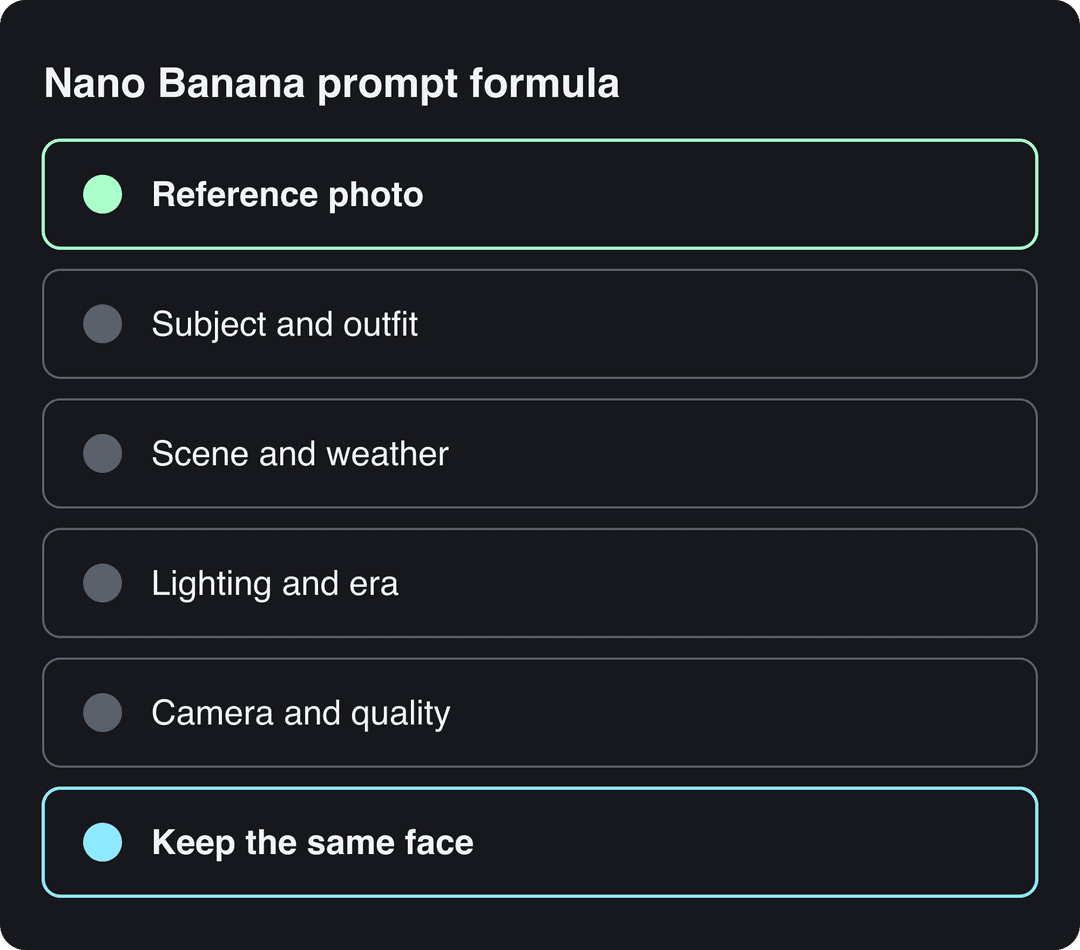
| Part | What to write | Example from the prompts below |
|---|---|---|
| Reference photo | Point to the upload: "the person in the attached image" | "based on the reference picture" |
| Subject and outfit | Clothes, pose, expression | "black and white retro-style leather jacket with bold horizontal stripes" |
| Scene and weather | Location, background, weather | "raining in the background" |
| Lighting and era | Light source, mood, period | "warm light source from the right", "inspired by the 80s Bollywood era" |
| Camera and quality | Framing and photo style | "full body, professional high-resolution photography" |
| Keep the face | Ask for the face to stay unchanged | "keep the same face as the uploaded photo" |
7 Nano Banana prompts to copy, with results
The prompts below are cleaned up from the originals (typos fixed, same instructions). Upload your photo first, then paste the prompt and change the details to fit you.
Prompt to try
Make a 20-second vertical video revealing a photorealistic 1/7 scale collectible figurine on a computer desk, with its 3D model open on the monitor and a premium toy box beside it. Open with the hook "I turned myself into a collectible toy", use slow product-showcase camera moves and warm studio lighting, and end on a close-up of the packaging.
Prompt 1: the 3D figurine trend
The Nano Banana 3D figurine trend turns a flat photo into a photorealistic collectible: the figure on a clear acrylic base, its 3D model open on a monitor, and a retail box beside it. The details that sell the effect are the scale, the base, the modeling software on screen and the packaging. Swap the Marvel background for your own fandom, hobby or brand.
A hyper-realistic 1/7 scale commercialized figurine of the characters in the reference picture, displayed on a computer desk. The figurine is crafted in a realistic style, standing on a round transparent acrylic base with no text. On the computer screen, a 3D modeling software is open, showing the modeling process of this figurine. Next to the screen is a premium toy packaging box styled like high-quality collectible figures, featuring two-dimensional flat illustrations and original artwork. In the background, multiple toy-sized Marvel superheroes are posed in an epic Avengers: Endgame battle scene, including Iron Man, Captain America with Mjolnir, Thor with Stormbreaker, Hulk, Black Widow, Hawkeye, Spider-Man, Doctor Strange, Black Panther, Scarlet Witch, Ant-Man and Captain Marvel. The atmosphere is dynamic and cinematic, while the figurine on the desk is highlighted with professional product showcase lighting.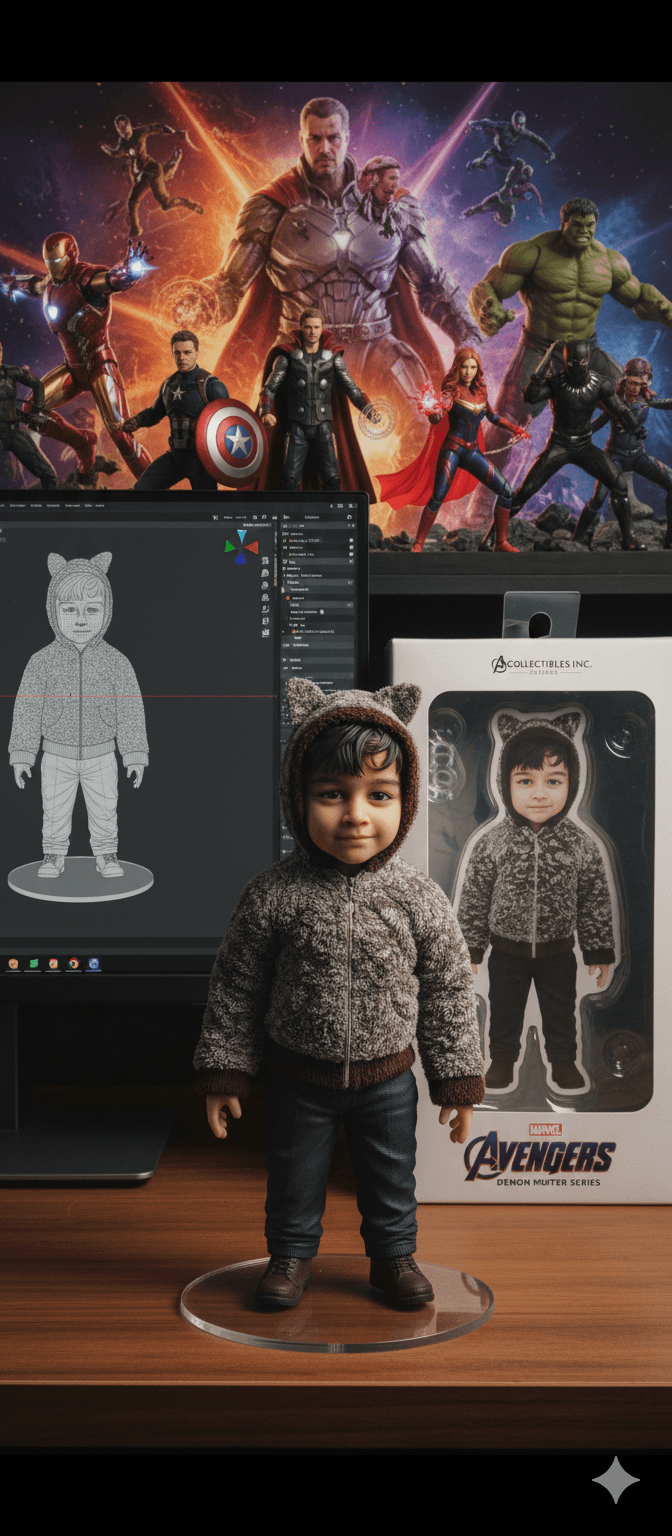
Prompt 2: sunlit saree couple portrait
Upload a photo of you and your partner. The input here was a stock photo of a couple laughing in the street, piggyback style.
Create a soft, sunlit portrait of the couple in the attached image. The woman wears a flowing sheer royal blue saree with delicate floral embroidery. She sits gracefully against a plain wall, facing the front, bathed in warm natural light, with a triangular patch of sunlight casting artistic shadows. Her gentle expression, long loose hair with strands moving slightly, and the dreamy golden glow create a serene, poetic and romantic mood. The man wears a white shirt and looks at her, smiling.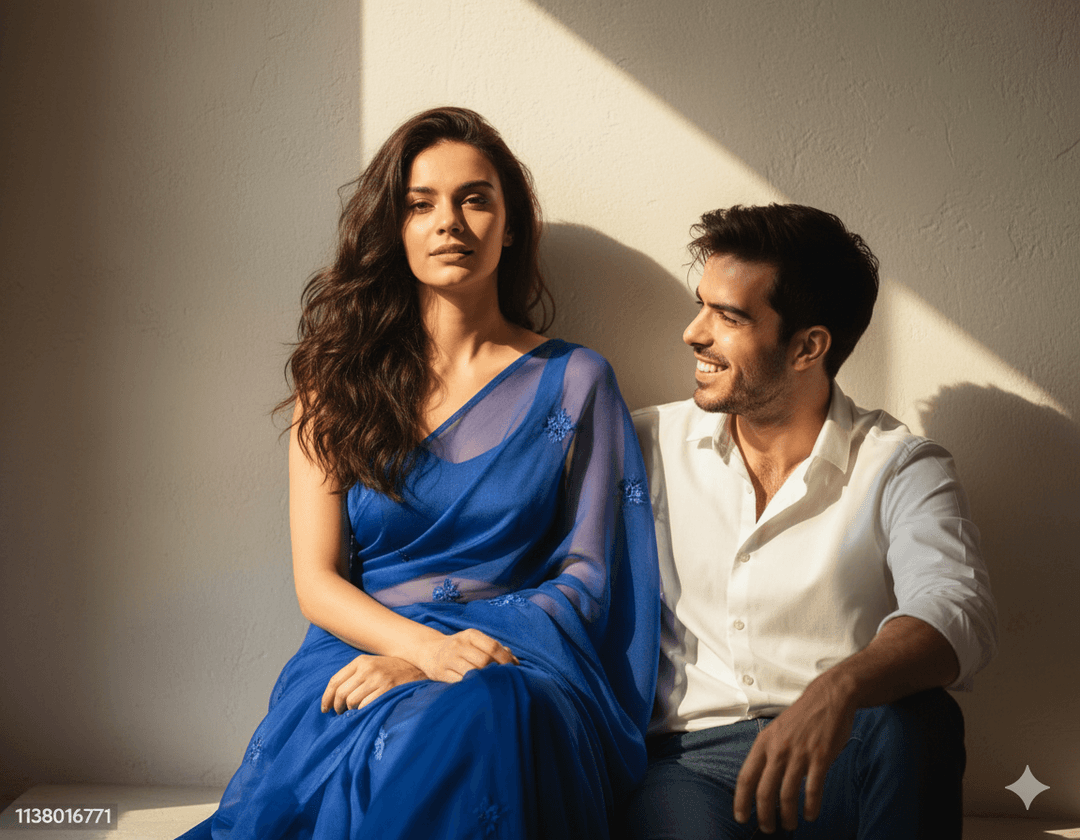
The model changed the pose completely (seated instead of piggyback) because the prompt describes a new pose. If you want to keep the original pose, say so.
Prompt to try
Create a 15-second vertical video of a couple laughing under an umbrella on a rainy street at night, styled like a grainy 80s Bollywood film poster with warm romantic lighting. Start with the hook "POV: your love story in 1985", add soft rain sounds and a retro music feel, and finish on the couple framed in neon reflections.
Prompt 3: 80s Bollywood rain
Same couple photo, different mood. This one keeps the piggyback pose because the prompt does not ask for a new one.
Create a grainy yet bright image based on the reference picture. The woman wears a black sheer saree and a sleeveless black blouse. The man wears a black shirt and white trousers. Both hold an umbrella while it rains in the background. Romantic lighting, inspired by the 80s Bollywood era.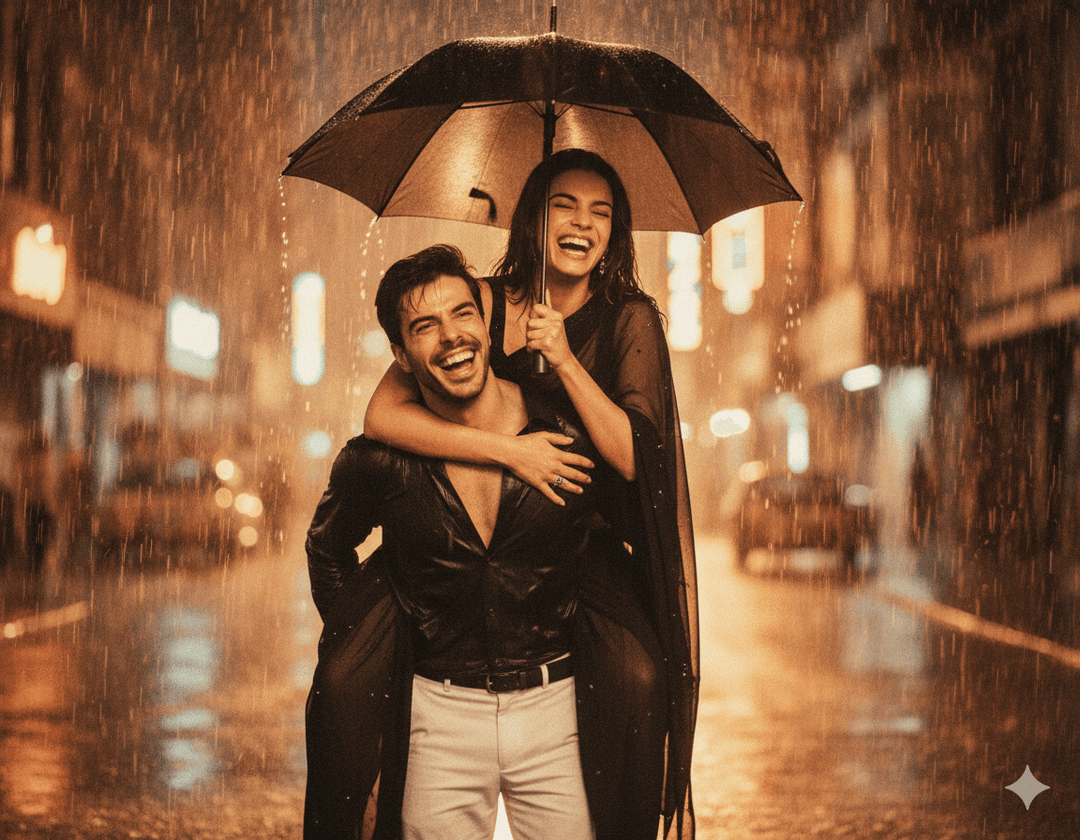
Prompt 4: banana outfits
A short, vague prompt on the same photo:
Change the outfits of these two characters into bananas.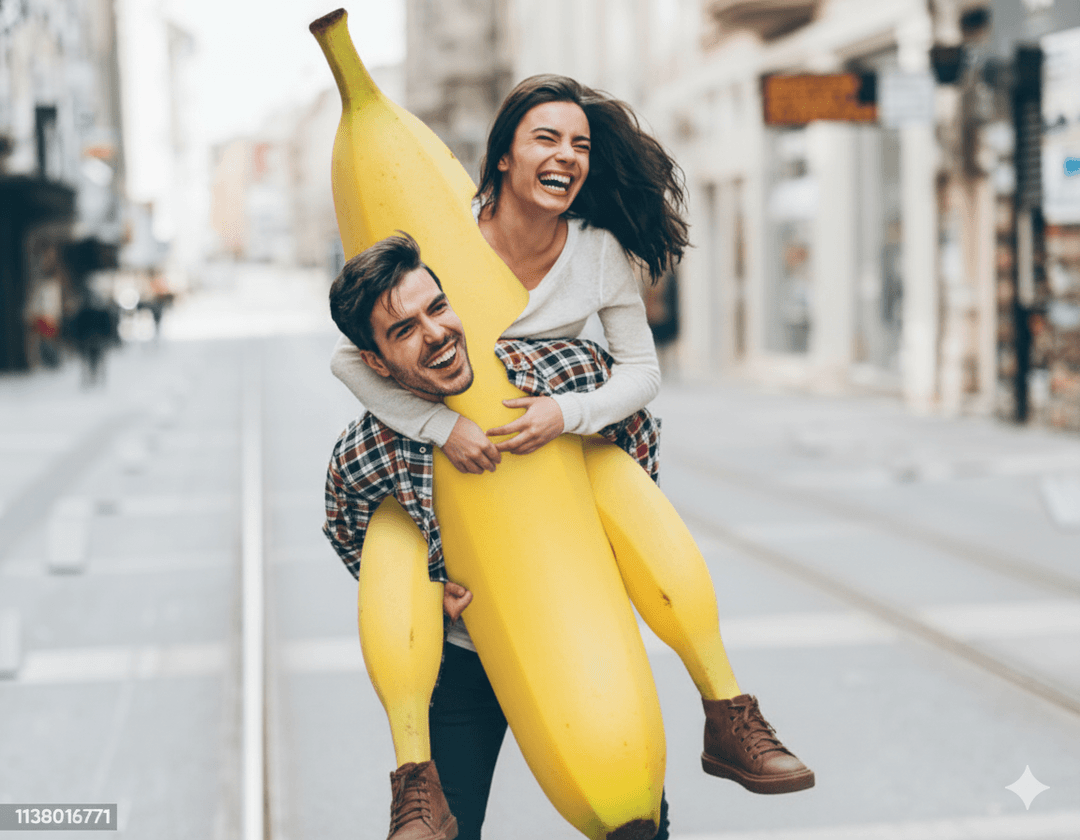
You get one giant banana with legs instead of two banana costumes. Fun for a meme, but it shows the rule: the fewer details you give, the stranger the interpretation. Write "each person wears a full-body banana costume" if that is what you want.
Prompt 5: red saree retro portrait
The input was a studio photo of a young woman in a white top and beige trousers.
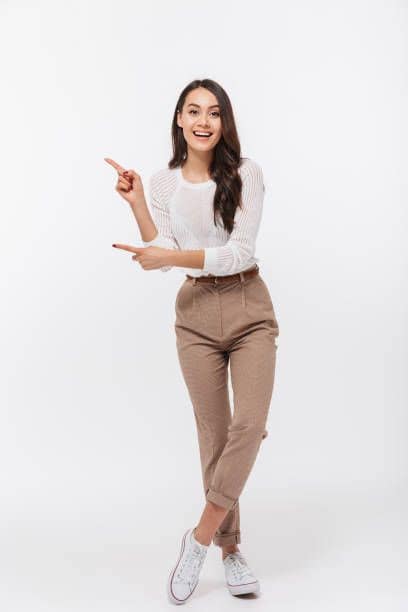
Convert into a 4k HD realistic, stunning portrait of a young Indian woman with long, dark, wavy hair over her shoulders. She wears a translucent, elegant red saree draped over one shoulder, with a fitted blouse underneath. White flowers are tucked behind her right ear. She looks slightly to her right with a soft, serene expression. Keep the same face as the uploaded photo, 100 percent unchanged. The background is a plain, warm-toned wall lit by a warm light source from the right, casting a soft-edged shadow of her profile and hair on the wall. The overall mood is retro and artistic.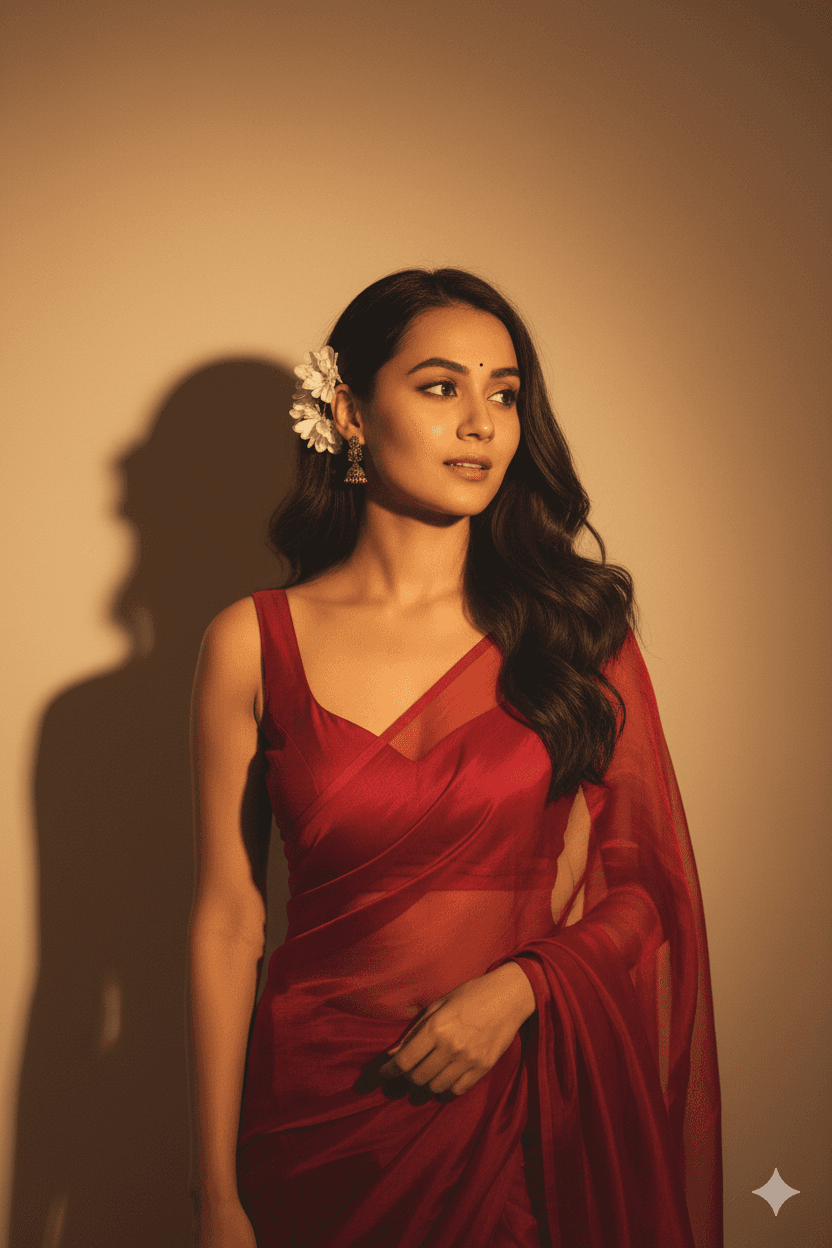
The styling is strong, but the face is not the one uploaded. The prompt describes a specific ethnicity and hair that differ from the input, and those words pulled the model away from the reference. Describe the clothes, light and setting, and leave the person's features to the photo.
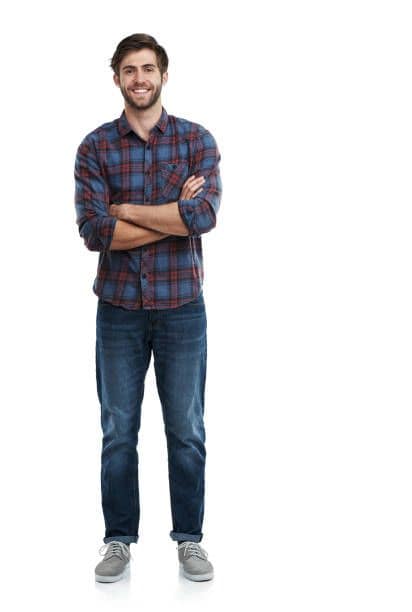
Prompt 6: fashion editorial portrait
The input was a full-length studio photo of a man in a plaid shirt and jeans.
A fashion editorial portrait of the uploaded man (face 100 percent preserved) sitting on a minimalist wooden cube against a clean beige background. He has slightly messy, wavy black hair and an intense expression, leaning forward with his elbows on his knees. He wears a black and white retro-style leather jacket with bold horizontal stripes, loose black pants and patterned sneakers. Soft, studio-like lighting highlights the clothing textures and gives a modern, cinematic look. Full body shot, professional high-resolution photography, ultra 4k detail, editorial aesthetic.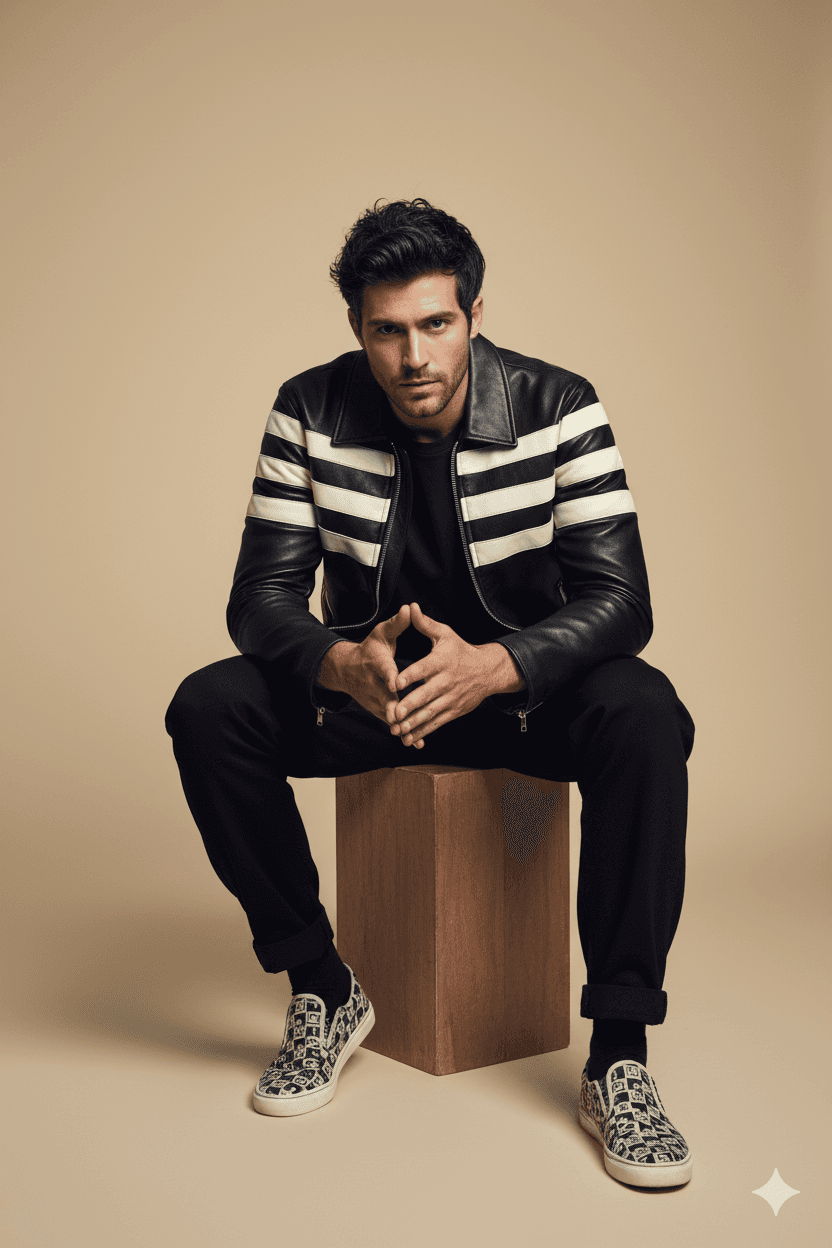
Prompt 7: business headshot
Generate a portrait photo that can be used as a business headshot.
One line is enough here because "business headshot" already implies the suit, the neutral background and the framing. Before you put it on LinkedIn, check that it still looks like you.
Why your Nano Banana image doesn't look like you
- If the face drifts: upload a sharper, front-facing photo, remove any words describing facial features, age or ethnicity, and in a follow-up message ask to keep the face from the original photo unchanged.
- If the model ignores part of the prompt: split it. Change the outfit first, then the background in a second message.
- If the result is bizarre: your prompt is too short. Add the subject, scene and light from the formula above.
- If the pose changes when you didn't want it to: add "keep the same pose and framing as the reference".
The index leans toward videos that surface in hashtag and keyword searches, so its view counts run high: compare the groups, not the absolute numbers.
Source: Revid TikTok index: 2,377,477 TikToks with AI labels per video, snapshot of Sep 15, 2026. Median views estimated from view buckets.
Show the data
| Median views | Share past 1M views | |
|---|---|---|
| AI generated | 151.7K | 19.5% |
| Animation/Cartoon | 121.3K | 14.2% |
| Mixed | 87.3K | 11.4% |
| Real shot | 67.3K | 9.5% |
How to turn Nano Banana images into a video with Revid
Still images get likes, but TikTok, Reels and Shorts are video feeds. Revid can put your edits in motion:
- Animate one image: upload a figurine or portrait to the AI Image Animator and optionally describe the motion. Small details can change in the animation.
- Combine a set of edits: upload several Nano Banana images to the photo to video converter to get one video, with an optional style transfer.
- Build a story: upload your images to turn them into a narrated story, then add a voice-over (70+ languages), captions and music, adjust it in the timeline editor and publish directly to TikTok, Instagram or YouTube. For a recurring character across several videos, see how to create a consistent AI character.
Sign-up is free and new accounts get free credits to try video creation, no credit card needed; regular creation then uses the credits of a paid plan, starting at $39/month.
Where you post matters. In Revid's study of AI videos vs real footage, AI-generated TikToks averaged twice the views of real footage, while on X, Instagram and Threads AI visuals clustered in the lowest engagement tier. Test your animated edits on TikTok first, and don't expect the same response everywhere.
Nano Banana will not be the last AI trend. To catch the next one early, browse viral TikToks about AI tools, search Revid's library of viral videos (about 2.77 million short-form videos with their engagement data) and read how to spot video trends early.
FAQ
Is Nano Banana free to use?
Yes, you can try it in the Gemini app with a free Google account. Google caps how many images you can make, and the caps depend on your plan and change over time, so check the Gemini app for your current limit.
Why is it called Nano Banana?
Nano Banana was the codename the model used during anonymous public testing, before Google revealed it as Gemini 2.5 Flash Image. The name stuck, and Google adopted it in the Gemini app.
Can I use Nano Banana on my phone?
Yes. The Gemini app on Android and iPhone offers the same image editing: upload a photo from your gallery, type the prompt and save the result.
Does Nano Banana add a watermark?
Yes. Gemini images carry a small visible sparkle mark in a corner (you can see it on the examples above), and Google says images made or edited with the model also carry an invisible SynthID watermark.
Can I edit someone else's photo with Nano Banana?
Only with that person's consent and if you have the rights to the photo. Watermarked stock photos are previews, not licensed images, so use your own pictures or properly licensed ones.
Sources
- Revid social index: 388,379 posts from X, Instagram, Threads, Reddit and LinkedIn with AI labels per post, snapshot of Sep 15, 2026.
- Revid TikTok index: 2,377,477 TikToks with AI labels per video, snapshot of Sep 15, 2026. Median views estimated from view buckets.
- TikTok, Helping people spot and understand AI-generated content on TikTok (July 2026)
Charts and figures checked on November 6, 2026.