Viral Video Link: How to Get, Find and Share One Safely
How to copy the link of any viral video, find the original clip everyone is talking about, avoid fake 'viral link' posts, and make your own video link spread.
On this page
A viral video link is the shareable URL of a video that is spreading fast on TikTok, Instagram or YouTube. To get one, open the video in the app, tap Share, then Copy link. To find today's viral videos, search the platform itself or a free viral video finder, never a stranger's 'link in bio'.
Most people who search for a viral video link just saw a post that names a shocking or 'leaked' clip but hides it behind a shortened URL, a Telegram group or a 'link in comments'. That is one of the oldest bait formats on social media: the link usually leads to spam, a phishing page or malware, not the video. Real viral videos live on the platform where they went viral, and you can reach them in seconds.
- Median views of challenge TikToks, the top format
- 182K
- Revid TikTok index, 2025-2026
- Share of challenge TikToks that passed 1M views
- 25.6%
- Revid TikTok index, 2025-2026
- Median views of TikToks whose dominant mood was outrage
- 156K
- Revid TikTok index, 2025-2026
- Shares per view on TikTok, against 7.1% for likes
- 0.88%
- Revid TikTok index
How do you get a viral video link?
A viral video is one that spreads quickly through online sharing, and its link is simply the post's URL. Every major app has a Copy link button:
| Platform | In the app | On a computer |
|---|---|---|
| TikTok | Tap the Share arrow on the right of the video, then Copy link | Open the video and copy the URL from the address bar |
| Tap the paper-plane Share icon under the reel, then Copy link | Open the reel and copy the URL | |
| YouTube | Tap Share (under a video, or on the right of a Short), then Copy link | Click Share, then Copy, or copy the URL |
Paste the link into a message, a note or your own post. It opens the video in the app for anyone who has it installed and in the browser for everyone else. If you can't find a Copy link option, the video may be private, restricted or already removed.
How to see a viral video link everyone is talking about
When a friend or a post mentions a viral clip without a working link, find the real post yourself:
- Search the platform with what you know: the creator's handle, a line from the video, the sound name or a few keywords. On TikTok, use the search bar and switch to video results.
- Read the comments of the post that mentions it. People often tag the original creator or paste the real link.
- Use a viral video finder. Revid's free TikTok video finder searches TikToks by topic with no login.
- Accept a dead end. If none of this turns anything up, the clip may have been deleted, made private, or may never have existed outside a bait post.
How to find the original viral video, not a repost
- A TikTok saved to someone's phone usually carries the creator's @handle as a watermark. Search that handle.
- Compare upload dates. The earliest upload with the biggest numbers is usually the original; reposts are often cropped, mirrored or carry someone else's captions.
- Check the creator's profile for the same video, and follow any 'via @...' credit on reposts back to the source.
Viral video link websites: where to find viral videos today
If you want to browse what is viral right now rather than hunt for one clip, use pages that list real posts from the platforms:
| Website | What you get | Best for |
|---|---|---|
| Viral TikTok video links | Viral TikToks, updated daily, free | Today's viral TikToks |
| Viral Instagram video links | Viral reels, free | Reels that are spreading now |
| Viral video rankings | Most viewed TikToks and YouTube Shorts | All-time hits |
| TikTok trends today | Rising hashtags, sounds and videos | Spotting a trend early |
| The platform's own search and feeds | The For You feed, Reels tab and Shorts feed | What the app thinks you will like |
On YouTube, skip the hunt for a general Trending page: the YouTube Help Center now only describes Trending Charts for select categories (music videos, movie trailers and gaming). Search and the Shorts feed are better routes to viral YouTube videos.
How to tell if a viral video link is fake
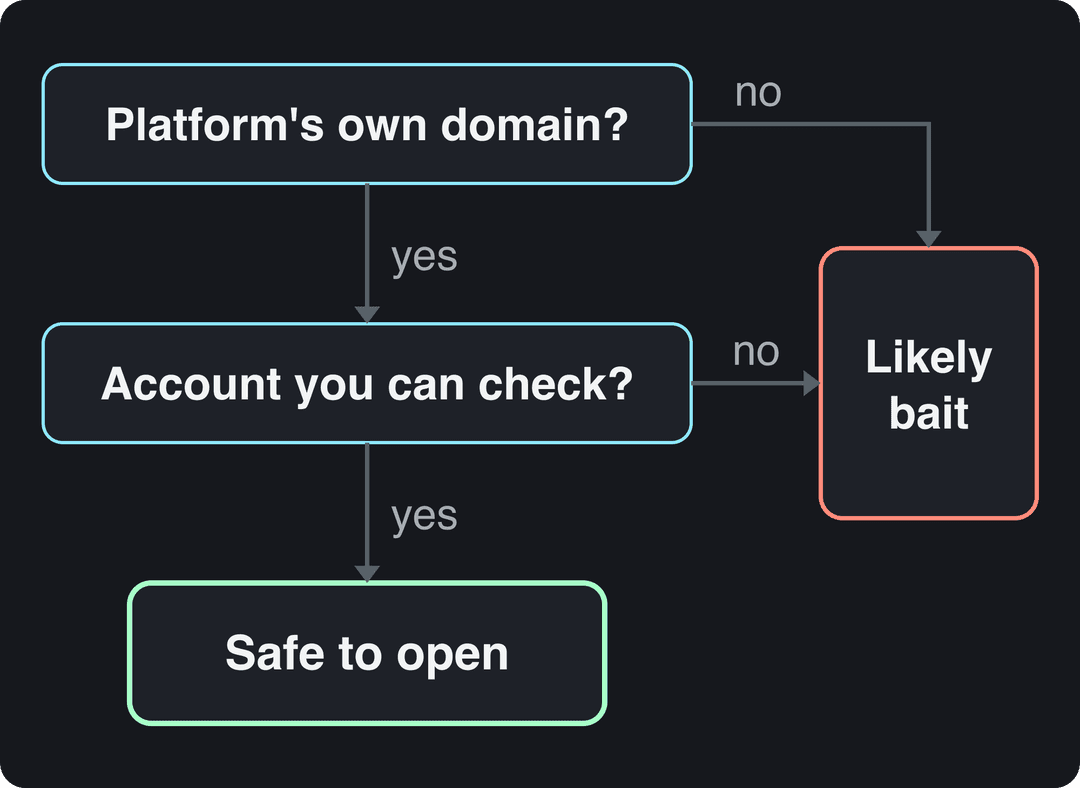
The rule is simple: a real viral video link points to the platform's own domain. Anything else in a post from an account you don't know deserves suspicion.
Red flags that a 'viral link' is bait:
- A shortened or unfamiliar domain instead of tiktok.com, instagram.com or youtube.com (a pattern like bit.ly/viralvid-xy).
- 'Leaked', 'full video', '18+' or a real person's name next to the words 'viral link'. Posts promising an adult or leaked clip are the classic version of this scam.
- A request before the video: log in, install an app, verify your age with a card, or join a Telegram or WhatsApp group.
- A new account with no other posts, and comments that are either off or full of identical 'link?' replies.
- Hashtags such as #viralvideolink or #virallink on a post that shows no actual video. Following those hashtags will not lead you to the real clip.
How to create a viral link for your own video
A link spreads when the video behind it is worth sending. Then distribution does the rest:
- Post natively first. Upload the video itself to TikTok, Instagram and YouTube instead of posting a link to it elsewhere. Feeds recommend videos, not links.
- Open with a strong hook. The first second decides whether anyone watches long enough to share. Borrow a proven opener from these TikTok hooks.
- Share the link right after posting. Send it to group chats, your newsletter, your other channels and the people featured in the video, so the first viewers arrive while the post is new.
- Put the link where people look. Your bio, a pinned comment, your website and your email signature.
- Track what works. Add UTM parameters to links you share from your site or newsletter and read the clicks in Google Analytics. Views, shares and retention live in TikTok Studio, Instagram insights and YouTube Studio.
For the full playbook on content that spreads, see our guide to creating viral content.
Prompt to try
Make a 30-second comedy TikTok taking a strong side in the airplane seat recline debate. Open with the hook "Reclining your seat on a 2-hour flight should be illegal, and here's why." Use fast cuts, punchy captions and a playful, opinionated voiceover that ends by asking viewers to tag the friend who always reclines.
What makes a video worth sharing: Revid's TikTok data
In Revid's analysis of 176,367 TikToks with 1,000+ likes posted between October 2025 and October 2026, the format of a video was one of the clearest dividing lines. Challenges had the highest median at 182K views (25.6% passed 1M), followed by comedy (155K, 22%) and reactions (105K, 16%). Storytelling (66K) and tutorials (62K) sat close to the overall median of 64.4K. The method and every chart are in the full study, what makes a TikTok go viral.
Challenges and comedy passed 1M views about twice as often as tutorials and storytelling, which are the most common formats.
Source: Revid analysis of 176,367 TikToks with 1,000+ likes posted between Oct 1, 2025 and Oct 16, 2026 (61,203 creators)
Show the data
| Median views | Share that passed 1M views | |
|---|---|---|
| Challenge | 182.3K | 25.6% |
| Comedy | 154.8K | 22.1% |
| Reaction | 104.8K | 16% |
| Dance | 83.8K | 15.5% |
| Storytelling | 66.1K | 12.2% |
| Lip Sync | 61.7K | 12.3% |
| Tutorial | 61.9K | 12.1% |
The emotion a video carries mattered just as much. Videos whose dominant mood was outrage had a 156K median (23.7% past 1M) and humor 121K (19.3%), while inspirational videos had only 45K (11.3%), the weakest of the moods measured.
High-arousal emotions (outrage, humor, sadness) earned the most views. Calm, inspirational videos earned the least, even though they collect the most likes per view.
Source: Revid analysis of 176,367 TikToks with 1,000+ likes posted between Oct 1, 2025 and Oct 16, 2026 (61,203 creators)
Show the data
| Median views | Share that passed 1M views | |
|---|---|---|
| Outrage | 156K | 23.7% |
| Humor | 121K | 19.3% |
| Sadness | 104.4K | 16.5% |
| Excitement | 92.5K | 15.9% |
| Joy | 89.9K | 18% |
| Informative | 64.1K | 11.2% |
| Neutral | 61.2K | 11.5% |
| Inspirational | 44.6K | 11.3% |
Two limits: the index only holds TikToks that already reached 1,000+ likes, so these figures show what successful videos have in common, not what causes success, and format and mood come from Revid's AI analysis of each video. The decision rule still holds: if you want a link people forward, make the kind of video people forward. A challenge others can join, a joke, a reaction or a strong opinion gets sent; a motivational quote over stock footage rarely does. Outrage scores high, but fake rage gets reported, so aim for a real point of view.
Start from a proven viral video with Revid
Instead of hunting for a link to copy, you can start from a video that has already proved itself. Revid's library holds about 2.77 million real short-form videos with their public engagement data, and you can repurpose viral videos from it into original ones:
- Search the library by topic, platform, engagement tier and length (searching is free with an account).
- Open a video and run Deep analysis (free, up to 60 a day) to see its hook, timed structure and scroll-stopping moment.
- Choose "Same energy, new script" or "Make it about your topic" to generate an original video with a new script and new visuals.
- Adjust it on the timeline, then publish to TikTok, Instagram and YouTube from one queue.
Sign-up is free and new accounts get free credits to try video creation, with no credit card needed. Regular creation then uses the monthly credits of a paid plan, from $39/month.
FAQ
Is it safe to click a viral video link?
Only if it points to the platform's own domain (tiktok.com, instagram.com or youtube.com) and comes from an account you can check. Shortened links in posts from strangers, especially ones promising leaked or adult clips, are usually scams.
Why won't a viral video link open?
The video was most likely deleted by the creator, removed by the platform, made private, or restricted in your country or by age. Try searching the creator's handle; if the post is gone, any 'mirror' link offering it is suspect.
Can I download a viral video from its link?
On TikTok you can save a video only if the creator allows downloads, and the saved file carries their watermark. Reposting someone else's video without permission can break copyright and platform rules, so share the link instead.
What does 'link in bio' mean on a viral video post?
It means the creator put a clickable link on their profile page because the post itself has no clickable link. From a real creator it leads to their site or product; from an anonymous account promising a hidden video, treat it as bait.
Does sharing my video link help it go viral?
Yes, shares are one of the rarest and strongest signals a video gets. In Revid's TikTok index, shares per view were 0.88% against 7.1% for likes, so every share you prompt counts.
Sources
- Revid analysis of 176,367 TikToks with 1,000+ likes posted between Oct 1, 2025 and Oct 16, 2026 (61,203 creators)
Charts and figures checked on November 6, 2026.