Content Creator Training: The 7 Skills to Learn, in Order (2026)
A practical content creator training plan: the seven skills to learn in order, when a course is worth it, and what Revid's data on 176,367 TikToks says about formats, hooks and filming.
On this page
Content creator training is learning the skills that turn posting into a repeatable system: choosing a niche and content pillars, writing hooks and scripts, filming with good light and sound, editing, adapting videos to each platform, and reading analytics. Courses help, but the core of the training is a weekly loop of publishing, reviewing results and adjusting.
Most beginners spend their first money and weeks on the wrong skill: gear and on-camera polish. In Revid's analysis of 176,367 TikToks with 1,000+ likes posted between October 2025 and October 2026, faceless videos had a median of 114K views against 67K for one person on camera, and selfie-style shots had the lowest median of any shooting style measured (48K). Format and idea choices moved the numbers far more than the camera did. The full study of what makes a TikTok go viral explains the method; it only covers videos that already passed 1,000 likes, so it shows what strong videos have in common, not causes.
- Median TikTok views for faceless videos, vs 67K for one person on camera
- 114K
- Revid analysis of 176,367 TikToks
- Median views for TikTok challenges, the top format measured
- 182K
- Revid analysis of 176,367 TikToks
- Median views for TikToks with under 40 characters of speech, vs 68K for 300+
- 123K
- Revid analysis of 176,367 TikToks
- Median views for selfie-style shots, the lowest shooting style measured
- 48K
- Revid analysis of 176,367 TikToks
What content creator training covers
Seven skills, learned roughly in this order. You don't need to master one before starting the next. You need a working version of each so you can publish, then you improve the weakest one.
| Skill | What to learn | How to practice it this week |
|---|---|---|
| Strategy | A niche, 2 to 4 content pillars, who each video is for | Write one sentence per pillar: who it helps and with what |
| Idea validation | Finding topics and formats that already get watched | Collect proven videos in your niche before you script |
| Scripting | A hook in the first 3 to 5 seconds, a tight body, one call to action | Write three hooks per video and film the strongest |
| Filming | Light, sound, framing, batching | Shoot a test clip at your spot and watch it with headphones |
| Editing | Cutting dead air, captions, pacing | Cut each video until nothing else can go without breaking it |
| Distribution | Platform formats, limits and repurposing | Turn one recording into a native version for each platform |
| Analytics and community | Retention, audience activity, replies | Review a 28-day window and reply to every real comment |
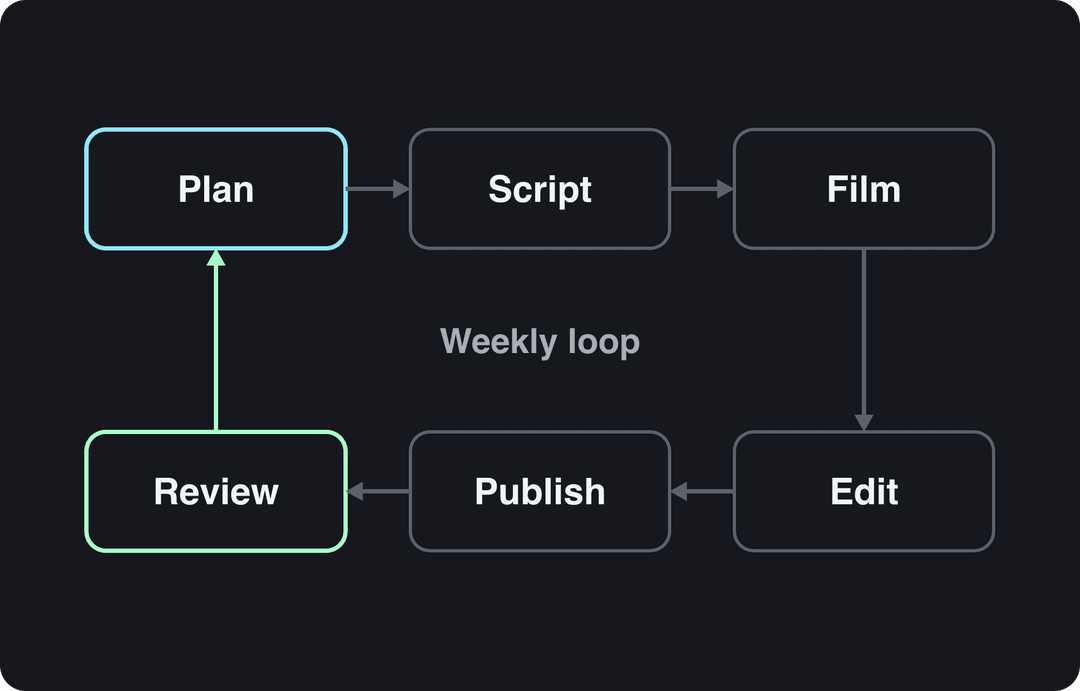
The loop is the training. A video that flopped teaches you something only if you check why before you plan the next one. For an outside primer on the craft, Grassroots Creative Agency's overview of content creation covers the basics from an agency's point of view.
Should you take a content creator course or train yourself?
Both work, at different stages. Courses give structure; posting gives feedback. Training without publishing is the most common trap, because no lesson replaces seeing exactly where your own viewers leave.
| Option | Best for | Watch out for |
|---|---|---|
| Paid courses (Udemy, Skillshare, or creator-run course schools hosted on Teachable) | A structured curriculum for one skill, such as editing or YouTube SEO | Instructors who don't publish in your niche, or who sell guaranteed income |
| Free platform resources (TikTok Creator Academy, YouTube Help Center) | Current rules, specs, analytics and monetization requirements | They teach the platform, not what works in your niche |
| Revid University | Learning structure by rebuilding real videos step by step | It focuses on short-form and AI-assisted production |
| A self-run practice loop | Everyone, from the first week | Slow progress if you never review your numbers honestly |
Decision rules:
- If you have never published, post before you pay for anything. Your first videos will show you which skill is actually weak.
- If one skill keeps blocking you (muddy audio, flat hooks, slow edits), find training for that skill only.
- If a course promises views or income, skip it. Nobody controls a recommendation algorithm.
Step 1: Pick a niche and 2 to 4 content pillars
Content pillars are the core topics your channel is known for. They give you a deep pool of ideas and tell viewers what to expect when they follow you.
To choose yours, answer four questions honestly:
- Can you talk about it every week for a year? Enthusiasm you fake shows on camera.
- What can you teach or show that others can't? Expertise, access or a strong point of view is what makes a channel worth following.
- Are people already watching it? If you can't find recent videos with real views on the topic, the demand may not be there.
- Could it earn money later? Brand deals, affiliate links, products and platform programs all need a topic that buyers care about.
Example: a personal finance creator might run three pillars, "budgeting for beginners", "investing basics" and "paying off debt". Every video fits one bucket, so a viewer who liked one video knows the next will be useful too.
Start narrow. "Fitness" is a category; "strength training for busy runners" is a niche you can own, and you can widen it once people know you for it.
Step 2: Validate ideas before you film
A good idea is one your audience has already shown it wants. Validating before you film is cheaper than learning after you post.
Start where people ask questions: comments on videos in your niche, Reddit threads, Quora, and the search autocomplete on TikTok and YouTube. Then check what is rising right now with today's TikTok trends.
Format matters as much as topic. In Revid's TikTok data, challenges had a median of 182K views, comedy 155K and reactions 105K, while storytelling (66K) and tutorials (62K) sat close to the sample's overall median of 64.4K. That doesn't mean a finance creator should start dancing. It means a plain tutorial needs a sharper hook or a borrowed format (a challenge, a reaction, a POV) to compete for attention.
Challenges and comedy passed 1M views about twice as often as tutorials and storytelling, which are the most common formats.
Source: Revid analysis of 176,367 TikToks with 1,000+ likes posted between Oct 1, 2025 and Oct 16, 2026 (61,203 creators)
Show the data
| Median views | Share that passed 1M views | |
|---|---|---|
| Challenge | 182.3K | 25.6% |
| Comedy | 154.8K | 22.1% |
| Reaction | 104.8K | 16% |
| Dance | 83.8K | 15.5% |
| Storytelling | 66.1K | 12.2% |
| Lip Sync | 61.7K | 12.3% |
| Tutorial | 61.9K | 12.1% |
To shortcut the research, search Revid's library of viral videos: about 2.77 million real short-form videos and posts with their public views and engagement, filterable by topic, platform, engagement tier and length. A few minutes of searching one pillar shows you which hooks and formats already work, so your filming time goes to ideas with evidence behind them.
Prompt to try
Make a 30-second vertical video for beginners on budgeting. Hook: "Stop tracking every coffee if you want to actually save money." Show one simple rule, the 50/30/20 split, in three short beats with bold on-screen text and a calm voice-over, then end by asking viewers to comment their biggest spending leak.
Step 3: Write scripts that hold attention
A script is the plan for keeping people watching. A short-form script has three parts:
- The hook (first 3 to 5 seconds). Lead with the most interesting claim, result or visual. In Revid's study of the 1,588 TikToks with over 100 million views, 51% of the videos with a transcript open with a statement and 16% with a question. A clear statement usually beats a vague question.
- The body. One idea per video, broken into short beats. Cut any sentence that doesn't move the viewer toward the payoff.
- The call to action. Ask for one thing: follow for part two, comment an answer, or check the link. One ask, said plainly.
Hook templates to adapt:
- "Stop doing [common habit] if you want [result]."
- "[Surprising result] in [short time frame]. Here's how."
- "The [topic] mistake almost every beginner makes."
- "I asked [expert or tool] to [task]. This is what happened."
Say less than you think. In Revid's TikTok data, videos with under 40 characters of speech had a median of 123K views, against 68K for videos that talked throughout (300+ characters). A visual payoff with one line of on-screen text often beats narration, so try a version of each idea that shows instead of tells.
For more openers, borrow from these TikTok hooks that stop the scroll. If writing is your bottleneck, draft out loud: using speech-to-text in your daily workflow lets you talk through a rough script, then tighten the transcript.
Faceless prompt to try
Create a 40-second faceless video on strength training for busy runners. Open with: "Two exercises fix most runner knee pain." Use close-up gym footage, a confident voice-over and short captions, one exercise per beat, and close with "Follow for part two."
The index leans toward videos that surface in hashtag and keyword searches, so its view counts run high: compare the groups, not the absolute numbers.
Source: Revid TikTok index: 2,377,477 TikToks with AI labels per video, snapshot of Sep 15, 2026. Median views estimated from view buckets.
Show the data
| Median views | Share past 1M views | |
|---|---|---|
| Drone | 173.9K | 27.9% |
| Steady cam | 162.7K | 26.2% |
| Screen recording | 159.9K | 23.8% |
| Handheld | 140.9K | 25.6% |
| POV | 139.9K | 26% |
| Tripod | 117K | 23.6% |
| Selfie | 67K | 16.3% |
Step 4: Film with the phone you have
A recent smartphone is enough to start. Three fundamentals matter more than the camera body:
- Light. Face a large window so soft daylight hits your face evenly, and never sit with the window behind you. For night shoots, a ring light or a pair of LED panels does the job.
- Sound. Viewers forgive soft video; they leave over bad audio. A phone's built-in mic picks up the whole room, so an inexpensive clip-on lavalier mic is the best first upgrade.
- Framing. Imagine a 3x3 grid on the screen and put your eyes on the top line instead of dead center. Keep key text away from the edges, where the app's buttons and captions sit.
Your shooting style is a choice too. In Revid's TikTok data, POV shots had a median of 107K views, screen recordings 91K, tripod shots 77K and selfie-style shots 48K. Rule of thumb: if you teach software, record the screen; if you review products or places, try POV; if you talk to camera, put the phone on a tripod and frame wider than a selfie.
You also don't have to be on camera at all. Faceless formats (voice-over on footage, screen recordings, animation) led the same data set, which makes them a real option if showing your face is what keeps you from posting.
Batch your recording
Film several scripts in one session instead of setting up for each video:
- Keep a corner record-ready, with the tripod and light left in place.
- Finalize every script for the session beforehand and load them on a tablet or teleprompter app.
- Bring a few changes of clothes so the videos don't look filmed on the same afternoon.
- Keep water nearby: talking to a lens is more tiring than it looks.
Batching turns filming from a weekly chore into one focused block, which is what makes a consistent schedule realistic.
Input
Your video as it is
Output
Step 5: Edit for pace, then automate the repetitive parts
Learn three editing habits by hand first: cut every pause and repeated take, open on the strongest frame instead of a greeting, and add captions, since many people scroll with the sound off. Once those are habits, hand the repetitive work to tools.
| Editing task | By hand | With an AI tool |
|---|---|---|
| Finding clips in a long video | Scrub the timeline and mark moments | Paste the link into a YouTube clip maker and get short vertical clips back |
| Captions | Type and time each line | Generate synced captions in 100+ languages with an AI caption generator |
| Converting to 9:16 | Reframe the crop shot by shot | Convert landscape footage to portrait 9:16 in one step |
| Editing a talking-head video | Cut, add zooms and on-screen text manually | Upload it to Auto Edit and get it back edited, with key lines turned into motion graphics |
Watch every AI edit before posting. Tools are fast at finding moments; you still decide which moment deserves a viewer's time.
Step 6: Adapt each video to the platform
One recording can feed every platform, but each one has its own limits and habits. Check the current rules before you repurpose.
| Platform | Length | What to know |
|---|---|---|
| TikTok | Uploads up to 60 minutes (10 minutes when recorded in the app) | TikTok recommends 9:16 at 1080x1920 |
| Instagram Reels | Up to 20 minutes | Reels over 3 minutes aren't recommended to non-followers; posts allow up to 5 hashtags |
| YouTube Shorts | Up to 3 minutes, square or vertical | A Short over 1 minute with an active Content ID claim is blocked globally |
| Facebook Reels | No length limit | Since March 2026, reposts with only borders, captions or speed changes count as unoriginal and are deprioritized |
A workable repurposing system:
- A long-form YouTube video as the source. Give it a strong title, a clear description and a thumbnail that matches the promise.
- TikTok, Reels and Shorts as trailers. Cut the sharpest moments, caption them, and get to the point in the first line.
- LinkedIn and X as insights. Pull one quote or one takeaway and post it as text or a simple graphic.
Step 7: Read your analytics and build a community
Analytics tell you what to repeat. In TikTok Studio, the Viewers tab shows when your viewers were most active over the last 7 days, and you can compare 7, 28, 60 or 365-day ranges. On Instagram, follower insights such as most-active times appear once you have at least 100 followers. Review on a 28-day window: long enough to see a pattern, short enough to act on it.
Three questions for every review:
- Which videos kept people watching past the hook, and what did they open with?
- Which pillar and format brought new followers?
- What will you make more of next month, and what will you stop?
Numbers are half the job. Reply to thoughtful comments with a real answer or a follow-up question, end videos with a specific question instead of "like and subscribe", use YouTube's Posts tab for polls and behind-the-scenes updates between uploads, and feature good comments in your next video. For more early-stage tactics, see these strategies for building an audience from scratch.
Practice the loop with Revid
Revid helps most with the idea and production steps of this training. Its free Deep analysis (up to 60 videos a day) watches any video and explains why it worked: the hook and its formula, the timed structure, the scroll-stopping moment, and a checklist to replicate it, which works like a teardown lesson on demand. From there, "Same energy, new script" turns a proven reference into an original video on your topic, with script, visuals, a voice-over in 70+ languages and captions. You can then publish to TikTok, Instagram and YouTube from one queue and see each post's views, likes and comments for your next review. Sign-up is free and new accounts get free credits to try video creation, no credit card needed; regular creation then uses the monthly credits of a paid plan, listed on the pricing page.
https://www.youtube.com/embed/O9vZotNEsac
FAQ
How long does it take to become a content creator?
There is no fixed timeline. Judge progress on the trend across 28-day windows rather than single videos: if retention and follower growth improve month over month, the training is working, even before any video breaks out.
Do you need a certificate to be a content creator?
No. Platforms don't ask for one, and brands look at your audience, your past content and your analytics, so a certificate helps only if the skills show in your videos.
Is it too late to become a content creator in 2026?
No, but generic content has a harder time. Goldman Sachs Research estimated in April 2023 that there were 50 million creators and only about 4% were professionals earning more than $100,000 a year, while IAB projected US creator economy ad spend at $37 billion in 2025. The Leap's roundup of creator economy statistics collects more market figures.
Can you earn money while you are still learning?
Yes, but platform programs have thresholds. TikTok's Creator Rewards Program needs 10,000 followers, 100,000 video views in the last 30 days and videos at least one minute long, and YouTube ad revenue needs 1,000 subscribers plus 4,000 watch hours in 12 months or 10 million Shorts views in 90 days (higher for new applicants from February 1, 2027). This guide on how to monetize a TikTok account covers every route.
Should you focus on one platform or post everywhere?
Start with one platform until you know its formats and your analytics, then repurpose to the others. Training on one feed first gives you cleaner feedback on what works.
Sources
- Revid analysis of 176,367 TikToks with 1,000+ likes posted between Oct 1, 2025 and Oct 16, 2026 (61,203 creators)
- Revid TikTok index: 2,377,477 TikToks with AI labels per video, snapshot of Sep 15, 2026. Median views estimated from view buckets.
Charts and figures checked on November 6, 2026.