Creators publish 30,000+ videos a month with Revid
AI Animation Generator from Image
Our AI animation generator from image lets you transform static photos into dynamic animations in seconds. Upload an image, choose an animation style, and generate engaging animated visuals using AI, no design skills required.
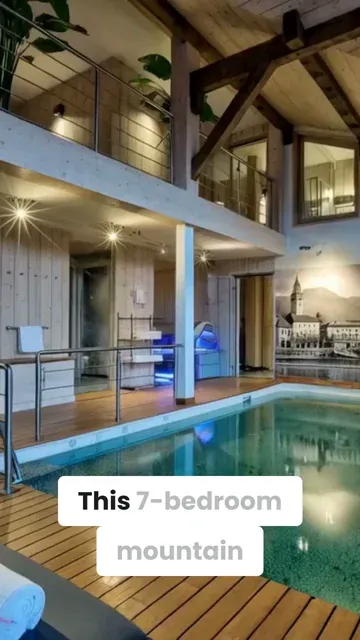
Discover this luxury chalet for sale in Morzine for only 4 500 000 €.
use the info in the announcement:
Luxurious 7-bedroom chalet in an elevated position with panoramic views across the Morzine Valley
Chalet Les Copains is one of the finest chalets in the Morzine Valley, impeccably designed and ideally located in sought-after L’Élé , between Montriond and Morzine.
Originally built in 2004, the property is in excellent condition and was recently modernised to a very high internal standard with all the features one could ask for in a luxurious ski chalet. Les Copains occupies an elevated position and has been designed to maximise sunshine throughout the day and early evening, with views to the east, south and west, across Morzine and towards the mountains in all directions.
Internally, the chalet is extremely spacious with circa 528 sqm of space (including a double garage) over four floors.
There are seven bedrooms in total, six doubles and one currently arranged as a bunk room for children. The large principal en-suite bedroom is discreetly situated on the same level as the living area and has direct access to an outdoor seating area. Three of the en-suite bedrooms on the second floor have direct access to a shared balcony with mountain views.
A large and spacious open-plan living, dining and kitchen area with a stunning central fireplace occupies the first floor of the chalet and benefits from access to the extensive wrap-around south-facing terrace. The clever design of this space includes a partially-separated kitchen, which was fully renovated in May 2023, complete with Gaggenau equipment. There is a dedicated cosy TV snug in part of the living area.
Les Copains has outstanding spa and wellness facilities on the ground floor, including a heated indoor swimming pool with relaxation deck, steam room, massage room and sauna. A well-equipped fitness studio can be found on the mezzanine level of the spa. There is also an outdoor jacuzzi which is discreetly tucked away on the terrace on the 1st floor of the chalet.
The chalet has an abundance of storage space, including a dedicated ski and boot room and an integrated double garage. There is additional external parking and a carport for two vehicles.
Chalet Les Copains presents a rare opportunity to acquire an exceptional mountain home with an abundance of space and luxurious features.
Key features:
– Imposing chalet with high quality interior specification
– Originally built in 2004 (only 2 owners)
– 528 sqm (approx.) of total internal space, plot of 2,463 sqm (approx.)
– 7 bedrooms in total, 5 en-suite
– Large open-plan living and dining area with superb central fireplace
– Brand new Gaggenau kitchen (fitted May 2023)
– Expansive wrap-around terrace, with dining and relaxation areas
– External hot tub on terrace
– Panoramic views of the Morzine Valley & mountains
– Many hours of sunshine with orientation to the east, south and west
– Underfloor heating and high-speed broadband
– Indoor swimming pool with decking and relaxation area
– Spa with equipped gym, sauna, steam room & massage room
– Impressive traditional wine cellar with bar area
– Spacious ski & boot room with heated boot racks
– Integral double garage and external car port for 2 more cars
– Super Morzine Telecabine 2 km, Montriond Village 1.6 km
Please contact Morzine Immo directly for further information and to arrange viewings.
The natural geographic risks that the property is exposed to can be found on the website www.georisques.gouv.fr
Source Media
FINAL VIDEO
How to Use the AI Animation Generator from Image in 3 Simple Steps
1 Upload Your Static Image
Start by uploading your static photo, illustration, or artwork into the AI animation generator from image. You can also type in a descriptive text prompt to guide the AI on the specific mood, style, or motion you want to see in your animated video.
2 Choose Your Animation Settings
Select your desired media type and video settings. If you want a unique artistic look, enable our 'Style Transfer' feature to transform the visual aesthetic of your input image. Whether you want a talking character or a moving landscape, the AI image to animation generator handles all the complex rigging automatically.
3 Generate and Share Your Video
Click generate and watch as the AI photo animator brings your picture to life in seconds. The AI analyzes the depth and subjects in your static image to apply realistic motion effects. Once generated, use our built-in editor to add music or captions, then share your animated video directly to TikTok, Instagram Reels, or YouTube Shorts.
Animate Any Static Image into a Video Without Animation or Design Skills
Upload any photo or illustration and Revid's AI animation generator converts it into a dynamic video with realistic motion effects applied to the image content. Environments move, subjects come to life, and static compositions gain the kind of cinematic motion that makes still photography feel alive on screen. There is no keyframing, rigging, or animation software involved. From image upload to finished animated video takes seconds, making it practical to animate any photo from your library without technical skills or a production workflow.
02
What the AI Animation Generator Produces from Your Photo
The AI analyzes the content of your uploaded image, identifies subjects, backgrounds, and depth layers, and applies realistic motion effects that match the natural movement expected from each element. Landscapes gain wind movement, portraits develop subtle life-like motion, and action scenes develop fluid energy appropriate to the subject. The output is a short animated video clip that can be shared directly on social media, used in video projects, or embedded in presentations. You can describe the desired animation style to guide the AI's motion choices.
03
Animated Images That Stand Out in Social Feeds Compared to Static Photos
Static photos receive significantly less engagement on TikTok, Instagram, and YouTube Shorts than video content. The same image that performs modestly as a photo post can attract dramatically more views, saves, and shares when converted into a short animated video. Photographers, artists, and brands who animate their best images for social media consistently outperform their static-only posting strategy. Revid makes it possible to animate any image in the time it takes to upload the file, turning every strong photo into potential social video content.
Target Audience
Use Cases for Image-to-Animation AI
Social media content
Create eye-catching animated posts for Instagram, TikTok, and YouTube Shorts. Transform your photos into dynamic content that stops the scroll and boosts engagement.
Marketing visuals and ads
Generate professional animated visuals for your marketing campaigns. Turn product photos and brand images into compelling ad content that captures attention and drives conversions.
Animated thumbnails
Make your video thumbnails stand out with AI-powered animations. Convert static thumbnail images into dynamic previews that increase click-through rates and views.
Creative storytelling
Bring your stories to life by animating key moments from your photos. Perfect for narrative videos, documentaries, and creative projects that need visual movement.
Comparison
AI Animation Generator from Image vs Other Tools
See how our AI animation generator compares to traditional animation tools. Transform static images into dynamic animations effortlessly.
Animate from a single image
Revid AI
Traditional Animation Tools
AI-powered motion
Revid AI
Traditional Animation Tools
No design skills required
Revid AI
Traditional Animation Tools
Fast generation
Revid AI
Traditional Animation Tools
Feature / Benefit
Revid AI
Traditional Animation Tools
Animate from a single image
AI-powered motion
No design skills required
Fast generation
Example Videos
See What You Can Create with AI Animation Generator from Image
Explore different styles and possibilities with our AI Animation Generator from Image
Why Use an AI Animation Generator from Image?
Transform static photos into dynamic animations effortlessly with AI-powered technology. No design skills or manual editing required.
Animate static photos automatically with AI
No manual animation or editing required
Create animations for social media, ads, and videos
Save time compared to traditional animation tools
Works directly from a single image
More Tools
Explore Similar Video Creation AI Video Tools
Discover more ways to create engaging videos with our AI-powered tools
FAQs
Frequently Asked Questions
What is the AI Animation Generator from Image?
The AI Animation Generator from Image is a powerful Revid AI tool that lets you convert any static image into a stunning animated video. By simply uploading a photo, our advanced AI analyzes the depth, subjects, and background to apply realistic motion effects. It's the ultimate AI image to animation generator for creators who want to bring their photos to life without needing complex animation software.
How do I animate a photo with AI using this tool?
It's incredibly easy to animate a photo with AI. Just upload your static image, type an optional prompt describing the motion or style you want, and hit generate. Our AI image animator tool automatically adds fluid motion to environments, subjects, and backgrounds. You don't need any manual keyframing, rigging, or design skills to turn a photo into a video with AI.
Do I need any design or animation skills to use the AI photo animator?
Not at all! Our AI animation generator from image is completely automated. There is no need for manual animation software, keyframing, or technical design skills. The AI intuitively understands how elements in your static image should move in real life and applies cinematic motion automatically in seconds.
What is the 'Style Transfer' feature in the AI Image to Animation Generator?
Style Transfer is a premium feature that allows you to completely transform the artistic look of your input images while animating them. For example, you can upload a standard photograph and have the AI animate it in the style of an oil painting, a 3D cartoon, or anime. Please note that applying style transfer to your images costs 16 credits per image.
Can I make a character or portrait speak using the AI image animator?
Yes! If you upload an image of a character, person, or mascot and want them to talk, our AI animation generator from image can handle it. Simply provide a script or prompt, and the AI will generate speech and audio, animating the character's facial expressions and lips to match the dialogue perfectly.
Why should I convert static images into animated videos for social media?
Animated images consistently outperform static photos on platforms like TikTok, Instagram Reels, and YouTube Shorts. By using our AI image to animation generator, you can transform a standard photo into dynamic, scroll-stopping video content. This cinematic motion captures attention faster, increases viewer retention, and significantly boosts engagement compared to posting static images.
How long does it take to turn a photo into a video with AI?
The process is incredibly fast. From the moment you upload your photo to the finished animated video, it typically takes just a few seconds to a couple of minutes. Our AI photo animator is optimized for speed, making it practical for social media managers and creators to animate their entire photo libraries instantly.
What kinds of photos work best with the AI animation generator?
You can animate almost any static image! The AI animation generator from image works beautifully with landscapes (adding wind or water movement), portraits (adding subtle, life-like facial motion), action shots, product photography, and even illustrated thumbnails. Simply provide a clear image, and the AI will bring it to life.
How much does it cost to use the AI Animation Generator from Image?
Using the AI image to animation generator consumes credits from your Revid AI account balance. The base generation uses a standard amount of credits depending on the video length, and enabling advanced features like 'Style Transfer' costs an additional 16 credits per image. Free users receive a starting allocation of credits, while our paid plans provide a monthly refill for bulk animation.
Can I guide the AI on how to animate my picture?
Absolutely. While the AI photo animator is smart enough to animate images automatically, you can use the prompt box to be highly descriptive. Mention specific styles, moods, and key elements you want the AI to focus on (e.g., 'make the clouds move quickly' or 'add a cinematic camera pan'). This ensures the resulting animated video matches your exact creative vision.
Can I edit the AI-generated animation after it's created?
Yes! Once the AI animation generator from image produces your video, you have full access to Revid AI's built-in editing suite. You can easily trim the animated clip, add background music, overlay text and captions, or stitch it together with other videos before sharing it with your audience.
On which platforms can I share the videos made by the AI image animator?
Videos created with our AI image to animation generator are perfectly optimized for all major social media platforms. By default, we generate videos in a vertical 9:16 aspect ratio, making them ideal for TikTok, Instagram Reels, and YouTube Shorts. However, you can use the generated animations anywhere you need dynamic, engaging video content.
RevidAI's Viral Search and Channel Watcher surface the formats, creators, and trends getting attention right now, then help you turn them into ideas of your own.
Discover winning video formats in your niche
Follow creators and channels that matter
Start with proven ideas instead of guessing
2
Turn An Idea Into A Story.
Found something worth making? Revid AI writes the script, suggests the structure, and turns links, prompts, or topics into complete video concepts.
Start with a prompt, topic, or URL
Generate scripts inspired by proven patterns
Build stories designed to keep people watching
3
Generate The Finished Video.
Script, voiceover, visuals, subtitles, and editing all come together in one workflow. No stitching together five different tools.
Turn text into complete, multi-minute videos
Generate everything in one place
Refine the result in the editor
4
Publish Everywhere.
Share your videos to TikTok, YouTube, Instagram, and wherever your audience is.